تعارف
This manual provides detailed instructions for the assembly, operation, and maintenance of your GAOMON White 4-Drawer Dresser. Please read this manual thoroughly before beginning assembly or use to ensure proper installation and safe operation. Keep this manual for future reference.

Image: The GAOMON White 4-Drawer Dresser, featuring a modern design with gold metal handles and legs, situated in a living space.
حفاظت جي ڄاڻ
To prevent injury and damage to the product, adhere to the following safety guidelines:
- بالغ اسيمبلي جي ضرورت آهي: This product contains small parts and requires adult assembly.
- مخالف ٽپ ڊيوائس: Always install the included anti-tip device to secure the dresser to a wall. This is crucial to prevent serious injury from tipping furniture.
- وزن جي حد: Do not exceed the recommended weight limits for the top surface or drawers. Overloading can cause instability or structural damage.
- مستحڪم سطح: ڊريس کي هڪ فليٽ، ليول ۽ مستحڪم مٿاڇري تي رکو.
- ٻارن جي حفاظت: ٻارن کي ڊريس تي چڙهڻ يا ان سان کيڏڻ جي اجازت نه ڏيو. ننڍڙا حصا ۽ پيڪنگنگ مواد ٻارن کان پري رکو.
- مناسب اوزار: صرف اسيمبلي جي هدايتن ۾ بيان ڪيل اوزار استعمال ڪريو.
پيڪيج مواد
Before assembly, verify that all components listed below are present and undamaged. If any parts are missing or damaged, contact customer support immediately.
- Dresser Panels (Top, Bottom, Sides, Back)
- Drawer Fronts, Sides, and Bottoms
- سون جي ڌاتو جا هٿ
- سون جي ڌاتو پير
- دراز سلائڊ (کاٻي ۽ ساڄي)
- اسيمبلي هارڊويئر (اسڪرو، ڊويل، ڪيم لاڪ، وغيره)
- اينٽي ٽِپ ڊيوائس ڪٽ
- ھدايت وارو دستور
سيٽ اپ ۽ اسيمبلي جون هدايتون
Assembly typically requires two adults and takes approximately 1-2 hours. Follow the steps carefully.
قدم 1: پنھنجي ڪم جي جڳھ تيار ڪريو
Clear a spacious, clean area. Lay out all parts and hardware. Identify each component using the provided labels or diagrams in the separate assembly guide (if applicable).
قدم 2: مکيه فريم کي گڏ ڪريو
Connect the side panels to the bottom panel using the specified hardware. Ensure all connections are secure. Attach the back panel sections, if provided in multiple pieces, ensuring they align correctly.
قدم 3: دراز سلائڊ انسٽال ڪريو
Attach the drawer slides to the inner sides of the dresser frame. Pay close attention to the orientation (left/right) and ensure they are level and securely fastened. The review mentions: "Be sure to look closely at the pictures in the manual and make sure your drawer guides are the right way up and the right way facing--the guides are for right and left side, so they are different, and it really matters which side they go on!"
قدم 4: دراز گڏ ڪريو
For each of the four drawers, connect the side panels to the front and back panels. Slide the drawer bottom into the grooves. Attach the corresponding drawer slides to the sides of each drawer. Finally, attach the gold metal handles to the drawer fronts.
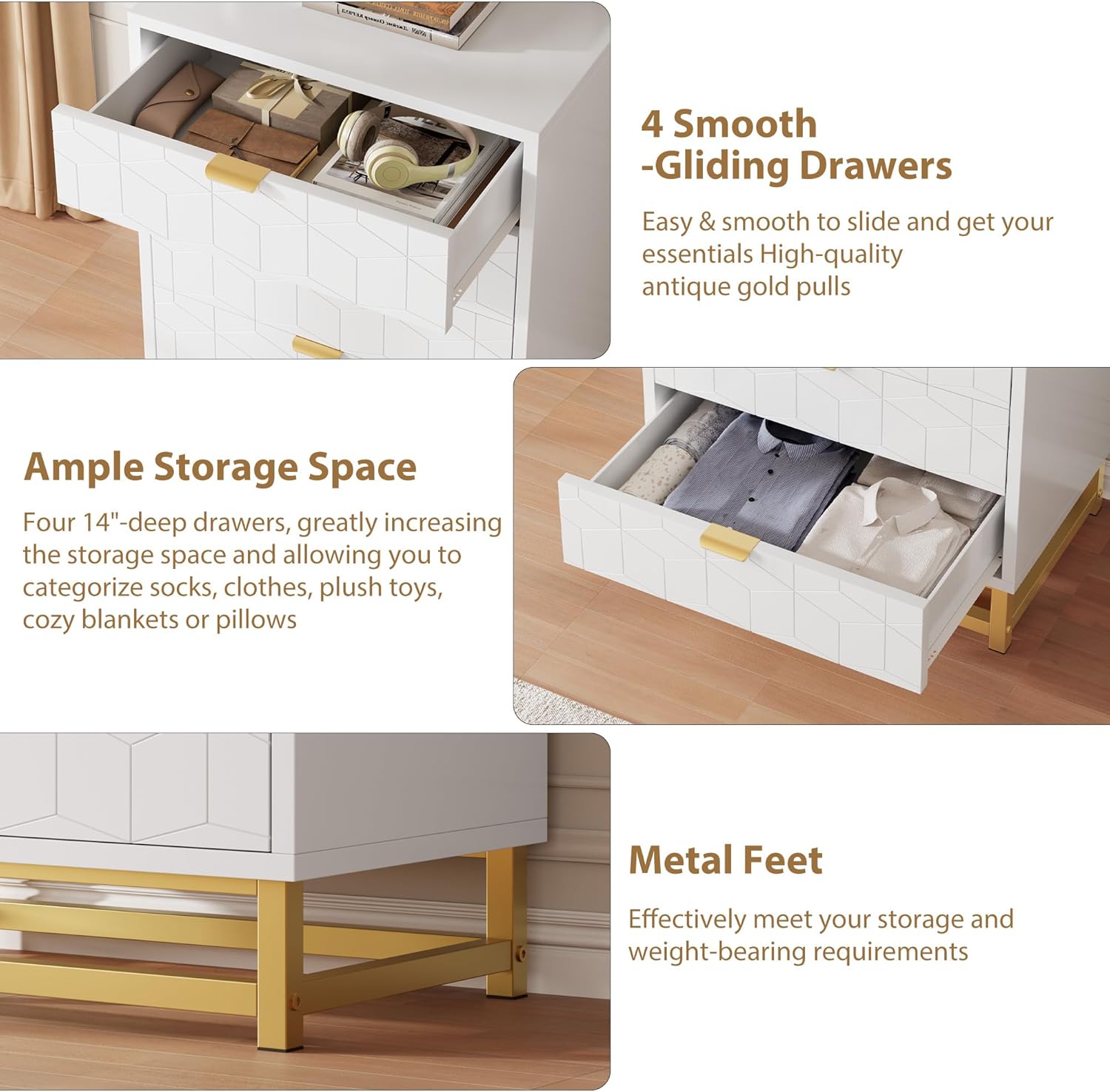
تصوير: هڪ ويجهو تصوير view highlighting the smooth-gliding drawers and the sturdy gold metal feet of the dresser.
قدم 5: دراز داخل ڪريو
Carefully align the assembled drawers with the slides in the main frame and push them in until they click into place or slide smoothly. Test each drawer for proper function.
Step 6: Attach Metal Legs
Secure the gold metal legs to the bottom of the dresser frame using the provided hardware. Ensure they are firmly attached and the dresser is stable.

Image: The base of two GAOMON dressers, showcasing the gold metal leg design and how they appear when placed next to each other.
Step 7: Install Anti-Tip Device
Locate a suitable wall stud behind the dresser. Attach one end of the anti-tip strap to the back of the dresser and the other end to the wall using the provided screws and anchors. This step is critical for safety.
آپريٽنگ هدايتون
Your GAOMON 4-Drawer Dresser is designed for organized storage in various rooms.
- دراز جو استعمال: Open and close drawers smoothly using the gold metal handles. Avoid forcing drawers open or shut.
- رکڻ جي گنجائش: The four deep drawers provide ample space for clothing, accessories, and other items. Distribute weight evenly within drawers to prevent strain on the slides.
- مٿين سطح: مٿئين مٿاڇري کي آرائشي شين لاءِ استعمال ڪري سگهجي ٿو، lamps, or other lightweight objects. Do not place excessively heavy items on the top surface.

Image: The GAOMON 4-Drawer Dresser with two drawers partially open, illustrating its storage capacity for various items like clothes and accessories.
سار سنڀال
Regular maintenance will help preserve the appearance and functionality of your dresser.
- صفائي: مٿاڇري کي نرم سان صاف ڪريو، ڊيamp ڪپڙو. گھڙڻ وارا صاف ڪندڙ يا سخت ڪيميڪلز کان پاسو ڪريو، جيڪي ختم کي نقصان پهچائي سگهن ٿا.
- illsرندڙ: Clean spills immediately to prevent staining or damage to the engineered wood.
- هارڊويئر: وقت بوقت سڀني اسڪرو ۽ فاسٽنرز کي چيڪ ڪريو ته جيئن پڪ ڪري سگهجي ته اهي سخت رهن. ضرورت مطابق ٻيهر مضبوط ڪريو.
- دراز جون سلائڊون: جيڪڏهن دراز سخت ٿي وڃن ٿا، ته سلائڊن تي ٿوري مقدار ۾ سلڪون لوبريڪنٽ لڳائي سگهجي ٿو.
مشڪلاتون
| مسئلو | ممڪن سبب | حل |
|---|---|---|
| دراز آساني سان نه سلائڊ ڪندا آهن. | Misaligned drawer slides; loose hardware; debris in slides. | Check slide alignment and tighten hardware. Clean slides. Apply silicone lubricant if needed. |
| ڊريسنگ لڏپلاڻ وارو يا غير مستحڪم آهي. | Loose assembly hardware; uneven floor; anti-tip device not installed. | Ensure all screws are tightened. Adjust furniture levelers if present. Install anti-tip device securely. |
| Gap in back panel. | Back panel not fully seated or connecting piece missed during assembly. | Ensure back panel sections are fully inserted into grooves and any connecting pieces are used. |
وضاحتون
| خاصيت | تفصيل |
|---|---|
| برانڊ | گامون |
| ماڊل نالو | KmfT9fsUb1jubHsmxlsxBwNzpeE |
| پيداوار جي ماپ | 15.8"ڊي x 23.6"ڊي x 34.5"ايڇ |
| رنگ | اڇو |
| مواد | انجنيئر ڪاٺ |
| ختم ڪرڻ جو قسم | پاليل |
| درازن جو تعداد | 4 |
| شيءِ جو وزن | 60 پائونڊ |
| اسيمبلي گهربل | ها |
| يو پي سي | 199414272810 |

Image: A detailed diagram illustrating the overall dimensions of the dresser (15.8"D x 23.6"W x 34.5"H) and the internal dimensions of a single drawer (14"D x 22.2"W x 6.5"H).
وارنٽي ۽ سپورٽ
For warranty information or assistance with your GAOMON dresser, please refer to the warranty card included in your package or contact GAOMON customer support directly. Contact details are typically available on the manufacturer's official webسائيٽ يا توهان جي خريداري جي نقطي ذريعي.
If you have questions regarding assembly or missing parts, please reach out to customer service for prompt assistance.


