1. تعارف
This manual provides detailed instructions for the installation, operation, and maintenance of your Amico 60 Inch Smart Ceiling Fan with Lights. Please read this manual thoroughly before installation and retain it for future reference.
The Amico 60-inch smart ceiling fan features a reversible DC motor, 5 blades, 6 speed settings, 3 color temperature (3CCT) dimmable LED lighting, and smart control options including remote, app (Joinin Home/Smart Life/Tuya Smart), and voice control (Alexa/Google Home). It is designed for indoor use in various spaces such as living rooms, bedrooms, offices, and kitchens.
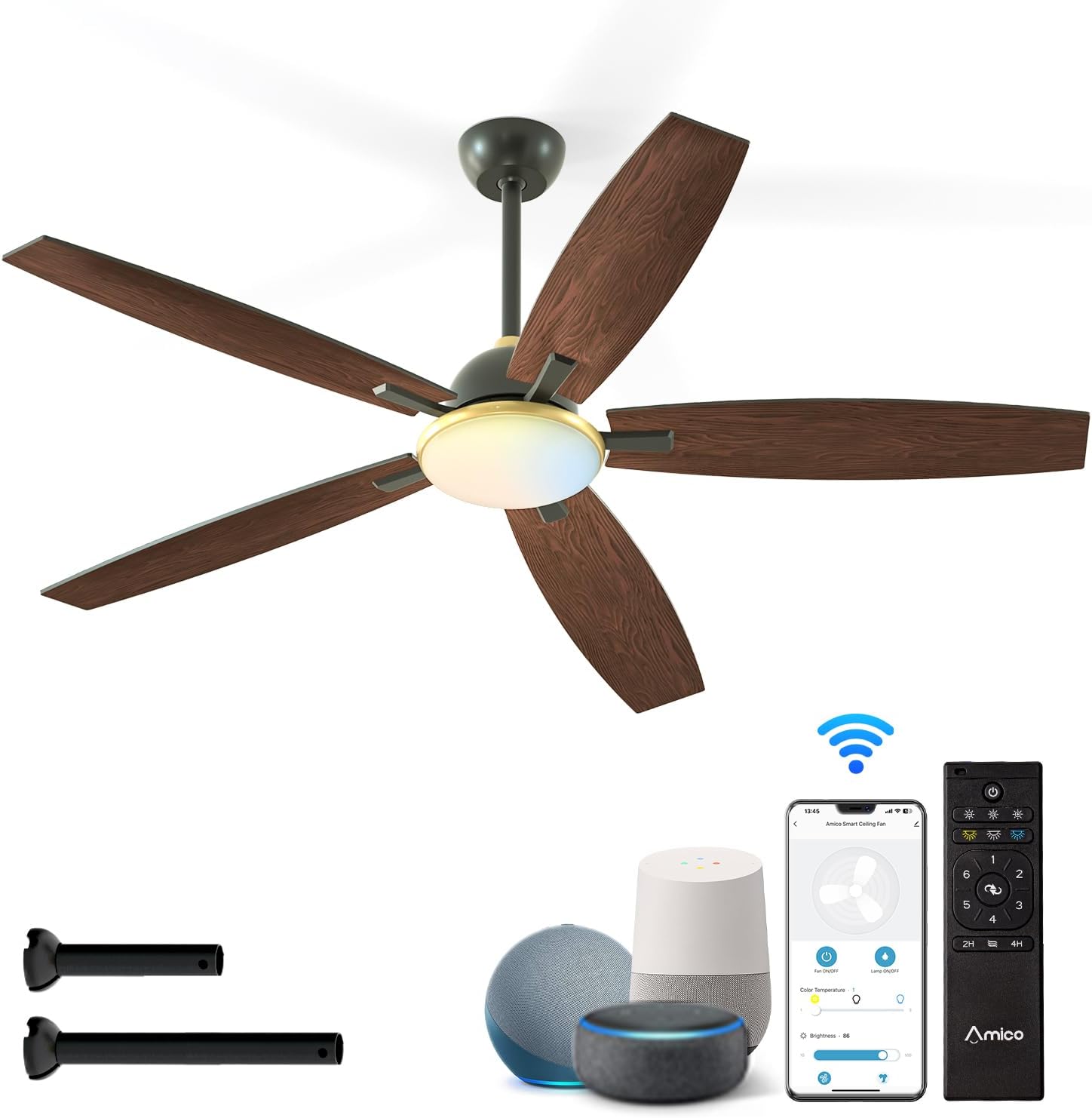
Figure 1: Amico 60 Inch Smart Ceiling Fan with included accessories and smart control options.
2. حفاظت جي ڄاڻ
خبردار: باهه، بجليءَ جي جھٽڪي، يا ذاتي زخم جي خطري کي گهٽائڻ لاءِ، هميشه انهن بنيادي احتياطن تي عمل ڪريو:
- فين لڳائڻ کان اڳ سڀ هدايتون پڙهو.
- Ensure the installation site is structurally sound and can support the fan's weight.
- سڀئي وائرنگ قومي ۽ مقامي اليڪٽريڪل ڪوڊس جي مطابق هجڻ گهرجن. جيڪڏهن توهان وائرنگ کان ناواقف آهيو، ته هڪ قابل اليڪٽريشن سان صلاح ڪريو.
- Disconnect power at the circuit breaker or fuse box before beginning installation or performing any maintenance.
- فين کي خراب ٿيل پاور ڪنڊ يا پلگ سان نه هلايو.
- فين بليڊ جي رستي ۾ شيون رکڻ کان پاسو ڪريو.
- This fan is designed for indoor use only. Do not expose directly to rain.
3. پيڪيج مواد
Verify that all components are present before beginning installation. If any parts are missing or damaged, contact Amico customer service.
- ڇت فين موٽر اسيمبلي
- پنن جا ڦڙا (5)
- لائٽ ڪٽ
- وال مائونٽ سان ريموٽ ڪنٽرول
- ڊائون راڊز (5 انچ ۽ 10 انچ آپشن)
- وڌندڙ خط
- Hardware Pack (screws, wire nuts, balance kit)
- استعمال ڪندڙ دستي

Figure 2: Fan dimensions and downrod options.
4. سيٽ اپ ۽ تنصيب
Professional installation is recommended if you are not experienced with electrical wiring or ceiling fan installation.
4.1 قبل از انسٽاليشن چيڪ
- Ensure power is disconnected at the main circuit breaker.
- Confirm the ceiling junction box is securely mounted and capable of supporting the fan's weight (approximately 10 pounds).
- Determine the appropriate downrod length (5-inch or 10-inch) based on your ceiling height.
4.2 فين لڳائڻ
- مهيا ڪيل اسڪرو استعمال ڪندي ڇت جي جنڪشن باڪس سان ماؤنٽنگ بریکٹ ڳنڍيو.
- Assemble the downrod to the motor housing, feeding the wires through the downrod.
- احتياط سان فين اسيمبلي کي مٿي کڻو ۽ ان کي ماؤنٽنگ بریکٹ کان لٽڪايو.
4.3 برقي ڪنيڪشن
Connect the fan's electrical wires to the household wiring according to the wiring diagram in the full instruction manual. Ensure all connections are secure using wire nuts.
4.4 بليڊ ۽ لائيٽ ڪٽ ڳنڍڻ
- Securely attach the five fan blades to the motor housing.
- Connect the light kit wiring and attach the light kit to the fan assembly.
- Install the light shade.

Figure 3: Downrod and Sloped Ceiling Mount options.
5. آپريٽنگ هدايتون
Your Amico Smart Ceiling Fan offers multiple control methods for convenience.
5.1 ريموٽ ڪنٽرول آپريشن
The included remote control allows for comprehensive fan and light adjustments.
- پاور آن / آف: پنکڙو ۽ بتي آن يا بند ڪريو.
- فين جي رفتار: Select from 6 fan speeds (Levels 1-2: Low/Comfortable, Levels 3-4: Medium/Natural, Levels 5-6: High/Cooling).
- روشني ڪنٽرول: Adjust light brightness (10%-100% dimmable) and select color temperature (3000K Warm White, 4000K Natural White, 6000K Cold White).
- موٽائي سگهڻ واري موٽر: Change fan direction for summer (downward airflow for cooling) or winter (upward airflow for heat circulation).
- ٽائمر سيٽنگ: Set a sleep shutdown timer for 2 or 4 hours.

Figure 4: Remote control and smart features overview.

Figure 5: Remote control functionality.
5.2 سمارٽ ايپ ڪنٽرول
Download the Joinin Home, Smart Life, or Tuya Smart app to control your fan from your smartphone or tablet.
- Download the chosen app from your device's app store.
- Follow the in-app instructions to pair your fan with the app.
- Once paired, you can control all fan and light functions remotely.

Figure 6: App control interface.
5.3 وائس ڪنٽرول
Integrate your fan with Alexa or Google Home for hands-free operation.
- Ensure your fan is connected to the Smart Life/Tuya Smart app.
- Enable the Smart Life/Tuya Smart skill in your Alexa or Google Home app.
- Discover devices. You can now use voice commands like "Alexa, turn on the ceiling fan" or "Hey Google, set fan speed to 3."

شڪل 7: عمل ۾ آواز ڪنٽرول.
5.4 اهم خاصيتون
- 6 ترتيب ڏيڻ واري رفتار: From a gentle breeze (Level 1-2) to strong cooling (Level 5-6).
- ريورسيبل ڊي سي موٽر: Optimizes air circulation for both summer (cooling) and winter (heat distribution).
- بي آواز آپريشن: Designed for quiet performance, operating at approximately 20dB, comparable to falling leaves.
- Customizable Dimmable Light: Adjust brightness from 10% to 100% and choose between 3000K (warm white), 4000K (natural white), and 6000K (cold white) color temperatures.

Figure 8: Fan speed settings.

شڪل 9: سال جي آرام لاءِ ريورسيبل موٽر.

Figure 10: Quiet operation for peaceful environments.
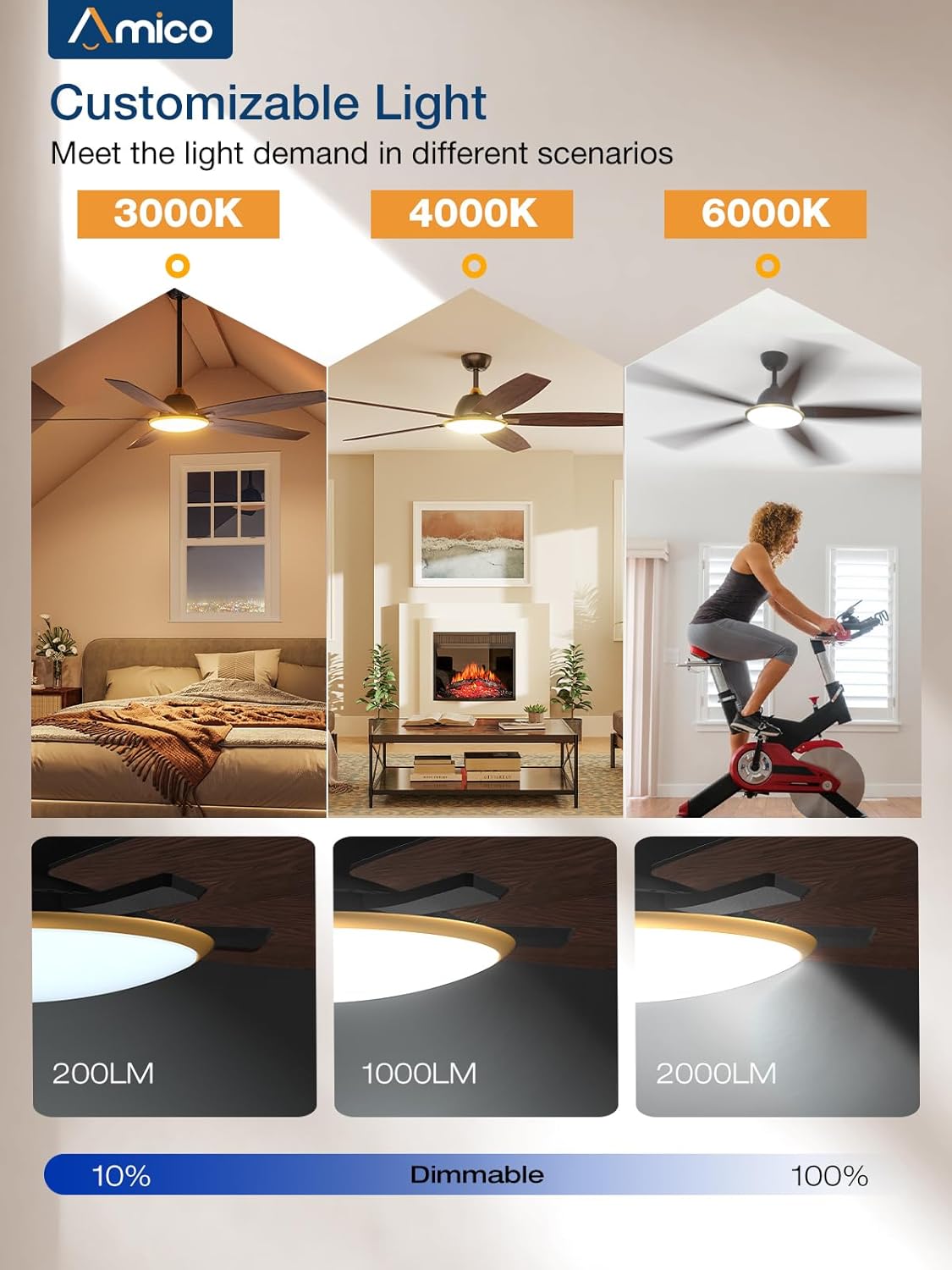
Figure 11: Customizable light settings.
6. سار سنڀال
باقاعده سار سنڀال توهان جي ڇت جي پنکڙي جي بهترين ڪارڪردگي ۽ ڊگهي عمر کي يقيني بڻائي ٿي.
- صفائي: وقت بوقت فين بليڊ ۽ موٽر هائوسنگ کي نرم، ڊي سان صاف ڪريوamp ڪپڙو. استعمال نه ڪريو abrasive cleaners يا solvents.
- روشني کٽ: Ensure the light shade is clean for optimal light output.
- بليڊ بيلنس: If the fan wobbles, use the included blade balancing kit to correct it.
- بندن کي مضبوط ڪريو: Check all screws and fasteners annually to ensure they are secure.
- پاور ڪنيڪشن: Always disconnect power before cleaning or performing any maintenance.
7. مسئلا حل ڪرڻ
If you encounter issues with your Amico ceiling fan, refer to the following common problems and solutions.
| مسئلو | ممڪن سبب | حل |
|---|---|---|
| فين شروع نٿو ٿئي | No power; loose wiring; remote control battery low. | سرڪٽ بريڪر چيڪ ڪريو. پڪ ڪريو ته سڀئي وائرنگ ڪنيڪشن محفوظ آهن. ريموٽ ڪنٽرول بيٽريون تبديل ڪريو. |
| روشني ڪم نه ڪندي آهي | Loose wiring in light kit; LED module failure. | Check light kit wiring connections. If issues persist, contact customer service. (Note: Some users reported issues with initial light connection, re-seating connectors may help.) |
| پنن جا ڦڙا | Loose blades; unbalanced blades; loose mounting bracket. | Ensure all blade screws are tight. Use the included balancing kit. Verify mounting bracket is secure. |
| ريموٽ ڪنٽرول ڪم نه ڪري رهيو آهي | Low battery; remote not paired. | Replace remote batteries. Refer to the full manual for remote pairing instructions. |
| Smart control (App/Voice) not working | Wi-Fi connectivity issues; incorrect app pairing; skill not enabled. | Ensure your Wi-Fi network is stable. Re-pair the fan with the app. Verify the Smart Life/Tuya Smart skill is enabled in your voice assistant app. |
| پرستار شور ڪري ٿو | Loose screws; motor issue. | Check all screws for tightness. If noise persists and is not typical airflow sound, contact customer service. |
وڌيڪ مدد لاءِ، مھرباني ڪري اميڪو ڪسٽمر سپورٽ سان رابطو ڪريو.
8. وضاحتون
- برانڊ: اميڪو
- ماڊل نالو: C0502AA0301022
- پيداوار جي ماپ: 60"ڊي x 60"ڊي x 15"ايڇ
- شيء جو وزن: 10 پائونڊ
- رنگ: ڪارو
- اليڪٽرڪ فين ڊيزائن: ڇت وارو پکو
- طاقت جو ذريعو: AC
- جلدtage: 120 وولٽ
- طاقت جي سطح جو تعداد: 6 (فين اسپيڊ)
- خاص خصوصيت: LED Light, Dimmable, Reversible DC Motor, Smart Control (Wi-Fi, Voice)
- هلڪو رنگ گرمي پد: 3000 ڪلو (گرم اڇو)، 4000 ڪلو (قدرتي اڇو)، 6000 ڪلو (ٿڌو اڇو)
- ڪنٽرول جو طريقو: Remote, App (Joinin Home/Smart Life/Tuya Smart), Voice (Alexa/Google Home)
- اندروني / ٻاهرين استعمال: Indoor (Not to be exposed directly to rain)
- شامل اجزاء: Light Kit, Remote Control, Downrods
- بيٽريون: 2 AAA batteries required for remote (included)
- سرٽيفڪيشن: اي ٽي ايل
9. وارنٽي ۽ سپورٽ
Amico is committed to product quality and customer satisfaction. If you experience any issues or have questions regarding your Amico ceiling fan, please contact our customer service team.
While specific warranty details are not provided in this document, Amico customer service has been noted for its responsiveness and willingness to assist with product issues, including sending replacement parts when necessary. Please retain your proof of purchase for warranty claims.
رابطي جي ڄاڻ: Refer to the packaging or the official Amico website for the most current customer support contact details (email or phone).


