1. تعارف
This manual provides detailed instructions for the installation, operation, and maintenance of your Cooler Master Elite 481 Wood Computer Case. Please read this manual thoroughly before beginning installation to ensure proper setup and safe usage. Keep this manual for future reference.
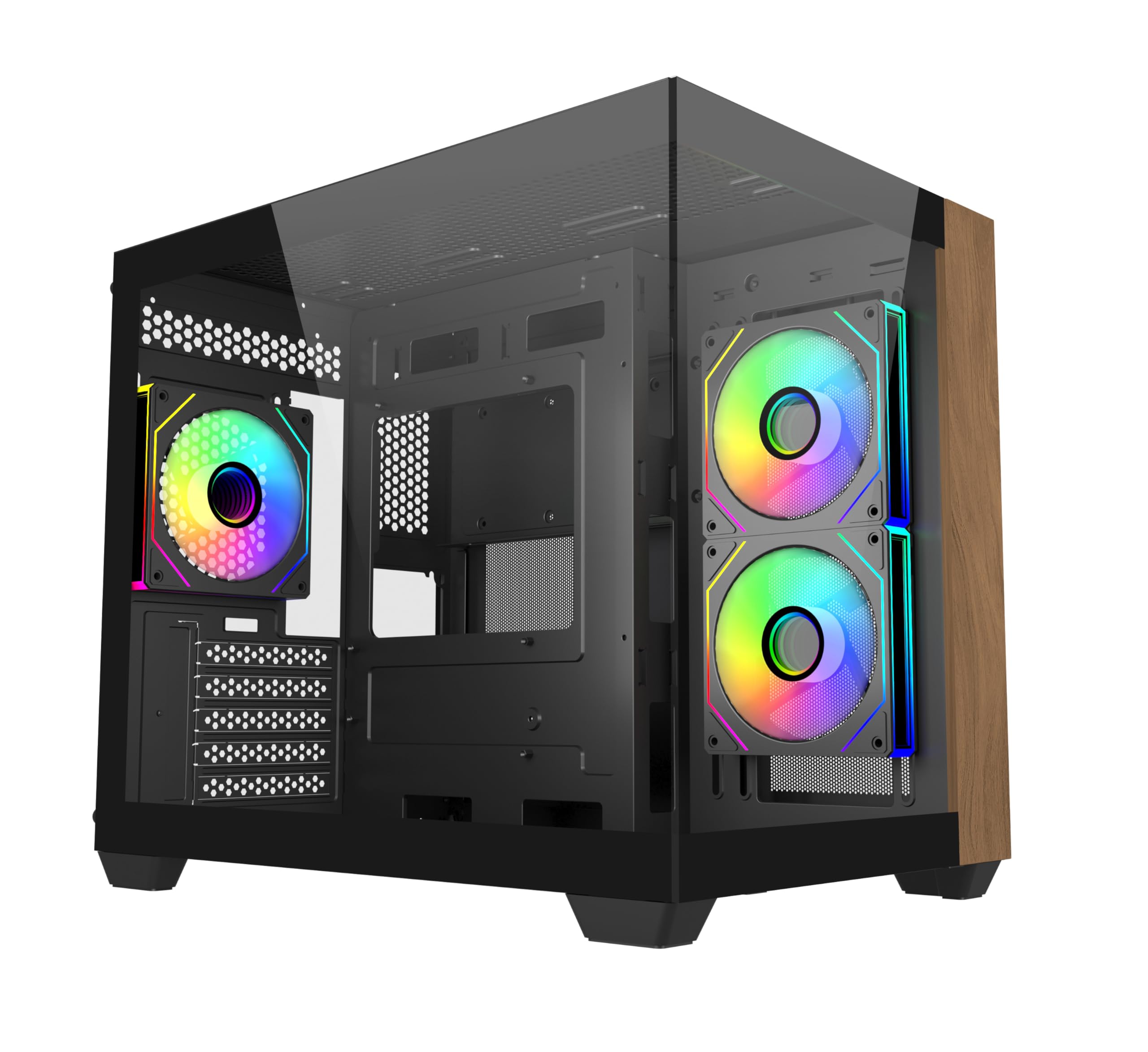
تصوير 1.1: سامهون view of the Cooler Master Elite 481 Wood Computer Case.
2. حفاظت جي ڄاڻ
- Always disconnect the power supply from the wall outlet before installing or servicing any components inside the computer case.
- Avoid exposing the case to moisture, dust, or extreme temperatures.
- ٽيمپرڊ شيشي جي پينلن کي احتياط سان سنڀاليو. اهي نازڪ آهن ۽ جيڪڏهن ڪري پون يا ٽڪرائجي وڃن ته ٽٽي سگهن ٿا.
- Ensure all cables are routed properly and secured to prevent interference with fans or other moving parts.
- ڪيس يا ان جي حصن کي تبديل ڪرڻ جي ڪوشش نه ڪريو، ڇاڪاڻ ته اهو توهان جي وارنٽي کي رد ڪري سگهي ٿو ۽ حفاظتي خطرو پيدا ڪري سگهي ٿو.
3. پيڪيج مواد
انسٽاليشن شروع ڪرڻ کان اڳ پڪ ڪريو ته سڀئي جزا موجود آهن:
- Cooler Master Elite 481 Wood Computer Case
- Accessory box (screws, standoffs, cable ties, etc.)
- 3 x Pre-installed ARGB Fans (2 reverse-blade side intake, 1 rear exhaust)
- استعمال ڪندڙ جو دستياب (ھي دستاويز)
4. سيٽ اپ ۽ تنصيب
4.1 ڪيس جي تياري
Carefully remove the case from its packaging. Place it on a stable, flat surface. Remove the tempered glass side panels by unscrewing the retaining screws and gently sliding them off. Store them safely to prevent damage.

Image 4.1: The case features dual tempered glass panels for a panoramic view.
4.2 Motherboard جي انسٽاليشن
The Elite 481 Wood supports mATX motherboards. Install the necessary standoffs for your motherboard form factor. Carefully place your motherboard into the case, aligning it with the standoffs, and secure it with screws.
4.3 پاور سپلائي يونٽ (PSU) لائڻ
The case features a top-mounted PSU chamber in the right compartment. Install your PSU into this designated area and secure it with screws. Route the necessary power cables through the cable management cutouts.
4.4 اسٽوريج ڊرائيو جي انسٽاليشن
Utilize the available mounting points for 2.5-inch SSDs and 3.5-inch HDDs. Secure drives using the provided screws or tool-less mechanisms where applicable.
4.5 گرافڪس ڪارڊ (GPU) جي انسٽاليشن
The case supports GPUs up to 410mm in length. Remove the necessary PCIe slot covers, insert your graphics card into the PCIe slot on your motherboard, and secure it with the retaining clip and screw.

Image 4.2: The case accommodates large graphics cards up to 410mm.
4.6 Cooling System Installation (Fans & Radiators)
The Elite 481 Wood supports up to 9 fans and offers extensive radiator support:
- اڳ ۾ نصب ٿيل مداح: 2 x 120mm reverse-blade ARGB fans (side intake), 1 x 120mm ARGB fan (rear exhaust).
- ريڊيٽر سپورٽ: Dual 360mm radiators (top and bottom), and a 280mm side radiator.
Install additional fans or radiators as needed, ensuring proper airflow direction for optimal cooling.

Image 4.3: Vertical cooling configuration with multiple fan mounts and radiator support.
4.7 ڪيبل مينيجمينٽ
The dual-chamber architecture provides 95mm of cable management space in the right chamber. Utilize the cable cutouts and included cable ties to route and secure cables neatly, ensuring unobstructed airflow and a clean build appearance.
4.8 Connecting Front I/O Panel
Connect the front I/O panel cables (USB 3.0, USB 3.2 Gen 2x2 Type-C, audio, power, reset, LED) to the corresponding headers on your motherboard. Refer to your motherboard manual for specific header locations.

Image 4.4: The upgraded high-speed I/O panel features USB 3.2 Gen 2x2 Type-C and dual USB 3.0 ports.
5. آپريٽنگ هدايتون
5.1 پاور آن/آف
Press the power button on the front I/O panel to turn your system on or off. A short press typically powers on, while a longer press (usually 4-5 seconds) will force a shutdown.
5.2 ARGB فين ڪنٽرول
The pre-installed ARGB fans are compatible with major motherboard ARGB software for synchronized lighting control. Connect the fan ARGB cables to your motherboard's 3-pin 5V ARGB header. Use your motherboard's software (e.g., ASUS Aura Sync, MSI Mystic Light, Gigabyte RGB Fusion, ASRock Polychrome Sync) to customize lighting effects.

Image 5.1: Pre-installed ARGB fans with motherboard sync support.
6. سار سنڀال
- مٽي فلٽر: The case features mesh panels on the top and bottom for ventilation. Regularly clean these dust filters to maintain optimal airflow and prevent dust buildup inside the system. Dust filters can typically be removed, cleaned with compressed air or water, and reinstalled.
- ٻاهرين صفائي: ٻاھرين سطحن کي نرم سان صاف ڪريو، ڊيamp cloth. Avoid using harsh chemicals or abrasive materials that could damage the finish or the wood panel.
- اندروني صفائي: Periodically use compressed air to remove dust from internal components, especially fan blades and heatsinks. Ensure the system is powered off and unplugged before cleaning.
7. مسئلا حل ڪرڻ
- سسٽم آن نه ٿي رهيو آهي:
- Check if the power supply is properly connected to the wall outlet and the PSU switch is in the 'ON' position.
- پڪ ڪريو ته PSU مان سڀئي پاور ڪيبل محفوظ طور تي مدر بورڊ ۽ حصن سان ڳنڍيل آهن.
- تصديق ڪريو ته فرنٽ پينل پاور بٽڻ ڪيبل صحيح طرح سان مدر بورڊ جي پاور هيڊر سان ڳنڍيل آهي.
- پنکڙا نه ڦرڻ/ARGB ڪم نه ڪرڻ:
- Check if fan power cables are securely connected to the motherboard or fan controller.
- Ensure ARGB cables are connected to a compatible 3-pin 5V ARGB header on the motherboard.
- Confirm that ARGB software is installed and configured correctly on your operating system.
- اعلي درجه حرارت:
- Verify that all case fans are spinning and oriented correctly for optimal airflow (bottom-to-top is recommended for this case).
- Clean any dust buildup on filters, fans, and heatsinks.
- Ensure proper thermal paste application on CPU cooler.
8. وضاحتون
| خاصيت | تفصيل |
|---|---|
| ماڊل نمبر | E481-KHNN-S00 |
| برانڊ | کولر ماسٽر |
| ڪيس جو قسم | مائي ٽاور |
| Motherboard مطابقت | مائڪرو ATX |
| رنگ | ڪارو |
| طول و عرض (L x W x H) | 53.1 x 54.4 x 26.1 سينٽي |
| شيءِ جو وزن | 13 ڪلو |
| GPU ڪليئرنس | 410mm تائين |
| ريڊيٽر سپورٽ | Top: 360mm, Bottom: 360mm, Side: 280mm |
| اڳ ۾ نصب ٿيل پرستار | 3 x ARGB (2x side intake, 1x rear exhaust) |
| I/O بندرگاهن | 2 x USB 3.0 Type-A, 1 x USB 3.2 Gen 2x2 Type-C |
| ڪيبل مينيجمينٽ اسپيس | 95mm |
9. وارنٽي ڄاڻ
Cooler Master products are covered by a limited warranty. For specific warranty terms and conditions, please refer to the warranty card included with your product or visit the official Cooler Master webسائيٽ. وارنٽي دعوائن لاءِ خريداري جو ثبوت رکو.
10. سپورٽ
For technical support, product inquiries, or assistance with installation, please visit the official Cooler Master support website or contact their customer service department. You can find contact information and FAQs on their webسائيٽ.
ڪولر ماسٽر آفيشل Webسائيٽ: www.coolemaster.com


