1. پراڊڪٽ ختمview
The VCELINK RJ45 Tool-Free Connector is designed for effortless and reliable termination of CAT6/CAT5E Ethernet cables without the need for specialized crimping tools. Featuring gold-plated contacts and a robust design, it ensures high-speed data transmission and a stable connection for various networking applications.

Figure 1: VCELINK RJ45 Tool-Free Connectors
2. دٻي ۾ ڇا آهي
توھان جي پيڪيج ۾ ھيٺيون شيون شامل ھجن:
- آر ايف 45 رابط
- بار بار
- آپريٽنگ هدايتون (هي دستور)
3. مصنوعات جي وضاحت
| خاصيت | وصف |
|---|---|
| پيداوار جي ماپ | 2.09 x 0.57 x 0.51 انچ؛ 0.49 اونس |
| ماڊل نمبر | KJ22-C6-2P-AU |
| برانڊ | VCELINK |
| ڪنيڪٽر جو قسم | ايٿنيٽ (RJ45) |
| ڪيبل جي قسم جي مطابقت | CAT6/CAT5E Ethernet cable 23-26AWG (Wire OD: 0.4-1.2mm) |
| Cable Jacket OD Support | 6.0-7.6mm |
| ٽرانسميشن جي رفتار | 1Gbps تائين |
| خاص خاصيتون | Tool-Free Installation, Gold-Plated Contacts, Nut-Type Strain Relief Boot, Reusable, Compact Size |
| مطابقت رکندڙ ڊوائيسز | Laptop, Modem, Personal Computer, Router, Server, Smart TV, Switch, Camera, TV Box |

Figure 2: Connector Components

Figure 3: Compact Design for Side-by-Side Use
4. انسٽاليشن گائيڊ
This tool-free RJ45 connector simplifies the termination process. Follow these steps for a successful installation:
4.1 گھربل اوزار (شامل نه آھي)
- تار اسٽريپر
- تار ڪٽڻ وارو
- Ethernet Cable (CAT6/CAT5E)
- Network Cable Tester (recommended for verification)
4.2 Wiring Standards (T568A & T568B)
Ensure you follow the correct wiring standard (T568A or T568B) for your network. The connector's load bar is color-coded for easy alignment.
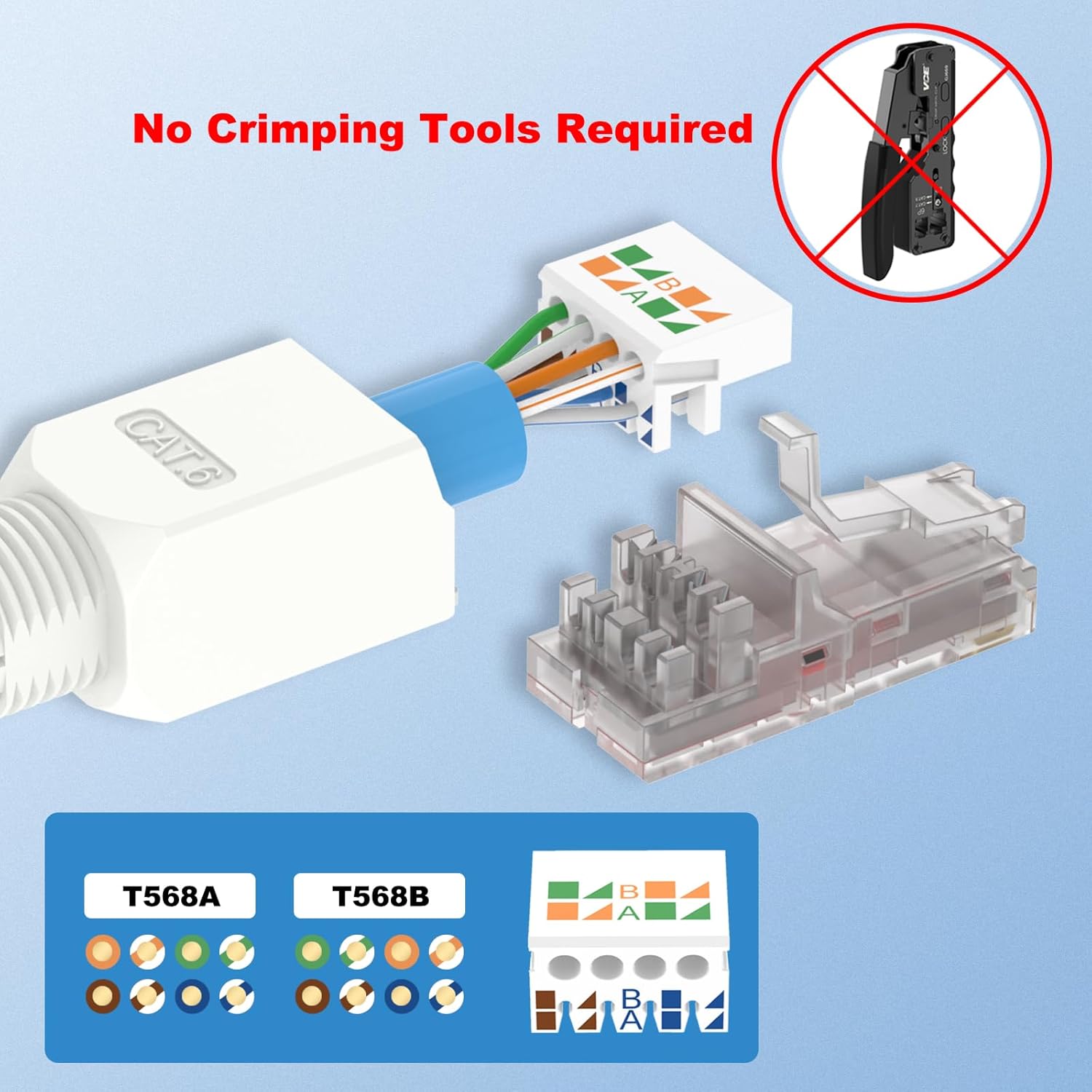
Figure 4: T568A and T568B Wiring Standards
4.3 قدم بہ قدم انسٽاليشن
- Insert the Boot: Slide the nut-type strain relief boot onto the Ethernet cable.
- ڪيبل جيڪٽ لاهي ڇڏيو: Carefully strip approximately 2cm (0.79 inches) of the outer cable jacket to expose the twisted pairs.
- Arrange and Straighten Wires: Untwist and straighten the 8 individual wires.
- Thread Wires into Load Bar: Following either the T568A or T568B color code (T568B is commonly used), thread each wire into the corresponding slot on the load bar. Ensure wires are fully seated.
- Cut Excess Wires: Use a wire cutter to trim the excess wires flush with the load bar. The top and bottom rows of wires may need to be cut to varying lengths for proper seating.
- ترتيب ڏيو ۽ دٻايو: Align the load bar with the grooves inside the connector housing and firmly press them together until they click into place.
- ڪپڙا بند ڪريو: Close the clear cover of the connector.
- نٽ کي مضبوط ڪريو: Slide the strain relief boot forward and tighten the nut onto the connector body to secure the cable.
- مڪمل: The connector is now terminated and ready for use.

Figure 5: Step-by-Step Installation Process
Video 1: How to install an Ethernet cable by yourself using the VCELINK tool-free connector.
5. آپريٽنگ هدايتون
Once terminated, the RJ45 connector functions as a standard Ethernet plug. Simply insert it into any compatible RJ45 socket on your network devices.

Figure 6: Wide Compatibility with RJ45 Sockets
5.1 تيز رفتار ٽرانسميشن
The gold-plated contacts ensure speedy and reliable signal transmission, supporting speeds up to 1Gbps for your CAT6/CAT5E network.

Figure 7: High-Speed Data Transmission
6. سار سنڀال
- Keep connectors clean and free from dust and debris.
- Avoid excessive bending or pulling on the cable near the connector to prevent damage to the internal wires.
- Store unused connectors in a dry, cool place.
7. مسئلا حل ڪرڻ
7.1 No Network Connection / Intermittent Connection
- وائرنگ چيڪ ڪريو: Verify that the wires are correctly threaded into the load bar according to the T568A or T568B standard. Ensure no wires are crossed or misplaced.
- Inspect Wire Lengths: Confirm that the trimmed wire ends are flush with the load bar and make proper contact with the connector's pins. Uneven cuts can lead to poor connection.
- Test with Cable Tester: Use a network cable tester to check for continuity and proper wiring. If the test fails, disassemble and re-install the connector.
- محفوظ ڪنيڪشن کي يقيني بڻايو: Make sure the connector is fully seated in the device's RJ45 port and the strain relief boot is tightened.
Video 2: The installation video also demonstrates how to test the cable with a network cable tester for signal integrity.
7.2 Reusability
One of the key features of this tool-free connector is its reusability. In case of an error or if you need to re-terminate, you can carefully disassemble the connector and re-install it.

Figure 8: Reusability Feature
8. وارنٽي ۽ سپورٽ
VCELINK products are designed for reliability and performance. For any issues or suggestions regarding your product, please do not hesitate to contact VCELINK customer support. Refer to the product packaging or the official VCELINK webمخصوص وارنٽي تفصيلن ۽ رابطي جي معلومات لاءِ سائيٽ.
Customer experience is always our top priority.


