تعارف
This manual provides detailed instructions for the setup, operation, maintenance, and troubleshooting of your OnePlus Buds 4 wireless earbuds. Please read this manual thoroughly to ensure proper use and to maximize your listening experience.
پيڪيج مواد
پڪ ڪريو ته سڀئي شيون توهان جي پراڊڪٽ پيڪنگنگ ۾ موجود آهن:
- ون پلس بڊس 4 ائربڊس (کاٻي ۽ ساڄي)
- چارج ڪيس
- USB-C چارجنگ ڪيبل
- اِرٽِپس جا ڪيترائي سائز (ايس، ايم، ايل)
- يوزر مينوئل (هي دستاويز)
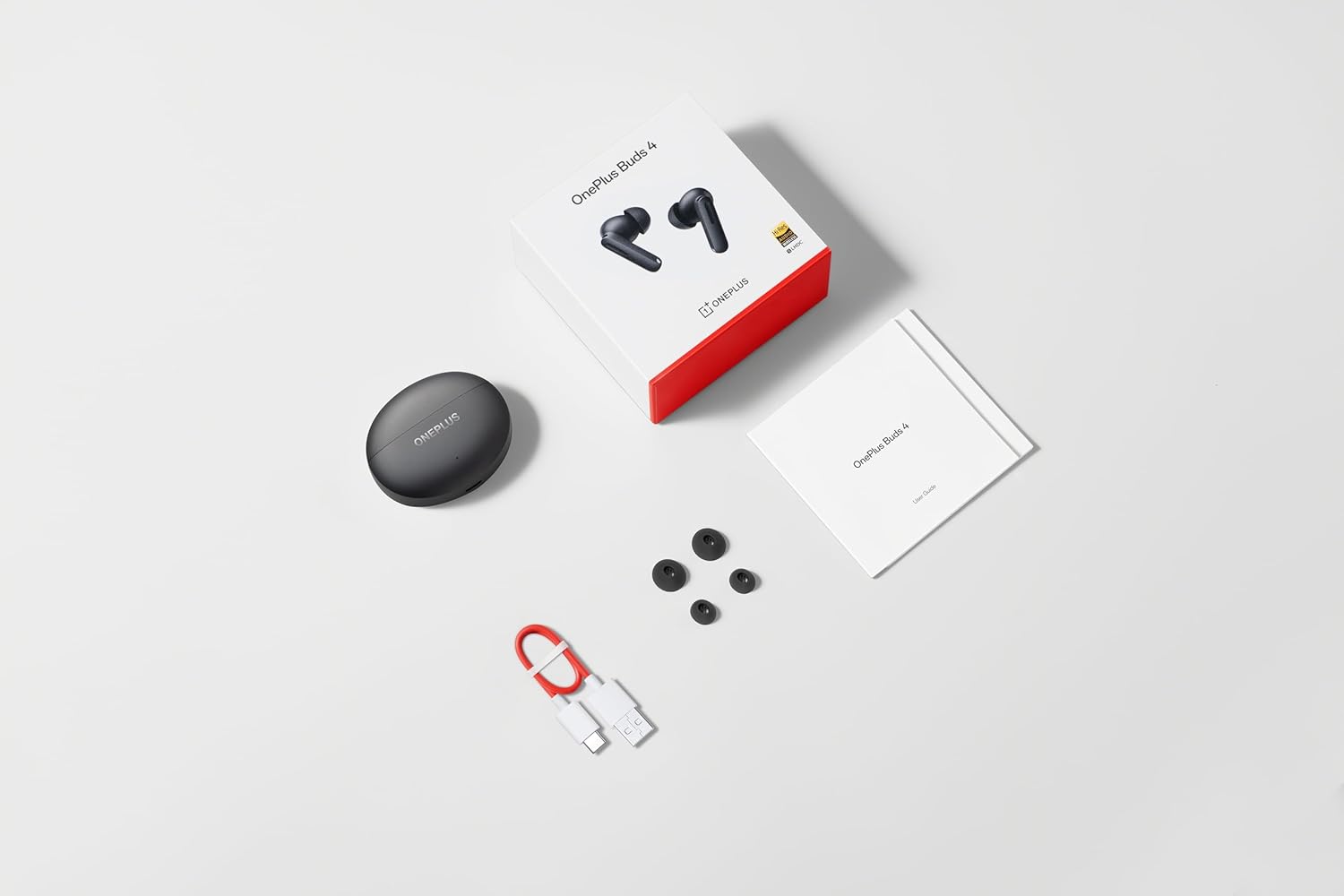
Image: The retail package contents for the OnePlus Buds 4, showing the earbuds, charging case, USB-C cable, and various ear tip sizes.
پيداوار ختمview
The OnePlus Buds 4 are advanced wireless in-ear headphones designed for high-quality audio and active noise cancellation. They feature an ergonomic design for comfort and secure fit, housed in a compact charging case.

Image: The OnePlus Buds 4 earbuds resting inside their open charging case. The earbuds and case are in Storm Gray, with the OnePlus logo visible on the case.

Image: This image shows the front perspective of the OnePlus Buds 4 earbuds and their charging case, highlighting the sleek Storm Gray finish.

Image: The image features the two OnePlus Buds 4 earbuds separated from their charging case, showcasing انهن جي ڊيزائن.
سيٽ اپ ڪريو
شروعاتي چارجنگ
Before first use, place both earbuds into the charging case and connect the case to a power source using the provided USB-C cable. Ensure the indicator light on the case illuminates, signifying charging. A full charge is recommended for optimal battery performance.
توهان جي ڊوائيس سان ڳنڻ
- پڪ ڪريو ته چارجنگ ڪيس ۾ ڪافي طاقت آهي.
- Open the charging case with the earbuds inside. The indicator light will flash white, indicating pairing mode.
- پنهنجي اسمارٽ فون يا بلوٽوٿ-فعال ڊوائيس تي، بلوٽوٿ سيٽنگز ڏانهن وڃو.
- Select "OnePlus Buds 4" from the list of available devices.
- Once connected, the indicator light on the case will turn off.
For subsequent connections, the earbuds will automatically connect to the last paired device when the case is opened.
Installing the HeyMelody App
For advanced features, customization, and firmware updates, download and install the HeyMelody app from your device's app store. This app allows you to personalize touch controls, adjust sound profiles, and manage noise cancellation settings.
Selecting the Right Ear Tips
Choosing the correct ear tip size is crucial for sound quality, noise cancellation, and comfort. Experiment with the included small, medium, and large ear tips to find the best fit for your ears. A good seal will enhance bass response and active noise cancellation effectiveness.

Image: This image illustrates the different sizes of silicone ear tips included with the OnePlus Buds 4, essential for a comfortable and secure fit.
آپريٽنگ هدايتون
ٽچ ڪنٽرول
The OnePlus Buds 4 feature intuitive touch controls on the stem of each earbud. These controls can be customized via the HeyMelody app.

Image: A close-up image of a single OnePlus Buds 4 earbud, indicating the specific area for touch controls on the stem.
- سنگل ٽيپ: موسيقي هلايو/روڪيو، ڪال جو جواب ڏيو/ختم ڪريو.
- ٻٽي ٽيپ: ايندڙ ٽريڪ، ڪال رد ڪريو.
- ٽرپل ٽيپ: اڳوڻو رستو.
- دٻايو ۽ رکو: Switch between Active Noise Cancellation, Transparency Mode, and Noise Cancellation Off.
- Swipe Up/Down (on stem): حجم کي ترتيب ڏيو.
فعال شور منسوخي (ANC) ۽ شفافيت موڊ
The earbuds offer advanced noise control features:
- فعال شور منسوخي (ANC): هڪ عميق ٻڌڻ جي تجربي لاءِ ماحول جي شور کي گھٽائي ٿو.
- شفافيت موڊ: توهان کي پنهنجي آڊيو مان لطف اندوز ٿيندي پنهنجي آس پاس جي ماحول کي ٻڌڻ جي اجازت ڏئي ٿو، حالتن جي شعور کي وڌائي ٿو.
Switch between these modes by pressing and holding the touch area on either earbud, or through the HeyMelody app.

Image: This graphic depicts the concept of Active Noise Cancellation, showing how the OnePlus Buds 4 reduce ambient sound for an immersive listening experience.
آڊيو خاصيتون
The OnePlus Buds 4 are equipped with features to deliver high-fidelity audio:
- Hi-Res Audio and LHDC 5.0: Supports high-resolution audio codecs for detailed and clear sound reproduction.
- عمدي 3D اسپيشل آڊيو: Provides a multi-directional sound experience, enhancing immersion in music and videos.

Image: An image highlighting the Hi-Res Audio and LHDC 5.0 capabilities of the OnePlus Buds 4, indicating high-fidelity sound reproduction.
Image: This graphic illustrates the immersive 3D Spatial Audio feature, suggesting a multi-directional sound experience provided by the earbuds.
Calls and Gaming
The earbuds feature enhanced voice cancellation for clear calls and low-latency connectivity for an optimized gaming and video watching experience.
توهان جي Earbuds ۽ ڪيس کي چارج ڪرڻ
To charge the earbuds, place them into the charging case. The earbuds will begin charging automatically. To charge the case, connect the provided USB-C cable to the charging port on the back of the case and to a power adapter (not included).

Image: The rear of the OnePlus Buds 4 charging case, clearly showing the USB-C port for charging.
The charging case provides extended battery life, allowing for over 24 hours of total listening time with multiple recharges of the earbuds.
سار سنڀال ۽ سنڀال
- صفائي: ائربڊس ۽ چارجنگ ڪيس کي باقاعدي طور تي نرم، سڪل، لِنٽ فري ڪپڙي سان صاف ڪريو. سخت ڪيميڪل يا رگڙيندڙ مواد استعمال نه ڪريو.
- ڪن جي صلاح: Remove and clean ear tips with water and mild soap if necessary. Ensure they are completely dry before reattaching.
- اسٽوريج: جڏهن استعمال ۾ نه هجي، ته ائربڊس کي انهن جي چارجنگ ڪيس ۾ محفوظ ڪريو ته جيئن انهن جي حفاظت ٿئي ۽ انهن کي چارج رکيو وڃي.
- پاڻي جي مزاحمت: The earbuds are water-resistant (IP55 rated), meaning they can withstand splashes and sweat. They are not designed for swimming or submersion in water. Ensure the earbuds are dry before placing them back in the charging case.
مشڪلاتون
If you encounter issues with your OnePlus Buds 4, refer to the table below for common problems and solutions.
| مسئلو | ممڪن سبب | حل |
|---|---|---|
| earbuds مان ڪوبه آواز ناهي | Low battery; Not paired; Volume too low. | Charge earbuds; Re-pair with device; Increase device volume. |
| ائربڊس نه ملائي رهيا آهن | Out of range; Pairing mode not active; Interference. | Ensure earbuds are in pairing mode (open case); Move closer to device; Turn off other Bluetooth devices. |
| فعال شور منسوخي اثرائتو نه آهي | Improper ear tip fit; ANC mode not active. | Try different ear tip sizes for a better seal; Ensure ANC is enabled via touch control or app. |
| چارج ڪيس چارج نه ڪرڻ | Cable issue; Power source issue. | Check USB-C cable connection; Try a different power adapter or USB port. |
| هڪ ائربڊ ۾ ڪو به آواز ناهي | Earbud not connected; Low battery. | Place both earbuds in the case, close, then reopen; Ensure both earbuds are charged. |
وضاحتون
| خاصيت | تفصيل |
|---|---|
| ماڊل نالو | ون پلس بڊس 4 |
| ماڊل نمبر | E513A |
| رابطي ٽيڪنالاجي | بلوٽوٿ 5.4 |
| شور ڪنٽرول | فعال شور منسوخي |
| آڊيو ڊرائيور جي ماپ | 11 ملي ميٽر |
| تعدد جي حد | 40 هرٽز - 20,000 هرٽز |
| حساسيت | 100 ڊي بي |
| رڪاوٽ | 18 اوم |
| ڪنٽرول جو طريقو | ٽچ ڪنٽرول |
| پاڻي جي مزاحمت جي سطح | IP55 (ايربڊس) |
| بيٽري جي زندگي (ايربڊس + ڪيس) | 24 ڪلاڪ کان وڌيڪ (چارج ڪيس سان) |
| مطابقت رکندڙ ڊوائيسز | Smartphones, Laptops, Desktops, Gaming Consoles, Tablets, Televisions |
حفاظت جي ڄاڻ
Please observe the following safety guidelines to prevent damage to your device or personal injury:
- ٻڌڻ جي حفاظت: ٻڌڻ کان پاسو ڪريو بلند آواز جي سطح تي وڌايل عرصي تائين ٻڌڻ جي نقصان کي روڪڻ لاءِ.
- ڊرائيونگ جي حفاظت: Do not use earbuds while driving or cycling in situations where it may distract you or pose a hazard.
- بيٽري جي سنڀال: Do not attempt to replace the battery yourself. Do not expose the device to extreme temperatures or direct sunlight.
- نيڪال: Dispose of the device and its batteries according to local regulations. Do not dispose of with household waste.
وارنٽي ۽ سپورٽ
Your OnePlus Buds 4 are covered by a limited warranty. For detailed warranty terms and conditions, please refer to the warranty card included in your package or visit the official OnePlus support website. For technical assistance or customer service, please contact OnePlus customer support.


