تعارف
Thank you for choosing the Mistral 42" DC Blade Free Fan. This user manual provides essential information for the safe operation, maintenance, and troubleshooting of your new fan. Please read this manual thoroughly before use and retain it for future reference.
اهم حفاظتي هدايتون
بجليءَ جا سامان استعمال ڪرڻ وقت هميشه بنيادي حفاظتي احتياطن تي عمل ڪريو ته جيئن باهه، بجليءَ جو جھٽڪو، ۽ ماڻهن جي زخمي ٿيڻ جو خطرو گهٽجي سگهي.
- هن ڊوائيس کي استعمال ڪرڻ کان پهريان سڀ هدايتون پڙهو.
- بجلي جي فراهمي کي يقيني بڻائيtage اوزار تي ريٽنگ ليبل سان ملندو آهي.
- خراب ٿيل ڪنڊ يا پلگ سان ڪو به پنو نه هلايو.
- Do not place the fan near heat sources or in direct sunlight.
- آپريشن دوران ٻارن ۽ پالتو جانورن کي پنکڙي کان پري رکو.
- Unplug the fan from the power outlet when not in use or before cleaning.
- پنکڙي جي ڪنهن به سوراخ ۾ آڱريون يا غير ملڪي شيون نه وجهو.
- هي اوزار صرف گھر جي استعمال لاء آهي.
پيڪيج مواد
مھرباني ڪري پنھنجي پيڪيج جي مواد کي چيڪ ڪريو. جيڪڏھن ڪا به شيءِ غائب يا خراب آھي، ته ڪسٽمر سپورٽ سان رابطو ڪريو.
- Mistral 42" DC Blade Free Fan Unit
- ريموٽ ڪنٽرول
- AC اڊاپٽر
- استعمال ڪندڙ جو دستياب (ھي دستاويز)
سيٽ اپ ڪريو
1. اسيمبلي
The Mistral 42" DC Blade Free Fan requires simple assembly.
- احتياط سان پيڪنگنگ مان سڀني اجزاء کي هٽايو.
- فين بيس کي هڪ مستحڪم، هموار مٿاڇري تي رکو.
- Ensure the main fan body is securely seated onto the base.
- Connect the AC adapter to the power input port on the fan, then plug it into a standard electrical outlet.

شڪل 1: سامهون view of the Mistral 42" DC Blade Free Fan.
2. Wi-Fi Setup (Mayer Home App)
To utilize the Wi-Fi features and voice control, download the "Mayer Home App" on your smartphone.
- Download the "Mayer Home App" from your device's app store (iOS or Android).
- Register or log in to your Mayer Home account.
- Follow the in-app instructions to add your Mistral fan. This typically involves putting the fan into pairing mode (refer to the app or fan's display for specific instructions) and connecting it to your home Wi-Fi network.
آپريٽنگ هدايتون
ڪنٽرول پينل ۽ ريموٽ ڪنٽرول
The fan can be operated using the full touch screen control panel on the unit or the included remote control.

Figure 2: Mistral Fan with Remote Control.
بنيادي ڪم:
- پاور آن / آف: ڪنٽرول پينل يا ريموٽ تي پاور بٽڻ کي دٻايو.
- فين جي رفتار: Adjust through 12 fan speeds using the '+' and '-' buttons.
- طريقا: Cycle through 5 modes: Fresh, Nature, Sleep, Baby, and Smart. Each mode adjusts airflow patterns for different comfort levels.
- تڪليف Activate left-right oscillation with options for 30, 60, or 120 degrees.
- ٽائمر: Set a pre-set on/off timer for up to 12 hours.
Smart Control (Wi-Fi & Voice)
Once connected to the Mayer Home App, you can control your fan remotely and integrate with voice assistants.
- Mayer Home App: Control all fan functions from your smartphone, including power, speed, modes, oscillation, and timer settings.
- وائس ڪنٽرول: The fan works with Google Home and Amazon Alexa. Link your Mayer Home account to your voice assistant app and use voice commands to operate the fan (e.g., "Hey Google, turn on the fan," "Alexa, set fan speed to 5").
سار سنڀال
Regular cleaning and maintenance will ensure optimal performance and longevity of your fan.
پنن جي صفائي
- صفائي ڪرڻ کان اڳ هميشه فين کي پاور آئوٽليٽ مان ڪڍو.
- نرم استعمال ڪريو، ڊيamp فين جي ٻاهرين سطحن کي صاف ڪرڻ لاءِ ڪپڙو. گھڙڻ وارا صاف ڪندڙ يا محلول استعمال نه ڪريو.
- For the Hepa 13 filter located at the sides, gently remove it and clean according to the instructions provided with the filter or by gently vacuuming. Do not wash the filter with water.
- پڪ ڪريو ته پنکڙي کي واپس لڳائڻ کان اڳ سڀئي حصا مڪمل طور تي سڪي ويا آهن.
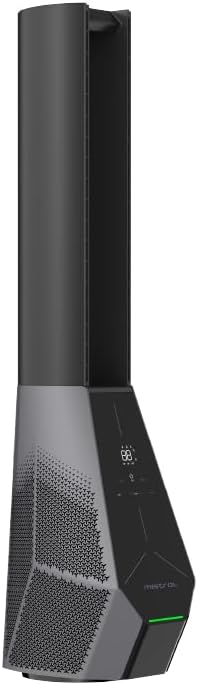
شڪل 3: پاسي view showing the filter location.
مشڪلاتون
جيڪڏهن توهان کي پنهنجي پرستار سان مسئلا درپيش اچن ٿا، ته هيٺ ڏنل عام مسئلن ۽ حلن جو حوالو ڏيو.
| مسئلو | ممڪن سبب | حل |
|---|---|---|
| پنکڙو نه ٿو هلي. | بجلي جي فراهمي ناهي؛ پاور بٽڻ نه دٻايو ويو آهي. | Check if the power cord is securely plugged in. Press the power button on the unit or remote. |
| ريموٽ ڪنٽرول ڪم نه ڪري رهيو آهي. | بيٽريون ختم ٿي ويون آهن يا غلط طور تي لڳايون ويون آهن؛ ريموٽ ۽ فين جي وچ ۾ رڪاوٽ. | Replace batteries. Ensure there is a clear line of sight to the fan's receiver. |
| وائي فائي ڪنيڪشن ناڪام ٿيو. | Incorrect Wi-Fi password; Fan too far from router; Router issues. | Double-check Wi-Fi password. Move fan closer to router. Restart your Wi-Fi router. Ensure you are connecting to a 2.4GHz network. |
| پنکڙو غير معمولي آواز ڪري ٿو. | Obstruction in air intake/outlet; Fan not on a stable surface. | Unplug and check for any foreign objects. Place the fan on a flat, stable surface. |
وضاحتون
| خاصيت | تفصيل |
|---|---|
| ماڊل | MBFAP4236DRW |
| جلدtage | 100-240V~ 50/60Hz |
| واتtage | 36W |
| هوا جو مقدار | 35 م³ / منٽ |
| وڌ ۾ وڌ ايئر فلو | 15 m/s |
| پيداوار جي ماپ (L*W*H) | 237.5 * 300 * 1067 ملي ميٽر |
| خالص وزن | 5.4 ڪلوگرام |
| موٽر جو قسم | ڊي سي برش بيس موٽر |
| ڪنٽرول | Full Touch Screen Control Panel, Remote, Wi-Fi (Mayer Home App), Voice Control (Google Home & Amazon Alexa) |
| فلٽر جو قسم | Hepa 13 Filter |
| آسن وارا | 30/60/120 Degree Left-Right |
| ٽائمر | 12 Hours Pre-set On/Off |
وارنٽي ڄاڻ
The Mistral 42" DC Blade Free Fan (Model: MBFAP4236DRW) comes with a comprehensive warranty:
- 1 سال general warranty on the appliance.
- هڪ اضافي 3 سال warranty specifically for the motor only.
Please retain your proof of purchase for warranty claims. The warranty covers manufacturing defects and malfunctions under normal use. It does not cover damage caused by misuse, accidents, unauthorized repairs, or normal wear and tear.
ڪسٽمر سپورٽ
For any inquiries, technical assistance, or warranty claims, please contact Mistral customer support.
Webسائيٽ: www.mistral.com.sg
اي ميل: support@mistral.com.sg
When contacting support, please have your product model number (MBFAP4236DRW) and proof of purchase ready.


