تعارف
This manual provides essential information for setting up, operating, and maintaining your HP 17.3" FHD Laptop. Designed for productivity and connectivity, this laptop features an Intel Core i3-N305 processor, a Full HD IPS anti-glare display, and runs on Windows 11 Pro. Please read this manual thoroughly to ensure proper use and to maximize your laptop's performance.
دٻي ۾ ڇا آهي
پڪ ڪريو ته سڀئي شيون پيڪيج ۾ موجود آهن:
- 1 x HP 17.3" FHD Laptop
- 1 x پاور اڊاپٽر
- 1 x هدايت نامو (هي دستاويز)
- 1 x Accessory Kit (includes 32GB USB Flash Drive, Bluetooth Earbuds, Electronic Cleaning Kit, USB-C Hub, 3-in-1 Charging Cable, USB-C Cable)
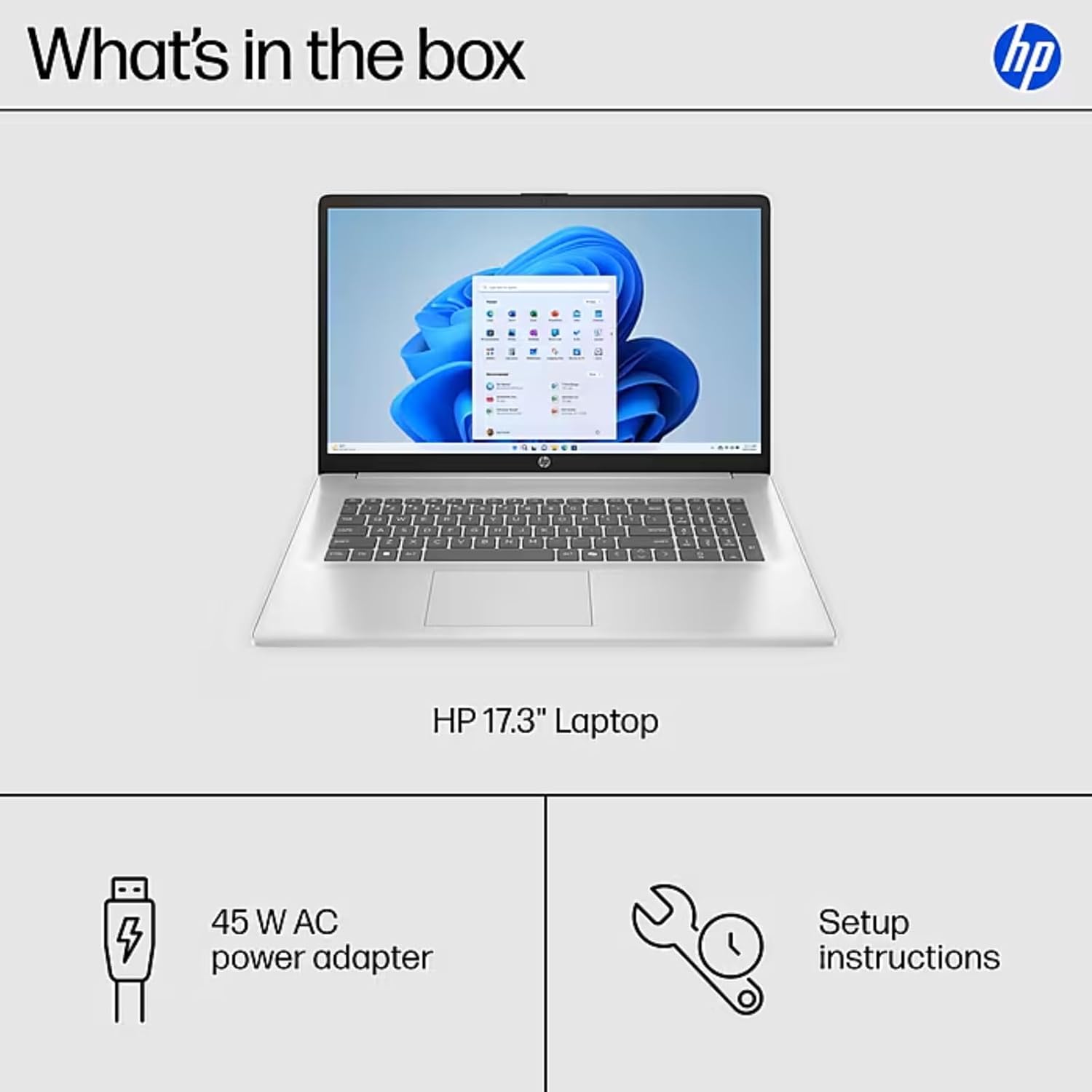
Image: The contents of the HP 17.3" Laptop box, including the laptop, power adapter, and a separate accessory kit.
سيٽ اپ ڪريو
- ليپ ٽاپ کوليو: احتياط سان ليپ ٽاپ ۽ سڀني لوازمات کي پيڪنگ مان هٽايو.
- پاور Connectنيو: Plug the power adapter into the laptop's AC Smart Pin port and then into a power outlet. Allow the battery to charge for at least 30 minutes before initial use.
- شروعاتي بوٽ: Open the laptop lid and press the power button. The laptop will guide you through the Windows 11 Pro setup process. Follow the on-screen instructions to configure your language, region, network, and user account.
- وائي فائي سان ڳنڍيو: During the initial setup, you will be prompted to connect to a wireless network. Select your network and enter the password.
- اپڊيٽ انسٽال ڪريو: سيٽ اپ کان پوءِ، بهتر ڪارڪردگي ۽ سيڪيورٽي کي يقيني بڻائڻ لاءِ ڪنهن به موجود ونڊوز اپڊيٽ جي جانچ ۽ انسٽال ڪرڻ جي صلاح ڏني وئي آهي.
توهان جي ليپ ٽاپ کي هلائڻ
ڏيکاريو خاصيتون
The HP 17.3" laptop features a Full HD (1920 x 1080) IPS anti-glare display. This screen provides vibrant colors and wide 178° viewing angles, reducing reflections for comfortable viewing in various lighting conditions. The large screen size is ideal for multitasking, document review, and media consumption.
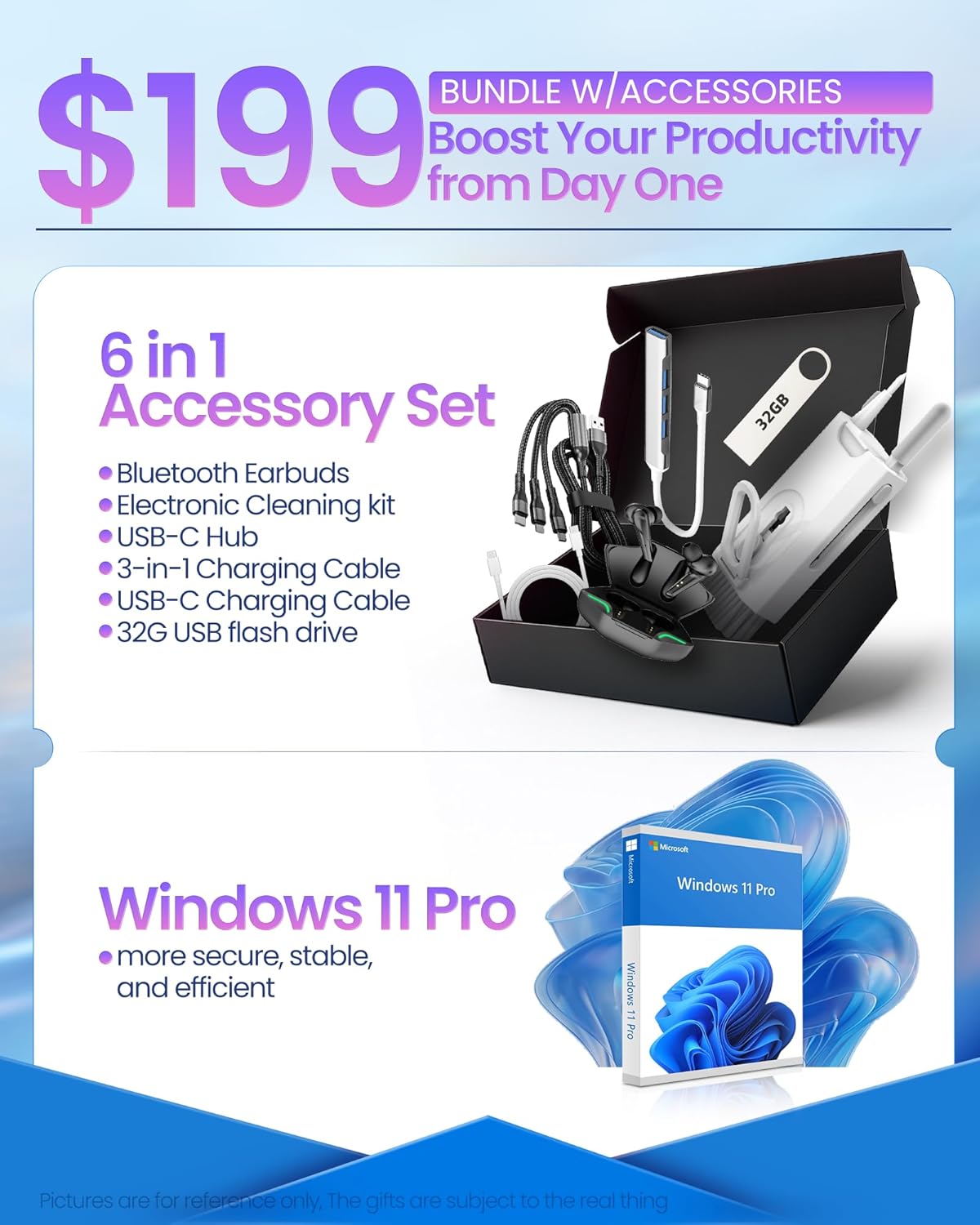
Image: The HP 17.3" laptop showcasing ان جو مڪمل HD ڊسپلي آهي.
پروسيسر ۽ ڪارڪردگي
Equipped with an Intel Core i3-N305 processor (8 cores, up to 3.9 GHz turbo) and Intel UHD Graphics, this laptop delivers efficient performance for daily tasks, schoolwork, and business applications. The 32GB DDR4 RAM ensures smooth multitasking, while the 2TB NVMe SSD provides fast storage access and quick boot times.

Image: The HP laptop running multiple applications, illustrating its multitasking performance.
Copilot AI Key
The dedicated Copilot AI Key provides instant access to AI-powered productivity tools within Windows 11 Pro. Press this key to quickly get assistance with writing, brainstorming, or finding information, streamlining your workflow.

تصوير: هڪ ويجهو تصوير view of the Copilot key on the HP laptop keyboard.
بندرگاهن ۽ ڪنيڪشن
The laptop offers a variety of ports for connecting peripherals and external displays:
- 1 x USB 2.0 ٽائپ-اي
- 1 x USB 3.2 Gen 1 Type-A
- 1 x USB 3.2 Gen 1 Type-C (5 Gbps)
- 1 x HDMI 1.4b
- 1 x Headphone/Mic Combo Jack
- 1 x AC سمارٽ پن
For wireless connectivity, the laptop supports Wi-Fi 6 and Bluetooth 5.4.

تصوير: تفصيلي view of the laptop's side ports.
پيداوار ختمview وڊيو
وڊيو: هڪ سرڪاري اوورview of the HP 17.3" HD Laptop for Student & Business with Windows 11 Pro, highlighting its features and benefits.
سار سنڀال
- صفائي: اسڪرين ۽ ٻاهرين حصي کي صاف ڪرڻ لاءِ نرم، لِنٽ فري ڪپڙو استعمال ڪريو. ضدي نشانن لاءِ، ٿورو ڊيampڪپڙي کي پاڻي يا اسڪرين محفوظ ڪلينر سان ڌوئڻ ڏيو. سخت ڪيميڪلز کان پاسو ڪريو.
- بيٽري جي سنڀال: بيٽري جي زندگي کي وڌائڻ لاءِ، انتهائي گرمي پد کان پاسو ڪريو. ڪڏهن ڪڏهن بيٽري کي 20٪ کان گهٽ ڊسچارج ڪرڻ ۽ پوءِ ان کي مڪمل طور تي چارج ڪرڻ جي صلاح ڏني وئي آهي.
- سافٽ ويئر اپڊيٽ: Regularly install operating system and driver updates to ensure security and optimal performance.
- اسٽوريج جو انتظام: وقتي طور تي غير ضروري صاف ڪريو files and applications to maintain sufficient free storage space on your SSD.
- جسماني تحفظ: Transport your laptop in a protective sleeve or bag to prevent scratches and damage.
مشڪلاتون
If you encounter issues with your HP laptop, consider the following common solutions:
- ليپ ٽاپ آن نه ٿيڻ:
- پڪ ڪريو ته پاور اڊاپٽر ليپ ٽاپ ۽ ڪم ڪندڙ پاور آئوٽليٽ ٻنهي سان محفوظ طور تي ڳنڍيل آهي.
- ٻئي ڊوائيس ۾ پلگ ان ڪندي چيڪ ڪريو ته پاور آئوٽليٽ ڪم ڪري رهيو آهي.
- هارڊ ري سيٽ ڪرڻ لاءِ پاور بٽڻ کي 15-20 سيڪنڊن لاءِ دٻائڻ جي ڪوشش ڪريو.
- اسڪرين جا مسئلا (ڊسپلي نه هجڻ، ٽمٽار):
- Connect an external monitor to the HDMI port to check if the issue is with the laptop's display or graphics output.
- ليپ ٽاپ کي ٻيهر شروع ڪريو.
- پڪ ڪريو ته ڊسپلي ڊرائيور ونڊوز اپڊيٽ يا ايڇ پي سپورٽ اسسٽنٽ ذريعي اپڊيٽ ٿيل آهن.
- وائي فائي رابطي جا مسئلا:
- ونڊوز سيٽنگز ۾ وائي فائي کي آف ۽ آن ٽوگل ڪريو.
- پنهنجو روٽر ۽ موڊيم ٻيهر شروع ڪريو.
- Ensure Wi-Fi drivers are updated.
- نيٽ ورڪ کي وساريو ۽ ٻيهر ڳنڍيو.
- سست ڪارڪردگي:
- پس منظر ۾ هلندڙ غير ضروري ايپليڪيشنون بند ڪريو.
- ٽاسڪ مئنيجر کي چيڪ ڪريو ته ڇا عمل وڌيڪ سي پي يو يا ريم استعمال ڪن ٿا.
- پڪ ڪريو ته ونڊوز ۽ ڊرائيور اپ ٽو ڊيٽ آهن.
- اسٽوريج جي جاءِ خالي ڪرڻ لاءِ ڊسڪ ڪلين اپ هلايو.
For more advanced troubleshooting or persistent issues, please refer to the HP support webسائيٽ يا ڪسٽمر سروس سان رابطو ڪريو.
وضاحتون
| برانڊ | HP |
| ماڊل نالو | HP 17 inch Laptop (B5RH2UA#ABA) |
| آپريٽنگ سسٽم | ونڊوز 11 پرو |
| اسڪرين جي ماپ | 17.3 انچ |
| اسڪرين جي قرارداد | 1920 x 1080 پکسلز (مڪمل HD) |
| ڊسپلي جو قسم | IPS, Anti-glare, LED, 178° wide viewing angles |
| پروسيسر | Intel Core i3-N305 (8 cores, up to 3.9 GHz) |
| گرافڪس | مربوط Intel UHD گرافڪس |
| رام | 32GB DDR4 (3200 MHz) |
| ذخيرو | 2TB NVMe SSD |
| وائرليس ڪنيڪشن | وائي فائي 6، بلوٽوٿ 5.4 |
| بندرگاهن | 1x USB 2.0 Type-A, 1x USB 3.2 Gen 1 Type-A, 1x USB 3.2 Gen 1 Type-C, 1x HDMI 1.4b, 1x Headphone/Mic Combo, 1x AC Smart Pin |
| بيٽري جي زندگي | Up to 9.5 hours (Average: 9 hours) |
| طول و عرض (L x W x H) | 15.78" x 10.15" x 0.78" |
| وزن | 4.6 پائونڊ |
| رنگ | چاندي |
وارنٽي ۽ سپورٽ
Your HP 17 FHD Laptop comes with a standard manufacturer's warranty. For detailed information regarding warranty terms, coverage, and duration, please refer to the warranty card included with your product or visit the official HP support webسائيٽ.
For technical assistance, driver downloads, and frequently asked questions, please visit the HP Support webسائيٽ: support.hp.com. توهان ذاتي مدد لاءِ سڌو سنئون HP ڪسٽمر سروس سان پڻ رابطو ڪري سگهو ٿا.