1. تعارف
This manual provides detailed instructions for the installation, configuration, and maintenance of your TP-Link SX3832 Omada 24-Port 10GBASE-T L2+ Managed Switch. This high-performance switch is designed for robust network environments, offering advanced Layer 2+ features, high-speed connectivity, and centralized cloud management capabilities.
2. پيڪيج مواد
تصديق ڪريو ته توھان جي پيڪيج ۾ ھيٺيون شيون شامل آھن:
- 1 x SX3832 Managed Switch
- 1 x پاور ڪور
- 1 x Console Cable
- 2 X چڙهڻ واري قوس
- 4 X رٻڙ جو پير
- 8 x اسڪرو
3. پراڊڪٽ ختمview
3.1 فرنٽ پينل
The front panel of the SX3832 switch features 24 1/2.5/5/10 Gbps RJ45 ports and 8 1/10 Gbps SFP+ slots, along with LED indicators for power, system status, and port activity.
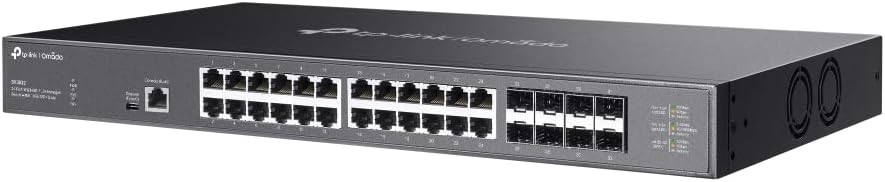
تصوير: سامهون واري زاويه view of the TP-Link SX3832 Omada switch, highlighting the 24 RJ45 ports and 8 SFP+ slots for high-speed network connections.

تصوير: مٿي کان هيٺ تائين زاويه view of the TP-Link SX3832 Omada switch, providing a clearer look at the port labels and LED indicators for status monitoring.
3.2 ريئر پينل
The rear panel includes the power input, a grounding terminal for safety, and a physical security lock slot.

تصوير: پوئين پاسي view of the TP-Link SX3832 Omada switch, detailing the power input, grounding terminal, and physical security lock slot.
3.3 هيٺيون پينل
The bottom panel features mounting points for rack installation and locations for attaching rubber feet for desktop use.

تصوير: هيٺيون view of the TP-Link SX3832 Omada switch, illustrating the mounting points for various installation scenarios.
3.4 اهم خاصيتون
- 24× 1/2.5/5/10 Gbps RJ45 ports for versatile high-speed connections.
- 8× 1/10 Gbps SFP+ slots for fiber optic uplinks.
- 640 Gbps switching capacity for high-bandwidth demands.
- Centralized cloud management via web or Omada app.
- Standalone management via web, CLI, SNMP, and RMON.
- Static Routing for efficient internal traffic management.
- VLAN, ACL, QoS, IGMP Snooping, OAM, and DDM support for advanced network control.
- ERPS for rapid protection and recovery in ring topologies.
- پائيدار ڌاتو جasing and rack-mountable design.
4. سيٽ اپ
4.1 جسماني تنصيب
The SX3832 switch can be installed on a desktop or mounted in a standard 19-inch equipment rack. For desktop use, attach the provided rubber feet to the bottom of the switch. For rack mounting, secure the two mounting brackets to the sides of the switch using the included screws, then mount the switch into the rack.
4.2 نيٽ ورڪ سان ڳنڍڻ
- پاور ڪنيڪشن: Connect the provided power cord to the switch's power inlet and to an appropriate AC power source.
- Ethernet ڪنيڪشن: Connect your network devices (servers, workstations, other switches) to the RJ45 ports using standard Ethernet cables. For fiber optic connections, insert compatible SFP+ modules into the SFP+ slots and connect fiber optic cables.
- ڪنسول ڪنيڪشن (اختياري): For initial configuration or advanced troubleshooting via CLI, connect the console cable from your computer to the switch's console port.
5. آپريٽنگ
5.1 انتظام جا اختيار
The SX3832 switch offers flexible management options:
- Omada Cloud Management: Integrate the switch into the TP-Link Omada Software Defined Networking (SDN) platform for centralized management via a web browser or the Omada app. This allows for remote control and monitoring of your entire Omada network.
- Webجي بنياد تي GUI: Access the switch's graphical user interface via a web browser for intuitive configuration and monitoring.
- ڪمانڊ لائن انٽرفيس (CLI): Use the console port or Telnet/SSH for command-line based configuration, ideal for experienced network administrators.
- ايس اين ايم پي/آر ايم او اين: Utilize Simple Network Management Protocol (SNMP) and Remote Monitoring (RMON) for network monitoring and management with compatible tools.
5.2 بنيادي ترتيب
Upon initial power-up, the switch will obtain an IP address via DHCP by default. You can then access its web-based GUI or Omada controller for further configuration. Refer to the Omada SDN Controller User Guide for detailed instructions on cloud-based management.
6. سار سنڀال
6.1 فرم ویئر تازه ڪاريون
باقاعدي طور تي ٽي پي لنڪ آفيشل چيڪ ڪريو website for the latest firmware versions. Updating the firmware ensures optimal performance, security, and access to new features. Follow the instructions provided with the firmware download for the update process.
6.2 فيڪٽري ري سيٽ
In case of configuration issues or if you need to restore the switch to its default settings, a factory reset can be performed. This typically involves pressing and holding a reset button on the device for a specified duration. Consult the full product manual for the exact procedure.
7. مسئلا حل ڪرڻ
If you encounter issues with your SX3832 switch, consider the following basic troubleshooting steps:
- طاقت ناهي: Ensure the power cord is securely connected to both the switch and the power outlet. Verify the power source is active.
- ڪابه لنڪ/سرگرمي LED ناهي: Check the Ethernet or fiber optic cable connections. Ensure connected devices are powered on and functioning correctly. Verify port settings (speed, duplex) if manually configured.
- مئنيجمينٽ انٽرفيس تائين رسائي نه ٿي سگهي: Verify your computer's IP address is in the same subnet as the switch (if not using DHCP). Check network cable connections. Try accessing via console port if web رسائي ناڪام ٿي.
- ڪارڪردگي جا مسئلا: Check for network congestion, cable quality, and ensure devices are negotiating at expected speeds. Review QoS settings if configured.
For more advanced troubleshooting, refer to the comprehensive user guide available on the TP-Link support webسائيٽ يا TP-Link ٽيڪنيڪل سپورٽ سان رابطو ڪريو.
8. وضاحتون
| وصف | قدر |
|---|---|
| شيءِ جو وزن | 9.6 پائونڊ |
| اپر درجه حرارت جي درجه بندي | 60 درجا Celsius |
| انٽرفيس جو قسم | آر جي 45، ايس ايف پي + |
| ڊيٽا جي منتقلي جي شرح | 640 گيگا بائيٽ في سيڪنڊ |
| ٺاهيندڙ | ٽي پي لنڪ |
| يو پي سي | 810142821445 |
| پيڪيج جي ماپ | 26 x 17 x 9 انچ |
| بندرگاهن جو تعداد | 24 |
| رنگ | ڪارو |
| مطابقت رکندڙ ڊوائيسز | ڊيسڪ ٽاپ، ليپ ٽاپ، پرنٽر |
9. سرڪاري پراڊڪٽ وڊيوز
9.1 پيداوار ختمview وڊيو
Video: A concise product overview of the TP-Link Omada switch, highlighting its key features and design. This video is provided by the seller, Amazon Product Imaging.
9.2 10G-T SFP+ RJ45 Module Overview
وڊيو: هڪ اوورview of a 10G-T SFP+ RJ45 module, demonstrating its use and compatibility with SFP+ slots found on switches like the SX3832. This video is provided by the seller, 10Gtek.
10. وارنٽي ۽ سپورٽ
The TP-Link SX3832 Omada 24-Port 10GBASE-T L2+ Managed Switch is backed by a 3-year warranty, ensuring reliability and peace of mind. For technical support, warranty claims, or additional resources, please visit the official TP-Link support website or contact their customer service. You can also find more information and resources on the ايميزون تي ٽي پي لنڪ اسٽور.