1. تعارف
Thank you for choosing the Olvy A10 Cordless Stick Vacuum Cleaner with Mop Function. This appliance is designed for efficient cleaning of various floor types, offering both vacuuming and mopping capabilities. Please read this manual thoroughly before use to ensure proper operation, maintenance, and safety.
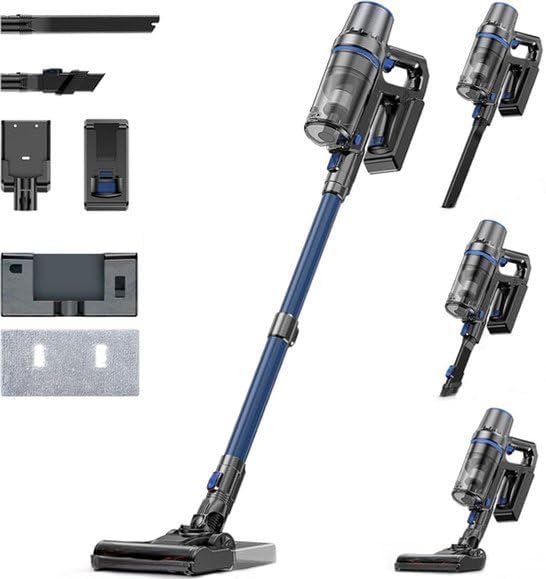
Image: The Olvy A10 Cordless Stick Vacuum Cleaner in its full assembly, alongside various attachments and the wall mount.
2. حفاظتي هدايتون
باهه، بجليءَ جي جھٽڪي، يا زخم جي خطري کي گهٽائڻ لاءِ، بجليءَ جو سامان استعمال ڪرڻ وقت هميشه بنيادي حفاظتي احتياطن تي عمل ڪريو.
- اوزار استعمال ڪرڻ کان پهريان سڀ هدايتون پڙهو.
- ٻاهر استعمال نه ڪريو يا گندي سطحن تي.
- رانديڪن جي طور تي استعمال ڪرڻ جي اجازت نه ڏيو. جڏهن ٻارن جي ويجهو يا ويجھو استعمال ڪيو وڃي ته ڌيان ڏيڻ ضروري آهي.
- صرف استعمال ڪريو جيئن هن دستور ۾ بيان ڪيو ويو آهي. صرف ٺاهيندڙ جي تجويز ڪيل منسلڪ استعمال ڪريو.
- خراب ٿيل تار يا پلگ سان استعمال نه ڪريو. جيڪڏهن اوزار ڪم نه ڪري رهيو آهي جيئن ان کي ڪرڻ گهرجي، ڪري ڇڏيو ويو آهي، خراب ٿي ويو آهي، ٻاهر ڇڏيو ويو آهي، يا پاڻي ۾ ڪري ڇڏيو ويو آهي، ته ان کي سروس سينٽر ڏانهن واپس ڪريو.
- ڊار سان نه ڇڪيو يا نه کڻو، ڊار کي هينڊل طور استعمال ڪريو، ڪنڊ تي دروازو بند ڪريو، يا تار کي تيز ڪنارن يا ڪنڊن جي چوڌاري ڇڪيو. ڪنڊ مٿان اوزار نه هلايو. تار کي گرم سطحن کان پري رکو.
- ڪنڊ تي ڇڪڻ سان ان پلگ نه ڪريو. ان پلگ ڪڍڻ لاءِ، پلگ کي پڪڙيو، نه ڪي ڪنڊ.
- گلي هٿن سان پلگ يا اوزار نه سنڀاليو.
- ڪنهن به شئي کي کولڻ ۾ نه وجهي. ڪنهن به افتتاحي بلاڪ سان استعمال نه ڪريو؛ مٽي، لنٽ، وار، ۽ هر شيء کان پاڪ رکو جيڪو هوا جي وهڪري کي گھٽائي سگھي ٿو.
- وار، ٿلها ڪپڙا، آڱريون ۽ جسم جي سڀني حصن کي کليل ۽ هلندڙ حصن کان پري رکو.
- ان پلگ ڪرڻ کان اڳ سڀ ڪنٽرول بند ڪريو.
- ڏاڪڻ تي صفائي ڪرڻ وقت اضافي احتياط استعمال ڪريو.
- ٻرندڙ يا ٻرندڙ مائع کڻڻ لاء استعمال نه ڪريو، جهڙوڪ گيسولين، يا انهن علائقن ۾ استعمال ڪريو جتي اهي موجود هجن.
- ٻرندڙ يا تماڪ ڇڪڻ واري شيءِ نه کڻو، جهڙوڪ سگريٽ، ماچس، يا گرم راھ.
- بغير مٽي کپ ۽ / يا فلٽر جي جاء تي استعمال نه ڪريو.
- غير ارادي طور تي شروع ٿيڻ کان روڪيو. پڪ ڪريو ته سوئچ آف پوزيشن ۾ آهي بيٽري پيڪ سان ڳنڍڻ کان اڳ، سامان کڻڻ يا کڻڻ.
- ري چارج صرف ٺاهيندڙ طرفان بيان ڪيل چارجر سان. هڪ چارجر جيڪو هڪ قسم جي بيٽري پيڊ لاءِ موزون آهي اهو شايد باهه جو خطرو پيدا ڪري سگهي ٿو جڏهن ٻئي بيٽري پيڪ سان استعمال ڪيو وڃي.
- بدسلوڪي حالتن ۾، بيٽري مان مائع خارج ٿي سگھي ٿو؛ رابطي کان بچڻ. جيڪڏهن رابطو حادثاتي طور تي ٿئي ٿي، پاڻي سان ڦوڪيو. جيڪڏهن مائع اکين سان رابطو ڪري، اضافي طور تي طبي مدد طلب ڪريو. بيٽري مان خارج ٿيل مائع شايد جلن يا جلن جو سبب بڻجي سگھي ٿو.
3. پيڪيج مواد
پڪ ڪريو ته سڀئي جزا پيڪيج ۾ موجود آهن:
- Main Unit (Handheld Vacuum)
- Adjustable توسيع ٽيوب
- فرش برش سر
- هٽائڻ واري بيٽري
- Water Tank (for mopping)
- موپ پيڊ
- 2-ان-1 برش جو اوزار
- ڇت جو اوزار
- ڀت جبل بریکٹ
- پاور اڊاپٽر
- Replacement HEPA Filter (2x)
- استعمال ڪندڙ دستي

Image: A visual representation of all components included with the Olvy A10 Cordless Stick Vacuum Cleaner.
4. پراڊڪٽ ختمview
The Olvy A10 features a powerful 350W motor providing up to 35,000 Pa suction, an integrated mop function, and a multi-stage HEPA filtration system. It includes an intelligent LED display for monitoring status and an auto-mode for adaptive cleaning.
اهم خاصيتون:
- طاقتور سکشن: 350W motor with 35,000 Pa for deep cleaning on various surfaces.
- 2-۾-1 ڪارڪردگي: Seamlessly switch between vacuuming and mopping.
- سمجھدار LED ڊسپلي: Provides real-time information on battery level, suction mode, and dust concentration.
- خودڪار موڊ: Automatically adjusts suction power based on detected dirt levels.
- HEPA 13 Filtration: Captures 99.99% of fine particles, suitable for allergy sufferers.
- ڊگھي ڊوڙ جو وقت: Up to 60 minutes on a single charge with a 2200 mAh removable battery.
- Lightweight and Versatile: Easy to maneuver and convert into a handheld vacuum for various cleaning tasks.

Image: Close-up of the intelligent LED display showing battery indicator, low power warning, auto mode, dust concentration, and control panel.

Image: The LED display indicating 'Auto-mode' and the current power level during operation.
5. سيٽ اپ ۽ اسيمبلي
5.1 شروعاتي چارجنگ
Before first use, fully charge the battery. The battery takes approximately 4-5 hours to fully charge.
- رليز بٽڻ کي دٻائي مين يونٽ مان بيٽري هٽايو.
- پاور اڊاپٽر کي بيٽري تي چارجنگ پورٽ سان ڳنڍيو.
- Plug the adapter into a power outlet. The battery indicator on the LED display will show charging status.
- هڪ ڀيرو مڪمل چارج ٿيڻ کان پوءِ، اڊاپٽر کي ڊسڪنيڪٽ ڪريو.

Image: The removable battery unit, highlighting its 2200 mAh capacity, 4-5 hour charging time, and up to 60 minutes run time.
5.2 ويڪيوم ڪلينر کي گڏ ڪرڻ
- بيٽري سان ڳنڍيو: Slide the charged battery into the main unit until it clicks into place.
- ايڪسٽينشن ٽيوب لڳايو: Connect the adjustable extension tube to the main unit. Ensure it clicks securely.
- فرش برش لڳايو: Connect the floor brush head to the other end of the extension tube.
- وال ماؤنٽ انسٽال ڪريو (اختياري): Choose a suitable location for the wall mount. Secure it to the wall using the provided screws and anchors. This allows for convenient storage and charging.
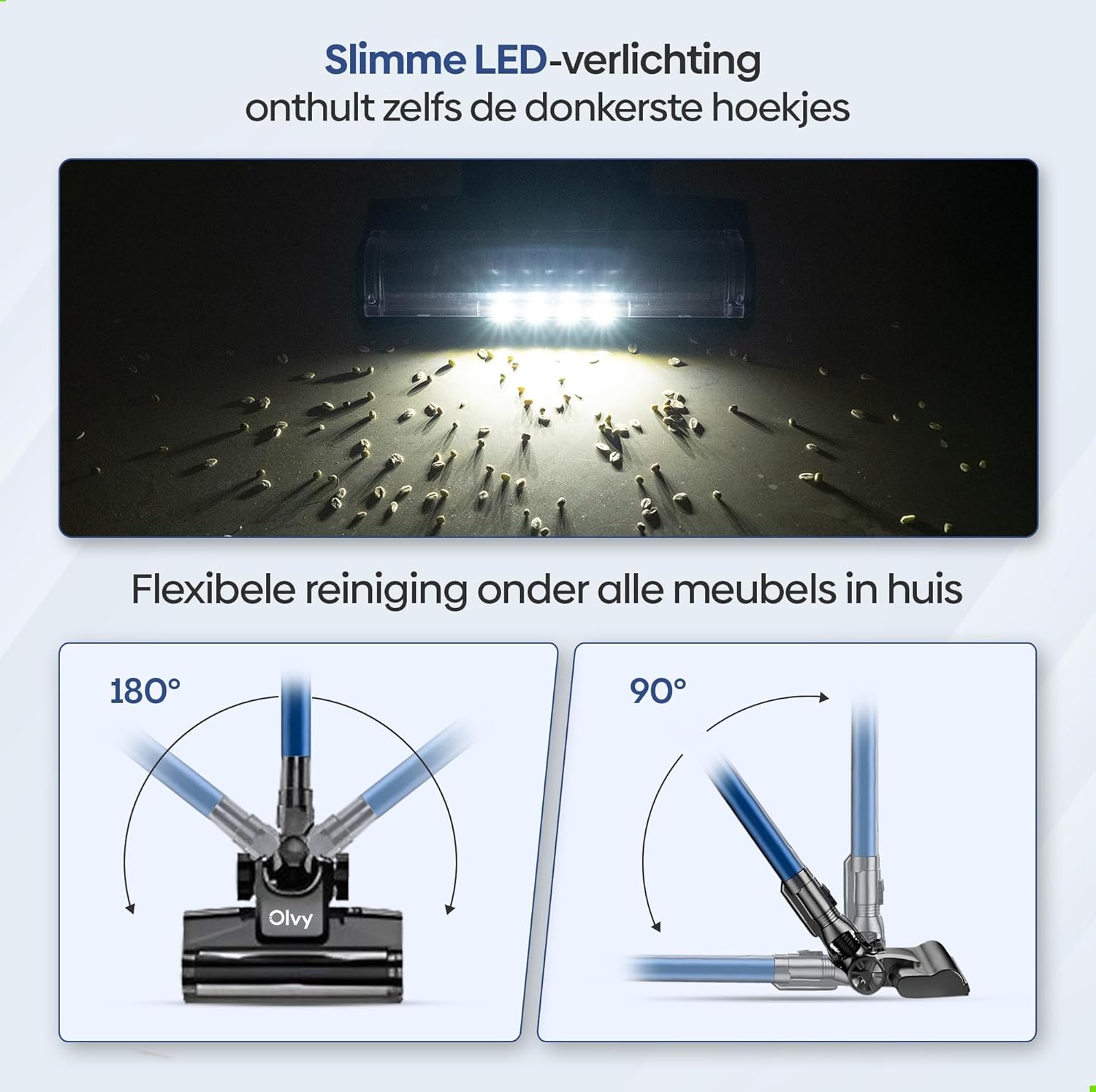
Image: The vacuum cleaner demonstrating both wall-mounted storage and self-standing capability.
6. آپريٽنگ هدايتون
6.1 بنيادي آپريشن
- پاور آن / آف: ويڪيوم ڪلينر کي آن يا آف ڪرڻ لاءِ مين يونٽ تي پاور بٽڻ کي دٻايو.
- سکشن پاور کي ترتيب ڏيو: The vacuum offers 5 suction levels. Use the control panel on the LED display to cycle through the power modes (Low, Normal, High, Turbo).
- خودڪار موڊ: Activate the intelligent auto mode for automatic suction adjustment based on dirt detection. The LED display will show 'Auto' when this mode is active.
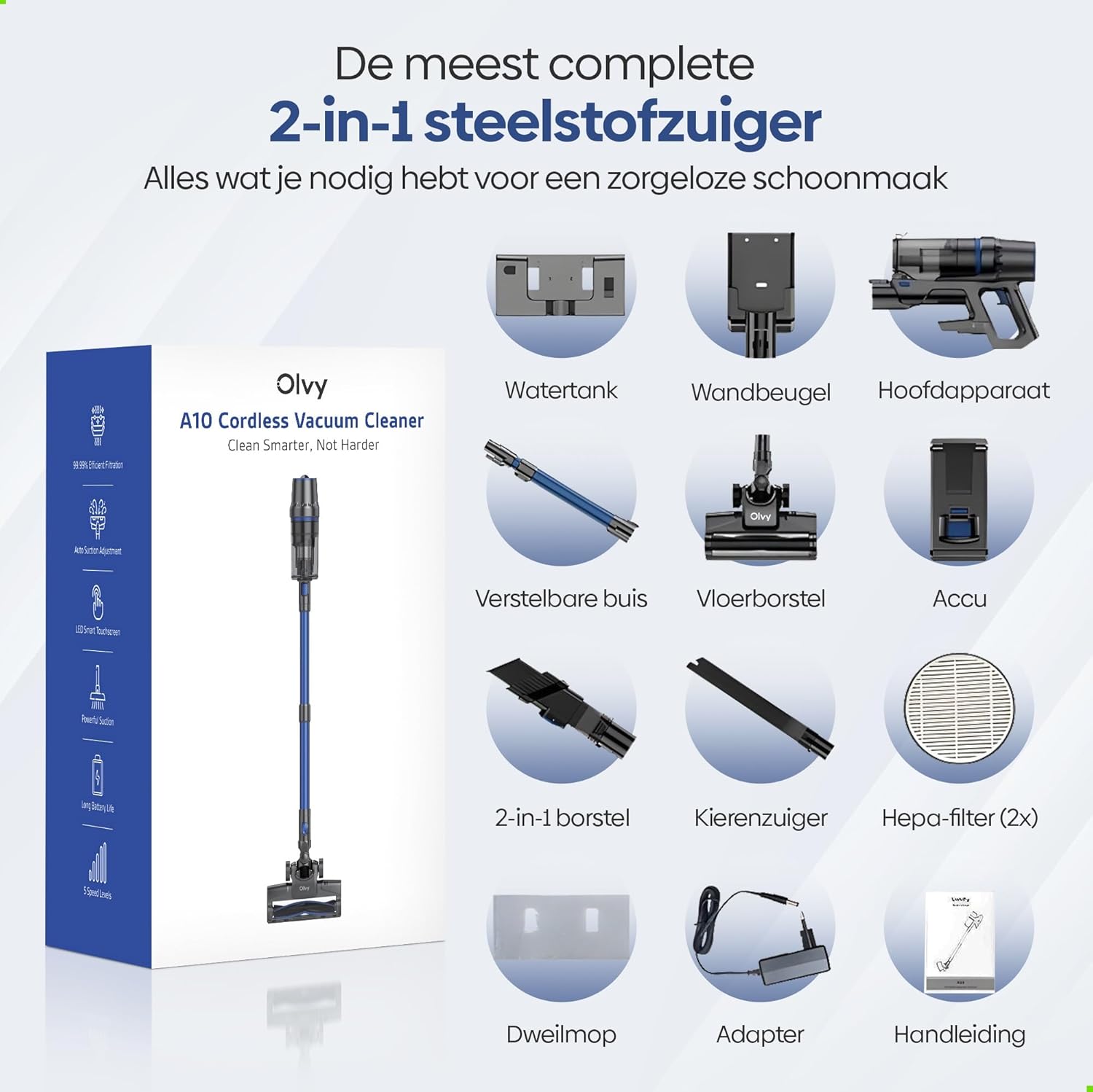
Image: The vacuum cleaner demonstrating its 4 suction levels (Low, Normal, High, Turbo) and intelligent auto mode, which adapts to dirt levels.
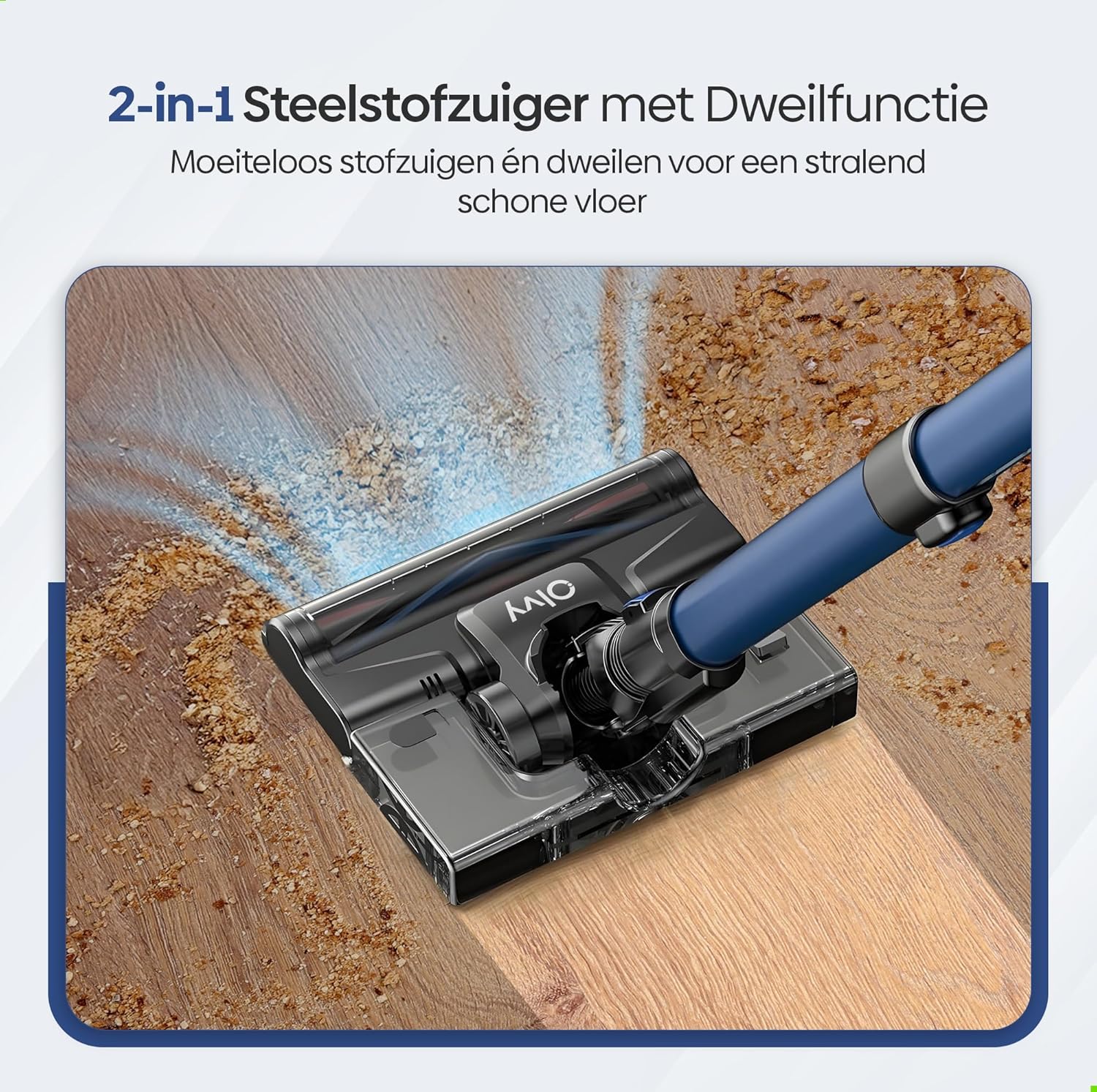
Image: A user operating the Olvy A10, showcasing its powerful 350W motor and 35,000 Pa suction for effective cleaning of various debris like hair, dust, crumbs, and sand.
6.2 موپ فنڪشن استعمال ڪندي
The integrated mop function allows for simultaneous vacuuming and wet cleaning of hard floors.
- پاڻي جي ٽانڪي ڀريو: Detach the water tank from the floor brush head. Fill it with clean water. Do not use corrosive liquids or detergents that may damage the tank or floor.
- موپ پيڊ لڳايو: Securely attach the mop pad to the bottom of the water tank.
- پاڻي جي ٽانڪي کي ٻيهر ڳنڍيو: Reinstall the filled water tank onto the floor brush head.
- Begin Mopping: Operate the vacuum cleaner as usual. The mop pad will dampen the floor as you vacuum, providing a streak-free clean.

تصوير: هڪ تفصيلي view of the 2-in-1 stick vacuum with mop function, showing water being dispensed for simultaneous vacuuming and mopping on a hard floor.

Image: The mop function of the Olvy A10 actively cleaning a hard floor, demonstrating its effectiveness in removing dirt and leaving a clean surface.
6.3 اٽيچمينٽ استعمال ڪندي
- 2-ان-1 برش ٽول: فرنيچر، پردا، ۽ نازڪ سطحن کي صاف ڪرڻ لاءِ مثالي.
- ڪڪڙ جو اوزار: Perfect for reaching tight spaces, corners, and edges.
- To use, detach the extension tube and connect the desired attachment directly to the main unit.

Image: The Olvy A10 being used in different configurations, including as a stick vacuum for floors, a handheld for high areas, and for cleaning under furniture.

Image: The vacuum's LED lighting revealing hidden dust particles on the floor, and diagrams illustrating its 180° and 90° flexible head rotation for cleaning under furniture.
7. سار سنڀال
Regular maintenance ensures optimal performance and extends the lifespan of your Olvy A10 vacuum cleaner.
7.1 ڪچري جي دٻي کي خالي ڪرڻ
Empty the dustbin regularly, especially when the 'Dust Concn' indicator on the LED display shows high concentration.
- پڪ ڪريو ته ويڪيوم بند ٿيل آهي.
- ڊسٽ بن ڇڏڻ واري بٽڻ کي دٻايو ته جيئن ان کي مکيه يونٽ کان ڌار ڪري سگهجي.
- Hold the dustbin over a trash can and press the bottom release latch to open the lid and empty the contents.
- Close the lid and reattach the dustbin to the main unit.

Image: The dustbin being emptied with a single click, demonstrating its large 0.8L capacity.

Image: A user washing the dustbin under running water, illustrating the washable components for easy cleaning.
7.2 فلٽر صاف ڪرڻ
The Olvy A10 uses a multi-stage filtration system, including an HEPA filter, which should be cleaned regularly.
- ڪچرو هٽايو.
- Twist and pull out the filter assembly (HEPA filter, dust filter, stainless steel filter).
- Tap off loose dirt from each filter component.
- Rinse the filters under cold running water. Do not use hot water or detergents.
- Allow all filter components to air dry completely for at least 24 hours before reassembling. Do not use the vacuum with wet filters.
- فلٽرن کي ٻيهر گڏ ڪريو ۽ انهن کي واپس ڪچري جي دٻي ۾ رکو، پوءِ ڪچري جي دٻي کي مکيه يونٽ سان ٻيهر ڳنڍيو.

Image: A cutaway diagram illustrating the multi-stage HEPA filtration system, including the dustbin filter, stainless steel filter, dust filter, HEPA air filter, and air outlet filter.
7.3 برش رول کي صاف ڪرڻ
وقت بوقت برش رول کي الجھي وارن يا ملبي لاءِ چيڪ ڪريو.
- ويڪيوم ڪلينر کي بند ڪريو.
- Press the release tab on the side of the floor brush head to remove the brush roll cover.
- برش رول ڪ Lيو.
- ڪنهن به الجھيل وارن يا فائبر کي ڪٽڻ ۽ هٽائڻ لاءِ قينچي يا صفائي جو اوزار استعمال ڪريو.
- برش رول کي ٻيهر داخل ڪريو ۽ ڍڪ کي محفوظ ڪريو.
7.4 موپ پيڊ جي صفائي
After each use of the mop function, remove and clean the mop pad.
- Detach the mop pad from the water tank.
- Rinse the mop pad under running water or machine wash it with mild detergent.
- Allow the mop pad to air dry completely before storing or reusing.
8. مسئلا حل ڪرڻ
If you encounter any issues with your Olvy A10, refer to the following common problems and solutions:
| مسئلو | ممڪن سبب | حل |
|---|---|---|
| ويڪيوم نه ٿو ڦري | بيٽري چارج نه ٿيل آهي يا صحيح طرح سان نصب ٿيل ناهي. | Charge the battery fully. Ensure the battery is securely clicked into the main unit. |
| گھٽ سکشن پاور | Dustbin is full. Filters are clogged. Brush roll is tangled. Obstruction in the nozzle or tube. | Empty the dustbin. Clean all filters thoroughly and ensure they are dry. Remove any hair or debris from the brush roll. Check for and remove any blockages. |
| برش رول نه گھمڻ | Brush roll is tangled or jammed. | Turn off the vacuum. Remove the brush roll and clear any obstructions. |
| Mop function not working | Water tank is empty or not properly installed. Mop pad is dry. | Fill the water tank. Ensure the water tank is securely attached to the floor brush. Dampen the mop pad slightly before use if needed. |
| مختصر هلائڻ وقت | Battery not fully charged. Using high suction mode continuously. Battery degradation. | Ensure battery is fully charged. Use lower suction modes for longer run time. If battery life significantly decreases, consider replacing the battery. |
9. وضاحتون
| خاصيت | تفصيل |
|---|---|
| برانڊ | اولوي |
| ماڊل نمبر | A10 |
| رنگ | ڪارو |
| پيداوار جي ماپ | 32 x 19 x 32 سينٽي |
| وزن | 5 ڪلو |
| موٽر پاور | 350W |
| سکشن پاور | 35,000 پ. تائين |
| رفتار جو تعداد | 5 (including Auto Mode) |
| شور جي سطح | 55 ڊيسيبل |
| هلائڻ جو وقت | 1 ڪلاڪ (60 منٽ) تائين |
| بيٽري جي گنجائش | 2200 mAh |
| چارج ڪرڻ وقت | 4-5 ڪلاڪ |
| فلٽر جو قسم | HEPA 13 (Washable) |
| ڪچري جي گنجائش | 0.8 ايل |
| طاقت جو ذريعو | بيٽري |
| تجويز ڪيل سطحون | All floors (carpets, hard floors) |
| خاص خاصيتون | 2-in-1 Vacuum & Mop, LED Display, Auto Mode, Pet-friendly, Lightweight |
10. وارنٽي ۽ سپورٽ
Olvy products are manufactured to high-quality standards. For warranty information, technical support, or service inquiries, please refer to the contact information provided with your purchase documentation or visit the official Olvy webسائيٽ. مھرباني ڪري وارنٽي دعوائن لاءِ خريداري جو ثبوت رکو.


