تعارف
This user manual provides comprehensive instructions for the Chieftec AS-02B-TG-OP Midi Tower PC Case. It covers essential information regarding product features, installation procedures, operational guidelines, maintenance tips, and technical specifications. Please read this manual thoroughly before installing or operating your PC case to ensure proper functionality and longevity.
پيداوار ختمview
The Chieftec AS-02B-TG-OP is a Midi Tower PC case designed for optimal cooling and a modern aesthetic. It features a sleek brushed front panel, a tempered glass side panel, and a pre-installed 120mm PWM fan for efficient heat dissipation.
اهم خاصيتون:
- Sleek brushed front panel design.
- Tempered glass side panel for component visibility.
- Optimized interior layout for efficient cooling.
- Pre-installed 120mm PWM fan at the rear.
- Support for various motherboard form factors (ATX, micro ATX, Mini-ITX).
- Multiple expansion bays for storage devices.
- Front I/O panel with USB 2.0, USB Type-C, and audio ports.
اجزاء جي سڃاڻپ:

شڪل 1: اڳيان- کاٻي view of the Chieftec AS-02B-TG-OP PC case, showcasing the brushed front panel and the tempered glass side panel.

شڪل 2: سڌو محاذ view of the Chieftec AS-02B-TG-OP PC case, highlighting the brushed finish of the front panel.

شڪل 3: Front-right angle view of the Chieftec AS-02B-TG-OP PC case, showing the subtle design elements.
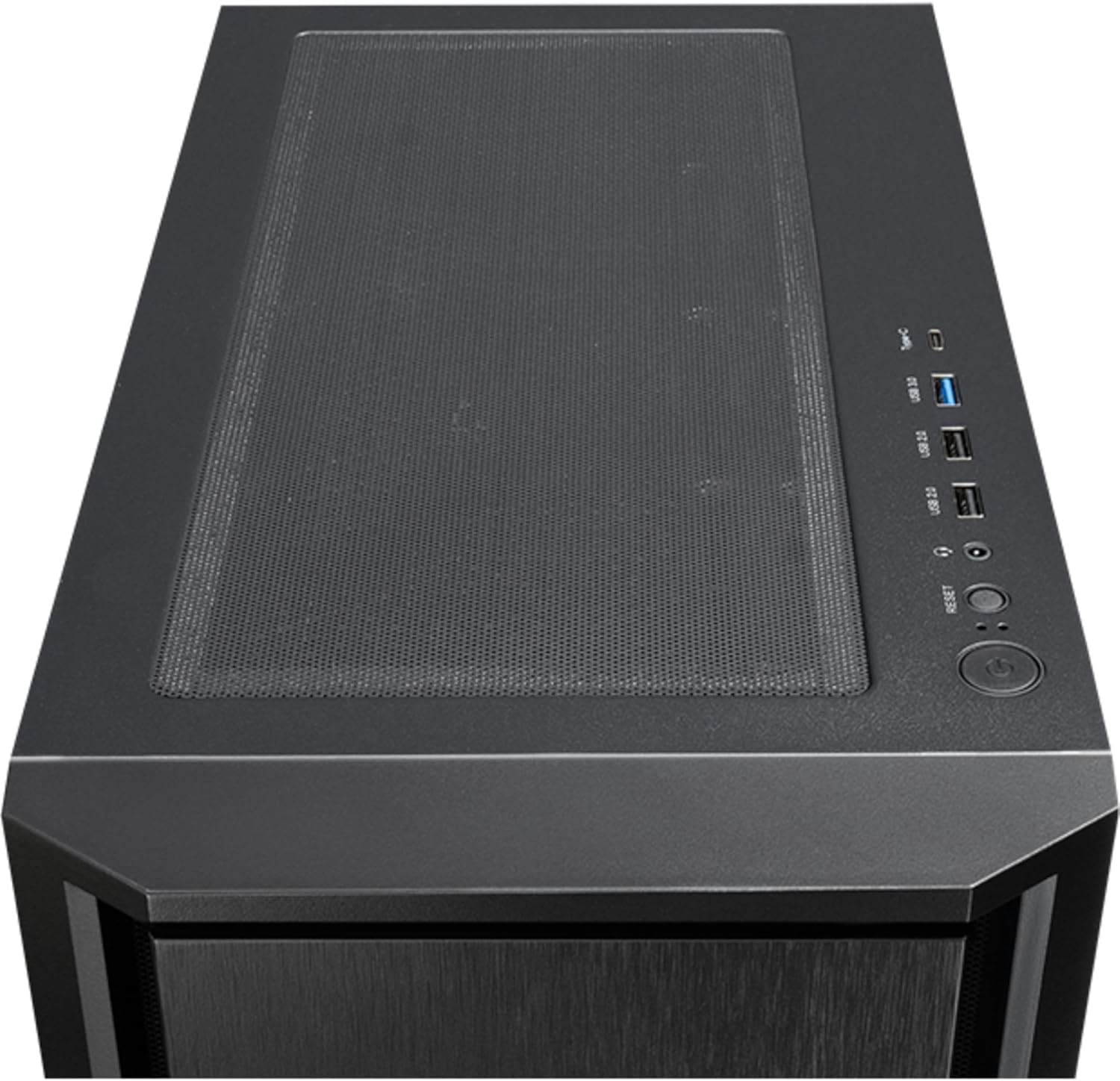
شڪل 4: مٿو view of the Chieftec AS-02B-TG-OP PC case, showing the top ventilation and the front I/O panel with USB ports and audio jacks.

شڪل 5: ريڙهه view of the Chieftec AS-02B-TG-OP PC case, detailing the expansion slots, rear fan mount, and PSU opening.

شڪل 6: هيٺيون view of the Chieftec AS-02B-TG-OP PC case, showing the case feet and bottom dust filter area.
سيٽ اپ ۽ تنصيب
This section guides you through the process of installing components into your Chieftec AS-02B-TG-OP PC case.
1. Preparing the Case:
- ڪيس کي هڪ مستحڪم، فليٽ مٿاڇري تي رکو.
- Carefully remove the tempered glass side panel by unscrewing the thumb screws at the rear.
- Remove the opposite side panel to access the cable management area.
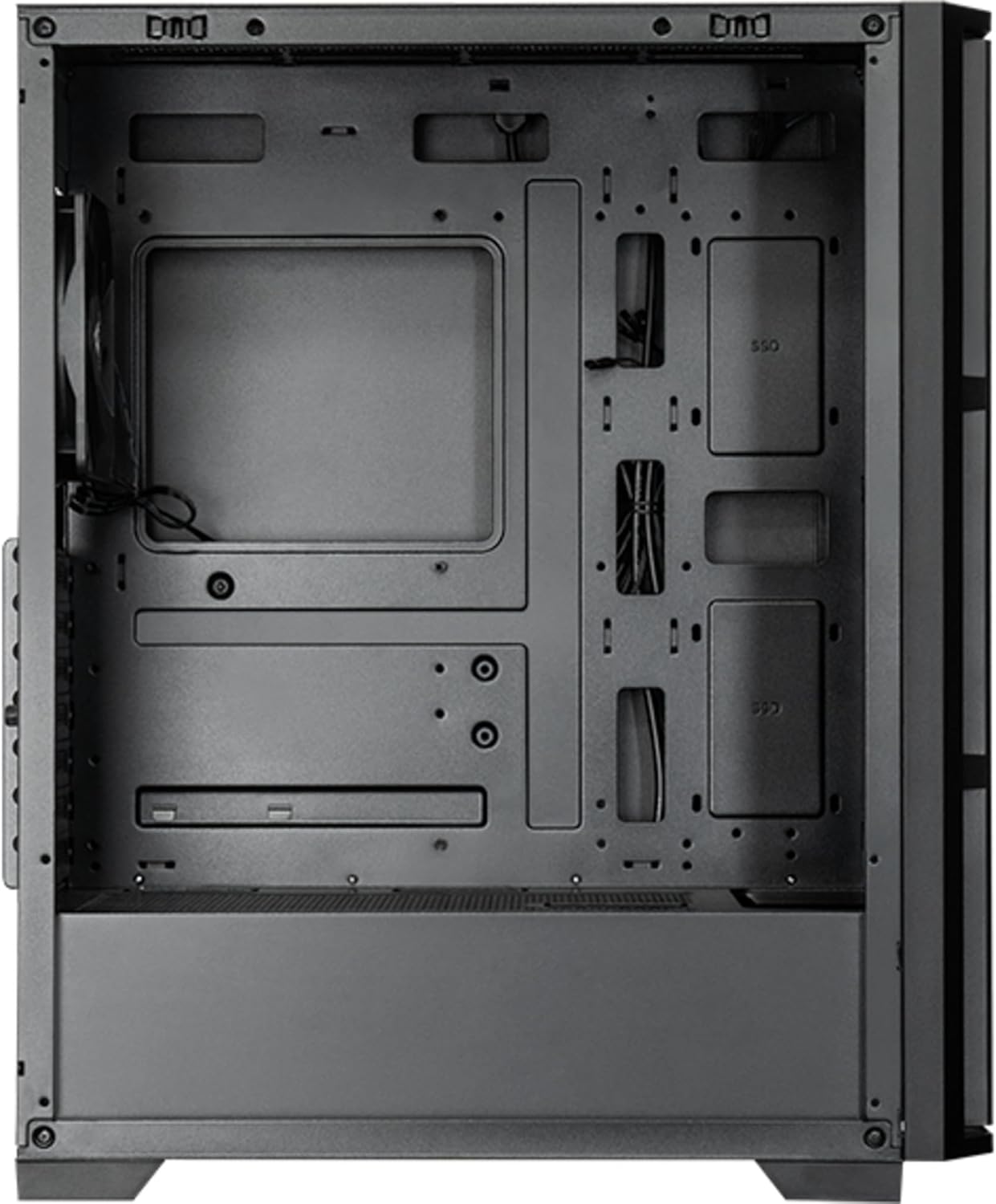
شڪل 7: اندريون view of the main compartment, showing the motherboard tray and fan mounting points.
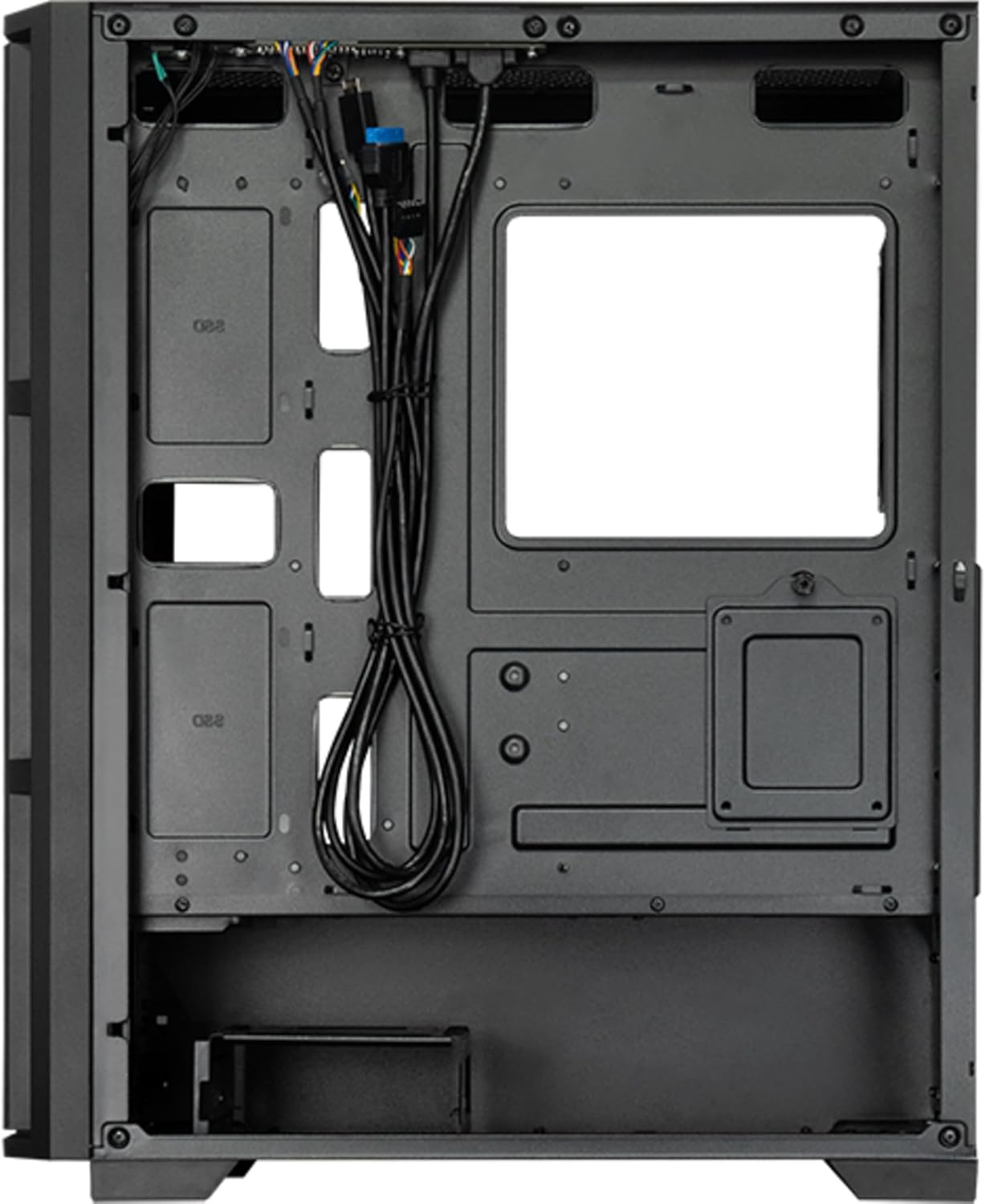
شڪل 8: اندريون view from the backside, illustrating the cable management routes and drive mounting locations.
2. مدر بورڊ لڳائڻ:
- ڪيس جي پوئين اوپننگ ۾ I/O شيلڊ نصب ڪريو.
- Align your ATX, micro ATX, or Mini-ITX motherboard with the standoffs inside the case.
- مهيا ڪيل اسڪرو استعمال ڪندي مدر بورڊ کي محفوظ ڪريو.
3. Power Supply Unit (PSU) Installation:
- The PSU is not included. Install your ATX power supply into the dedicated compartment at the bottom rear of the case.
- ڪيس جي پوئين پاسي کان اسڪرو سان PSU کي محفوظ ڪريو.
4. Storage Drive Installation:
- Install 3.5" HDDs into the drive cages located at the bottom.
- Install 2.5" SSDs/HDDs into the dedicated mounting points behind the motherboard tray.
- Secure all drives with appropriate screws.
5. Graphics Card and Expansion Cards:
- ڪيس جي پوئين پاسي کان ضروري ايڪسپينشن سلاٽ ڪَورز هٽايو.
- Insert your graphics card or other expansion cards into the PCIe slots on the motherboard.
- ڪارڊن کي اسڪرو سان محفوظ ڪريو.
6. ڪيبل انتظام:
- Route all power and data cables through the cutouts and tie-down points behind the motherboard tray.
- Connect the front panel I/O cables (USB, audio, power switch, reset switch, LED indicators) to the corresponding headers on your motherboard.
- Ensure cables do not obstruct airflow.
7. Fan and Cooling System Installation:
- The case includes one pre-installed 120mm PWM fan at the rear.
- Additional fans can be installed at the front (up to 3x 120mm/140mm) and top (up to 2x 120mm/140mm).
- Radiators up to 360mm can be installed at the front and up to 280mm at the top.
- Connect fan power cables to the motherboard fan headers.
آپريٽنگ هدايتون
Once all components are installed and secured, and the side panels are reattached, your PC is ready for operation.
پاور آن:
- Connect the power cable from your power supply to a wall outlet.
- Press the power button located on the top I/O panel of the case.
- The system should boot up, and any installed lighting will illuminate.
Front I/O Panel Usage:
- USB 2.0 بندرگاهن (x2): For connecting peripherals such as keyboards, mice, and USB drives.
- USB ٽائپ-سي پورٽ (x1): جديد USB-C ڊوائيسز کي ڳنڍڻ لاءِ.
- آڊيو جڪس (هيڊ فون/مائڪروفون): For connecting headphones, speakers, or microphones.
- ري سيٽ بٽڻ: ڪمپيوٽر کي ٻيهر شروع ڪرڻ لاءِ.
سار سنڀال
باقاعده سار سنڀال بهترين ڪارڪردگي کي يقيني بڻائڻ ۾ مدد ڪري ٿي ۽ توهان جي پي سي جي اجزاء جي عمر وڌائي ٿي.
صفائي:
- ٻاهران: نرم استعمال ڪريو، ڊيamp cloth to wipe down the exterior surfaces. Avoid abrasive cleaners.
- مٽي فلٽر: The case features dust filters (e.g., on the top and bottom). Regularly remove and clean these filters with compressed air or by rinsing with water (ensure they are completely dry before reinstallation).
- اندروني: Periodically use compressed air to remove dust buildup from fans, heatsinks, and other internal components. Ensure the system is powered off and unplugged before cleaning the interior.
هوا جو وهڪرو:
- Ensure adequate space around the case for proper airflow.
- وائنٽيليشن جي افتتاح کي روڪڻ کان بچاء.
مشڪلاتون
هي حصو عام مسئلن کي حل ڪري ٿو جيڪي توهان کي منهن ڏئي سگهن ٿا.
طاقت ناهي:
- Check if the power cable is securely connected to both the PSU and the wall outlet.
- Ensure the power switch on the PSU itself is in the "ON" position.
- تصديق ڪريو ته فرنٽ پينل پاور سوئچ ڪيبل صحيح طرح سان مدر بورڊ هيڊر سان ڳنڍيل آهي.
پنکھا نه ڦرڻ:
- Check if fan power cables are securely connected to the motherboard fan headers or a fan controller.
- Ensure fan speed settings in BIOS/UEFI or operating system are not set to zero RPM.
فرنٽ پينل USB/آڊيو ڪم نه ڪري رهيو آهي:
- Verify that the USB and audio cables from the front panel are correctly connected to the corresponding headers on the motherboard.
- Check motherboard drivers for USB and audio functionality.
وضاحتون
| خاصيت | تفصيل |
|---|---|
| ماڊل نالو | AS-02B-TG-OP |
| برانڊ | چيفٽيڪ |
| فارم فيڪٽر | ميدي ٽاور |
| پيداوار جو رنگ | ڪارو |
| Supported Motherboard Form Factors | ATX, micro ATX, Mini-ITX |
| طول و عرض (W x D x H) | 215 ملي ميٽر x 390 ملي ميٽر x 485 ملي ميٽر (8.46" x 15.35" x 19.09") |
| شيءِ جو وزن | 5.3 ڪلوگرام (تقريبن 11.68 پائونڊ) |
| 3.5" Expansion Bays | 2 |
| 2.5" Expansion Bays | 2 |
| 5.25" Expansion Bays | 0 |
| توسيع سلاٽ | 7 |
| پاسي واري ونڊو | Yes (Tempered Glass) |
| روشني | Yes (Multi-color) |
| وڌ ۾ وڌ CPU کولر جي اوچائي | 16.5 سينٽي |
| اڳيان I / O بندرگاھ | 2x USB 2.0, 1x USB Type-C, Audio In/Out |
| اڳ ۾ نصب ٿيل پرستار | 1x 120mm PWM (Rear) |
| Supported Front Fans (Max) | 3x 120 ملي ميٽر يا 3x 140 ملي ميٽر |
| Supported Top Fans (Max) | 2x 120 ملي ميٽر يا 2x 140 ملي ميٽر |
| Supported Front Radiators | 120mm، 140mm، 240mm، 280mm، 360mm |
| Supported Top Radiators | 120mm، 140mm، 240mm، 280mm |
| بجلي جي فراهمي شامل | نه |
وارنٽي ڄاڻ
The Chieftec AS-02B-TG-OP PC case comes with a 2 سالن جي ٺاهيندڙ جي وارنٽي from the date of purchase. This warranty covers defects in materials and workmanship under normal use. It does not cover damage caused by misuse, accident, modification, unauthorized repair, or improper installation.
مھرباني ڪري وارنٽي دعوائن لاءِ خريد ڪرڻ جو پنھنجو ثبوت رکو.
حمايت
For technical assistance, troubleshooting beyond this manual, or warranty inquiries, please contact Chieftec customer support.
- Webسائيٽ: Refer to the official Chieftec webسپورٽ وسيلن ۽ رابطي جي معلومات لاءِ سائيٽ.
- اي ميل/فون: Specific contact details can typically be found on the product packaging or the official Chieftec support page.
When contacting support, please have your product model (AS-02B-TG-OP) and proof of purchase readily available.


