1. تعارف
This manual provides detailed instructions for the installation, operation, and maintenance of your EmpireTech IPC-T54PRO-ZE 4MP Turret IP Camera. Please read this manual thoroughly before using the product to ensure proper functionality and safety.
The EmpireTech IPC-T54PRO-ZE is a high-performance 4-megapixel IP camera featuring a 1/1.8" CMOS image sensor, motorized vari-focal lens (2.7mm-12mm), built-in IR and warm dual lights, two-way talk capability, and Intelligent Video System (IVS) functions. It is designed for both indoor and outdoor surveillance applications.
2. پيڪيج مواد
Verify that all items are present and in good condition. If any items are missing or damaged, contact your vendor immediately.
- EmpireTech IPC-T54PRO-ZE 4MP Turret IP Camera
- ماؤنٽنگ هارڊويئر (اسڪرو، وال اينڪر)
- ايٿرنيٽ ڪيبل لاءِ پنروڪ ڪنيڪٽر
- تڪڙو شروع ھدايت
- ڊرل سانچو
3. پراڊڪٽ ختمview
The following image illustrates the main components of the EmpireTech IPC-T54PRO-ZE camera.
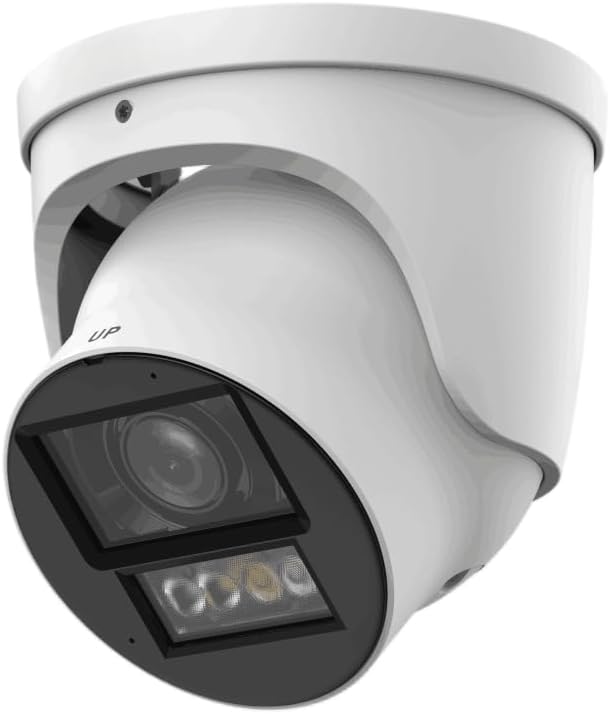
Figure 3.1: EmpireTech IPC-T54PRO-ZE Turret IP Camera. This image shows the front and side view of the white turret camera, highlighting the lens, IR/warm lights, and the adjustable mounting bracket.
- ڪئميرا لينس: 2.7mm-12mm Motorized vari-focal lens.
- آئي آر روشني ڪندڙ: Provides infrared light for night vision up to 60m.
- گرم روشنيون: Provides visible light for color night vision up to 50m and active deterrence.
- مائڪروفون: Built-in dual microphone for audio input.
- اسپيڪر: Built-in speaker for two-way talk functionality.
- Ethernet Port (PoE): For network connection and Power over Ethernet.
- پاور ان پٽ: 12 وي ڊي سي پاور ان پٽ.
- مائڪرو ايس ڊي ڪارڊ سلاٽ: Supports up to 1 TB Micro SD card for local storage.
- الارم I/O: 1 input, 1 output.
- آڊيو I/O: 1 input, 1 output.
- RS-485 پورٽ: For control and communication.
4. سيٽ اپ ۽ تنصيب
4.1 حفاظتي احتياط
- پڪ ڪريو ته انسٽاليشن يا سار سنڀال کان اڳ پاور سپلائي منقطع آهي.
- Use only specified power adapters (12 VDC or PoE).
- ڪئميرا کي بي نقاب ڪرڻ کان پاسو ڪريو انتهائي گرمي پد يا نمي کي.
- ڪئميرا کي ڌار ڪرڻ جي ڪوشش نه ڪريو. سروسنگ کي قابل اهلڪارن ڏانهن موڪليو.
4.2 ڪئميرا لائڻ
- جڳھ چونڊيو: هڪ مناسب اندروني يا ٻاهرين جڳهه چونڊيو جيڪو گهربل مهيا ڪري viewing angle and is within range of your network and power source. The camera is IP67 and IK10 rated for outdoor use.
- سطح تيار ڪريو: چڙهڻ واري مٿاڇري تي اسڪرو سوراخن کي نشان لڳائڻ لاءِ مهيا ڪيل ڊرل ٽيمپليٽ استعمال ڪريو.
- سوراخ سوراخ: Drill pilot holes for the mounting screws and insert wall anchors if necessary.
- ڪئميرا کي محفوظ ڪريو: Attach the camera base to the mounting surface using the provided screws.
- زاويه ترتيب ڏيو: Loosen the adjustment screws to position the camera lens to the desired viewing angle, then tighten the screws to secure it.
4.3 وائرنگ ڪنيڪشن
- Ethernet ڪنيڪشن: Connect an Ethernet cable to the camera's RJ45 port. If using PoE, this will also provide power. Use the waterproof connector for outdoor installations.
- پاور ڪنيڪشن (اختياري): If not using PoE, connect a 12 VDC power adapter (not included) to the camera's power input port.
- Audio/Alarm/RS-485 (Optional): Connect external audio devices, alarm sensors, or RS-485 control devices as required.
- مائڪرو ايس ڊي ڪارڊ لڳائڻ: Locate the Micro SD card slot (usually under a cover) and insert a Micro SD card (up to 1 TB) for local storage. Ensure the camera is powered off before inserting/removing the card.
5. آپريٽنگ هدايتون
5.1 شروعاتي سيٽ اپ ۽ نيٽ ورڪ ترتيب
- پاور آن: Connect the camera to power (PoE or 12V DC adapter).
- نيٽ ورڪ رسائي: The camera will obtain an IP address via DHCP by default. Use the manufacturer's IP Search Tool (available on the EmpireTech website) to find the camera's IP address on your network.
- Web انٽرفيس رسائي: کوليو a web browser and enter the camera's IP address. Log in using the default username and password (refer to the Quick Start Guide or manufacturer's documentation for default credentials).
- پاسورڊ تبديل ڪريو: For security, immediately change the default password upon first login.
- نيٽ ورڪ سيٽنگون: Configure network settings (e.g., static IP address) if required.
5.2 Video Surveillance and Recording
- جيئڻ View: ذريعي لائيو وڊيو فيڊ تائين رسائي حاصل ڪريو web interface or a compatible NVR/VMS software.
- Motorized Lens Control: Use the zoom and focus controls in the web interface to adjust the 2.7mm-12mm motorized vari-focal lens for optimal clarity.
- رڪارڊنگ: Configure recording schedules, motion detection recording, or continuous recording to the Micro SD card, NVR, or network storage.
- Smart H.264+/H.265+ Encoding: The camera supports advanced compression for efficient storage and bandwidth usage.
5.3 Dual Light Modes (IR and Warm Light)
- The camera features built-in IR illuminators for black and white night vision and warm lights for full-color night vision.
- اسمارٽ ڊبل لائيٽ: The camera can automatically switch between IR and warm light modes based on detected events or ambient light conditions. Configure these settings in the camera's web انٽرفيس.
5.4 ٻه طرفي ڳالهه ٻولهه
- Utilize the built-in dual microphone and speaker for two-way audio communication through the camera's web interface or compatible mobile application.
5.5 Intelligent Video System (IVS)
- The camera supports IVS features such as tripwire and intrusion detection. Configure these functions in the camera's web interface to enhance surveillance capabilities and trigger alarms.
6. سار سنڀال
- باقاعده صفائي: Periodically clean the camera lens and housing with a soft, dry cloth. For stubborn dirt, use a mild cleaning solution and a soft cloth. Do not use abrasive cleaners.
- فرم ويئر اپڊيٽس: Check the EmpireTech official website regularly for firmware updates. Updating firmware can improve performance, add new features, and enhance security. Follow the provided instructions carefully when updating.
- پاسورڊ مينيجمينٽ: Regularly change your camera's password to maintain security.
- اسٽوريج جو انتظام: If using a Micro SD card, periodically review ۽ رڪارڊ ٿيل foo کي منظم ڪريوtage to ensure sufficient storage space.
7. مسئلا حل ڪرڻ
| مسئلو | ممڪن سبب | حل |
|---|---|---|
| ڪابه وڊيو فيڊ | No power; Network connection issue; Incorrect IP address. | Check power supply (PoE or 12V DC). Verify Ethernet cable connection. Use IP Search Tool to confirm IP address. |
| خراب تصوير جو معيار | Dirty lens; Incorrect focus; Low light conditions. | Clean the lens. Adjust the motorized vari-focal lens focus via the web interface. Ensure IR/warm lights are enabled for low light. |
| رسائي نه ٿو ڪري سگھجي web انٽرفيس | Incorrect IP address; Network firewall; Browser issues. | Verify IP address. Check network firewall settings. Try a different web برائوزر. |
| ٻه طرفي ڳالهيون ڪم نه ٿيون ڪن | Microphone/speaker settings; Network bandwidth. | Check audio settings in the web interface. Ensure sufficient network bandwidth. |
8. وضاحتون
| خاصيت | تفصيل |
|---|---|
| ماڊل نمبر | IPC-T54PRO-ZE |
| تصويري سينسر | 4-MP 1/1.8" CMOS |
| وڌ. قرارداد | 4 MP (2688 × 1520) @25/30 fps |
| لينس جو قسم | 2.7mm-12mm Motorized Vari-focal |
| IR فاصلو | 60 ميٽر (196.85 فوٽ) تائين |
| Warm Light Distance | 50 ميٽر (164.04 فوٽ) تائين |
| وڊيو ڪمپريشن | ROI, SVC, SMART H.264+/H.265+, AI H.264/H.265 |
| آڊيو | Built-in Dual Mic, 1-ch Speaker, Two-Way Talk |
| ذخيرو | Micro SD card (max. 1 TB) |
| الارم I/O | 1 in, 1 out |
| بجلي جي فراهمي | 12 VDC/PoE (ePoE support) |
| پاور آئوٽ | 12 VDC, max. 165mA |
| تحفظ | IP67، IK10 |
| طول و عرض | 5.02 x 4.8 x 5.02 انچ |
| وزن | 2.03 پائونڊ |
| ڪنيڪشن پروٽوڪول | ايٿرنيٽ |
| مخصوص استعمال | Surveillance (Indoor, Outdoor) |
9. وارنٽي ڄاڻ
EmpireTech products typically come with a limited manufacturer's warranty. For specific warranty terms and conditions, please refer to the warranty card included with your product or visit the official EmpireTech webسائيٽ. وارنٽي دعوائن لاءِ خريداري جو ثبوت رکو.
10. ڪسٽمر سپورٽ
If you encounter any issues or have questions regarding your EmpireTech IPC-T54PRO-ZE camera, please contact EmpireTech customer support through their official webسائيٽ يا توهان جي پراڊڪٽ دستاويزن ۾ ڏنل رابطي جي معلومات.
- آن لائين وسيلا: جو دورو ڪريو EmpireTech Store on Amazon پراڊڪٽ جي معلومات ۽ اپڊيٽ لاءِ.
- ٽيڪنيڪل سپورٽ: Refer to the contact details provided in your product packaging or on the official EmpireTech webٽيڪنيڪل مدد لاء سائيٽ.


