1. تعارف
The Baseus Bass BH1 NC headphones are designed to provide an immersive audio experience with advanced noise cancellation technology. Featuring Real-Time Adaptive Hybrid ANC, SuperBass 2.0, LDAC Hi-Res Sound, and an extended 80-hour playtime, these headphones are engineered for comfort and superior sound quality. This manual provides detailed instructions for setup, operation, maintenance, and troubleshooting to ensure optimal performance.
2. دٻي ۾ ڇا آهي

Image: The product packaging displaying the headphones, charging cable, and quick start guide.
- Baseus Bass BH1 NC Noise Cancelling Headphones
- USB-C ڊيٽا ڪيبل
- استعمال ڪندڙ دستي
3. پراڊڪٽ ختمview
Familiarize yourself with the physical components and controls of your Baseus Bass BH1 NC headphones.

تصوير: هڪ سامهون وارو زاويه view of the Baseus Bass BH1 NC headphones in Moon White, highlighting the earcups and headband.
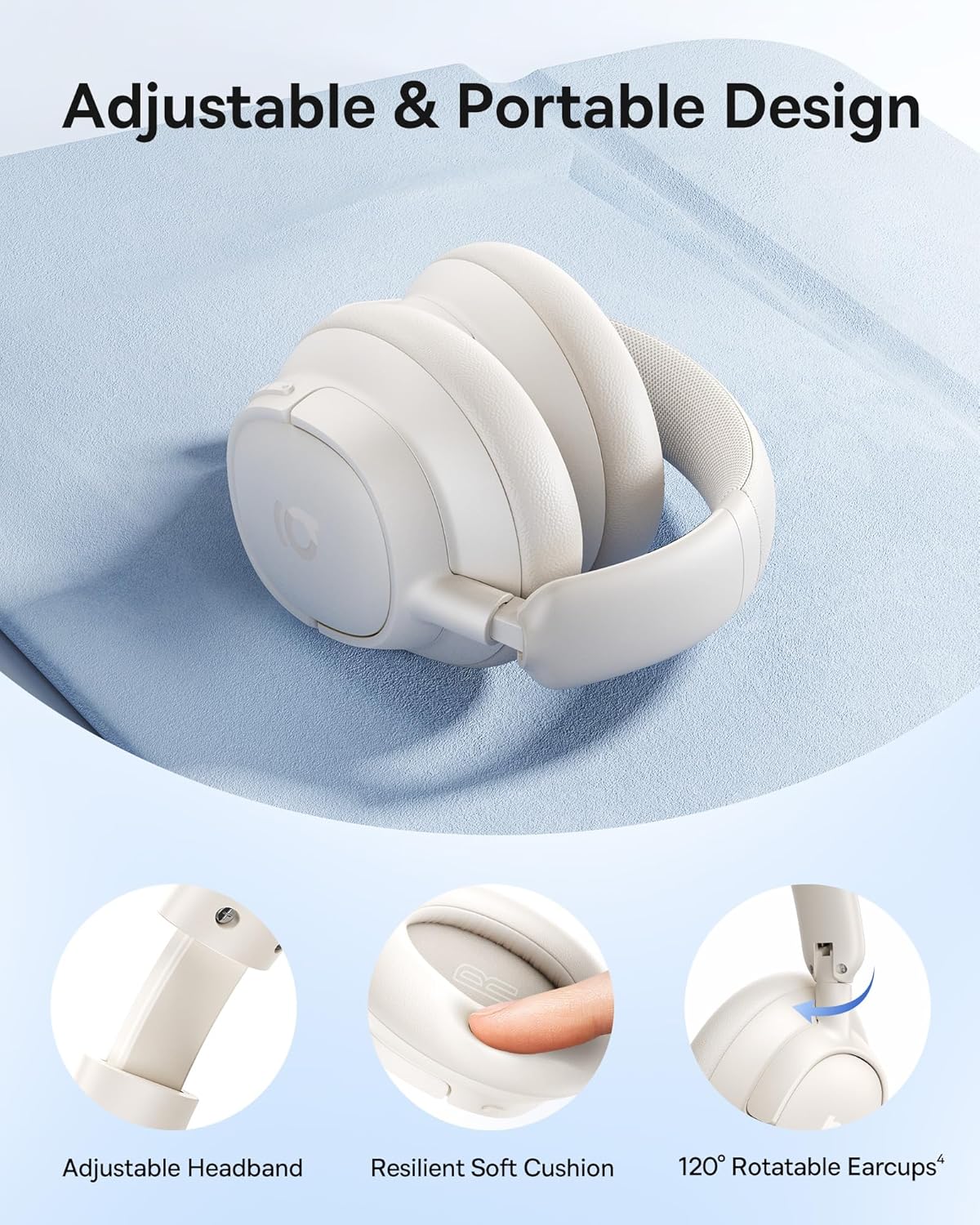
تصوير: تفصيلي view of the adjustable headband, resilient soft cushion, and 120-degree rotatable earcups, illustrating the ergonomic design.
ڪنٽرول ۽ بندرگاهن:

Image: An illustration detailing the functions of each physical button on the headphones, including controls for music playback, call management, and ANC mode switching.
- پاور بٽڻ: پاور آن/آف ڪرڻ ۽ بلوٽوٿ پيئرنگ شروع ڪرڻ لاءِ استعمال ٿيندو آهي.
- واليوم اپ/اڳيون ٽريڪ بٽڻ: حجم وڌائڻ لاءِ مختصر پريس، ايندڙ ٽريڪ لاءِ ڊگهو پريس.
- آواز گھٽائڻ/پوئين ٽريڪ بٽڻ: حجم گهٽائڻ لاءِ مختصر پريس، پوئين ٽريڪ لاءِ ڊگهو پريس.
- ملٽي فنڪشن بٽڻ: موسيقي هلايو/روڪ ڪريو، ڪالن جو جواب ڏيو/ختم ڪريو، وائيس اسسٽنٽ کي چالو ڪريو.
- ANC بٽڻ: Toggles between ANC On, Transparency Mode, and ANC Off.
- USB-C پورٽ: هيڊفون چارج ڪرڻ لاءِ.
4. سيٽ اپ
4.1 هيڊفون چارج ڪرڻ
Before first use, fully charge your headphones. Connect the provided USB-C cable to the charging port on the headphones and the other end to a USB power adapter (not included) or a computer's USB port. The LED indicator will show charging status.
- مڪمل چارج 80 ڪلاڪن تائين راند جو وقت (ANC بند) يا 55 ڪلاڪ (ANC آن) فراهم ڪري ٿو.
- A quick 10-minute charge can provide approximately 10 hours of playtime.

Image: Visual representation of the headphones' battery life, indicating 80 hours with ANC off and 55 hours with ANC on, along with the rapid charging capability.
4.2 بلوٽوٽ جوڙي
- پڪ ڪريو ته هيڊفون بند ٿيل آهن.
- پاور بٽڻ کي تقريباً 3-5 سيڪنڊن تائين دٻايو ۽ رکو جيستائين LED اشارو نيرو ۽ ڳاڙهو چمڪي، جيڪو جوڙڻ واري موڊ کي ظاهر ڪري ٿو.
- پنهنجي ڊوائيس (اسمارٽ فون، ٽيبليٽ، ليپ ٽاپ) تي، بلوٽوٿ کي فعال ڪريو ۽ موجود ڊوائيسز جي ڳولا ڪريو.
- Select "Baseus Bass BH1 NC" from the list of found devices.
- هڪ ڀيرو ڳنڍجڻ کان پوءِ، LED اشارو آهستي آهستي مضبوط نيرو يا فليش نيرو ٿي ويندو.
4.3 سمارٽ ايپ ڪنٽرول
For enhanced functionality and personalization, download the Baseus app from your device's app store. The app allows you to fine-tune sound settings, adjust EQ modes, manage noise reduction settings, and more.

Image: A visual guide to the Baseus app, showcasing its various control options for sound customization and headphone management.
5. آپريٽنگ هدايتون
5.1 پاور آن/آف
- پاور آن: 2 سيڪنڊن لاءِ پاور بٽڻ کي دٻايو ۽ رکو.
- بجلي بند: 3 سيڪنڊن لاءِ پاور بٽڻ کي دٻايو ۽ رکو.
5.2 ميوزڪ پلے بیک
- راند/روڪ: ملائي واري فنڪشن جي بڪ کي هڪ ڀيرو دٻايو.
- حجم مٿي واليوم اپ بٽڻ کي مختصر دٻايو.
- حجم ھيٺ واليوم ڊائون بٽڻ کي مختصر دٻايو.
- اڳيون ٽريڪ: 2 سيڪنڊن لاءِ حجم اپ بٽڻ کي دٻايو.
- پويون ٽريڪ: Long press the Volume Down button for 2 seconds.
5.3 ڪال مئنيجمينٽ
- جواب/آخر ڪال: ملائي واري فنڪشن جي بڪ کي هڪ ڀيرو دٻايو.
- ڪال رد ڪريو: 2 سيڪنڊن لاءِ ملٽي فنڪشن بٽڻ کي دٻايو ۽ رکو.
- وائس اسسٽنٽ کي فعال ڪريو. ملٽي فنڪشن بٽڻ کي ٽي -يرا دايو.

Image: A user demonstrating the call clarity feature of the headphones, emphasizing the AI-powered voice boost and 5-mic sound sensors.
5.4 شور ڪنٽرول موڊس
The Baseus Bass BH1 NC headphones feature Adaptive Hybrid ANC, offering up to -45dB noise reduction. Use the ANC button to cycle through modes:

Image: A visual representation of the noise cancellation capabilities, showing the headphones within a bubble indicating -45dB noise reduction.
- ANC تي: Activates active noise cancellation to reduce ambient sound.
- شفافيت موڊ: Allows you to hear your surroundings without removing the headphones. Press and hold the ANC button for 2 seconds for Quick Attention.
- ANC بند: شور جي منسوخي کي غير فعال ڪري ٿو.
5.5 ملٽي پوائنٽ ڪنيڪشن
The headphones support Instant Multipoint Connection, allowing seamless switching between two connected devices without manual re-pairing.
5.6 آڊيو خاصيتون
Experience pristine audio with:
- سپر باس 2.0: Dynamically enhances low frequencies for rich, punchy bass.
- LDAC Hi-Res Sound: Transmits 3X more data than standard Bluetooth codecs for ultra-clear, lossless audio.
- 40 ايم ايم ڊائنامڪ ڊرائيور: Equipped with bio-cellulose diaphragms for immersive depth and detailed clarity.

Image: A profile view of a person wearing the headphones, with text overlays emphasizing the SuperBass 2.0 and Hi-Res audio features.
6. سار سنڀال
- صفائي: هيڊفونز کي نرم، سڪل ڪپڙي سان صاف ڪريو. سخت ڪيميڪل يا رگڙيندڙ مواد استعمال نه ڪريو.
- اسٽوريج: هيڊفونز کي سڌي سج جي روشني ۽ انتهائي گرمي پد کان پري ٿڌي، سڪل جاءِ تي رکو.
- بيٽري جي سنڀال: بيٽري جي زندگي کي وڌائڻ لاءِ، هيڊفونز کي بار بار مڪمل طور تي چارج ڪرڻ کان پاسو ڪريو. انهن کي باقاعدي طور تي چارج ڪريو، جيتوڻيڪ ڊگهي عرصي تائين استعمال ۾ نه هجي.
- پاڻي جي مزاحمت: هي هيڊفون پاڻي کان بچاءُ وارا نه آهن. پاڻي يا گهڻي نمي جي سامهون اچڻ کان پاسو ڪريو.
7. مسئلا حل ڪرڻ
7.1 پاور آن نه ٿو ڪري سگھجي
- پڪ ڪريو ته هيڊفون چارج ٿيل آهن. USB-C ڪيبل استعمال ڪندي انهن کي پاور سورس سان ڳنڍيو.
- Press and hold the Power button for a few seconds to confirm it's not just a short press.
7.2 ڊوائيس سان جوڙي نه ٿو سگهجي
- پڪ ڪريو ته هيڊفون پيئرنگ موڊ ۾ آهن (ايل اي ڊي چمڪندڙ نيرو ۽ ڳاڙهو).
- پڪ ڪريو ته توهان جي ڊوائيس تي بلوٽوٿ فعال آهي ۽ اهو رينج اندر آهي (عام طور تي 10 ميٽر).
- پنهنجي فون جي بلوٽوٿ سيٽنگز مان ڊوائيس کي وساري ڇڏيو ۽ ٻيهر جوڙڻ جي ڪوشش ڪريو.
- هيڊفون ۽ پنهنجي ڊوائيس ٻئي ٻيهر شروع ڪريو.
7.3 ڪو به آواز يا گهٽ آواز نه
- هيڊفونز ۽ توهان جي ڳنڍيل ڊوائيس ٻنهي تي حجم جي سطح چيڪ ڪريو.
- پڪ ڪريو ته هيڊفون توهان جي ڊوائيس سان صحيح طرح سان ڳنڍيل آهن.
- ڪنهن ٻئي ايپليڪيشن يا ذريعن کان آڊيو هلائڻ جي ڪوشش ڪريو.
7.4 ANC اثرائتي طور تي ڪم نه ڪري رهيو آهي
- Ensure ANC mode is activated (not Transparency Mode or ANC Off).
- Check for proper fit of the earcups over your ears to create a good seal.
- Environmental factors can affect ANC performance; it is most effective against low-frequency, constant noise.
8. وضاحتون
| ماڊل نالو | Baseus Bass BH1 NC |
| رابطي ٽيڪنالاجي | بلوٽوٿ 6.0، وائرليس |
| وائرليس ڪميونيڪيشن ٽيڪنالاجي | بلوٽوٿ 6.0 |
| مواد | پلاسٽڪ |
| پيداوار لاءِ مخصوص استعمال | وندر، فٽنيس، سفر |
| مصنوعات لاءِ سفارش ڪيل استعمال | Calling, Cycling, Exercising, Music, Running, Travel, Work Out |
| مطابقت رکندڙ ڊوائيسز | سيل فون، بلوٽوٿ آڊيو صلاحيت وارا ڊوائيسز (iOS، Android، ونڊوز، Mac OS، سوئچ)، ليپ ٽاپ، ٽيبليٽ |
| ڪنٽرول قسم | بٽڻ ڪنٽرول |
| ڪنٽرول جو طريقو | دٻايو بٽڻ |
| شين جو تعداد | 1 |
| آڊيو ڊرائيور جو قسم | متحرڪ ڊرائيور |
| بلوٽوت ورزن | 6.0 |
| آڊيو ڊرائيور جي ماپ | 40 ملي ميٽر |
| يو پي سي | 810196181533 |
| ٺاهيندڙ | بيسس |
| شيءِ جو وزن | 15.2 اونس |
| شيون ماڊل نمبر | Baseus Bass BH1 NC |
| بيٽريون | Nonstandard Battery batteries required. (included) |
| رنگ | چنڊ اڇو |
| ڪن جي جڳهه | ڪن مٿان |
| فارم فيڪٽر | ڪن مٿان |
| شور ڪنٽرول | موافقت وارو شور منسوخي |

Image: A technical drawing illustrating the precise measurements of the headphones, including earcup dimensions and overall weight.
9. وارنٽي ۽ سپورٽ
Baseus products are designed and manufactured to the highest quality standards. For warranty information, please refer to the warranty card included with your product or visit the official Baseus website. If you encounter any issues or require technical assistance, please contact Baseus customer support through their official channels.
وڌيڪ مدد لاءِ، مھرباني ڪري دورو ڪريو ايميزون تي بيسس اسٽور.


