تعارف
Welcome to the user manual for your Raycon Essential Open Earbuds. These true wireless open-ear Bluetooth headphones are designed for comfort and awareness, allowing you to enjoy high-quality audio while staying connected to your surroundings. Featuring an ultra-lightweight design, comfort hook, IPX5 water resistance, and up to 36 hours of battery life, these earbuds are perfect for an active lifestyle.

Figure 1: Raycon Essential Open Earbuds (Black)
پيڪيج مواد
مھرباني ڪري پڪ ڪريو ته سڀئي شيون توھان جي پيڪيج ۾ موجود آھن:
- ريڪون ايسينشل اوپن ايئربڊس (کاٻي ۽ ساڄي)
- چارج ڪيس
- USB چارجنگ ڪيبل
- استعمال ڪندڙ جو دستياب (ھي دستاويز)

Figure 2: Earbuds in Charging Case
اهم خاصيتون
- کليل ڪن ڊيزائن: Experience crystal-clear sound while staying fully aware of your surroundings. The open-ear design delivers high-quality audio without blocking your environment — perfect for workouts, outdoor runs, or multitasking throughout the day.

Figure 3: Open-Ear Design for Environmental Awareness
- فيدرلائيٽ فٽ: The Essential Open Earbuds are so lightweight and comfortable, you might forget you're even wearing them. The minimalist, ear-hugging design ensures a secure fit that won’t budge during intense movement, all while keeping you stylish and streamlined.

Figure 4: Ultra-Lightweight Design (13.3g)
- Built for On-The-Go (IPX5 Water Resistant): Sweat-resistant and made for motion, these wireless earbuds are ideal for gym sessions, cycling, and daily hustle. They’re pocket-sized and portable – the perfect essential earbuds that fit into your life with zero bulk. The IPX5 rating means they are resistant to splashes and sweat.

شڪل 5: IPX5 پاڻي جي مزاحمت
- Long Battery Life + Easy Charging: Stay powered through your day with all-day battery life and a sleek charging case that fits in the palm of your hand. Fast charging means less downtime and more freedom to move. Enjoy up to 8 hours of non-stop playback and a total of 36 hours with the charging case.

شڪل 6: وڌايل بيٽري جي زندگي
- لچڪدار ڪن جو ٿلهو: The ergonomic ear hook bends to fit the shape of any ear, ensuring a secure and comfortable fit.

Figure 7: Flexible Ear Hook Design
- ڪمپيڪٽ ڊيزائن: Slide in your pocket or toss in your bag. Portable, fun-sized, and ready for any adventure.

شڪل 8: ڪمپيڪٽ ۽ پورٽيبل ڊيزائن
- ملٽي پوائنٽ ڪنيڪشن: Connect to two devices and switch between them seamlessly — without the juggling.

Figure 9: Multipoint Connection Capability
سيٽ اپ گائيڊ
1. پنهنجا ائربڊ چارج ڪرڻ
Before first use, fully charge your Raycon Essential Open Earbuds and their charging case.
- Place both earbuds into the charging case. Ensure they are seated correctly.
- مهيا ڪيل USB چارجنگ ڪيبل کي ڪيس تي چارجنگ پورٽ سان ڳنڍيو ۽ ٻئي ڇيڙي کي USB پاور سورس (مثال طور، وال اڊاپٽر، ڪمپيوٽر USB پورٽ) ۾ لڳايو.
- چارجنگ ڪيس تي انڊيڪيٽر لائيٽ چارجنگ اسٽيٽس ڏيکاريندي. مڪمل چارج ٿيڻ کان پوءِ، لائيٽ تبديل يا بند ٿي ويندي.
Video 1: Demonstrates charging the earbuds and case, as well as wearing them. This video is provided by the seller and is relevant for setup and operation.
2. توهان جي ڊوائيس سان جوڙو ٺاهڻ
جڏهن پهريون ڀيرو ڪيس مان ڪڍيا ويندا ته ائربڊس پاڻمرادو پيئرنگ موڊ ۾ داخل ٿي ويندا.
- چارجنگ ڪيس کوليو ۽ ٻئي ائربڊ ڪڍو. اهي خودڪار طريقي سان پاور آن ٿيندا ۽ پيئرنگ موڊ ۾ داخل ٿيندا.
- توهان جي ڊوائيس (اسمارٽ فون، ٽيبليٽ، ڪمپيوٽر) تي، بلوٽوٿ سيٽنگز ڏانهن وڃو.
- ڳولھيو "Raycon Essential Open Earbuds" in the list of available devices.
- Select the earbuds to connect. You will hear an audible confirmation once connected.
For subsequent connections, the earbuds will automatically connect to the last paired device when removed from the case, if Bluetooth is enabled on the device.
آپريٽنگ هدايتون
Earbuds پائڻ
Gently loop the ear hook over your ear and position the earbud speaker near your ear canal. Adjust for a comfortable and secure fit.
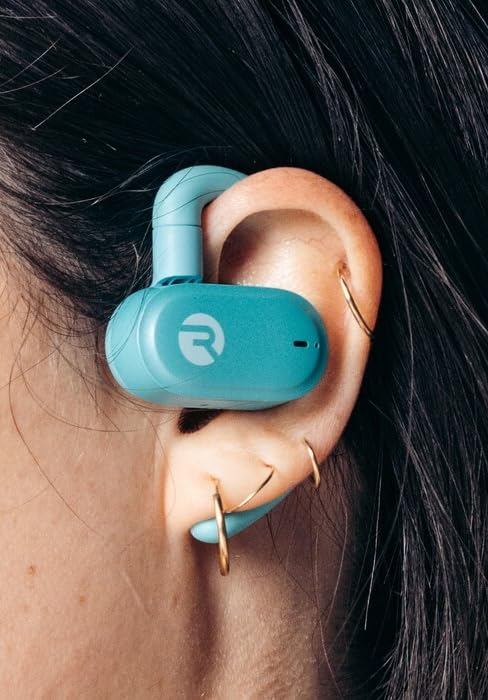
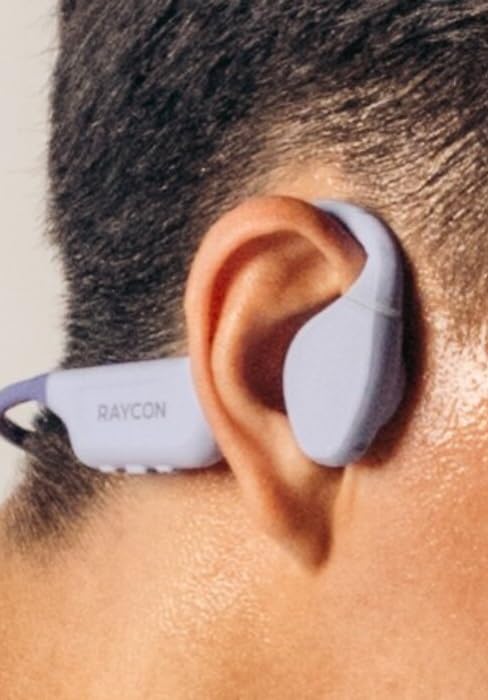
Figure 10: Proper Wearing of Essential Open Earbuds
ٽچ ڪنٽرول
The Essential Open Earbuds feature touch controls for various functions. Please note that the touch controls are sensitive. Refer to the quick start guide or the Raycon app for a full list of touch control functions, as specific actions (e.g., play/pause, skip track, answer call) are typically managed via taps on the earbud surface.
| عمل | فنڪشن |
|---|---|
| اڪيلو ٽيپ | موسيقي هلايو/روڪيو، ڪال جو جواب ڏيو/ختم ڪريو |
| ڊبل ٽيپ ڪريو (ساڄو ائربڊ) | ايندڙ ٽريڪ |
| ٻٽي ٽيپ ڪريو (کاٻي ائربڊ) | اڳيون ٽريڪ |
| ڊگهو پريس | وائيس اسسٽنٽ کي فعال ڪريو |
Note: Specific touch control gestures may vary. Consult the official Raycon support resources for the most accurate and up-to-date information.
سار سنڀال
صفائي
بهترين ڪارڪردگي ۽ صفائي برقرار رکڻ لاءِ، باقاعدي طور تي پنهنجا ائربڊس ۽ چارجنگ ڪيس صاف ڪريو.
- ائربڊس ۽ چارجنگ ڪيس کي صاف ڪرڻ لاءِ نرم، سڪل، لِنٽ فري ڪپڙو استعمال ڪريو.
- ضدي مٽيءَ لاءِ، ٿورو ڊيampen the cloth with water. Avoid excessive moisture.
- گھڙڻ وارا صاف ڪندڙ، محلول، يا ايروسول اسپري استعمال نه ڪريو.
- چارج ڪرڻ کان اڳ پڪ ڪريو ته ائربڊس ۽ ڪيس ٻنهي تي چارجنگ ڪانٽيڪٽس صاف ۽ سڪل آهن.
ذخيرو
جڏهن استعمال ۾ نه هجي، ته پنهنجا ائربڊ انهن جي چارجنگ ڪيس ۾ محفوظ ڪريو ته جيئن انهن کي محفوظ رکي سگهجي ۽ انهن کي چارج رکيو وڃي.
- ٿڌي، سڪل جاءِ تي، انتهائي گرمي پد ۽ سڌي سج جي روشني کان پري رکو.
- نم ماحول ۾ ذخيرو ڪرڻ کان پاسو ڪريو.
بيٽري جي سنڀال
بيٽري جي زندگي کي وڌائڻ لاء:
- بار بار بيٽري کي مڪمل طور تي ختم ڪرڻ کان پاسو ڪريو.
- Charge the earbuds regularly, even if not used for extended periods.
- صرف مهيا ڪيل چارجنگ ڪيبل يا تصديق ٿيل برابر استعمال ڪريو.
مشڪلاتون
If you encounter issues with your Raycon Essential Open Earbuds, try the following solutions:
| مسئلو | ممڪن حل |
|---|---|
| Earbuds won't turn on. | Ensure the earbuds and charging case are fully charged. Place earbuds in the case, close it, then open it again. |
| ائربڊس ڊوائيس سان جوڙو نه ٺهندا. |
|
| Sound breaks up or is intermittent. |
|
| ٽچ ڪنٽرول تمام گهڻا حساس يا غير جوابده آهن. |
|
| هڪ ائربڊ ۾ ڪو به آواز ناهي. |
|
وضاحتون
| خاصيت | تفصيل |
|---|---|
| ماڊل نالو | ريڪون ضروري اوپن ايئربڊس |
| ماڊل نمبر | آر بي او 715 |
| رابطي ٽيڪنالاجي | وائرليس (بلوٽوٿ 6.0) |
| ڪن جي جڳهه | کليل ڪن |
| فارم فيڪٽر | Over Ear (with hook design) |
| ڪنٽرول قسم | ٽچ ڪنٽرول |
| پاڻي جي مزاحمت جي سطح | IPX5 (پاڻيءَ جي مزاحمتي) |
| بيٽري جي زندگي (ايربڊس) | 8 ڪلاڪ تائين |
| ڪل بيٽري جي زندگي (ڪيس سان) | 36 ڪلاڪ تائين |
| شيءِ جو وزن | 5 آونس (ايئر بڊس + ڪيس) |
| ائيربود وزن | تقريبن 13.3 گرام في ائربڊ |
| ٺاهيندڙ | ريڪون گلوبل |
| ASIN | B0FHJ7G4WF |
| يو پي سي | 811162032989 |
وارنٽي ۽ سپورٽ
وارنٽي ڄاڻ
Raycon products typically come with a limited manufacturer's warranty. Please refer to the official Raycon website or the warranty card included with your product for specific terms, conditions, and duration of the warranty.
ڪسٽمر سپورٽ
For further assistance, technical support, or warranty claims, please contact Raycon customer support:
- Webسائيٽ: Visit the official Raycon website for FAQs, support articles, and contact options. (www.rayconglobal.com)
- اي ميل/فون: Specific contact details can usually be found on the support section of their webسائيٽ.
Please have your product model number (RBO715) and purchase information ready when contacting support.


