تعارف
The Beats Solo 4 are wireless Bluetooth on-ear headphones designed for a premium audio experience. They offer compatibility with both Apple and Android devices, extended battery life, and advanced audio features like Personalized Spatial Audio. This manual provides detailed instructions for setting up, operating, maintaining, and troubleshooting your Beats Solo 4 headphones.
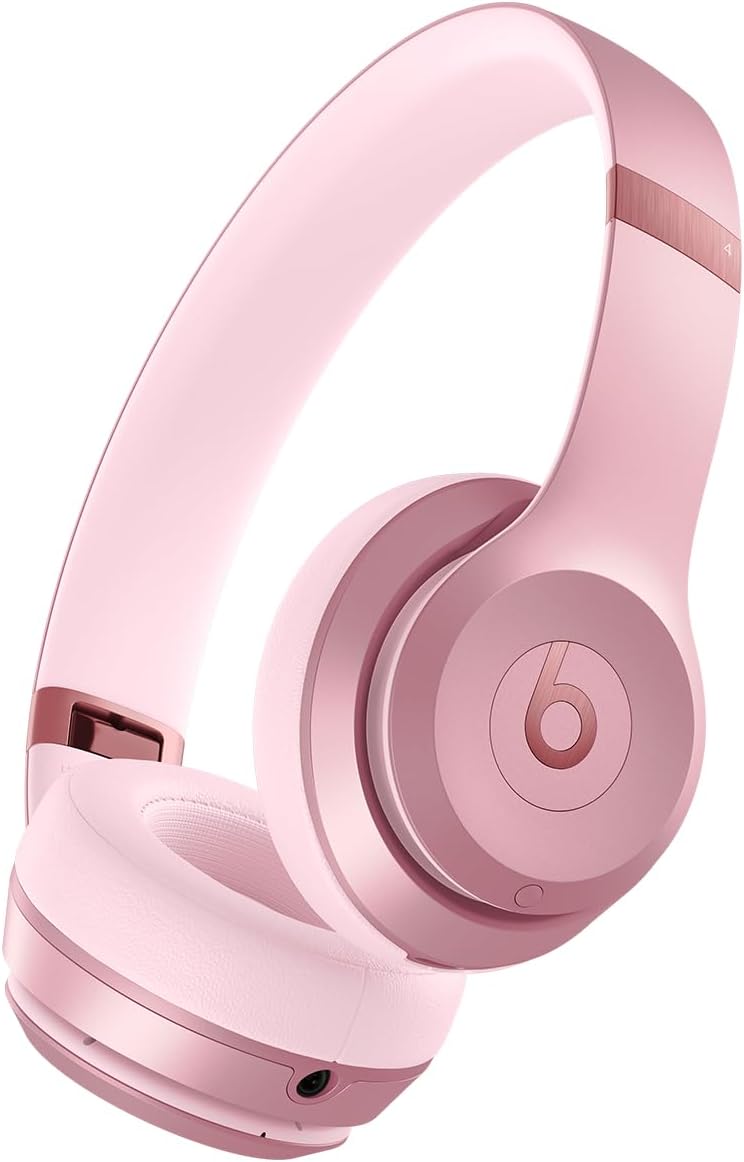
تصوير: سامهون view of the Beats Solo 4 Wireless Headphones in Metallic Pink.
دٻي ۾ ڇا آهي
Upon unboxing your Beats Solo 4 headphones, verify that all the following components are included:
- بيٽس سولو 4 هيڊفون
- حفاظتي ڪيس
- USB-C to USB-C cable for charging and audio (USB-C power adapter sold separately)
- 3.5 ملي ايم اينالاگ آڊيو ڪيبل
- جلدي شروع گائيڊ ۽ وارنٽي ڪارڊ
سيٽ اپ ڪريو
1. پنهنجا هيڊفون چارج ڪرڻ
Before initial use, ensure your Beats Solo 4 headphones are fully charged. Connect the provided USB-C to USB-C cable to the charging port on the headphones and to a compatible USB-C power adapter (sold separately) or a USB-C port on a computer.
- A 10-minute charge provides up to 5 hours of playback (Fast Fuel feature).
- مڪمل چارج 50 ڪلاڪن تائين بيٽري جي زندگي فراهم ڪري ٿو.

Image: Visual representation of the 50-hour battery life capability of the Beats Solo 4 headphones.
2. توهان جي ڊوائيس (بلوٽوٿ) سان جوڙڻ
The Beats Solo 4 headphones offer dual compatibility for one-touch pairing with both iOS and Android devices.
For iOS Devices (Apple):
- پڪ ڪريو ته توهان جي iOS ڊوائيس تي بلوٽوت فعال آهي.
- Power on your Beats Solo 4 headphones.
- Hold your Beats Solo 4 near your unlocked iOS device.
- Follow the on-screen prompts to connect. This will automatically set up your headphones with all devices signed into your iCloud account.
Android ڊوائيسز لاء:
- Download the Beats app from the Google Play Store (optional, but recommended for full features).
- پڪ ڪريو ته توهان جي Android ڊوائيس تي بلوٽوٿ فعال آهي.
- Power on your Beats Solo 4 headphones.
- Open the Beats app or go to your device's Bluetooth settings.
- Select "Beats Solo 4" from the list of available devices to pair.

Image: The Beats Solo 4 headphones demonstrating Apple and Android compatibility with a smartphone.
توهان جا هيڊفون هلائڻ
ڪنٽرول
The Beats Solo 4 headphones feature intuitive on-ear controls for managing audio playback, calls, and voice assistant interaction.
- حجم ڪنٽرول: Use the dedicated volume buttons on the ear cup.
- پلے بیک ڪنٽرول: Press the 'b' button for play/pause, double-press for next track, triple-press for previous track.
- ڪال مينيجمينٽ: Press the 'b' button to answer/end calls.
- آواز جو اسسٽنٽ: Press and hold the 'b' button to activate Siri or your device's voice assistant.
آڊيو خاصيتون
Personalized Spatial Audio
Experience immersive sound with dynamic head tracking. This feature creates a theater-like experience, making it sound as if audio is coming from all around you. Compatible hardware and software are required. For Apple devices, an iPhone with TrueDepth camera is needed to create a personal profile for Spatial Audio.

Image: Visual representation of Personalized Spatial Audio, showing sound emanating from multiple directions around the headphones.
بيڪار آڊيو
The Beats Solo 4 supports lossless audio playback via the included USB-C or 3.5 mm audio cables. This allows for high-fidelity audio transmission without compression, providing a richer listening experience. Compatible lossless content from supported apps/services is required.

Image: A user wearing Beats Solo 4 headphones, highlighting the lossless audio capability via wired connection.
سار سنڀال
Proper care and maintenance will extend the lifespan of your Beats Solo 4 headphones.
- صفائي: Use a soft, dry, lint-free cloth to clean the headphones. Do not use abrasive cleaners or sprays.
- اسٽوريج: When not in use, store the headphones in the provided protective case to prevent scratches and damage. The foldable design makes them compact for storage.
- نمي: The Beats Solo 4 are not water resistant. Avoid exposure to liquids, moisture, or extreme humidity.
- گرمي پد: هيڊ فونز کي انتهائي گرمي پد تي نه لڳايو.

Image: The Beats Solo 4 headphones in their folded, compact state, suitable for storage in the protective case.
مشڪلاتون
If you encounter issues with your Beats Solo 4 headphones, try the following solutions:
| مسئلو | ممڪن حل |
|---|---|
| هيڊفون آن نه ٿي رهيا آهن | پڪ ڪريو ته هيڊفون مڪمل طور تي چارج ٿيل آهن. USB-C ڪيبل استعمال ڪندي پاور سورس سان ڳنڍيو. |
| ڊوائيس سان جوڙو نه ٿو ٺاهي سگهجي |
|
| ڪوبه آواز يا گهٽ حجم نه |
|
| ناقص ڪال معيار |
|
| Headphones not responding | Perform a factory reset (refer to the Quick Start Guide for specific instructions on how to reset your Beats Solo 4). |
وضاحتون
| خاصيت | تفصيل |
|---|---|
| ماڊل نالو | بيٽس سولو 4 |
| رابطي ٽيڪنالاجي | Wireless (Bluetooth Class 1) |
| بلوٽوت ورزن | 5.3 |
| بلوٽوٿ رينج | 100 ميٽر تائين |
| بيٽري جي زندگي | 50 ڪلاڪ تائين |
| Fast Fuel Charging | 10 منٽ چارج 5 ڪلاڪ پلے بیک تائين مهيا ڪري ٿو |
| آڊيو ان پٽ | USB-C audio, 3.5 mm analog input |
| ڪن جي جڳهه | ڪن تي |
| وزن | 7.65 اوز / 217 گ |
| طول و عرض (L x W x H) | 6.9 انچ x 6.2 انچ x 2.7 انچ (17.7 سينٽي x 15.8 سينٽي x 6.8 سينٽي) |
| ڪنٽرول قسم | Volume Control, App Control, Button Control, Siri, Touch Control, Voice Control |
| پاڻي جي مزاحمت جي سطح | نه پاڻي مزاحمتي |
| شامل اجزاء | Headphones, Protective Case, USB-C to USB-C cable, 3.5 mm audio cable, Quick Start Guide, Warranty Card |
وارنٽي ۽ سپورٽ
Your Beats Solo 4 headphones come with a limited warranty. Please refer to the included Warranty Card for detailed terms and conditions, including coverage period and how to make a claim.
For additional support, frequently asked questions, or to contact customer service, please visit the official Beats support webسائيٽ. توهان وڌيڪ معلومات پڻ ڳولي سگهو ٿا Beats Store on Amazon.
Note: This manual does not include information on AppleCare+ protection plans, which are separate service agreements.
اهم حفاظتي ڄاڻ
Read all safety information before using your Beats Solo 4 headphones to avoid injury. Do not listen at high volume levels for long periods to prevent hearing damage. Do not use headphones while driving or cycling, or in situations where inability to hear ambient sounds could be dangerous.


