1. حفاظت جي ڄاڻ
Please read this manual carefully before using the product to ensure proper operation and to avoid damage. Keep this manual for future reference.
- گاڏي هلائڻ دوران ڊوائيس نه هلايو. سيٽنگز کي صرف تڏهن ترتيب ڏيو جڏهن گاڏي محفوظ طور تي پارڪ ڪئي وڃي.
- Ensure the dash cam does not obstruct your view روڊ کان هيٺ يا گاڏين جي ڪنٽرول ۾ مداخلت.
- Use only original accessories provided with the product.
- ڊوائيس کي گهڻي عرصي تائين انتهائي گرمي پد يا سڌي سج جي روشني ۾ بي نقاب ڪرڻ کان پاسو ڪريو.
- ڊوائيس کي پاڻي ۽ نمي کان پري رکو.
2. پيڪيج مواد
پڪ ڪريو ته سڀئي شيون پيڪيج ۾ موجود آهن:
- Mirror Dash Camera Unit
- پوئين ڪئميرا
- ڪار چارجر
- چارجنگ ڪيبل (USB-C)
- جي پي ايس ماڊل
- 64GB مائڪرو ايس ڊي ڪارڊ
- انسٽاليشن ٽول (پرائي ٽول)
- استعمال ڪندڙ دستي
- Mounting Straps (for mirror)
- Adhesive Pads and Screws (for rear camera)

Image: All components included in the QOZ V969 Mirror Dual Dash Camera package.
3. سيٽ اپ ۽ تنصيب
3.1 Installing the Mirror Dash Camera
- Attach the mirror dash camera to your existing rearview مهيا ڪيل رٻڙ جي پٽين کي استعمال ڪندي آئينو. پڪ ڪريو ته اهو محفوظ طور تي مضبوط ٿيل آهي ۽ توهان جي رڪاوٽ نه بڻجي view.
- Adjust the integrated front camera lens to capture the desired view اڳيان روڊ جو.

Image: The mirror dash camera is designed to clip securely over your vehicle's existing rearview آئينو.
3.2 ريئر ڪيمرا لڳائڻ
- Mount the rear camera at the back of your vehicle, typically above the license plate or inside the rear window. Use the provided adhesive pads and screws for secure attachment.
- Route the rear camera cable to the front of the vehicle, tucking it along the headliner and A-pillar trim using the installation tool to conceal the wiring.
- Connect the rear camera cable to the designated port on the mirror dash camera.
- Connect the red wire from the rear camera cable to your vehicle's reverse light power wire. This enables the display to automatically switch to the rear camera view جڏهن ڦيرايو.

Image: Wiring diagram for connecting the rear camera to the main unit and the vehicle's reverse light for automatic activation.
3.3 Connecting Power and GPS
- Insert the 64GB Micro SD card into the designated slot on the mirror dash camera.
- Connect the GPS module to its port on the mirror dash camera. Position the GPS module on the dashboard or near the windshield for optimal signal reception.
- Plug the car charger into your vehicle's 12V power outlet (cigarette lighter).
- Connect the USB-C charging cable from the car charger to the mirror dash camera.

Image: The dash camera package includes a 64GB SD card and a GPS module for route and speed tracking.
4. آپريٽنگ هدايتون
4.1 پاور آن/آف
جڏهن توهان جي گاڏي جي اگنيشن آن ٿيندي ته ڊيش ڪيم خودڪار طريقي سان پاور آن ٿيندو ۽ رڪارڊنگ شروع ڪندو. جڏهن اگنيشن بند ڪئي ويندي ته اهو خودڪار طريقي سان پاور آف ٿيندو.
4.2 10" IPS Touch Screen Interface
The 10-inch IPS touch screen provides a wide viewing angle and vivid color accuracy. Swipe left/right to switch between front camera view، پوئين ڪئميرا view, or a split-screen display showing both simultaneously. Swipe up/down on the screen to adjust the camera's vertical viewزاويه.
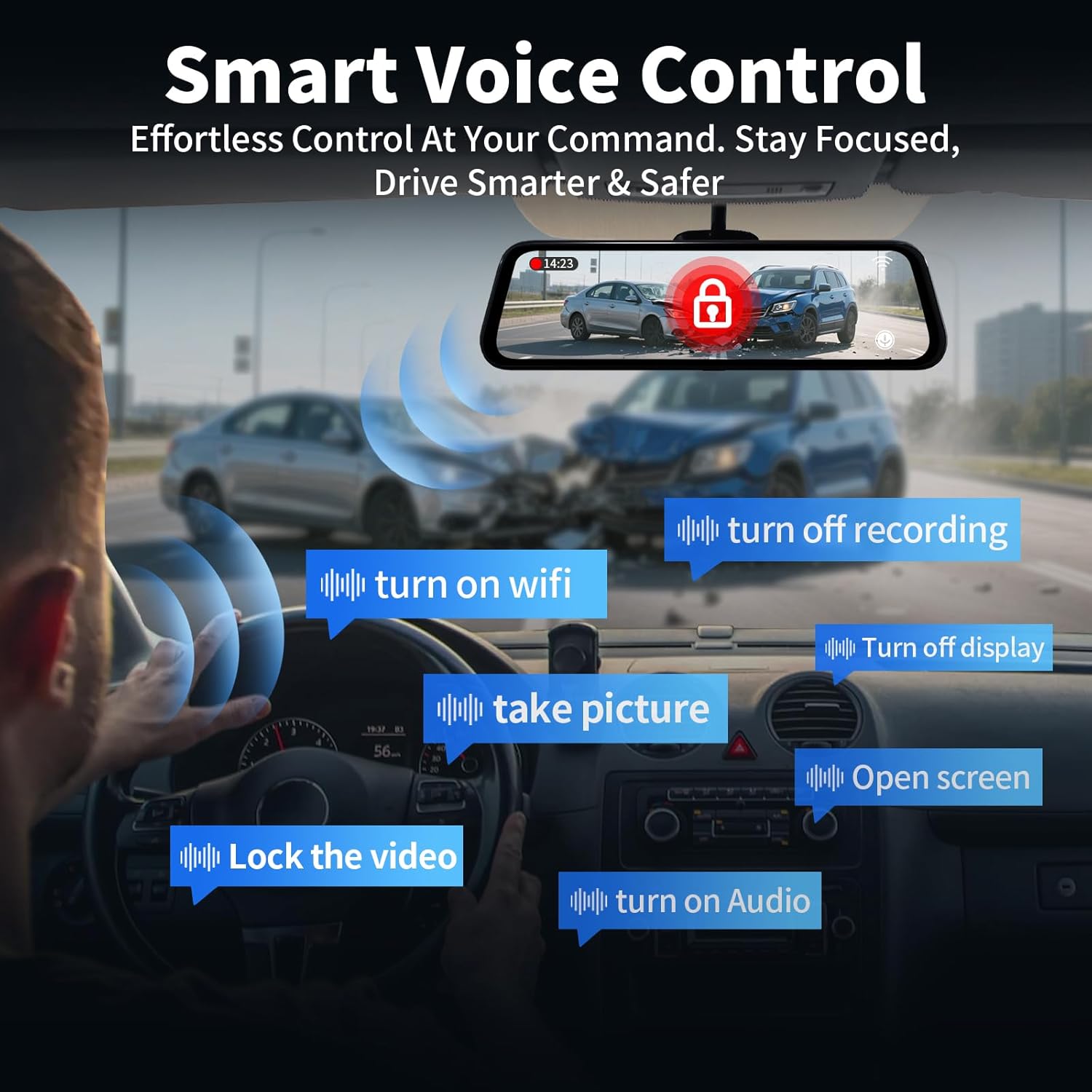
Image: The 10-inch IPS touch screen offers a clear and responsive interface for managing camera views ۽ سيٽنگون.
4.3 وائس ڪنٽرول
ڊيش ڪيم هٿ کان سواءِ آپريشن لاءِ وائس ڪمانڊ کي سپورٽ ڪري ٿو. هيٺيان ڪمانڊ استعمال ڪريو:
- "Turn off screen" / "Turn on screen"
- "Show front camera" / "Show rear camera" / "Show both cameras"
- "ويڊيو بند ڪريو"
- "تصوير ڪڍو"
- "Turn on audio" / "Turn off audio"
- "Turn on Wi-Fi" / "Turn off Wi-Fi"
- "رڪارڊنگ بند ڪريو"
- "اوپن اسڪرين"

Image: Voice control allows for hands-free operation of key dash cam functions, enhancing driving safety.
Video: Demonstration of voice control features for the QOZ 4K+2.5K Mirror Dash Cam.
4.4 Built-in Wi-Fi & APP Control
Connect the dash cam to your smartphone via Wi-Fi using the dedicated app (available on iOS and Android). Through the app, you can view زنده فوtage, playback recorded videos, manage settings, and download files directly to your device. This allows for easy sharing of travel experiences.
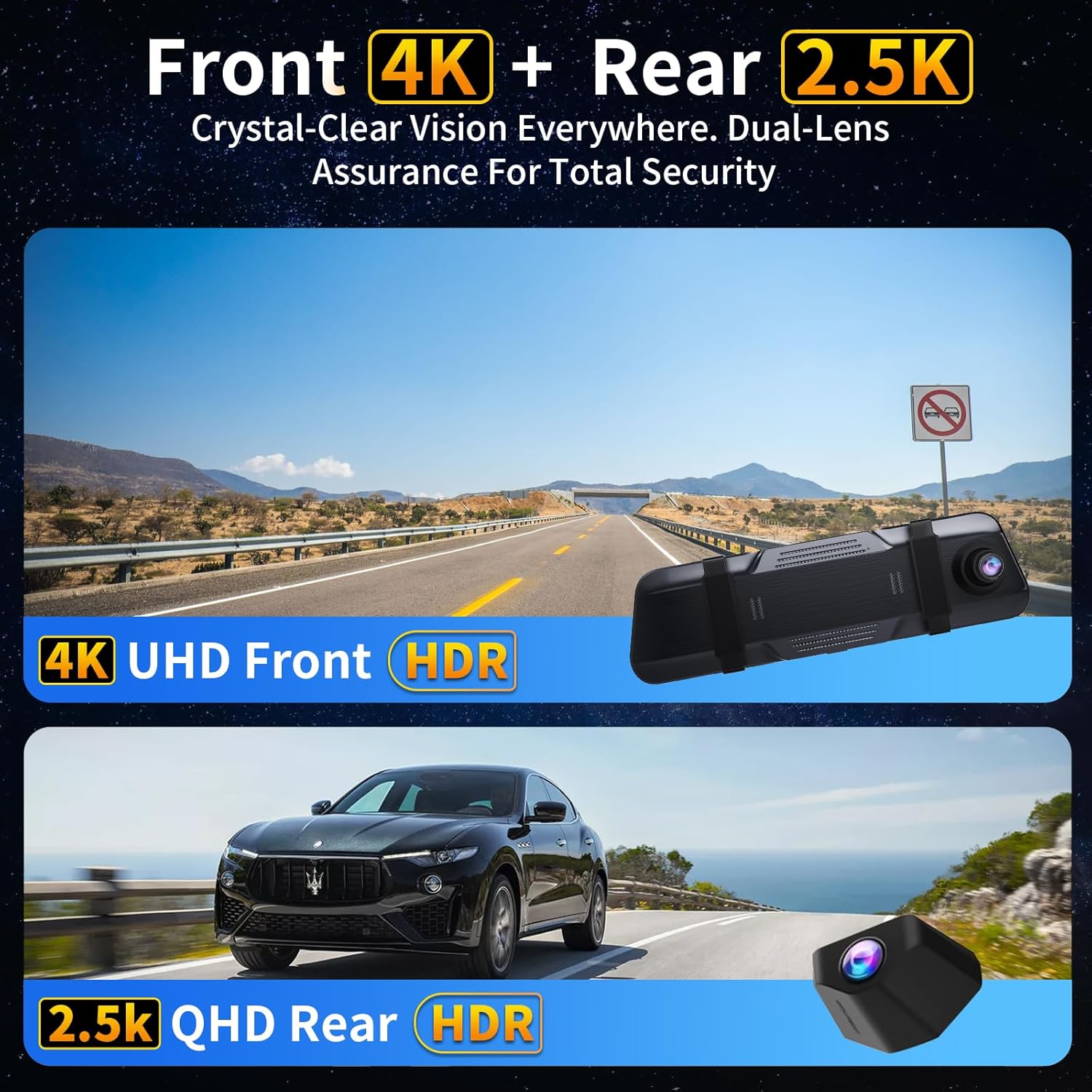
Image: The dash camera connects to a smartphone app via 5.8GHz Wi-Fi for viewing, playback, and management.
4.5 لوپ رڪارڊنگ
The dash cam continuously records video in segments (e.g., 1, 2, or 5 minutes). When the SD card is full, the oldest unlocked files are automatically overwritten to ensure uninterrupted recording. Locked files اوور رائٽ ٿيڻ کان محفوظ آهن.
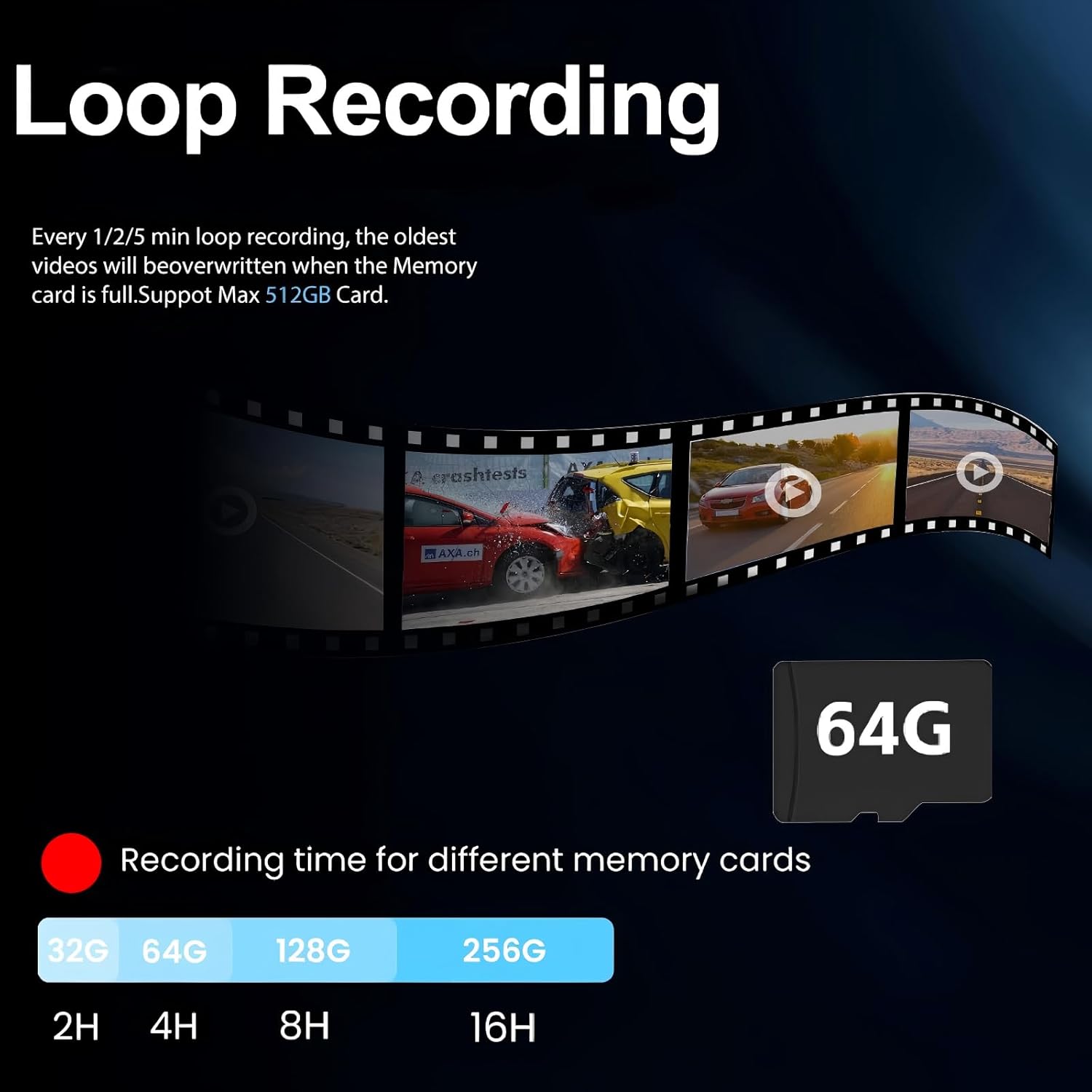
Image: Loop recording ensures continuous video capture by overwriting the oldest files جڏهن ميموري ڪارڊ مڪمل آهي.
4.6 جي-سينسر (ايمرجنسي رڪارڊنگ)
The built-in G-Sensor detects sudden impacts or collisions. When triggered, it automatically locks the current video segment, preventing it from being overwritten by loop recording. These locked files serve as crucial evidence in case of an accident.

Image: The G-Sensor automatically locks video footage upon detecting a collision, securing important evidence.
4.7 24H Parking Monitor
With the optional hardwire kit (ASIN: B0DCYYLL6T, sold separately), the dash cam can monitor your vehicle 24 hours a day. It detects collisions, vandalism, or suspicious activity while parked and automatically saves critical video clips to the memory card.

Image: The 24-hour parking monitor provides continuous surveillance, requiring an optional hardwire kit.
4.8 WDR & Super Night Vision
The Wide Dynamic Range (WDR) technology balances exposure in varying light conditions, preventing overexposure in bright areas and underexposure in dark areas. Super Night Vision enhances clarity in low-light environments, ensuring sharp details like license plates are captured 24/7.
Image: WDR and Super Night Vision technologies ensure clear and detailed recordings in various lighting conditions, day or night.
4.9 Adjustable Rear Cam Display
The rear camera display can be adjusted to adapt to different installation methods and vehicle types. Options include vertical flip and mirror flip to ensure the correct orientation of the rear view.

Image: The adjustable rear camera display allows for various viewing orientations, including vertical and mirror flips.
5. سار سنڀال
- SD ڪارڊ فارميٽ: Regularly format the Micro SD card (at least once a month) to ensure optimal performance and prevent data corruption. This can usually be done through the dash cam's settings menu.
- صفائي: Use a soft, dry cloth to clean the screen and camera lenses. Avoid using abrasive cleaners or solvents.
- فرم ويئر اپڊيٽس: ٺاهيندڙ جي چيڪ ڪريو webتوهان جي ڊوائيس ۾ جديد خاصيتون ۽ بگ فڪسس کي يقيني بڻائڻ لاءِ فرم ويئر اپڊيٽس لاءِ وقتاً فوقتاً سائيٽ چيڪ ڪريو.
6. مسئلا حل ڪرڻ
- "SD Card Full" Error: If you encounter this message, ensure loop recording is enabled. If it persists, format the SD card. If the issue continues, the SD card may be faulty and require replacement.
- ڊيش ڪيم آن نه ٿي رهيو آهي: Check the car charger connection and ensure the vehicle's 12V power outlet is functioning.
- خراب وڊيو معيار: Ensure camera lenses are clean. Check the recording resolution settings (set to 4K front and 2.5K rear for optimal quality).
- GPS ٽريڪ نه ٿي رهيو آهي: Ensure the GPS module is properly connected and placed in an area with clear sky view.
7. وضاحتون
| ماڊل نالو | V969-وائس ڪنٽرول مرر ڊيش ڪيم |
| پيداوار جي ماپ | 10 x 1 x 4 انچ |
| شيءِ جو وزن | 1.98 پائونڊ |
| وڊيو ڪيپچر ريزوليوشن | 4K Front + 2.5K Rear |
| جو ميدان View | 170 Degrees (Front) + 150 Degrees (Rear) |
| رابطي ٽيڪنالاجي | وائي فائي (5.8GHz) |
| خاص خاصيتون | App Control, Built-In Display, Built-In GPS, Night Vision, Parking Monitor, Voice Control, Loop Recording, G-Sensor, WDR |
| شامل اجزاء | Car Charger, Charging Cable, Installation Tool, User Manual, 64GB Card, GPS Module |
8. وارنٽي ۽ سپورٽ
For warranty information, technical support, or any inquiries regarding your QOZ V969 Mirror Dual Dash Camera, please contact the manufacturer directly. Refer to the contact information provided in the product packaging or on the official QOZ webسائيٽ.


