1. تعارف
The BLUETTI B300K is a 2764.8Wh LiFePO4 battery pack designed to expand the capacity of compatible BLUETTI solar generators, specifically the BLUETTI Apex 300. This battery pack provides additional energy storage for various applications, including home backup, emergency power, and off-grid use. It features advanced battery cell technology and a robust design for reliable performance.
2. حفاظتي ھدايتون
For safe operation and to prevent damage, always adhere to the following guidelines. Refer to the comprehensive user manual of your primary BLUETTI Apex 300 solar generator for detailed safety instructions and warnings.
- حصو نه جدا ، مرمت ، يا تبديل ڪريو.
- يونٽ کي باهه، پاڻي ۽ انتهائي گرمي پد کان پري رکو.
- استعمال ۽ چارج ڪرڻ دوران مناسب وينٽيليشن کي يقيني بڻايو وڃي.
- Use only BLUETTI-approved cables and accessories.
- ٻارن ۽ پالتو جانورن جي پهچ کان پري رکو.
The B300K utilizes ultra-safe LiFePO4 battery cells and a premium Battery Management System (BMS) for enhanced reliability and durability.
3. پيڪيج مواد
پيڪنگ ڪرڻ وقت پڪ ڪريو ته سڀئي شيون موجود آهن:
- BLUETTI B300K Expansion Battery (x1)
- CA90 Battery Extension Cable for BLUETTI Apex 300 (x1)
- User Manual (this document) (x1)

Figure 3.1: BLUETTI B300K Package Contents. Includes the B300K battery unit, the CA90 battery extension cable, and the user manual.
4. مصنوعات جون خاصيتون
- Universal Expansion Compatibility: The B300K seamlessly connects with the Apex 300 through its dedicated expansion port, allowing for flexible capacity upgrades.
- Next-Generation LiFePO4 Cells: Equipped with advanced cells providing at least 4,000 cycles to 80% capacity, offering extended lifespan and improved performance at high temperatures.
- Next-Gen Design Architecture 2.0: Features a wireless internal design that minimizes the risk of failure and maximizes space efficiency, contributing to a more compact and portable product.
- Built-In USB Charging Port: Includes a USB-A 12W charging port for direct device charging, functioning as a large power bank.
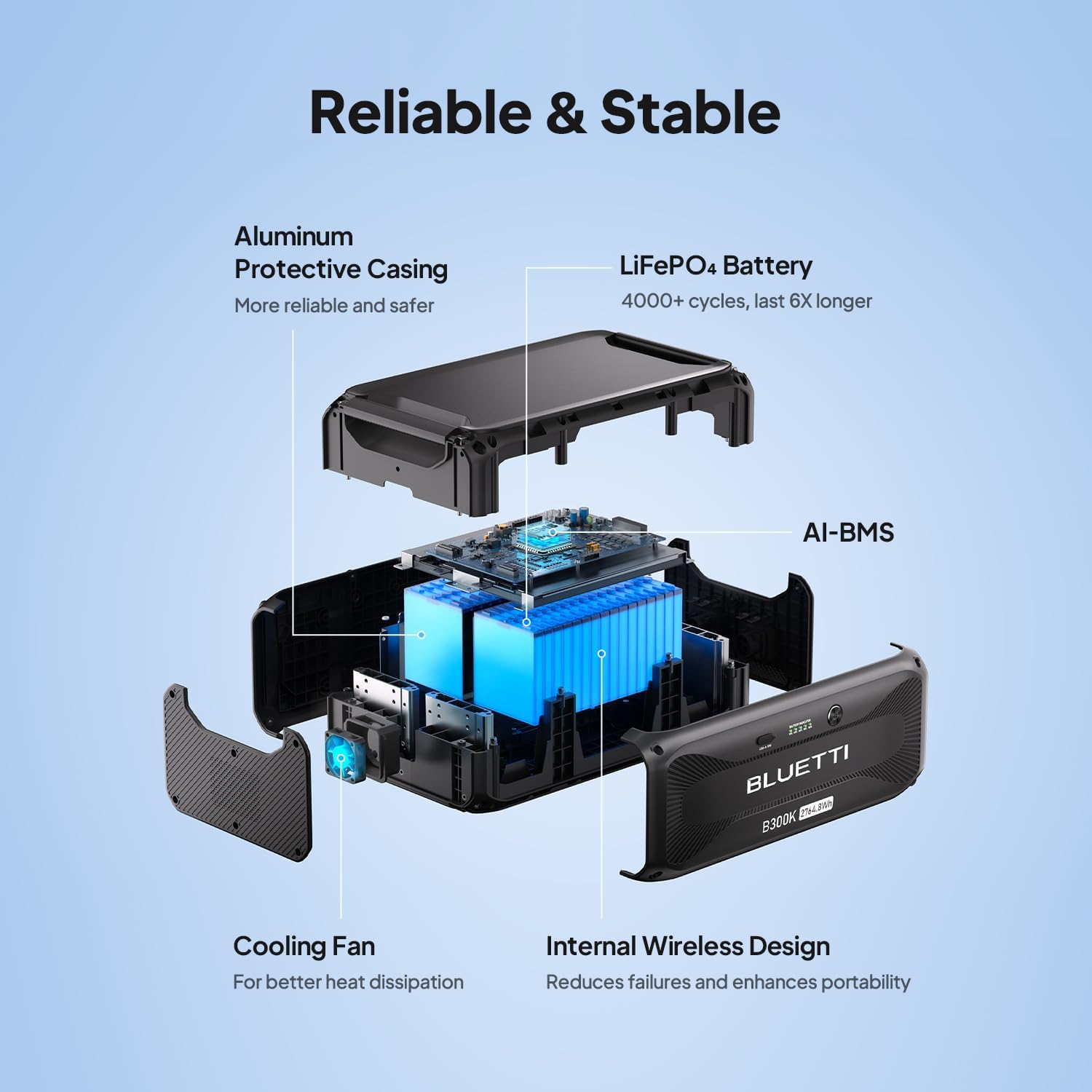
Figure 4.1: Internal components of the BLUETTI B300K, highlighting its robust and efficient design.
5. سيٽ اپ ۽ ڪنيڪشن
The B300K is designed for straightforward integration with your BLUETTI Apex 300. Ensure both units are powered off before making connections.
- Locate the expansion port on your BLUETTI Apex 300 and the corresponding port on the B300K.
- Connect the two units using the provided CA90 battery extension cable. Ensure the connection is secure.
- Once connected, the B300K will be recognized by the Apex 300, expanding its total battery capacity.

Figure 5.1: Modular power expansion with the BLUETTI B300K and Apex 300.

شڪل 5.2: مثالample of a large-scale power setup with multiple B300K units.
6. آپريٽنگ هدايتون
The B300K operates in conjunction with your BLUETTI Apex 300. Power management and output functions are primarily controlled via the Apex 300 unit.
- پاور آن / آف: To activate the B300K, press and hold its power button for approximately 3 seconds. The battery indicator lights will illuminate.
- چارج ڪرڻ: The B300K charges automatically when connected to a powered-on Apex 300 unit. The Apex 300 can be charged via solar panels, AC wall outlet, or other compatible sources.
- يو ايس بي آئوٽ: The integrated USB-A port (12W) on the B300K can be used to charge small electronic devices directly.
- نگراني: Monitor the B300K's status and charge level through the display on your connected Apex 300 unit or via the BLUETTI smartphone application.

Figure 6.1: The B300K functioning as a power bank for portable devices.
Video 6.1: Official BLUETTI video demonstrating the Apex 300 and its modular power expansion capabilities, which includes the B300K battery pack. This video illustrates various use cases and the system's versatility for home and outdoor power needs.
7. سار سنڀال ۽ سنڀال
Proper maintenance ensures the longevity and optimal performance of your B300K battery pack.
- بيٽري جي عمر: The B300K is designed to provide at least 4,000 charge cycles to 80% of its original capacity. This means it can be fully charged and discharged thousands of times before significant degradation occurs.
- اسٽوريج: If storing the unit for an extended period, ensure it is charged to approximately 50-80% and stored in a cool, dry place away from direct sunlight. Recharge every 3-6 months to maintain battery health.
- صفائي: يونٽ جي ٻاهرين حصي کي صاف ڪرڻ لاءِ سڪل، نرم ڪپڙو استعمال ڪريو. سخت ڪيميڪل يا رگڙيندڙ مواد استعمال نه ڪريو.
8. مسئلا حل ڪرڻ
If you encounter issues with your B300K, consider the following general troubleshooting steps:
- يونٽ پاور نه آهي: Ensure the power button is pressed and held for 3 seconds. Verify the unit has sufficient charge.
- چارج نه ٿيڻ: Check all cable connections between the B300K and the Apex 300. Ensure the Apex 300 is functioning correctly and receiving power from its input source.
- ڪنيڪشن جا مسئلا: Disconnect and reconnect the CA90 cable. Ensure the ports are clean and free of debris.
For more specific issues or persistent problems, refer to the troubleshooting section of your BLUETTI Apex 300 user manual or contact BLUETTI customer support.
9. ٽيڪنيڪل وضاحتون
| تفصيل | تفصيل |
|---|---|
| ماڊل | بي 300 ڪي |
| ظرف | 2764.8 واٽ ڪلاڪ |
| بيٽري جو قسم | LiFePO4 |
| سائيڪل زندگي | 80٪ گنجائش تائين 4,000+ سائيڪلون |
| شيءِ جو وزن | 65 پائونڊ (تقريبن 29.5 ڪلوگرام) |
| پيداوار جي ماپ (L x W x H) | 20.67" x 12.87" x 8.23" (تقريبن 52.5 سينٽي ميٽر x 32.7 سينٽي ميٽر x 20.9 سينٽي ميٽر) |
| USB-اي آئوٽ | 12W |
| مطابقت | BLUETTI Apex 300 Solar Generator |
10. وارنٽي ۽ سپورٽ
The BLUETTI B300K comes with a 3-year coverage period. For any inquiries, technical assistance, or warranty claims, please contact BLUETTI customer support through their official channels. BLUETTI maintains widespread sales and after-service networks to assist users.
For the most up-to-date support information, visit the official BLUETTI webسائيٽ تي وڃو يا پنهنجي پراڊڪٽ پيڪنگنگ ۾ ڏنل رابطي جي تفصيلن جو حوالو ڏيو.


