1. تعارف
This manual provides essential information for using your Redmi 15 5G smartphone. Please read it carefully to ensure proper operation and to maximize the device's features. Keep this manual for future reference.

تصوير: اڳيان ۽ پوئتي view of the Redmi 15 5G smartphone.
2. دٻي ۾ ڇا آهي
پڪ ڪريو ته سڀئي شيون توهان جي پراڊڪٽ پيڪيج ۾ موجود آهن:
- Redmi 15 5G اسمارٽ فون
- چارجر
- USB ڪيبل
- SIM Eject Tool
- وارنٽي ڪارڊ
- يوزر گائيڊ (هي دستاويز)
- حفاظتي ڪيس
3. ڊوائيس اوورview
Familiarize yourself with the physical components of your Redmi 15 5G.
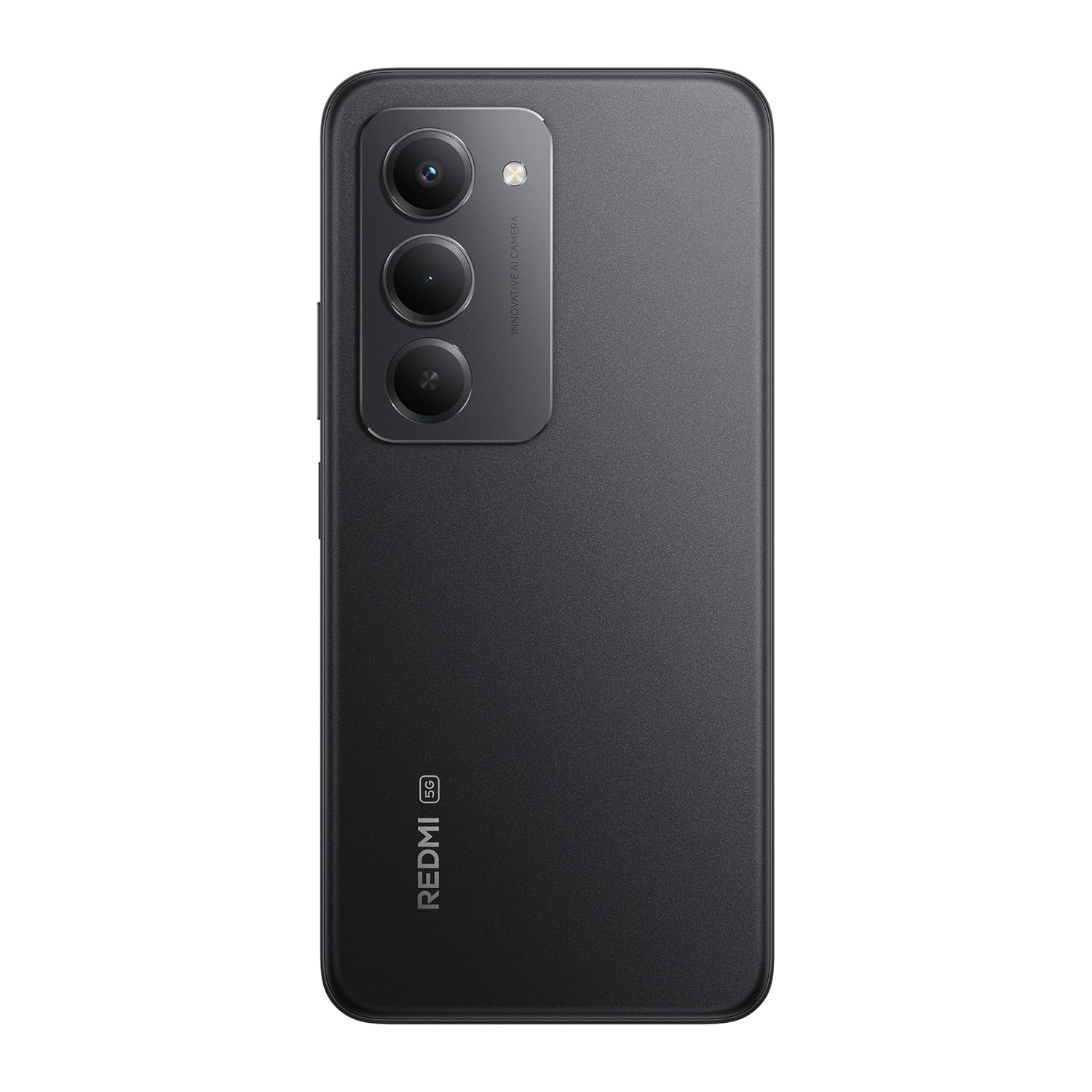
تصوير: پوئين پاسي view of the Redmi 15 5G, highlighting the camera array.

تصوير: پاسي view of the Redmi 15 5G, illustrating button placement.
اهم خاصيتون:
- ڏيکاريو: 17.53cm (6.9") FHD+ display with up to 144Hz refresh rate.
- پروسيسر: Qualcomm Snapdragon 6s Gen 3.
- ڪئميرا: 50MP AI Dual Camera system.
- بيٽري: Massive 7000mAh battery with 33W charging and 18W reverse charging.
- استحڪام: IP64 مٽي ۽ پاڻي جي مزاحمت.
- آپريٽنگ سسٽم: Xiaomi HyperOS سان Android 15.
4. سيٽ اپ
4.1. سم/ايس ڊي ڪارڊ داخل ڪرڻ
- پنهنجي ڊوائيس جي پاسي تي سم ڪارڊ ٽري ڳوليو.
- Insert the SIM eject tool into the small hole next to the tray and press firmly until the tray pops out.
- پنهنجا نانو-سم ڪارڊ ۽/يا مائڪرو ايس ڊي ڪارڊ ٽري تي مقرر ڪيل سلاٽ ۾ رکو. پڪ ڪريو ته سون جا رابطا هيٺئين طرف هجن.
- احتياط سان ٽري کي واپس ڊوائيس ۾ دٻايو جيستائين اهو جاء تي ڪلڪ ڪري.
4.2. شروعاتي پاور آن ۽ سيٽ اپ
- Press and hold the Power button (located on the side) until the Redmi logo appears.
- پنهنجي ٻولي، علائقو چونڊڻ، وائي فائي سان ڳنڍڻ، ۽ پنهنجو گوگل اڪائونٽ سيٽ اپ ڪرڻ لاءِ اسڪرين تي ڏنل هدايتن تي عمل ڪريو.
- You will be guided through setting up security features like fingerprint unlock or facial recognition.
4.3. ڊوائيس کي چارج ڪرڻ
پهرين استعمال کان اڳ، توهان جي ڊوائيس کي مڪمل طور تي چارج ڪرڻ جي صلاح ڏني وئي آهي.
- USB ڪيبل کي چارجر سان ڳنڍيو.
- چارجر کي پاور آئوٽليٽ ۾ لڳايو.
- Connect the USB cable to the Type-C port at the bottom of your phone.
- چارجنگ انڊيڪيٽر اسڪرين تي ظاهر ٿيندو.

Image: Illustration of 18W reverse charging capability.
5. توهان جي ڊوائيس کي هلائڻ
5.1. بنيادي نيويگيشن
- ڇڪڻ: ايپ کولڻ لاءِ آئڪن تي ٽيپ ڪريو يا ڪا شيءِ چونڊيو.
- سوائپ Slide your finger across the screen to scroll or navigate between screens.
- چٽيو: تصويرن کي زوم ان يا آئوٽ ڪرڻ لاءِ ٻه آڱريون استعمال ڪريو ۽ web صفحا.
- اشارو: Configure navigation gestures in Settings for a full-screen experience.
5.2. ڪال ڪرڻ ۽ پيغام موڪلڻ
- کوليو فون app to dial numbers or select contacts.
- کوليو نياپا app to compose and send text messages.
5.3. ڪئميرا جو استعمال
The Redmi 15 5G features a 50MP AI Dual Camera.
- کوليو ڪئميرا ايپ.
- Select your desired mode (Photo, Portrait, Video, etc.).
- تصويرون ڪڍڻ يا وڊيو رڪارڊنگ شروع/بند ڪرڻ لاءِ شٽر بٽڻ تي ٽيپ ڪريو.
- Utilize AI features like AI Sky and AI Erase for enhanced photography.

Image: Close-up of the 50MP AI Dual Camera module.

Image: Demonstrating AI Sky and AI Erase camera capabilities.
5.4. بيٽري جو انتظام
Your device is equipped with a 7000mAh battery.
- To check battery status, go to سيٽنگون > بيٽري.
- Enable Battery Saver mode to extend battery life.
- The device supports 33W fast charging and 18W reverse charging.

Image: Battery performance metrics for the 7000mAh battery.
5.5. ڪنيڪشن
- وائي فائي: وائرليس نيٽ ورڪن سان ڳنڍيو ذريعي سيٽنگون > وائي فائي.
- بلوٽوٿ: ٻين بلوٽوٿ ڊوائيسز سان جوڙيو ذريعي سيٽنگون > بلوٽوت.
- موبائل ڊيٽا: Manage your cellular data connection via سيٽنگون > موبائل نيٽ ورڪ.
5.6. Software (Android 15 with Xiaomi HyperOS)
Your Redmi 15 5G runs on Android 15 with Xiaomi HyperOS, offering a customized user experience and regular security updates.

Image: Software update policy for Xiaomi HyperOS.
6. سار سنڀال
6.1. توهان جي ڊوائيس کي صاف ڪرڻ
- اسڪرين ۽ جسم کي صاف ڪرڻ لاءِ نرم، لِنٽ کان پاڪ ڪپڙو استعمال ڪريو.
- سخت ڪيميائي يا ٻرندڙ مواد استعمال ڪرڻ کان پاسو ڪريو.
- صفائي کان پهريان ڊوائيس کي طاقت کان ڌار ڪريو.
6.2. سافٽ ويئر اپڊيٽ
Regularly check for software updates to ensure optimal performance and security.
- ڏانهن وڃو سيٽنگون > فون بابت > MIUI ورجن.
- ٽيپ ڪريو تازه ڪاري لاء چيڪ ڪريو.
- ڪنهن به دستياب اپڊيٽ کي ڊائون لوڊ ۽ انسٽال ڪرڻ لاءِ اسڪرين تي ڏنل هدايتن تي عمل ڪريو.
6.3. بيٽري جي سنڀال
- ڊوائيس کي انتهائي گرمي پد تي ظاهر ڪرڻ کان بچاء.
- بيٽري کي بار بار مڪمل طور تي ختم نه ٿيڻ ڏيو.
- Use only the official charger and cable provided.
6.4. Dust and Water Resistance (IP64)
The Redmi 15 5G is rated IP64 for dust and water resistance. This means it is protected against dust ingress and splashing water from any direction. However, it is not designed for submersion in water. Avoid exposing the device to high-pressure water or prolonged submersion.

Image: Durability features including IP64 dust and water resistance.
7. مسئلا حل ڪرڻ
جيڪڏهن توهان کي پنهنجي ڊوائيس سان مسئلا درپيش اچن ٿا، ته هيٺ ڏنل حل آزمايو:
- ڊوائيس چالو نه آهي: پڪ ڪريو ته بيٽري چارج ٿيل آهي. چارجر کي ڳنڍيو ۽ ٻيهر پاور آن ڪرڻ جي ڪوشش ڪرڻ کان اڳ ڪجھ منٽ انتظار ڪريو.
- چارج ڪرڻ جا مسئلا: Check if the charger and cable are properly connected. Try a different power outlet.
- نيٽ ورڪ مسئلا: Ensure your SIM card is correctly inserted. Check network settings in سيٽنگون > موبائل نيٽ ورڪ. Restart the device.
- ايپ جواب نه ڏئي رهي آهي: Force close the app from the recent apps screen or go to Settings > Apps > [App Name] > Force stop.
- سست ڪارڪردگي: Clear cache, uninstall unused apps, or restart the device.
- فيڪٽري ريسٽ: As a last resort, you can perform a factory reset (سيٽنگون> فون بابت> فيڪٽري ري سيٽ). خبردار: اهو توهان جي ڊوائس تي سڀ ڊيٽا ختم ڪري ڇڏيندو. اڳتي وڌڻ کان اڳ اهم ڊيٽا جو بيڪ اپ وٺو.
8. وضاحتون
| خاصيت | تفصيل |
|---|---|
| آپريٽنگ سسٽم | Android 15, Xiaomi HyperOS |
| رام | 6 جي بي |
| پيداوار جي ماپ | 16.8 x 0.8 x 8 سينٽي |
| شيون ماڊل نمبر | 25057RN09I |
| ڪنيڪشن ٽيڪنالاجيز | بلوٽوٿ، يو ايس بي، وائي فائي |
| خاص خاصيتون | Dust resistance, Water resistance (IP64) |
| ڊسپلي قرارداد | 1080 x 2340 پکسلز |
| آڊيو جيڪ | قسم سي |
| رنگ | اڌ رات جو ڪارو |
| بيٽري پاور ريٽنگ | 7000 mAh |
| شيءِ جو وزن | 217 جي |
| سي پي يو اسپيڊ | 2.3 GHz تائين |
9. وارنٽي ۽ سپورٽ
9.1. وارنٽي ڄاڻ
Your Redmi 15 5G comes with a limited manufacturer's warranty. Please refer to the وارنٽي ڪارڊ included in your product package for detailed terms and conditions, including coverage period and service procedures.
9.2. ڪسٽمر سپورٽ
For further assistance, technical support, or service inquiries, please visit the official Redmi support website or contact their customer service. Contact details can typically be found on the warranty card or the official Redmi webسائيٽ.


