1. تعارف
This manual provides detailed instructions for the installation, operation, and maintenance of your MUBVIEW Bell J7 2K Wireless Video Doorbell Camera with Chime. Please read this manual thoroughly before using the product to ensure proper function and safety. This device is designed to enhance your home security with advanced features like 2K video, motion detection, and two-way audio.
2. دٻي ۾ ڇا آهي
انسٽاليشن سان اڳتي وڌڻ کان اڳ پڪ ڪريو ته سڀئي جزا موجود آهن:
- Camera Doorbell x1
- Chime x1
- يوزر مينوئل x1
- چارجنگ ڪيبل x1
- بيٽري x3
- Other Accessories (screws, anchors, screwdriver)

Image: Contents of the MUBVIEW Bell J7 package, including the doorbell, chime, and installation tools.
3. پراڊڪٽ ختمview
Familiarize yourself with the main parts of your video doorbell and chime:
دروازي جي ڪئميرا
- 2K Camera Lens: هاءِ ريزوليوشن وڊيو ڪيپچر ڪري ٿو.
- پي آءِ آر موشن سينسر: Detects human movement.
- مائڪروفون: ٻه طرفي آڊيو رابطي لاء.
- اسپيڪر: For two-way audio communication and siren.
- دروازي جو بٽڻ: گھنٽي کي چالو ڪري ٿو ۽ اطلاع موڪلي ٿو.
- Micro USB-C Port: اندروني بيٽري چارج ڪرڻ لاءِ.
- ري سيٽ بٽڻ: For device reset.
- مائڪرو ايس ڊي ڪارڊ سلاٽ: For local video storage (up to 128GB, card not included).
- Anti-Theft Button: Triggers an alarm if the doorbell is removed from its mount.
وائرليس چيم
- اسپيڪر: Emits doorbell sound.
- حجم ڪنٽرول: Adjusts chime volume.
- ٽون چونڊيندڙ: Changes chime melody.
- طاقت جو ذريعو: بيٽري تي هلندڙ لچڪدار جڳهه لاءِ.

تصوير: سامهون view of the MUBVIEW Bell J7 doorbell and chime.
4. سيٽ اپ
Follow these steps to set up your MUBVIEW Bell J7 doorbell camera:
4.1 دروازي جي گھنٽي کي چارج ڪرڻ
- Before first use, fully charge the doorbell camera using the provided USB charging cable.
- The charging port is located on the side of the doorbell, protected by a rubber flap.
- A full charge can last up to 180 days, depending on usage.
4.2 ايپ جي انسٽاليشن ۽ وائي فائي ڪنيڪشن
- ڊائون لوڊ ڪريو ڪلائوڊ ايج or MUBVIEW app from your smartphone's app store (Apple App Store or Google Play Store).
- Register for an account or log in if you already have one.
- پڪ ڪريو ته توهان جو اسمارٽ فون هڪ سان ڳنڍيل آهي 2.4GHz وائي فائي نيٽ ورڪ. The doorbell is not compatible with 5GHz Wi-Fi.
- In the app, select "Add Device" and choose "Smart Video Doorbell".
- Follow the on-screen prompts to connect the doorbell to your Wi-Fi network. This typically involves scanning a QR code displayed on your phone with the doorbell camera.
- Once connected, you can name your device and complete the setup.
4.3 دروازي جي گھنٽي لڳائڻ
The doorbell can be mounted using screws or strong adhesive tape (not included for all mounting types).
- Attach the mounting bracket to your desired location on the wall or door frame. Ensure it is at an appropriate height for optimal viewing.
- Secure the bracket using the provided screws and anchors.
- Slide the doorbell camera into the mounting bracket until it clicks securely into place.
- For added security, a small screw can be inserted from the bottom of the bracket into the doorbell to prevent easy removal.

Image: Installation of the MUBVIEW Bell J7 doorbell camera onto its mounting bracket.
5. آپريٽنگ هدايتون
5.1 زنده View ۽ ٻه طرفي آڊيو
- MUB کوليوVIEW app to access the live video feed from your doorbell camera.
- Use the microphone icon in the app to enable two-way audio and speak with visitors at your door.
- The voice changer feature can be activated for added privacy and security.

Image: Demonstrating two-way audio and voice message functionality via the app.
5.2 حرڪت جي ڳولا ۽ خبرداريون
- The doorbell features advanced PIR motion and human detection to minimize false alarms.
- When motion is detected, you will receive instant push notifications on your smartphone.
- Adjust motion detection sensitivity and set custom motion zones within the app to suit your environment.

Image: Smartphone notification for human detection from the doorbell camera.
5.3 رات جو خواب
- The doorbell camera automatically switches to IR night vision in low-light conditions.
- Enhanced night vision provides clear images up to 33 feet.
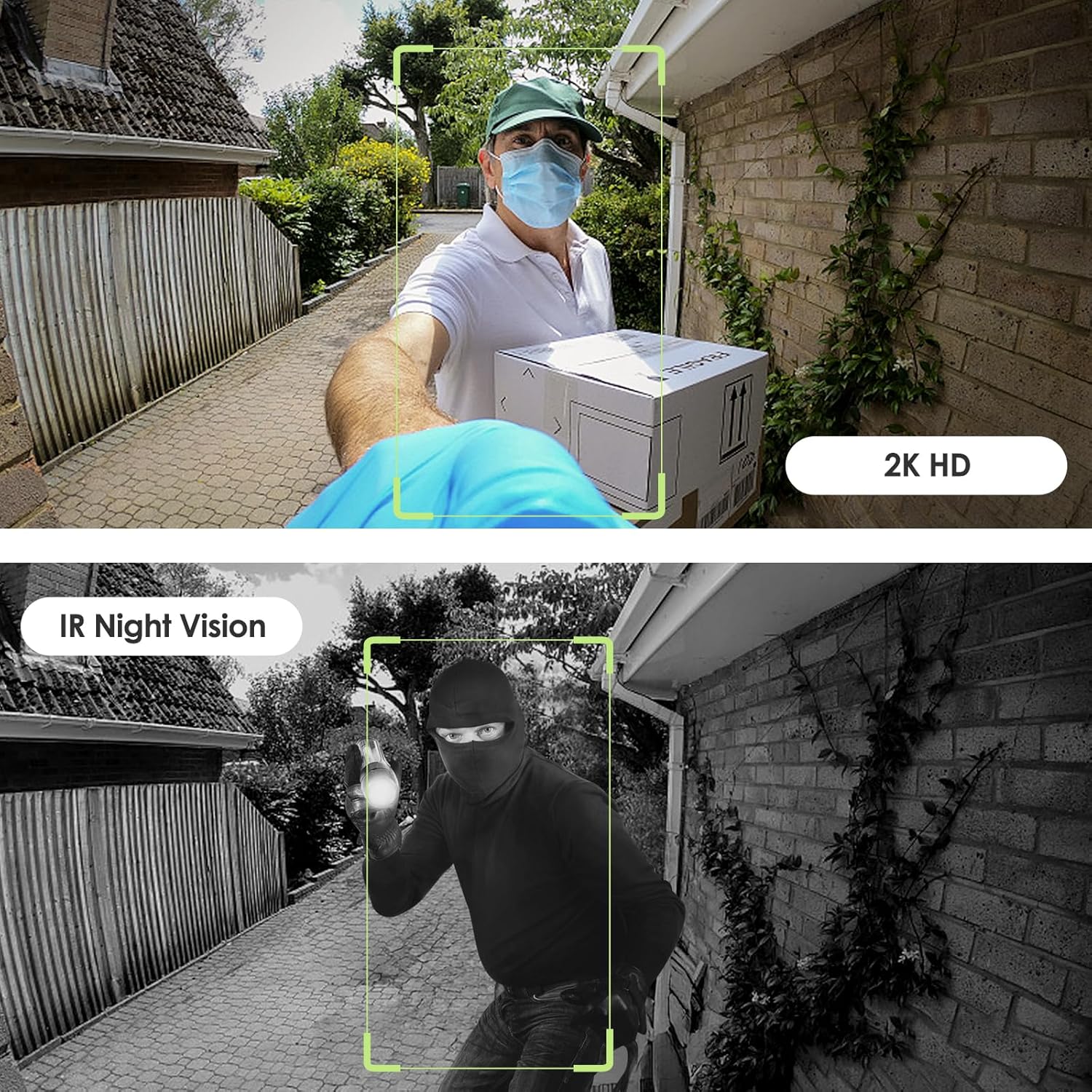
Image: Day and night vision capabilities of the MUBVIEW Bell J7 doorbell.
5.4 ويڊيو اسٽوريج
- مائڪرو ايس ڊي ڪارڊ: Insert a micro SD card (up to 128GB, not included) into the designated slot for local storage of recorded footage.
- Cloud Storage: Enjoy 7-day free cloud loop storage. Optional premium cloud storage plans are available for extended storage and features.

Image: Multiple storage options: local Micro SD card and cloud service.
6. خاصيتون
- 2K Full HD Resolution: Provides clear and detailed video.
- 145° وائڊ اينگل لينس: هڪ وسيع پيش ڪري ٿو view توهان جي دروازي کان.
- بيٽري سان هلندڙ: Ensures easy, wire-free installation.
- 2.4GHz وائي فائي ڪنيڪشن: Stable and reliable wireless connection.
- IP65 موسم جي مزاحمت: Built to withstand various outdoor conditions (rain, heat, hail, sun, dust).
- مخالف چوري الارم: Siren sounds if the doorbell is tampسان ڀريل.
- آواز مٽائيندڙ: Enhances privacy during two-way audio.
- Pre-Recorded Voice Messages: Respond quickly with custom messages.
- خانداني حصيداري: Supports up to 15 online users and 20 user accounts.
- مطابقت: Alexa ۽ گوگل اسسٽنٽ سان ڪم ڪري ٿو.

تصوير: مٿانview of MUBVIEW Bell J7 features.
7. سار سنڀال
7.1 بيٽري چارج ڪرڻ
The doorbell is powered by rechargeable batteries. Monitor the battery level through the app and recharge as needed. The battery life can extend up to 180 days on a single charge, depending on activity and settings.
7.2 صفائي
Wipe the camera lens and the doorbell's exterior with a soft, damp مٽي ۽ ملبہ هٽائڻ لاءِ ڪپڙو. سخت ڪيميڪلز يا رگڙيندڙ مواد استعمال ڪرڻ کان پاسو ڪريو جيڪي ڊوائيس کي نقصان پهچائي سگهن ٿا.
7.3 موسم جي مزاحمت
MUBVIEW Bell J7 is IP65 weather-resistant, designed to endure various outdoor conditions. However, extreme weather conditions may still impact performance or battery life.

Image: IP65 Weather Resistance of the MUBVIEW Bell J7 doorbell.
8. مسئلا حل ڪرڻ
| مسئلو | ممڪن حل |
|---|---|
| ڊور بيل وائي فائي سان ڳنڍجي نه رهي آهي | Ensure your Wi-Fi is 2.4GHz. Move the doorbell closer to your router during setup. Reset the doorbell and try again. |
| Frequent false motion alarms | Adjust the motion detection sensitivity in the app. Set custom motion zones to exclude busy areas or moving foliage. |
| غريب وڊيو معيار | ايپ ۾ پنهنجي وائي فائي سگنل جي طاقت چيڪ ڪريو. پڪ ڪريو ته ڪئميرا لينس صاف ۽ رڪاوٽن کان پاڪ آهي. |
| مختصر بيٽري جي زندگي | Reduce motion detection sensitivity or frequency of live view access. Ensure the doorbell is fully charged. |
| Anti-theft alarm not working | Ensure the anti-theft feature is enabled in the app settings. Check if the doorbell is properly seated in its mounting bracket, activating the tamper بٽڻ. |
9. وضاحتون
- ماڊل نالو: بيل جي 7
- وڊيو ڪيپچر جو حل: 2K
- رابطي ٽيڪنالاجي: وائرليس (2.4GHz وائي فائي)
- طاقت جو ذريعو: Battery Powered (3 A batteries included)
- اندروني / ٻاهرين استعمال: ٻاھران
- پاڻي جي مزاحمت جي سطح: IP65 پنروڪ
- خاص خاصيتون: 2-Way Audio, Built-In Light, HD Resolution, Image Sensor, Motion Sensor, Voice Changer, Anti-Theft Alarm
- مطابقت رکندڙ ڊوائيسز: Smartphone (via CloudEdge/MUBVIEW ايپ)
- پيداوار جي ماپ: 1.37 x 5.27 x 2.2 انچ
- شيء جو وزن: 15.4 اونس
10. وارنٽي ۽ سپورٽ
MUBVIEW is committed to providing quality products and customer satisfaction. For any inquiries or support needs, please refer to the following:
- ڪسٽمر سروس: Available via Call Service (9AM-5PM EST) and Online Email.
- واپسي: 30-day Amazon return policy applies.
- حفاظتي منصوبا: اختياري 2 سالن ۽ 3 سالن جي حفاظتي منصوبا خريداري لاءِ موجود آهن.
For detailed contact information, please visit the official MUBVIEW website or refer to the contact details provided in the product packaging.

Image: MUBVIEW Customer Service details.


