تعارف
Thank you for choosing the Geevon Mini Digital Refrigerator Thermometer. This device is designed to provide accurate temperature readings for your refrigerator or freezer, ensuring safe storage of perishable goods. Its IP65 waterproof rating and user-friendly design make it suitable for various environments, from home kitchens to commercial settings.
مھرباني ڪري پراڊڪٽ استعمال ڪرڻ کان پھريائين ھن دستوري کي احتياط سان پڙھو ته جيئن صحيح آپريشن کي يقيني بڻائي سگھجي ۽ ان جي عمر وڌ کان وڌ ڪري سگھجي.
حفاظت جي ڄاڻ
- Do not expose the device to extreme temperatures outside its operating range (-30°C to 50°C / -22°F to 122°F).
- Keep the device away from strong magnetic fields, which may affect its accuracy.
- ڊوائيس کي ڌار ڪرڻ يا تبديل ڪرڻ جي ڪوشش نه ڪريو. اهو وارنٽي کي رد ڪري ڇڏيندو ۽ نقصان پهچائي سگھي ٿو.
- مقامي ضابطن مطابق بيٽرين کي ضايع ڪريو. بيٽرين کي نه ساڙيو.
- Keep out of reach of children to prevent accidental ingestion of small parts or batteries.
پيداوار ختمview
The Geevon Mini Digital Refrigerator Thermometer features a clear LCD display, simple controls, and versatile mounting options. It is designed for reliable temperature monitoring in various cold storage environments.
اهم خاصيتون:
- Accurate Temperature Measurement: Provides precise readings within -30°C to 50°C (-22°F to 122°F) with an accuracy of ±1°C (±2°F).
- وڏي LCD ڊسپلي: Easy-to-read screen shows current, maximum, and minimum temperatures.
- IP65 پنروڪ ڊيزائن: Ensures reliable performance in humid or wet conditions.
- Max/Min Temperature Record: Tracks the highest and lowest temperatures recorded since the last reset.
- Switchable Units: آساني سان سيلسيس (°C) ۽ فارنهائيٽ (°F) جي وچ ۾ سوئچ ڪريو.
- ورسٽائل چڙهڻ: Features a magnetic back, a stable kickstand, and a hanging hook for flexible placement.
- سادي آپريشن: Three-button interface for power, unit change, and Max/Min reset.
اجزاء:
- Digital Thermometer Unit
- CR2032 Button Cell Battery (pre-installed or included)
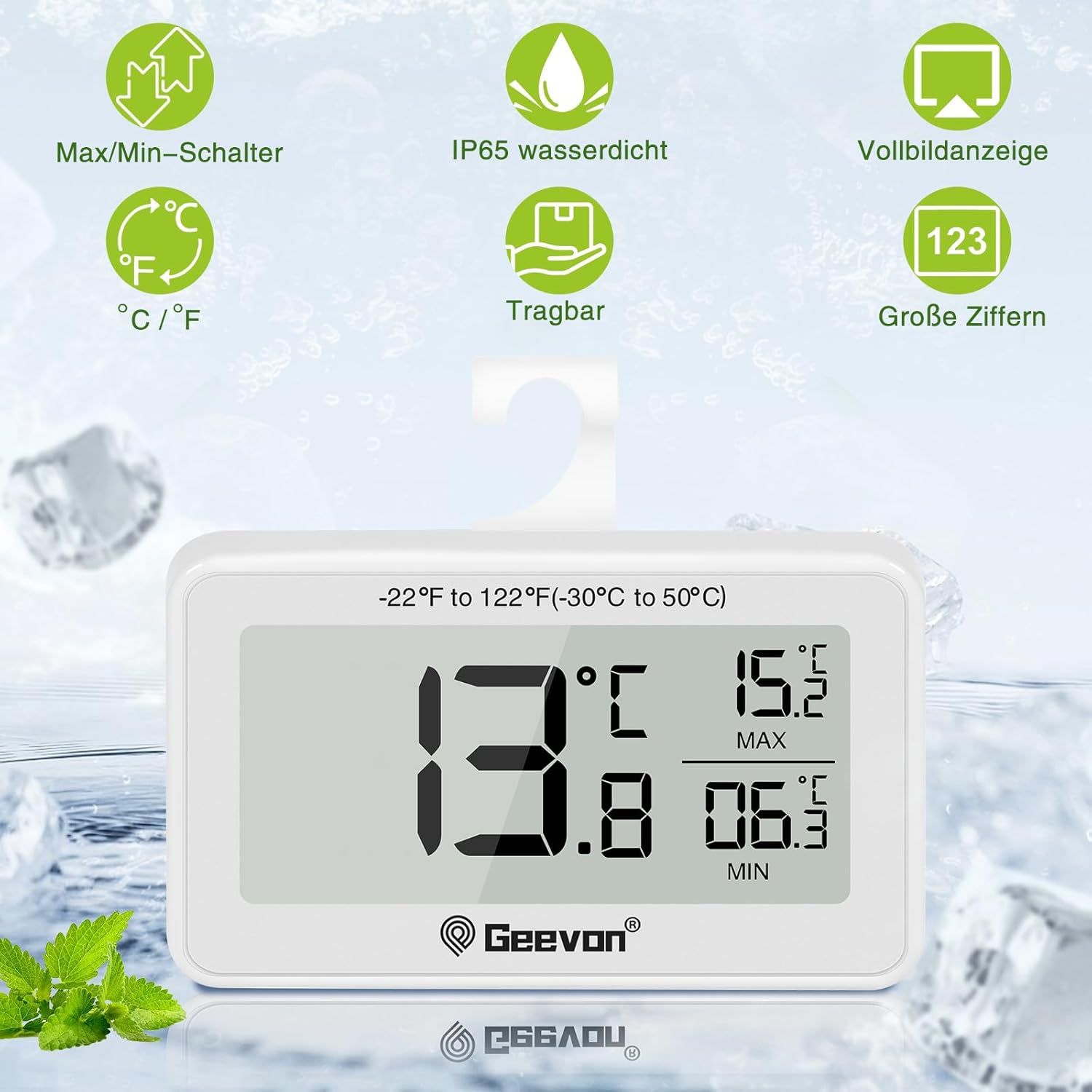
شڪل 1: سامهون view of the thermometer displaying current, maximum, and minimum temperatures. The display shows 13.8°C as current, 15.2°C as MAX, and 06.3°C as MIN. Icons for Max/Min switch, IP65 waterproof, full screen display, °C/°F switch, portable, and large digits are visible above the device.
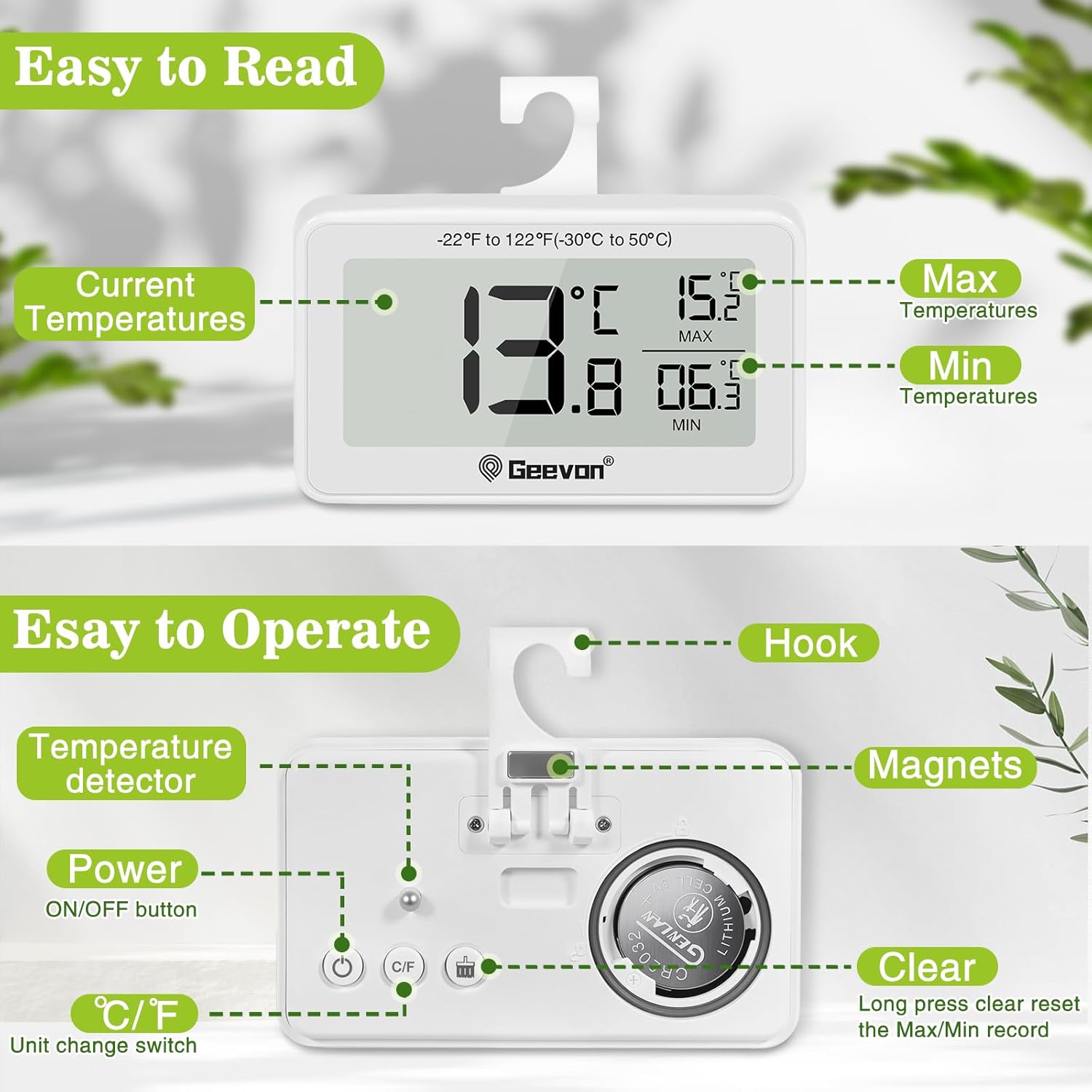
شڪل 2: پوئتي view of the thermometer highlighting the hook, magnets, temperature detector, ON/OFF button, °C/°F unit change switch, and the clear (Max/Min reset) button. The battery compartment for the CR2032 battery is also visible.
سيٽ اپ ڪريو
1. Battery Installation/Activation:
The thermometer typically comes with a CR2032 button cell battery pre-installed. If the display is not active, you may need to remove a plastic insulation tab from the battery compartment or install a new battery.
- ڊوائيس جي پٺي تي بيٽري جي خاني کي ڳولھيو.
- Use a coin or a small screwdriver to twist the battery cover counter-clockwise to open.
- Remove any plastic insulation tab if present.
- هڪ نئين CR2032 بيٽري داخل ڪريو جنهن جو مثبت (+) پاسو مٿي هجي.
- Replace the battery cover and twist clockwise to secure.

Figure 3: Battery replacement guide. The image illustrates how to open and close the battery compartment by twisting the cover. It also notes that unscrewing is not required.
2. Initial Placement:
Once the battery is installed, the thermometer will power on automatically and display the current temperature. Place the thermometer in your desired location within the refrigerator or freezer.
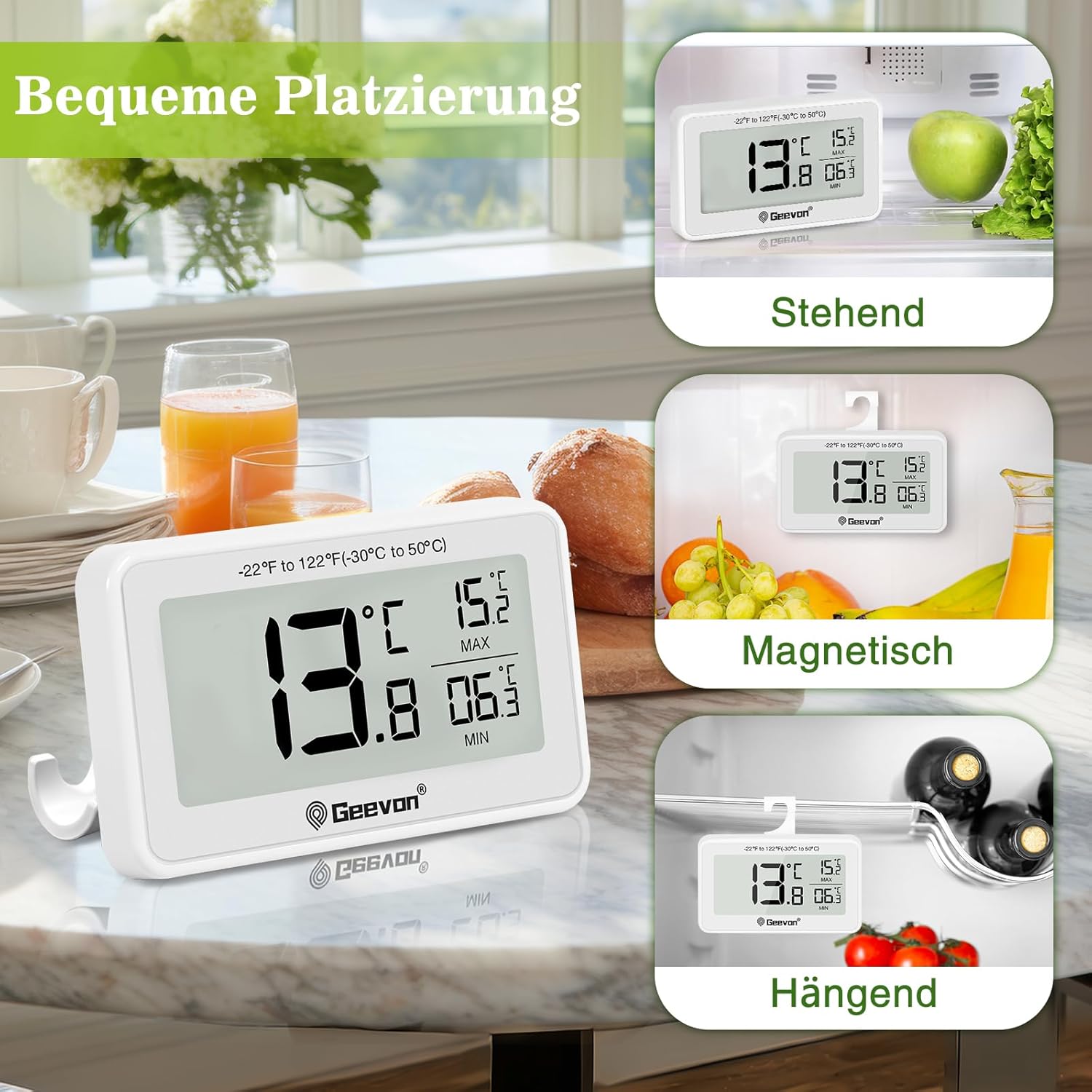
Figure 4: Versatile placement options for the thermometer, including standing on its kickstand, magnetic attachment to a metal surface, and hanging from a shelf or rack using its integrated hook.
آپريٽنگ هدايتون
پاور آن / آف:
- کي دٻايو آن/بند button (power symbol) on the back to turn the device on or off.
سوئچنگ گرمي پد يونٽ (°C/°F):
- کي دٻايو ° سي / ° ايف button on the back to toggle between Celsius and Fahrenheit display.
Viewing and Resetting Max/Min Temperatures:
The thermometer automatically records the maximum (MAX) and minimum (MIN) temperatures reached since the last reset. These values are displayed on the right side of the screen.
- MAX/MIN رڪارڊ کي ري سيٽ ڪرڻ لاءِ، کي دٻايو ۽ رکو صاف ڪريو button (labeled "Clear" or with a reset icon) on the back for approximately 3 seconds. The MAX/MIN values will reset to the current temperature.
سار سنڀال
صفائي:
- ٿرماميٽر کي نرم سان مسح ڪريو، ڊيamp ڪپڙو. استعمال نه ڪريو abrasive cleaners يا solvents.
- The device is IP65 waterproof, meaning it is protected against low-pressure water jets from any direction. However, avoid submerging it completely in water for extended periods.

Figure 5: The thermometer demonstrating its IP65 waterproof capability, shown partially in water.
بيٽري مٽائڻ:
When the display becomes dim or the device stops functioning, it's time to replace the battery. Refer to the "Battery Installation/Activation" section under Setup for detailed instructions.
مشڪلاتون
| مسئلو | ممڪن سبب | حل |
|---|---|---|
| ڪابه ڊسپلي يا مدھم ڊسپلي ناهي | بيٽري مري وئي آهي يا صحيح طور تي نصب ٿيل ناهي. | Replace the CR2032 battery or ensure it is correctly inserted with the positive (+) side up. Remove any plastic insulation tab. |
| غلط درجه حرارت پڙهڻ | Device placed too close to a heat source or air vent; battery low. | Relocate the thermometer to a central area of the refrigerator/freezer. Replace battery if low. Allow time for the temperature to stabilize. |
| بٽڻ جواب نه ڏئي رهيا آهن | Battery low; temporary software glitch. | Replace the battery. Try turning the device off and on again. |
| MAX/MIN values not resetting | CLEAR button not held long enough. | Press and hold the CLEAR button for approximately 3 seconds until the values reset. |
وضاحتون
| خاصيت | تفصيل |
|---|---|
| ماڊل نمبر | 8707B-WH-4 |
| درجه حرارت جي حد | -30 ° C کان 50 ° C (-22 ° F کان 122 ° F) |
| درجه حرارت جي درستگي | ±1°C (±2°F) |
| ڊسپلي قرارداد | ±0.1°C/°F |
| پنروڪ درجه بندي | IP65 |
| طاقت جو ذريعو | 1 x CR2032 بٽڻ سيل بيٽري (شامل) |
| پيداوار جي ماپ (L x W x H) | 6.2 x 2.2 x 8.4 سينٽي (2.44 x 0.87 x 3.31 انچ) |
| پيداوار جو وزن | 100 گرام (3.53 اونس) |
| ڊسپلي جو قسم | ڊجيٽل LCD |
| مواد | Acrylonitrile Butadiene Styrene (ABS) |
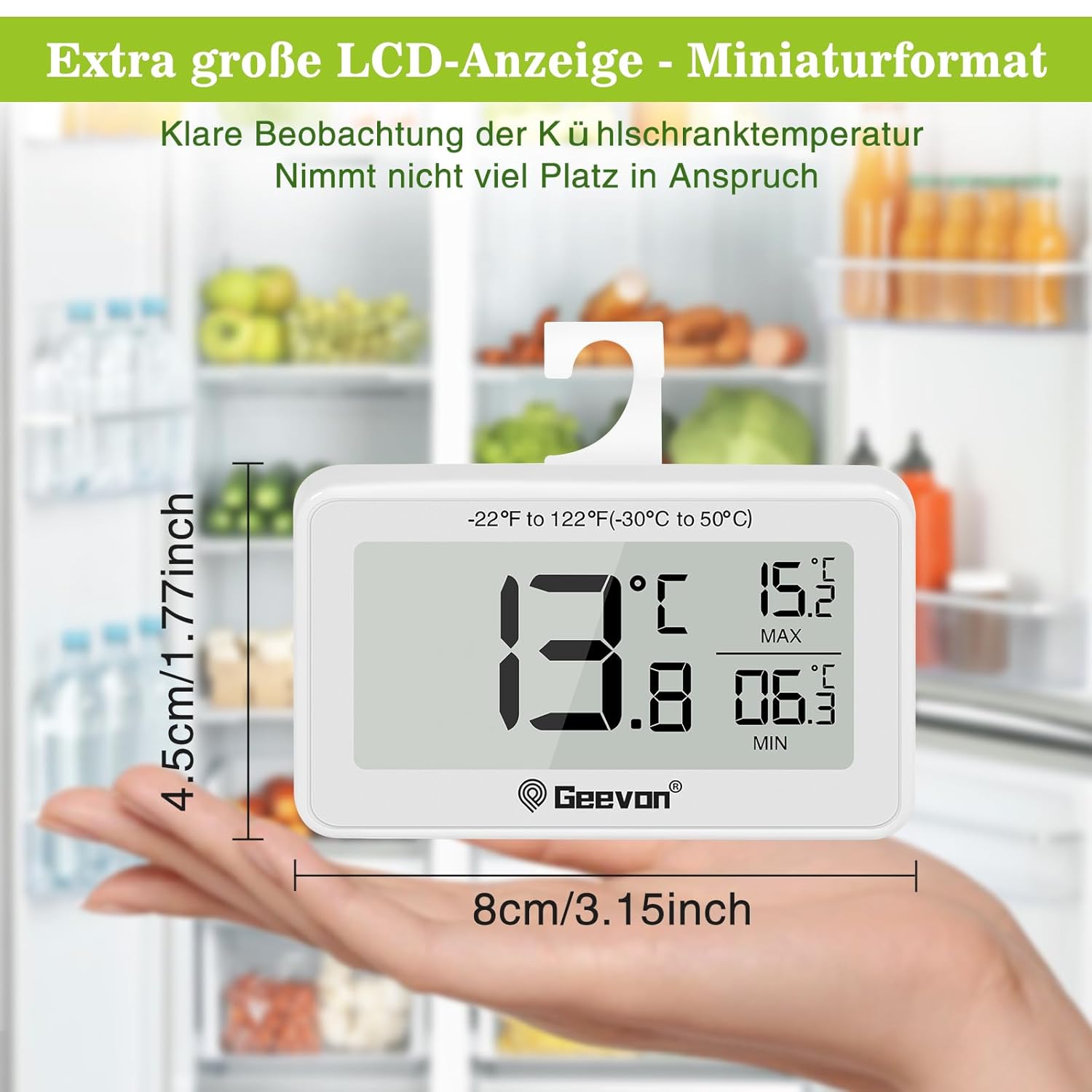
Figure 6: Dimensions of the thermometer, illustrating its compact size in hand.

Figure 7: The thermometer in a refrigerator setting, emphasizing its measurement accuracy of ±1°C (±2°F), resolution of ±0.2°F, and temperature range of -30°C to 50°C (-22°F to 122°F).
وارنٽي ۽ سپورٽ
Geevon is committed to providing high-quality products and customer satisfaction. While specific warranty details are not provided in this manual, Geevon offers a lifetime consulting service for its products.
If you encounter any questions or issues with your Geevon Mini Digital Refrigerator Thermometer, please contact Geevon customer support for assistance. Your feedback and experience are important to us.
For support, please refer to the contact information provided with your purchase or visit the official Geevon webسائيٽ.


