
1. تعارف
The avedio links HDMI Splitter (Model CNAL6174HEI) is designed to duplicate a single HDMI input signal to two HDMI output displays simultaneously. This device supports advanced HDMI 2.1 features, including ultra-high resolutions up to 8K@60Hz and high refresh rates like 4K@120Hz/144Hz. It is ideal for applications requiring the same video content to be shown on multiple screens, such as home entertainment, gaming, and presentations.

This image illustrates a typical use case for the HDMI splitter, showing a user enjoying content on a large 8K television, with the splitter facilitating the connection from a source device.
2. مصنوعات جون خاصيتون
- 8K@60Hz Ultra-High Definition & 48Gbps High-Speed Transmission: Fully compliant with HDMI 2.1 specifications, achieving a maximum transmission speed of 48Gbps. Supports high resolutions and high refresh rates such as 8K@60Hz, 4K@144Hz/120Hz, and 1080P@120Hz, while also being backward compatible. It stably transmits video signals without degradation, clearly reproducing delicate movie details and fast-paced game movements.
- Diverse HDR Formats & Gaming Features: Compatible with HDR10, HDR10+, Dolby Vision, and HLG, also supporting low-latency Dolby Vision HDR to SDR conversion. Equipped with Variable Refresh Rate (VRR), Adaptive Sync technologies (FreeSync/G-Sync), and Auto Low Latency Mode (ALLM) for optimal gaming, suppressing screen lag and blackouts, and providing a smooth gaming experience.
- EDID Automatic/Manual Mode for Resolution Management: Features EDID management, allowing selection between two modes: Automatic and Manual Copy. In Automatic mode, it automatically adapts to the common highest resolution of connected displays. In Manual mode, it can output a unified resolution supported by the display connected to HDMI OUT 1. This allows for easy optimal image quality settings even when using devices with different resolutions.
- HDCP2.3 Compatible & Wide Device Compatibility: Supports HDCP2.3/2.2/1.4, enabling seamless playback of copyright-protected content from services like Netflix and Amazon Prime Video. Widely compatible with HDMI output devices such as Blu-ray players, DVDs, game consoles (PlayStation 3/4/5, Xbox, Nintendo Switch), PCs/laptops, Fire Stick, and Roku. Output destinations include TVs, monitors, projectors, and VR headsets.
- Plug and Play & Comprehensive Accessories: Designed for plug-and-play operation, allowing immediate use by simply connecting devices. LED indicators allow quick confirmation of operating status (Power: solid red, Signal connection: solid green).

This image highlights key features of the avedio links HDMI Splitter, such as the included 1.2m 8K HDMI cable, 48Gbps bandwidth, support for VRR, ALLM, HDR, HDCP 2.3, and 4K@144Hz resolution.

This image demonstrates the visual improvement provided by HDR technology, comparing a scene with standard dynamic range to one with High Dynamic Range, showcasing richer colors and deeper contrast.
3. پيڪيج مواد
پڪ ڪريو ته سڀئي شيون پيڪيج ۾ موجود آهن:
- 1 x avedio links HDMI 2.1 Splitter Unit
- 1 x 1.2m 8K-compatible HDMI Cable (with gold-plated connectors)
- 1 x 1m Micro USB Power Cable
- 1 x ھدايت وارو دستور
Note: A 5V1A power adapter is recommended for stable operation but is sold separately.

This image visually lists the items included in the product package: the HDMI splitter, a power cable, an 8K HDMI cable, and the instruction manual.
4. سيٽ اپ جون هدايتون
- ڳنڍيو انپٽ ماخذ: Connect your HDMI source device (e.g., Blu-ray player, game console, PC) to the HDMI IN port on the splitter using an HDMI cable.
- Connect Output Displays: Connect your two HDMI display devices (e.g., TV, monitor, projector) to the HDMI OUT 1 and HDMI OUT 2 ports on the splitter using HDMI cables.
- پاور Connectنيو: Connect the provided Micro USB power cable to the splitter's power input port. For stable operation, connect the other end of the USB cable to a 5V1A power adapter (sold separately) and plug it into a power outlet.
- پاور آن: Power on your HDMI source device and both display devices. The splitter's LED indicators will show its operating status (Power: solid red, Signal connection: solid green).

This image illustrates a setup where a laptop is connected to the HDMI splitter, which then duplicates the video signal to two external monitors, creating a mirrored display for a gaming or workstation environment.
5. آپريٽنگ هدايتون
The avedio links HDMI Splitter operates on a plug-and-play basis. Once connected as described in the setup section, it will automatically duplicate the input signal to both connected displays.
اي ايڊ ايڊ مئنيجمينٽ
The splitter features EDID management to optimize resolution settings for your displays. There are two modes:
- خودڪار موڊ: In this mode, the splitter automatically detects the common highest resolution supported by both connected displays and outputs the signal at that resolution. This is the default and recommended mode for most setups.
- ڪاپي موڊ: In this mode, the splitter copies the EDID information from the display connected to HDMI OUT 1. It then outputs the signal at the resolution supported by the HDMI OUT 1 display, unifying the output resolution for both displays based on OUT 1's capabilities. This mode is useful when you have displays with different maximum resolutions and want to prioritize the resolution of a specific display (connected to OUT 1).
To switch between EDID modes, refer to the physical switch or button on the device, if available, or consult the included instruction manual for specific controls.
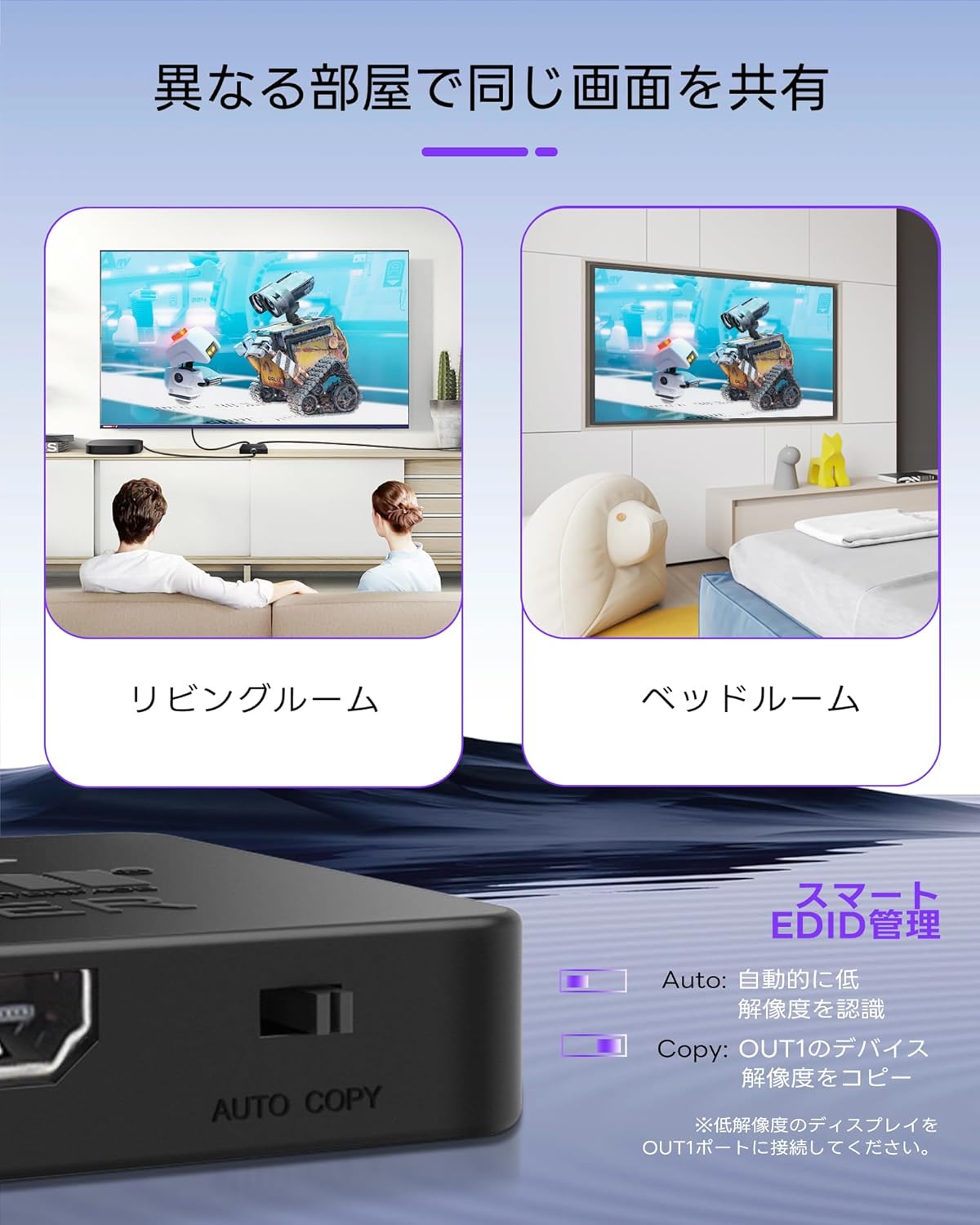
This image demonstrates how the HDMI splitter can be used to share the same video content across different rooms, such as a living room and a bedroom. An inset graphic explains the EDID Auto and Copy modes for resolution management.

هي تصوير هڪ تفصيلي وضاحت فراهم ڪري ٿي view of the EDID management feature on the HDMI splitter, showing the 'AUTO COPY' switch and illustrating the functionality of both Automatic mode (automatic resolution detection) and Copy EDID mode (copying resolution from the HDMI OUT 1 device).
6. مطابقت
The avedio links HDMI Splitter offers broad compatibility with a variety of HDMI-enabled devices:
- ان پٽ ڊوائيسز: Blu-ray players, DVD players, game consoles (PlayStation 3/4/5, Xbox, Nintendo Switch), PCs/laptops, Fire Stick, Roku, and other HDMI output devices.
- Output Displays: TVs, monitors, projectors, VR headsets, and other HDMI input displays.
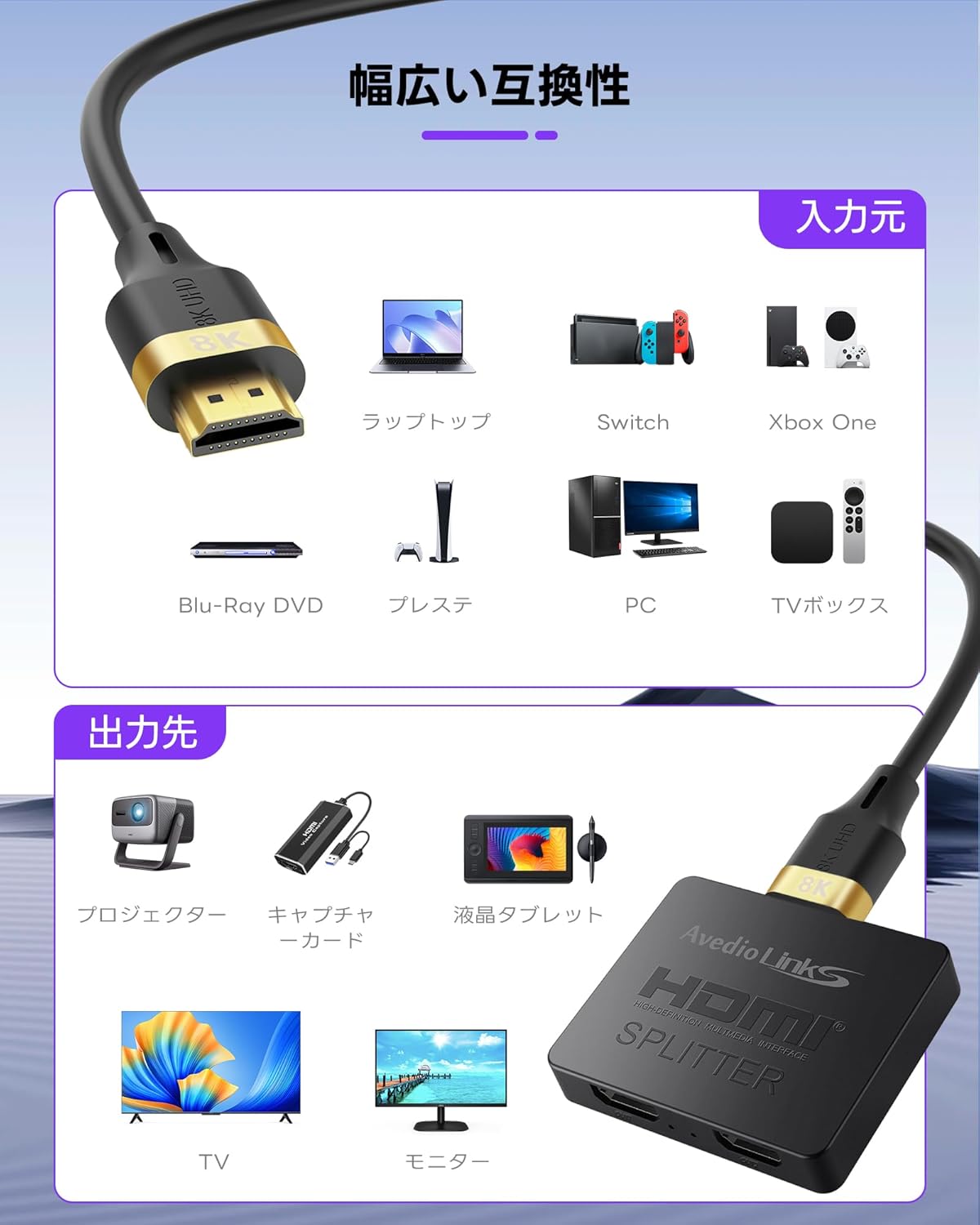
This image visually represents the extensive compatibility of the HDMI splitter, showcasing various input devices like laptops, game consoles, and PCs, and output devices such as projectors, TVs, and monitors.

This image further illustrates the broad compatibility of the HDMI splitter, detailing various input sources like laptops, game consoles, and media players, and output destinations including projectors, capture cards, and different types of displays.
7. اهم استعمال جا نوٽس
Please be aware of the following limitations and considerations:
- This HDMI splitter is designed exclusively for "duplicate/mirror display". It does not support extended mode (displaying different content on two screens).
- It does not function as an HDMI سوئچ (2 inputs 1 output).
- It does not function as an HDMI آڊيو ڪڍڻ وارو (for connecting to soundbars or separate audio systems).
- ARC/eARC (Audio Return Channel/enhanced Audio Return Channel) are not supported.
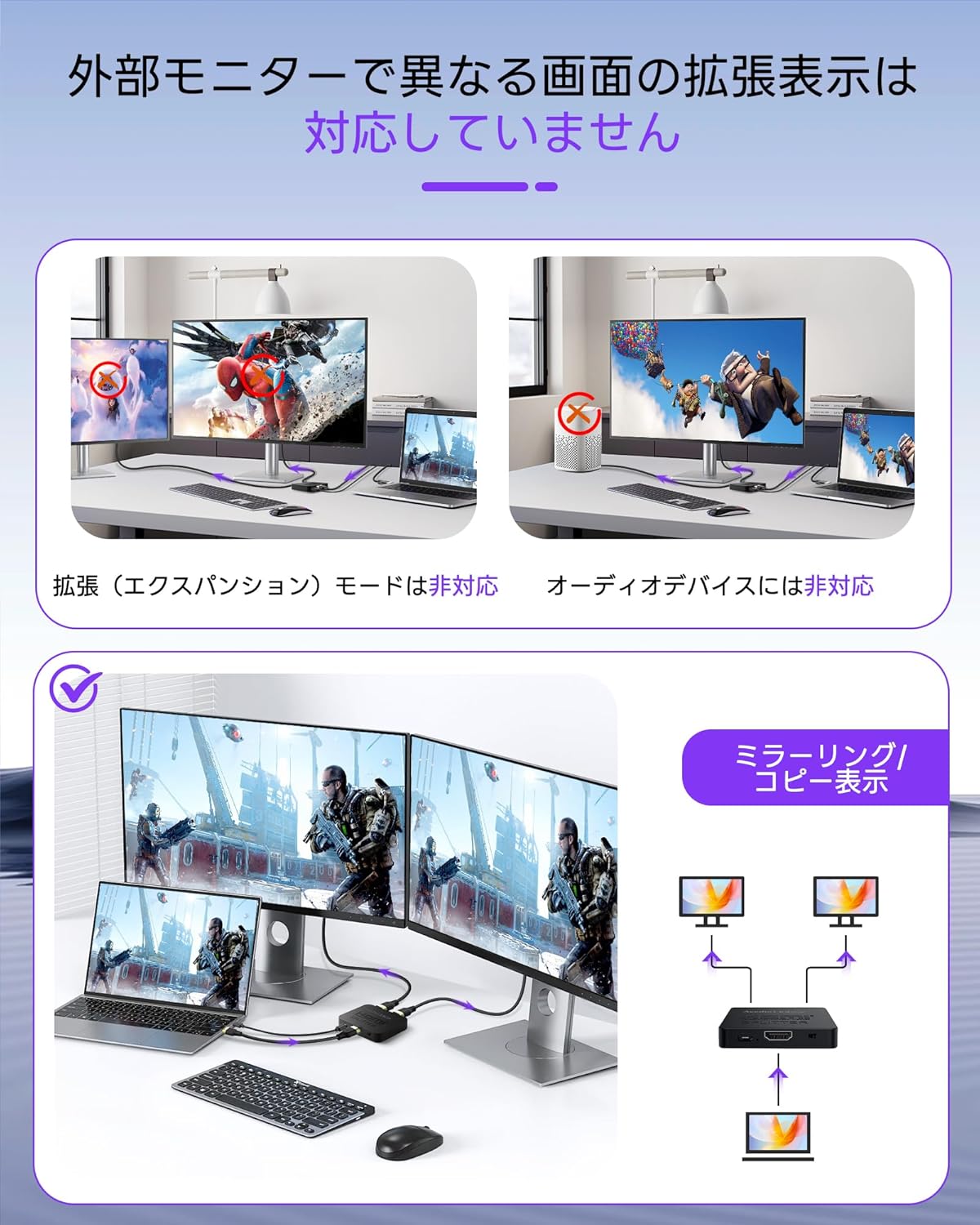
This image clarifies that the HDMI splitter does not support extended display mode, where two screens show different content, nor does it support direct connection to audio devices for extraction.

This image reiterates the limitations of the HDMI splitter, specifically that it does not support extended display configurations or connections to external audio devices for sound extraction.
8. وضاحتون
| خاصيت | وصف |
|---|---|
| برانڊ | avedio لنڪس |
| ماڊل نمبر | CNAL6174HEI |
| ڪنيڪٽر جو قسم | HDMI (Female to Female) |
| رنگ | ڪارو |
| بندرگاهن | 1 ان پٽ، 2 آئوٽ پُٽ |
| وڌ ۾ وڌ ريڪارڊ | 8K@60Hz, 4K@144Hz/120Hz, 1080P@120Hz |
| ڊيٽا جي منتقلي جي شرح | 48 جي بي پي ايس |
| HDR سپورٽ | HDR10, HDR10+, Dolby Vision, HLG |
| گيمنگ خاصيتون | VRR, FreeSync/G-Sync, ALLM |
| HDCP تعميل | HDCP2.3/2.2/1.4 |
| اي ايڊ ايڊ مئنيجمينٽ | Auto Mode, Copy Mode |
| پاور ان پٽ | Micro USB (5V1A recommended, adapter sold separately) |
| طول و عرض | 19.5 x 15.5 x 1.9 سينٽي |
| وزن | 110 جي |
9. مسئلا حل ڪرڻ
- ڪوبه سگنل/ڪاري اسڪرين ناهي:
- Ensure all HDMI cables are securely connected to both the splitter and your devices.
- Verify that the splitter is receiving adequate power from a 5V1A power adapter.
- Try using different HDMI cables, especially high-quality HDMI 2.1 certified cables for 8K/4K high refresh rate signals.
- Check the EDID mode. If one display has a lower resolution, try setting the splitter to Copy mode (copying from the higher resolution display connected to OUT 1) or Auto mode.
- Ensure your source device and displays are powered on and set to the correct HDMI input.
- Flickering/Unstable Image:
- Ensure the power supply is stable and sufficient (5V1A recommended).
- Reduce the resolution or refresh rate of the source device to see if the issue persists.
- ٻين اليڪٽرانڪ ڊوائيسز کان مداخلت لاء چيڪ ڪريو.
- آڊيو مسئلا:
- Confirm that your displays' audio settings are correctly configured.
- Remember that this splitter does not support ARC/eARC or audio extraction. Audio will be passed through to the connected displays.
10. سار سنڀال
- ڊوائيس کي سڌي سج جي روشني ۽ گرمي جي ذريعن کان پري ٿڌي، سڪل جاءِ تي رکو.
- ڊوائيس کي نمي يا انتهائي گرمي پد تي ظاهر ڪرڻ کان بچاء.
- ڊوائيس کي نرم، سڪل ڪپڙي سان صاف ڪريو. مائع يا ايروسول ڪلينر استعمال نه ڪريو.
- وڌيڪ گرم ٿيڻ کان بچڻ لاءِ ڊوائيس جي چوڌاري مناسب وائيٽليشن کي يقيني بڻايو وڃي.
11. وارنٽي ۽ سپورٽ
For warranty information or technical support, please contact avedio links customer service through the retailer where you purchased the product or visit the official avedio links website. Please have your model number (CNAL6174HEI) and purchase details ready when contacting support.


