1. تعارف
خريد ڪرڻ لاءِ مهربانيasing the LG 43-Inch Class QNED AI 4K Smart TV. This manual provides essential information for the safe and efficient operation of your television. Please read it thoroughly before use and keep it for future reference.
The LG QNED AI 4K TV offers vivid, immersive color with its wide color gamut technology, enhanced by the α7 AI Processor Gen8. It intelligently optimizes picture and sound based on content. Powered by LG webOS 24, it provides a streamlined streaming experience with customizable Quick Cards and the Magic Remote. Enjoy virtual 5.1 surround sound, FILMMAKER MODE, and advanced gaming features like FreeSync, VRR, and GeForce NOW.
2. حفاظت جي ڄاڻ
باهه، بجليءَ جي جھٽڪي، يا زخم جي خطري کي گهٽائڻ لاءِ هن پراڊڪٽ کي استعمال ڪندي هميشه بنيادي حفاظتي احتياطن تي عمل ڪريو.
- ٽي وي کي مينهن يا نمي کي بي نقاب نه ڪريو.
- ٽي وي نه کوليو سيasing؛ سڀني خدمتن کي قابل اهلڪارن جي حوالي ڪريو.
- مناسب وينٽيليشن کي يقيني بڻايو ۽ وينٽيليشن جي سوراخن کي نه روڪيو.
- صرف ٽي وي سان فراهم ڪيل پاور ڪنڊ استعمال ڪريو.
- ٽي وي کي گرمي جي ذريعن ۽ سڌي سج جي روشني کان پري رکو.
- Avoid placing heavy objects on the power cord or TV.
3. دٻي ۾ ڇا آهي
پڪ ڪريو ته سڀئي جزا موجود آهن:
- LG 43 انچ ڪلاس QNED AI 4K سمارٽ ٽي وي
- پاور ڪيبل
- ريموٽ ڪنٽرول (2 AAA بيٽريون شامل آهن)
- اسٽينڊ اجزاء
- استعمال ڪندڙ جو دستياب (ھي دستاويز)
4. سيٽ اپ
4.1 اسٽينڊ کي ڳنڍڻ
Carefully place the TV screen-down on a soft, flat surface. Attach the stand components to the designated slots on the bottom of the TV using the provided screws. Ensure the stand is securely fastened before placing the TV upright.
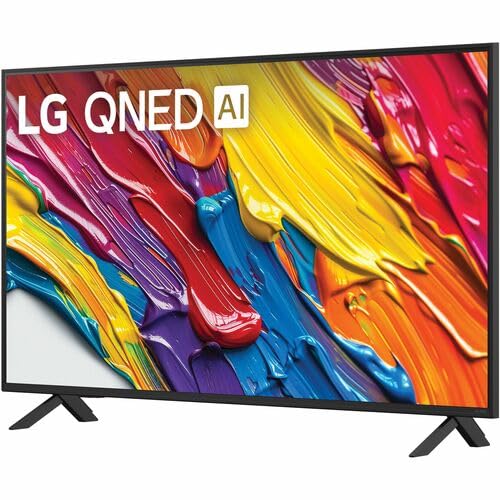
تصوير: پوئين پاسي view of the LG 43QNED82AUA TV with its stand.
4.2 ڀت تي چڙهڻ (اختياري)
This TV supports VESA mount standard 200 x 200 mm. For wall mounting, remove the stand and use a compatible wall mount bracket (sold separately). Follow the instructions provided with your wall mount.
4.3 ڳنڍڻ وارا آلات
Connect your external devices (cable box, Blu-ray player, gaming console, etc.) to the appropriate ports on the TV. The TV features 3 HDMI ports, 1 USB port, Ethernet, and S/PDIF (Optical) for audio output.

Image: Connectivity ports on the back of the LG 43QNED82AUA TV.
4.4 پاور کوليو
Plug the power cable into the TV and then into a wall outlet. Press the power button on the remote control or on the TV to turn it on. Follow the on-screen instructions for initial setup, including network connection and channel scanning.
5. پنهنجو ٽي وي هلائڻ
5.1 ريموٽ ڪنٽرول
The included Magic Remote allows for intuitive control with point-and-click functionality, voice commands, and a scroll wheel. Insert the two AAA batteries (included) into the remote control.
5.2 Webاو ايس 24 اسمارٽ پليٽ فارم
توهان جو ٽي وي LG تي هلندو آهي. webOS 24 operating system. Navigate through apps, settings, and inputs using the customizable Quick Cards. Access popular streaming services like Netflix, Prime Video, Disney Plus, HBO Max, and Apple TV directly from the home screen.
5.3 تصوير ۽ آواز سيٽنگون
Access the settings menu to adjust picture modes (e.g., Standard, Vivid, Cinema, Filmmaker Mode) and sound modes (e.g., AI Sound Pro, Standard, Cinema). The α7 AI Processor Gen8 automatically optimizes these settings based on the content being viewايڊ.

Image: Dynamic QNED Color representation.
6. Smart Features and AI
6.1 AI Picture and Sound
The α7 AI Processor Gen8 enhances brightness, improves sound, and refines picture detail with 4K upscaling and Dynamic Tone Mapping. AI Sound Pro provides virtual 5.1 surround sound, and WOW Orchestra integrates TV speakers with compatible LG soundbars for an enhanced audio experience.
6.2 Voice Assistance and AI Search
Your TV has Alexa Built-in. Press the Alexa button on your remote to activate voice commands. Utilize AI ڳولھيو personalized recommendations and to find content quickly. The TV also supports Google Assistant, Apple AirPlay 2, and Google Cast for seamless integration with your smart home ecosystem.

Image: LG AI Search interface.
7. گيمنگ جون خاصيتون
The LG QNED AI 4K TV is designed for an optimal gaming experience with a 60 Hz native refresh rate, which can be boosted up to 144 Hz with VRR (Variable Refresh Rate) enabled. It supports FreeSync and features LG Game Optimizer and Game Dashboard for quick access to gaming settings.
- فري سنڪ ۽ وي آر آر: هموار راند لاءِ اسڪرين جي ڦاٽڻ ۽ هٻڪڻ کي گهٽائي ٿو.
- گيم آپٽمائيزر ۽ ڊيش بورڊ: Centralized hub for adjusting game settings, including genre-specific picture modes.
- Cloud Gaming: Access GeForce NOW and Xbox Cloud Gaming (subscriptions and compatible controllers required).
- ALLM (خودڪار گھٽ ويڪرائي موڊ): جڏهن گيم ڪنسول جو پتو پوي ٿو ته خودڪار طريقي سان گهٽ ليٽنسي موڊ ۾ سوئچ ڪري ٿو.

Image: Gaming experience on the LG 43QNED82AUA TV.
8. ڪنيڪشن
Your LG QNED AI 4K Smart TV offers a variety of connectivity options:
- HDMI: 3 ports for connecting external devices.
- USB: 1 port for media playback or connecting USB devices.
- Ethernet: وائرڊ انٽرنيٽ ڪنيڪشن لاءِ.
- وائي فائي: Built-in for wireless internet access.
- بلوٽوٽ 5.0: وائرليس هيڊفون، سائونڊ بار، يا ٻين بلوٽوٿ ڊوائيسز کي ڳنڍڻ لاءِ.
- آپٽيڪل (ايس/پي ڊي آءِ ايف): For digital audio output to sound systems.
- اسڪرين مررنگ: Supports AirPlay 2 and Google Cast for casting content from mobile devices.
9. سار سنڀال
9.1 ٽي وي صاف ڪرڻ
Unplug the TV before cleaning. Use a soft, dry cloth to wipe the screen and exterior. For stubborn marks, lightly dampڪپڙي کي پاڻي يا خاص اسڪرين ڪلينر سان ڌوئڻ. سخت ڪيميڪلز يا رگڙيندڙ مواد استعمال ڪرڻ کان پاسو ڪريو.
9.2 سافٽ ويئر اپڊيٽ
Ensure your TV's software is up to date for optimal performance and new features. Software updates auto-download when connected to the internet. If "auto-update" is disabled, you will receive a prompt to update manually.
10. مسئلا حل ڪرڻ
جيڪڏهن توهان کي پنهنجي ٽي وي سان مسئلا درپيش اچن ٿا، ته هيٺ ڏنل عام حلن جو حوالو ڏيو:
| مسئلو | حل |
|---|---|
| طاقت نه آهي | Check power cable connection, wall outlet, and remote batteries. |
| تصوير ناهي، پر آواز موجود آهي. | Verify input source, check cable connections, try a different HDMI port. |
| آواز ڪونهي، پر تصوير موجود آهي. | Check volume, mute status, audio output settings, and external audio device connections. |
| ريموٽ ڪنٽرول ڪم نه ڪري رهيو آهي | Replace batteries, ensure no obstructions between remote and TV, re-pair Magic Remote if necessary. |
| خراب تصوير معيار | Adjust picture settings, check source resolution, ensure strong signal for broadcast channels. |
| وائي فائي سان ڳنڍجي نٿو سگھي | Restart router, check Wi-Fi password, ensure TV is within range, try wired Ethernet connection. |
For further assistance, please refer to the full electronic manual available on the LG support webسائيٽ تي وڃو يا LG ڪسٽمر سپورٽ سان رابطو ڪريو.
11. وضاحتون
| خاصيت | تفصيل |
|---|---|
| اسڪرين جي ماپ | 43 انچ |
| ڊسپلي ٽيڪنالاجي | ايل اي ڊي (QNED) |
| قرارداد | 4K (3840 x 2160) |
| ريفريش جي شرح | 60 Hz (Native), up to 144 Hz (VRR) |
| پروسيسر | α7 AI پروسيسر Gen8 |
| HDR سپورٽ | HDR10، HLG |
| آپريٽنگ سسٽم | webاو ايس 24 |
| رابطي | Wi-Fi, Bluetooth 5.0, Ethernet, 3x HDMI, 1x USB, Optical (S/PDIF) |
| وائس اسسٽنٽ | Alexa بلٽ ان، گوگل اسسٽنٽ مطابقت رکندڙ |
| طول و عرض (اسٽينڊ سان) | 10.1"ڊي x 38.1"ڊي x 25"ايڇ |
| وزن (بغير موقف) | 20.7 پائونڊ |
| ويسا ماؤنٽ معياري | 200 x 200 ملي ميٽر |
| بجلي جو استعمال | 82 واٽ |
| سالياني توانائي واپرائڻ | 152 ڪلواٽ ڪلاڪ في سال |

Image: LG 43QNED82AUA TV dimensions.
12. وارنٽي ۽ سپورٽ
12.1 وارنٽي ڄاڻ
This LG TV comes with a 1 Year Parts & Labor Limited Warranty. Please retain your proof of purchase for warranty claims. For full warranty terms and conditions, refer to the warranty card included with your product or visit the official LG webسائيٽ.
12.2 ڪسٽمر سپورٽ
For technical support, product registration, or service inquiries, please visit the LG support website or contact their customer service hotline. Contact information can be found on the LG official webسائيٽ يا توهان جي ٽي وي سان مهيا ڪيل دستاويز ۾.