1. تعارف
The BLUETTI Elite 30 V2 is a compact and portable power station designed to provide reliable power for various applications, including outdoor activities, road trips, and home emergencies. It features a durable LiFePO4 battery, multiple output ports, and advanced safety features.
This manual provides essential information for the safe and efficient operation of your Elite 30 V2. Please read it thoroughly before use and retain it for future reference.

Figure 1: BLUETTI Elite 30 V2 Portable Power Station
2. پيڪيج مواد
پڪ ڪريو ته هيٺ ڏنل سڀئي شيون توهان جي پيڪيج ۾ شامل آهن:
- BLUETTI Elite 30 V2 Power Station
- اي سي چارجنگ ڪيبل
- ڪار چارج ڪيبل
- استعمال ڪندڙ دستي
وڊيو 1: انباڪسنگ ۽ شروعاتي اوورview of the BLUETTI Elite 30 V2 package contents.
3. پراڊڪٽ ختمview
3.1. فرنٽ پينل

شڪل 2: فرنٽ پينل لي آئوٽ
- ڊي سي/پي وي ان پٽ: For solar panel or DC charging (12V-28V/10A/200W max).
- DC Output 12V/10A: Car outlet for 12V devices.
- 12V/8A DC5521 Outputs (x2): For compatible 12V devices.
- USB-C 140W Output: High-speed USB-C charging.
- USB-A 15W Outputs (x2): Standard USB-A charging.
- USB-C 100W Output: Fast USB-C charging.
- LCD ڊسپلي: بيٽري جي سطح، ان پٽ/آئوٽ پٽ واٽ ڏيکاري ٿوtage، ۽ حيثيت اشارا.
- ڊي سي پاور بٽڻ: Activates/deactivates DC outputs.
- مکيه پاور بٽڻ: يونٽ کي آن/آف ڪري ٿو.
- AC پاور بٽڻ: Activates/deactivates AC outputs.
- AC Output 120V/600W (x2): Standard AC outlets.
3.2. ريئر پينل
The rear panel includes the AC input port and a grounding screw.
- AC ان پٽ: For charging via the included AC charging cable.
- گرائونڊنگ اسڪرو: اختياري گرائونڊنگ ڪنيڪشن لاءِ.
4. سيٽ اپ
4.1. شروعاتي چارجنگ
Before first use, fully charge the BLUETTI Elite 30 V2. Connect the AC charging cable to the AC input port on the rear of the unit and plug it into a standard wall outlet. The LCD display will indicate the charging status.
4.2. ايپ ڪنيڪشن
The Elite 30 V2 supports smart app control via Bluetooth and Wi-Fi. Download the official BLUETTI app from your device's app store. Follow the in-app instructions to connect your power station for remote monitoring and control.

Figure 3: Smart App Control Interface
5. آپريٽنگ موڊس
5.1. AC/DC Output
Press the corresponding AC or DC power button on the front panel to activate the outlets. The LCD screen will show the output wattage. Ensure the total power consumption of connected devices does not exceed the rated output.
5.2. Power Lifting Mode (1500W)
The Elite 30 V2 features a Power Lifting mode that allows it to handle resistive loads up to 1500W, such as kettles or toasters, for short durations. This mode can be activated via the BLUETTI app settings.
5.3. Uninterruptible Power Supply (UPS) Functionality
When connected to a wall outlet and powering devices, the Elite 30 V2 can function as a UPS. In the event of a power outage, it automatically switches to battery power within 10 milliseconds, ensuring uninterrupted operation for connected devices.

Figure 4: UPS Mode in action, providing seamless power during an outage.
Video 2: Detailed explanation of the Elite 30 V2's features, including UPS functionality and output ports.
6. چارج ڪرڻ جا طريقا
The Elite 30 V2 supports multiple charging methods:
- AC وال آئوٽليٽ: Charges from 0% to 100% in approximately 70 minutes (up to 380W input).
- شمسي پينل: Supports up to 200W solar input (12V-28V/10A). Charging time varies based on solar intensity and panel wattage. A solar charging cable is required and sold separately for 100W or 200W solar panels.
- ڪار چارج ڪرڻ: Charges via the 12V car charging cable.

شڪل 5: اي سي وال چارجنگ
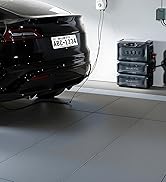
Figure 6: Solar Charging Setup
7. بيٽري جي ڄاڻ
The Elite 30 V2 utilizes a 288Wh LiFePO4 (Lithium Iron Phosphate) battery. LiFePO4 batteries are known for their long lifespan, enhanced safety, and stability. This battery is rated for over 3000 charge cycles to 80% capacity, providing a long-term power solution.
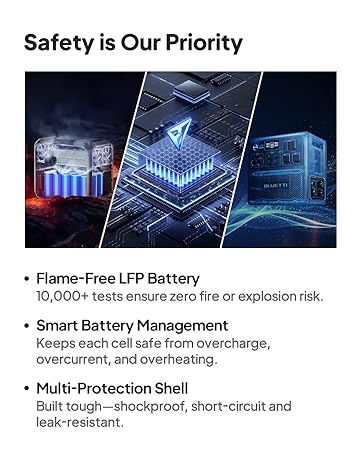
Figure 7: Internal Battery Safety Features
8. وضاحتون
| خاصيت | تفصيل |
|---|---|
| ماڊل | ايلٽ 30 V2 |
| بيٽري جي گنجائش | 288Wh LiFePO4 |
| AC ٻاھر | 600W (1500W Power Lifting) |
| يو ايس بي-سي آئوٽ | 1x 140W، 1x 100W |
| USB-اي آئوٽ | 2x 15W |
| ڊي سي اوٽ | 1x 12V/10A Car Port, 2x 12V/8A DC5521 |
| AC ان پٽ | Up to 380W (70 min to 100%) |
| شمسي ان پٽ | 12V-28V/10A/200W Max |
| يو پي ايس سوئچ اوور وقت | <10ms |
| وزن | 9.5 پائونڊ (4.3 ڪلوگرام) |
| طول و عرض (L x W x H) | 9.8" x 7" x 6.6" |
| آپريٽنگ شور جي سطح | <30dB |
9. سار سنڀال
- Store the unit in a cool, dry place away from direct sunlight and heat sources.
- ڊگهي عرصي تائين اسٽوريج لاءِ، بيٽري جي زندگي کي وڌائڻ لاءِ يونٽ کي هر 3-6 مهينن ۾ 50-80٪ تائين چارج ڪريو.
- Clean the exterior with a soft, dry cloth. Do not use abrasive cleaners or immerse the unit in water.
- Ensure ventilation ports are clear of obstructions during operation.
10. مسئلا حل ڪرڻ
10.1. Unit Not Turning On
- پڪ ڪريو ته بيٽري چارج ٿيل آهي. چارج ڪرڻ لاءِ AC آئوٽليٽ سان ڳنڍيو.
- ڪجھ سيڪنڊن لاءِ مکيه پاور بٽڻ کي دٻايو ۽ رکو.
10.2. No Output from AC/DC Ports
- Ensure the respective AC or DC power button is activated (indicated by an illuminated light).
- Check if the device connected exceeds the power station's output limits.
- Verify the power station is not in an overload protection state (check LCD display for error codes).
10.3. سست چارجنگ
- For solar charging, ensure panels are in direct sunlight and correctly angled.
- Check charging mode settings in the app (e.g., Silent mode charges slower).
- Verify charging cables are securely connected and undamaged.
11. وارنٽي ۽ سپورٽ
The BLUETTI Elite 30 V2 comes with a 5-year product warranty. For technical support, warranty claims, or any inquiries, please contact BLUETTI customer service through their official webسائيٽ يا توهان جي وارنٽي ڪارڊ ۾ ڏنل رابطي جي معلومات.


