1. تعارف ۽ اوورview
The AOC ACG 2502 Wireless Gaming Headset is designed to provide a versatile and immersive audio experience across various gaming platforms and devices. Featuring dual-mode wireless connectivity (2.4GHz and Bluetooth 5.4), 7.1 virtual surround sound, and a noise-cancelling microphone, this headset offers high-quality audio and clear communication for extended gaming sessions.

Image: The AOC ACG 2502 Wireless Gaming Headset, showcasing its design and included connectivity accessories.
2. دٻي ۾ ڇا آهي
- 1 x ACG2502 Gaming Headset
- 1 x ٽائپ-سي چارجنگ ڪيبل
- 1 x USB Transmitter (2.4GHz wireless dongle)
- 1 x Type-C to 3.5mm Audio Cable
- 1 x استعمال ڪندڙ دستياب
3. مصنوعات جون خاصيتون
- Dual-Mode Wireless with Ultra-Low Latency: Enjoy both 2.4 GHz and Bluetooth 5.4 connectivity with a guaranteed maximum latency of 20 ms for rock-solid audio synchronization.
- 4-in-1 Universal Connectivity: Equipped with USB-A, Type-C, Bluetooth 5.4, and 3.5 mm wired modes, allowing connection to consoles, mobile devices, and PCs. Note: Bluetooth modes are incompatible with PS5 and PS4. Only the 3.5mm wired mode is compatible with Xbox Series X/S; other Xbox models are not supported.
- High-Resolution 7.1 Virtual Surround Sound: Features dual acoustic chambers and 50 mm graphene diaphragms, plus a built-in DAC delivering 96 kHz/24-bit output for precise directional audio.
- Lightweight, Ergonomic Comfort: Weighing just 239 g, the headset includes protein-leather earcups with breathable foam and an adjustable headband for fatigue-free extended use.
- Long-Lasting Battery with Fast Charge: Provides up to 45 hours of gameplay on a single charge. A full recharge takes approximately 2 hours via USB-C, with the ability to game while charging.
- Triple-Stage Noise Cancelling Microphone: The boom mic features foam isolation, DSP filters for echo and background noise elimination, and AI-driven voice enhancement for clear communication.
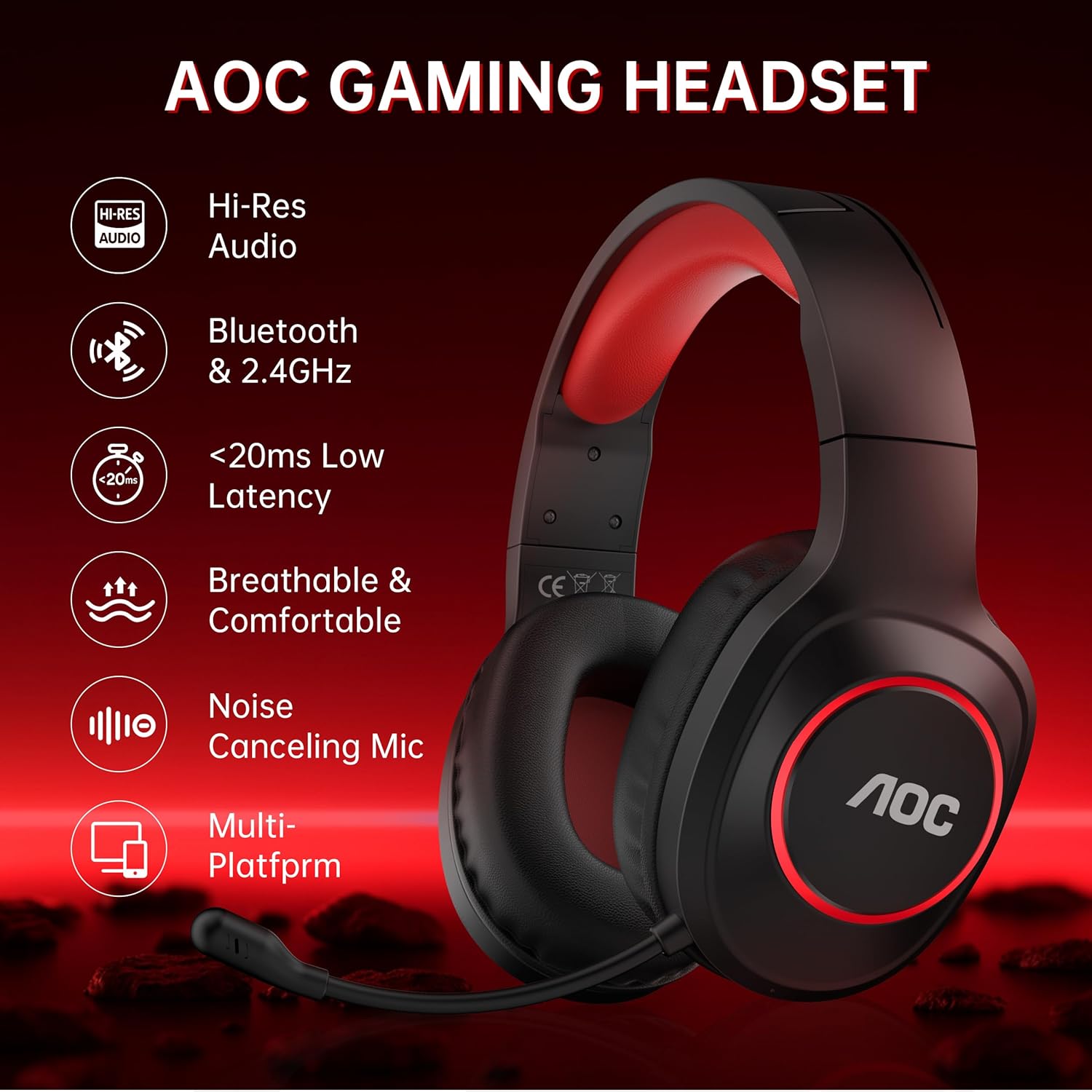
Image: Key features of the AOC Gaming Headset, including Hi-Res Audio and multi-platform compatibility.
4. سيٽ اپ ۽ ڪنيڪشن
4.1 شروعاتي چارجنگ
Before first use, fully charge the headset. Connect the Type-C charging cable to the charging port on the headset and the other end to a USB power source. The indicator light will be red while charging and turn blue when fully charged. A full charge takes approximately 2.5 hours.
4.2 2.4GHz Wireless Connection (USB Transmitter)
- Plug the USB Transmitter into an available USB-A or Type-C port on your PC, PS5/PS4, or Nintendo Switch.
- Press and hold the Power Button on the headset for 3 seconds to turn it on.
- Double-click the Power Button to switch to "Adapter mode." The headset will announce "Adapter mode," and its indicator light will flash white.
- Once successfully connected, the headset's indicator light will turn solid white, and the transmitter's blue light will stay on.
Note: The microphone is disabled when connected to Nintendo Switch via 2.4GHz.

Image: The 2.4GHz USB wireless dongle, emphasizing low latency connectivity.
4.3 بلوٽوٿ 5.4 ڪنيڪشن
- Press and hold the Power Button on the headset for 3 seconds to turn it on.
- Double-click the Power Button to switch to "Bluetooth mode." The headset will announce "Bluetooth mode," and the indicator light will blink blue, indicating it's in pairing mode.
- On your mobile device or PC, open Bluetooth settings and search for "AOC ACG2502" to connect.
- ڪامياب جوڙو ٺاهڻ کان پوءِ، توهان موسيقي هلائي سگهو ٿا يا وائس ڪال ڪري سگهو ٿا.
Note: Bluetooth modes are incompatible with PS5 and PS4.
4.4 3.5 ملي ميٽر وائرڊ ڪنيڪشن
Connect the Type-C to 3.5mm audio cable to the headset's Type-C port and the 3.5mm end to your device (e.g., Xbox Series X/S controller, PC, mobile device). This mode does not require battery power.
Note: Only the 3.5mm wired mode is compatible with Xbox Series X/S; all other Xbox models are not supported.

Image: Visual guide for connecting the headset to various platforms using different modes.
5. آپريٽنگ هدايتون
The headset features intuitive controls located on the left earcup.
- پاور بٽڻ:
- Press and hold for 3 seconds to power On/Off.
- Single click to play/pause audio or answer a call.
- Double click to end or reject a call.
- Double click to switch between 2.4GHz and Bluetooth modes.
- حجم + بٽڻ: Click to increase volume. Press and hold to continuously raise volume.
- حجم - بٽڻ: Click to decrease volume. Press and hold to continuously lower volume.
- Microphone & Light Switch:
- Single click to mute/unmute the microphone.
- Double click to toggle ambient RGB lighting On/Off.
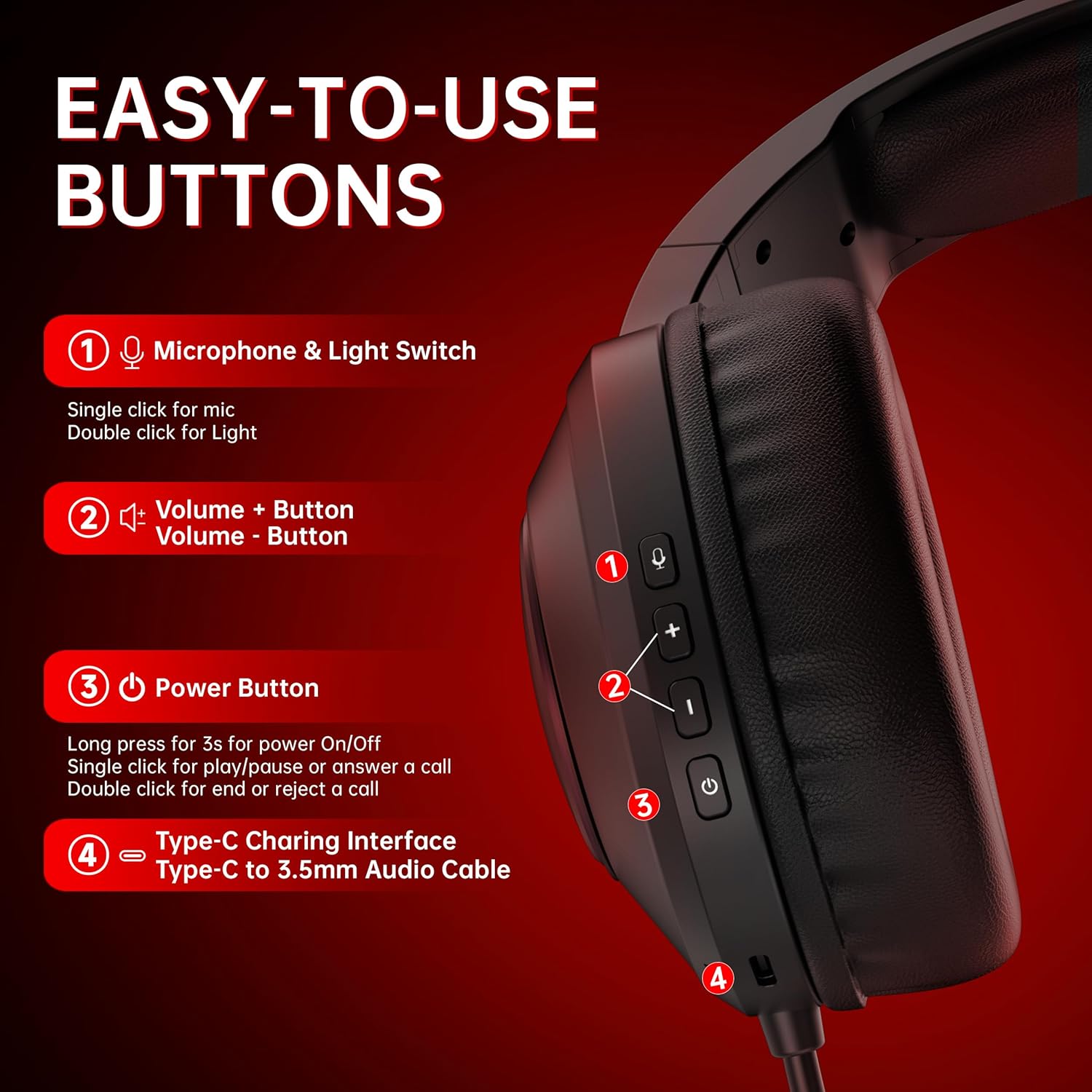
تصوير: تفصيلي view of the headset's control buttons for easy operation.
6. چارج ڪرڻ
The headset offers up to 45 hours of battery life on a single charge. When the battery is low, the indicator light will flash red, and you will hear a "Battery low" sound. Connect the Type-C charging cable to recharge. The headset can be used while charging, ensuring uninterrupted gameplay.

Image: Illustration of the headset's 45-hour battery life.
7. مائڪروفون جو استعمال
The detachable boom microphone features triple-stage noise cancelling technology to ensure clear voice transmission. This includes foam isolation to block ambient sounds, DSP filters to eliminate echo and background noise, and AI-driven voice enhancement. The microphone is adjustable and can be moved up or down as needed.
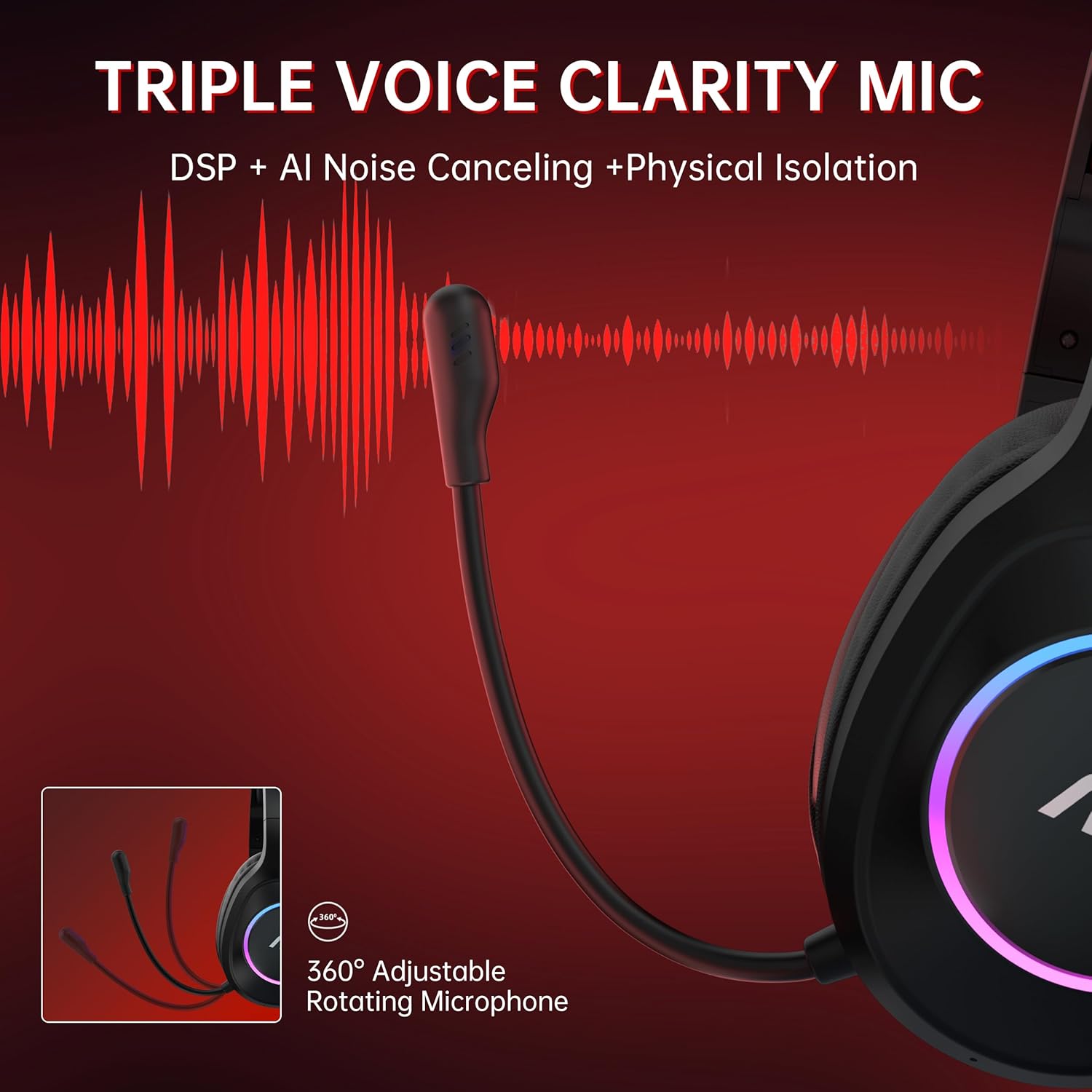
Image: The headset's adjustable microphone and its noise-cancelling capabilities.
8. وضاحتون
| خاصيت | تفصيل |
|---|---|
| ماڊل نالو | ACG 2502 |
| رابطي ٽيڪنالاجي | 2.4GHz, Bluetooth 5.4, Wired (3.5mm) |
| آڊيو ليٽيسي | 20 Milliseconds (max) |
| بيٽري جي زندگي | 45 ڪلاڪ تائين |
| چارج ڪرڻ وقت | لڳ ڀڳ. 2.5 ڪلاڪ |
| آڊيو ڊرائيور جي ماپ | 50 ملي ميٽر |
| اسپيڪر جي رڪاوٽ | 32 اومس |
| تعدد جواب | 20 هرٽز - 20 ڪلو هرٽز |
| حساسيت | 90 ڊي بي |
| مائڪروفون جو قسم | All-round, Noise Cancelling |
| Transmission Distance (2.4GHz) | 10 ميٽر |
| بلوٽوٿ رينج | 33 فوٽ (تقريبن 10 ميٽر) |
| وزن | 15.2 آونس (تقريبن 431 گرام) |
| مواد | Acrylonitrile Butadiene Styrene (ABS), Polyurethane (PU) |
9. سار سنڀال
- صفائي: هيڊ سيٽ صاف ڪرڻ لاءِ نرم، سڪل ڪپڙو استعمال ڪريو. سخت ڪيميڪلز يا رگڙيندڙ مواد استعمال ڪرڻ کان پاسو ڪريو.
- اسٽوريج: هيڊ سيٽ کي سڌي سج جي روشني ۽ انتهائي گرمي پد کان پري ٿڌي، سڪل جاءِ تي رکو.
- بيٽري جي سنڀال: بيٽري جي زندگي کي وڌائڻ لاءِ، هيڊ سيٽ کي بار بار مڪمل طور تي چارج ڪرڻ کان پاسو ڪريو. ان کي باقاعدي طور تي چارج ڪريو، جيتوڻيڪ ڊگهي عرصي تائين استعمال ۾ نه هجي.
- ڪيبل جو انتظام: نقصان کان بچڻ لاءِ ڪيبلن کي نرميءَ سان هٿ ڪريو. تيز موڙ يا گهڻي ڇڪڻ کان پاسو ڪريو.
10. مسئلا حل ڪرڻ
- ڪابه آڊيو ناهي/خراب آڊيو معيار:
- پڪ ڪريو ته هيڊ سيٽ آن ۽ چارج ٿيل آهي.
- Verify the correct connectivity mode (2.4GHz, Bluetooth, or Wired) is selected and properly connected to your device.
- Check device volume settings and headset volume controls.
- If using 2.4GHz, ensure the USB transmitter is securely plugged in and its indicator light is solid blue.
- جيڪڏهن بلوٽوٿ استعمال ڪري رهيا آهيو، پڪ ڪريو ته هيڊ سيٽ توهان جي ڊوائيس جي بلوٽوٿ سيٽنگن ۾ جوڙيل ۽ ڳنڍيل آهي.
- Test with the 3.5mm wired connection to isolate if the issue is wireless-related.
- مائڪروفون ڪم نه ڪري رهيو آهي:
- Ensure the microphone is not muted (single click the Microphone & Light Switch).
- Verify the microphone is securely attached.
- پنهنجي ڊوائيس جي آڊيو ان پٽ سيٽنگن کي چيڪ ڪريو ته جيئن پڪ ڪري سگهجي ته هيڊ سيٽ مائڪروفون چونڊيو ويو آهي.
- Remember the microphone is disabled when connected to Nintendo Switch via 2.4GHz.
- ڳنڍي/جوڙو نه ٿو ٿي سگهي:
- Ensure the headset is in the correct pairing mode (flashing white for 2.4GHz, flashing blue for Bluetooth).
- ڊوائيس جي ويجهو وڃو انهي کي يقيني بڻائڻ لاءِ ته توهان حد اندر آهيو.
- Turn off and on both the headset and the device's wireless function.
- Clear previous Bluetooth pairings on your device and attempt to pair again.
- بيٽري جلدي ختم ٿئي ٿي:
- پڪ ڪريو ته هيڊ سيٽ مڪمل طور تي چارج ٿيل آهي استعمال ڪرڻ کان پهريان.
- Reduce RGB lighting usage, as this consumes additional power.
- جيڪڏهن مسئلو جاري رهي، ڪسٽمر سپورٽ سان رابطو ڪريو.
11. وارنٽي ۽ سپورٽ
The AOC ACG 2502 Wireless Gaming Headset comes with a 1-year free replacement or repair warranty. AOC also provides 24/7 ڪسٽمر سپورٽ ۽ هڪ 60-day hassle-free return policy. For any issues or inquiries, please refer to the contact information provided in the included user manual or visit the official AOC support webسائيٽ.


