تعارف
This manual provides detailed instructions for the setup, operation, and maintenance of your GUSTARD R30 Fully-Discrete R2R Network Streamer DAC. Please read this manual thoroughly before using the device to ensure optimal performance and longevity.
پيڪنگ جي فهرست
پيڪيج کولڻ تي، مھرباني ڪري تصديق ڪريو ته ھيٺ ڏنل سڀ شيون شامل آھن:
- GUSTARD R30 Mainframe
- پاور ڪنڊ
- USB ڪيبل
- ريموٽ ڪنٽرول
- وارنٽي ڪارڊ

سامهون پينل ختمview
The front panel of the GUSTARD R30 features essential controls and a display for real-time status and operations.
- پاور بٽڻ: Toggles between standby and active states. The R30 can remain in standby mode when the rear power switch is ON.
- ڊسپلي ايريا: Shows the current input channel, encoding format, and sampling rate. Displays menu items when in the setup menu.
- حجم ڊسپلي: Indicates the current volume level, ranging from -63.5dB to 0dB. 'FIXED' indicates bypass mode. Displays menu options during configuration.
- '-' بٽڻ: Normally decreases volume. Cycles through options in the menu.
- گيئر بٽڻ: Short press switches inputs. Long press enters/exits the menu. Short press navigates items in the menu.
- '+' بٽڻ: Normally increases volume. Cycles through options in the menu.

ريئر پينل ختمview
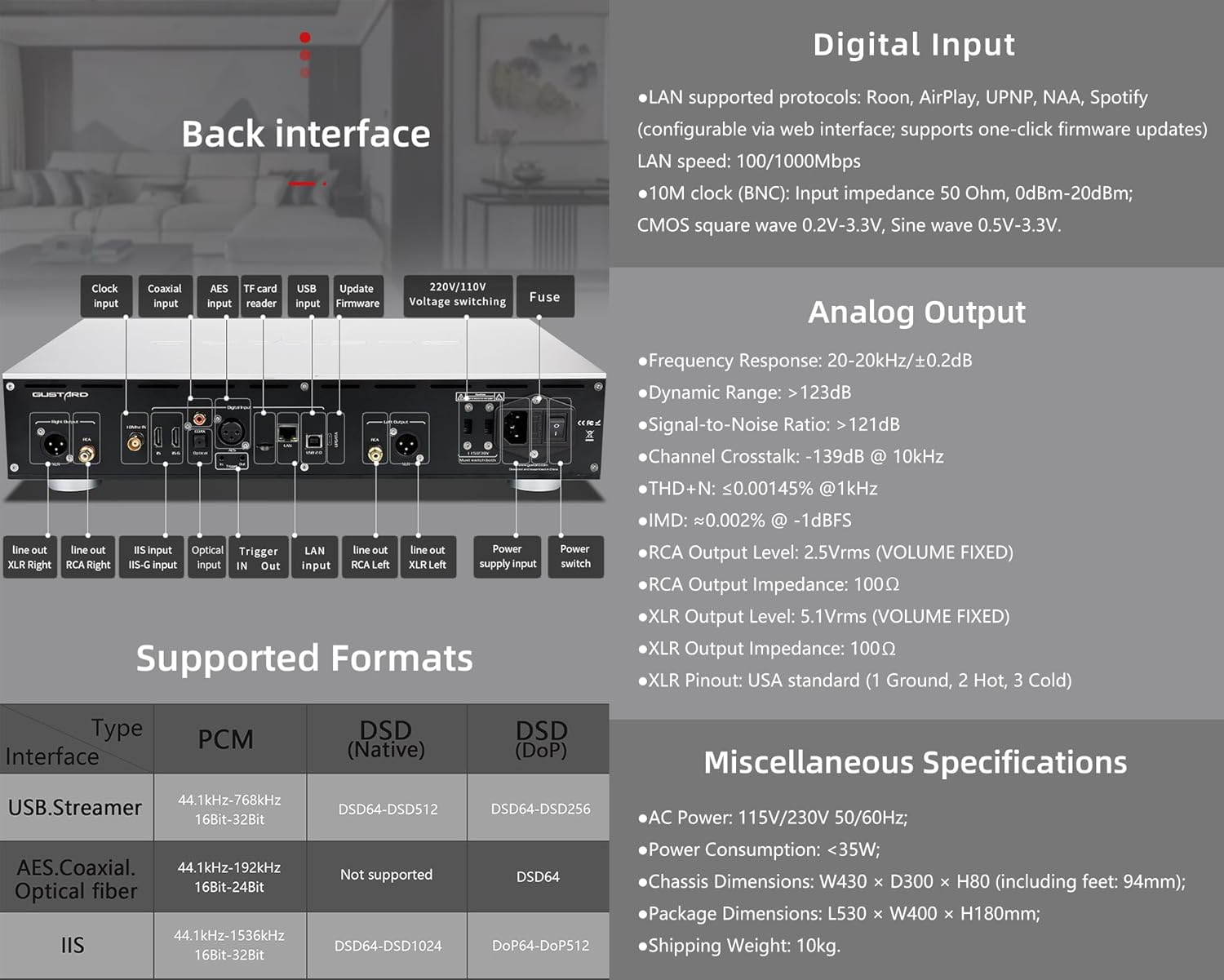
The rear panel provides various input and output connections for the GUSTARD R30.
- گھڙي ان پٽ: For external 10MHz clock synchronization.
- Coaxial ان پٽ: ڊجيٽل آڊيو ان پٽ.
- AES ان پٽ: ڊجيٽل آڊيو ان پٽ.
- USB ان پٽ ڪمپيوٽر يا ٻئي USB آڊيو ذريعن سان ڳنڍڻ لاءِ.
- LAN Input: For network streaming functionality.
- TF ڪارڊ ريڊر: firmware تازه ڪاري لاء.
- تازه ڪاري Firmware: فرم ويئر اپڊيٽ لاءِ USB پورٽ.
- 220V/110V Voltagاي سوئچنگ: Selector for power voltage.
- ڪم: پاور فيوز.
- Line Out XLR Right/Left: متوازن اينالاگ آڊيو آئوٽ پُٽ.
- Line Out RCA Right/Left: غير متوازن اينالاگ آڊيو آئوٽ پُٽ.
- IIS Input (IIS-G): Digital audio input with Gustard pinout.
- بصري ان پٽ: ڊجيٽل آڊيو ان پٽ.
- ٽريگر اندر/آئوٽ: For 12V trigger control.
- پاور سپلائي ان پٽ: اي سي پاور ڪنيڪشن.
- پاور سوئچ: مکيه پاور ٽوگل.
Important: Ensure both voltagاي سوئچ ساڳئي وولٽ تي سيٽ ڪيا ويا آهنtagاي جڏهن 220V/110V وول هلائي رهيو آهيtage switch, otherwise, it may damage the internal transformer upon powering on.
ڊسپلي ۽ پينل ڪنٽرول
The R30 utilizes a large OLED display for real-time status monitoring and functional operations. The diagram below illustrates the main interface display states.
1. OLED ڊسپلي
The display shows the input channel, external clock indication, encoding format, sampلنگ جي شرح، ۽ حجم.
2. Input Channel Selection
R30 ۾ 7 ان پٽ چينل آهن. مکيه انٽرفيس تي، گيئر بٽڻ جو هر پريس هن ترتيب ۾ موجود چينلن ذريعي چڪر لڳائي ٿو: COAX → AES → OPT → USB → اسٽريمر → IIS(G) → IIS(M*).
***Note: IIS(G) is for fixed Gustard pinout configuration and cannot be adjusted. IIS(M*) supports adjustable pinout configuration.
3. حجم جي ترتيب
- When the main interface is displayed, pressing the "+" or "-" buttons directly adjusts the analog volume attenuation function of the passive preampلفٽ ڪندڙ. گهٽتائي 0dB کان -63.5dB تائين آهي (ڪل 63.5dB گهٽتائي).
- Pressing "+" at 0dB activates Fixed Output mode (bypassing attenuation circuit), displaying 'FIXED' indicator.
- When 'FIXED' is displayed, pressing "-" first exits bypass mode before controlling the attenuation level.

سيٽ اپ مينيو
On the main screen, long press the Gear Button to enter the settings menu (hereinafter referred to as the menu button). In this state, the menu button can sequentially switch the menu items to be modified. "+" and "-" buttons are used to adjust the currently selected menu options. When the screen is in the settings menu, long press the menu button again to return to the main screen.
مينيو جي جوڙجڪ:
- PCM فلٽر
- ڊي ايس ڊي فلٽر
- NOS موڊ
- REF CLOCK
- IIS MODE
- فيز
- TRIGGER CH.
- TRIGGER VOL.
- ڏيکاريو

مينيو فنڪشن
مين انٽرفيس تي مينيو بٽڻ کي دٻائي مينيو تائين رسائي حاصل ڪريو. هر مينيو آپشن هيٺ تفصيل سان بيان ڪيو ويو آهي.
1. PCM FILTER (PCM Digital Filter Adjustment)
R30 هڪ خود ترقي يافته اعليٰ ڪارڪردگي واري PCM اوور استعمال ڪري ٿوampلنگ ڊجيٽل فلٽر ماڊيول ٽن فلٽر قسمن سان:
- VIVID (Default): Similar to the FAST roll-off type of traditional digital filter, but with better ringing characteristics, very small pre-ringing, and fast convergence post-ringing. It aims for a broad soundstage and sound restoration. Recommended for most music styles.
- GENTLE: Similar to the SLOW roll-off type of traditional digital filter, offering a soft listening experience.
- ترتيب: A hybrid digital filter, balancing characteristics between Vivid and Gentle for a good listening experience.
2. DSD FILTER (DSD Digital Filter Adjustment)
The DSD filter has 4 built-in bandwidth options: 47K (Default), 50K, 60K, 70K.
3. NOS موڊ (ڪوبه اوور نه)ampling Filter Mode)
When enabled, the PCM signal bypasses the oversampling filter entirely, decoded straight through the R-2R decoder module. This preserves micro-details and timing integrity. When enabled, there may be a slight clicking sound when the playback data format switches between PCM and DSD.
- DISABLE (Default)
- فعال ڪريو
4. REF CLOCK (Reference Clock Selection)
The GUSTARD-K2, low-noise clock synthesizer, achieves ultra-low jitter performance. The R30 offers two clock options:
- INTERNAL (Default): Uses the built-in OCXO internal reference.
- EXT. 10MHz: Selects an external 10MHz reference source. It is recommended to connect to GUSTARD C16 or C18 reference 10M master clocks.
If the external clock is lost, powered off, or its frequency deviation is greater than +/-150ppm, "EXT ERR" will be displayed and flash.
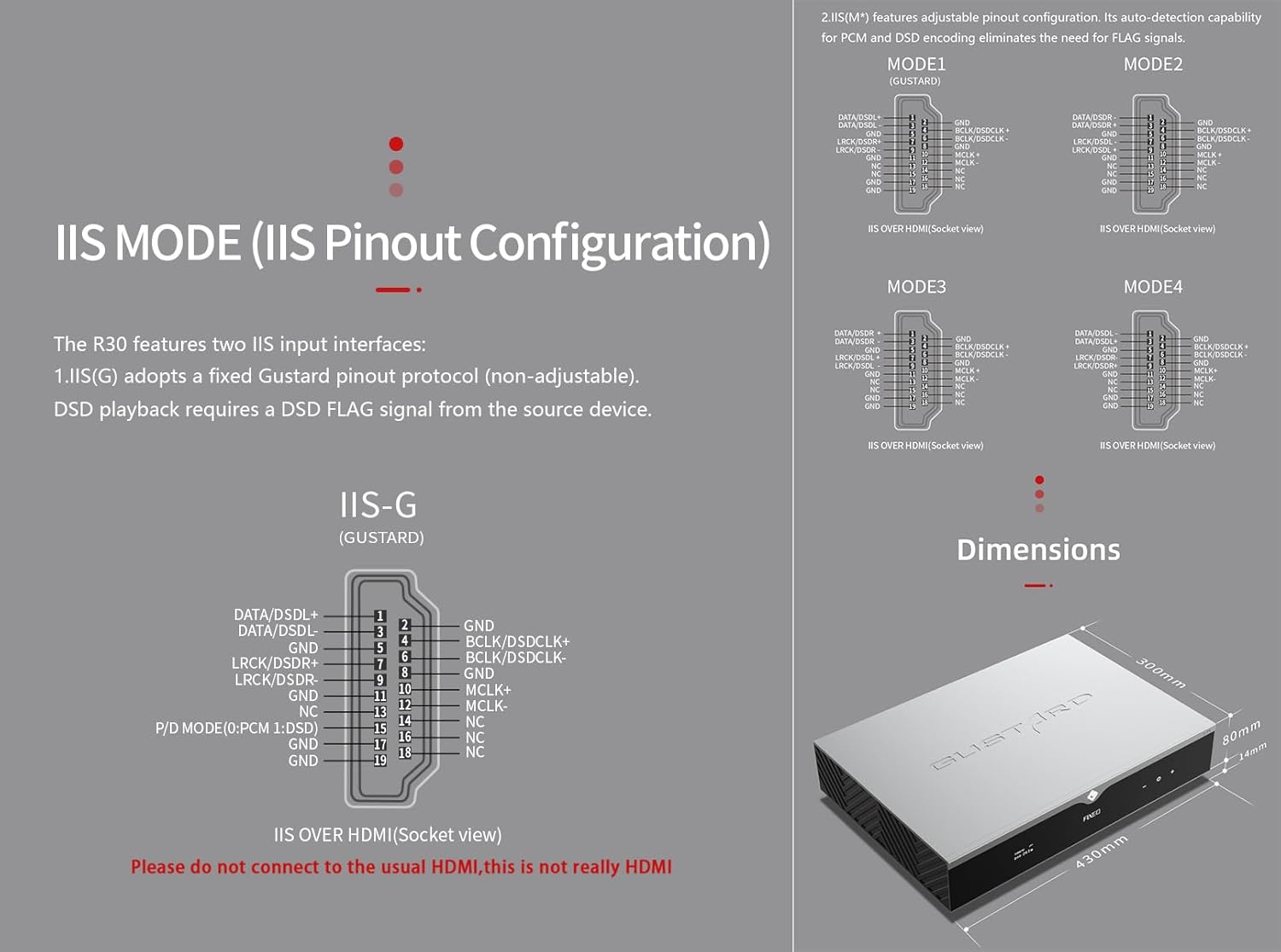
5. IIS MODE (IIS Pinout Mode Selection)
R30 ۾ ٻه IIS ان پٽ انٽرفيس آهن:
- IIS(G): Fixed Gustard pinout protocol (non-adjustable). DSD playback requires a DSD FLAG signal from the source device.
- IIS(M*): Features adjustable pinout configuration. Its auto-detection capability for PCM and DSD encoding eliminates the need for FLAG signals.
IIS(M*) adjustable Pinout mode IIS input has four Pinouts: MODE1 (Default), MODE2, MODE3, MODE4. MODE1 is compatible with the GUSTARD mode. If you are connecting to a GUSTARD front end such as U12, U16, U18, S16, S26, etc., you can match them with MODE1, which is the former works in the Gustard output mode.
Please do not connect to the usual HDMI, this is not really HDMI.
6. PHASE (Phase Setting)
هي فنڪشن ٻه آپشن پيش ڪري ٿو:
- NON-inverted (Default): When non-inverted, the RCA output of R30 is normal phase, and the XLR balanced output is American standard polarity output (1 ground, 2 hot, 3 cold).
- اُلٽو: When inverted, only the RCA output is reverse phase, and the XLR balanced output is Japanese/European standard polarity output (1 ground, 2 cold, 3 hot).
7. TRIGGER CH. (Linkage Trigger Start Channel Selection)
The R30 can be triggered by an external 12V linkage signal and automatically turn on from standby mode. When the 12V trigger signal ceases or drops to 0V, automatic standby activation occurs. When the R30 is working, it is switched to the input channel of this setting by the 12V trigger linkage signal.
- LAST (Default): The input channel that was in use before entering standby last time.
- Other options include COAX, AES, OPT, USB, STREAMER, IIS(G), IIS. Selecting any channel activates it upon receiving a 12V trigger signal.
8. TRIGGER VOL. (Link Trigger Boot Volume Selection)
R30 کي اسٽينڊ بائي کان هڪ خارجي 12V ٽرگر سگنل ذريعي آن ڪري سگهجي ٿو ۽ خودڪار طريقي سان چونڊيل حجم جي سطح تي سيٽ ڪري سگهجي ٿو. متبادل طور تي، آپريشن دوران، هڪ 12V ٽرگر سگنل آئوٽ پُٽ کي پري سيٽ واليوم ۾ تبديل ڪري ٿو. هي آپشن ٽرگر ايڪٽيويشن کان پوءِ آئوٽ پُٽ واليوم کي ترتيب ڏئي ٿو.
- LAST (Default): The volume used before entering standby.
- مقرر: Fixed full-scale output bypassing attenuation.
- -20dB: Output at a volume attenuated to -20dB.
- -30dB: Output at a volume attenuated to -30dB.
- -40dB: Output at a volume attenuated to -40dB.
9. DISPLAY (Screen Brightness Settings)
Long-term high-brightness use of OLED screens can cause screen burn-in or ghosting. Therefore, the R30 is designed to always select automatic screen off, or manually select automatic screen off, which can also reduce interference.
- AUTO (Default): Automatically reduce brightness.
- پاڻمرادو بند: Automatically turn off the screen.
انفراريڊ ريموٽ ڪنٽرول
DAC پراڊڪٽس هلائڻ وقت، DAC ڪنٽرول موڊ ۾ داخل ٿيڻ لاءِ DAC بٽڻ کي 3 سيڪنڊن کان وڌيڪ دٻايو ۽ رکو. AMP/اسٽريم موڊس ٻين گسٽارڊ شين کي ڪنٽرول ڪن ٿا.
- تيار رهو: Press once to activate R30 from standby. Press once during operation to enter standby.
- مينيو: Press to access R30's setup menu.
- 4 طرفي ڪنجين سان پيڊ: Up/Down navigates menu items. Left/Right adjusts selected options. Center press activates/deactivates mute.
- پوئتي: Returns to main interface.
- جلد-: Decreases output volume on main interface.
- جلد+: Increases output volume on main interface.
نوٽس:
- Operational range varies with angle.
- Obstructions between remote and sensor may cause malfunction.
- Remove batteries if unused for more than 1 month.
- Thoroughly clean battery compartment if leakage occurs.
- May accidentally trigger other IR-controlled devices.

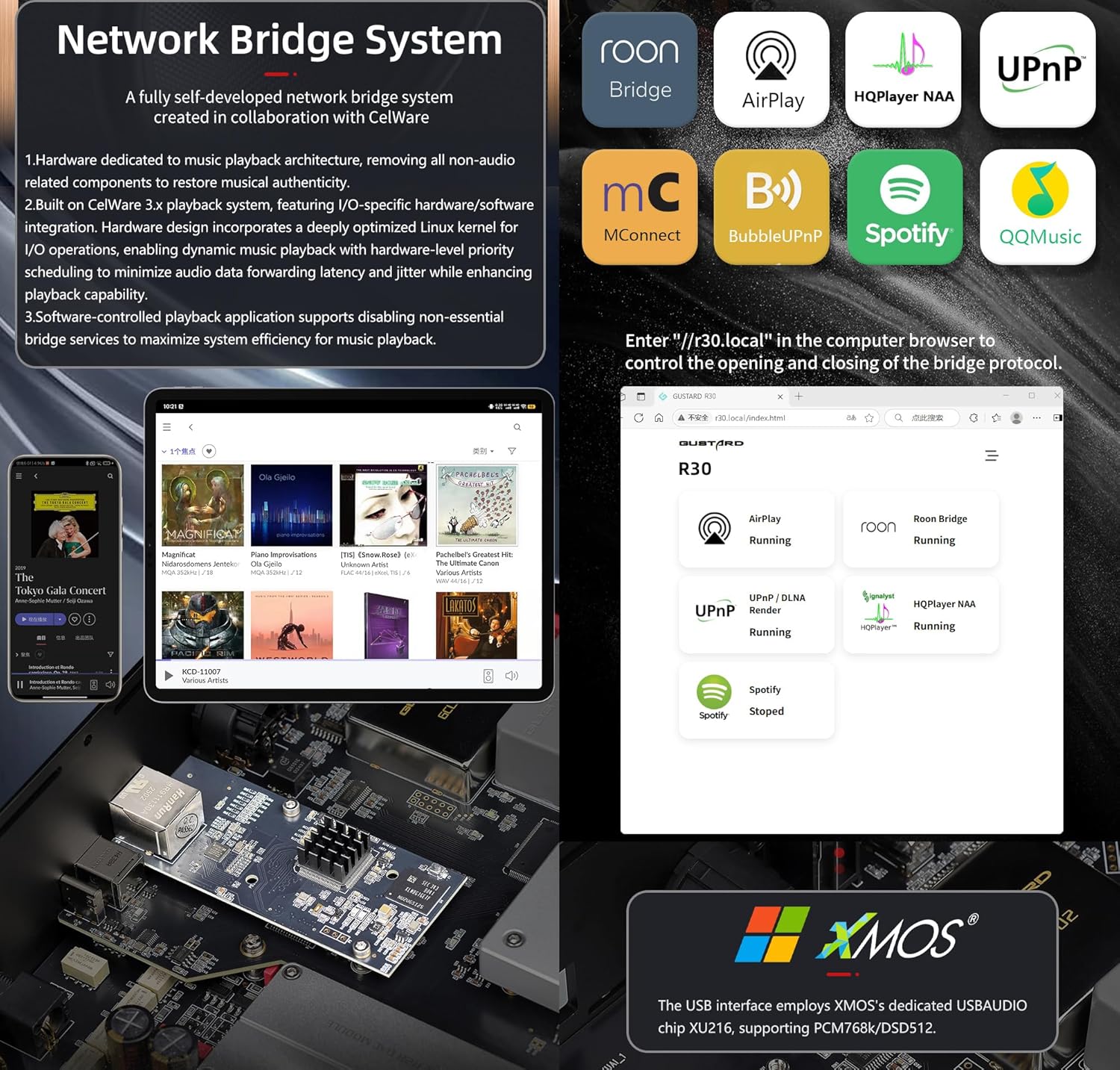
نيٽ ورڪ برج اسٽريمر ڪوئڪ اسٽارٽ
After connecting R30's RJ45 port to your local network:
- Select the STREAMER channel and await system boot (approximately 1 minute, until "DSD 24.5MHz" appears).
- Access R30's configuration page via: http://R30.local (as shown below). Disable unused streaming protocols on the web سسٽم جي ڪارڪردگي کي وڌائڻ لاءِ انٽرفيس. فرم ويئر اپڊيٽ پڻ هتي ڪيا ويندا آهن.
(Mobile/tablet operation pending until dedicated app release)
You can turn off streaming protocols that are not frequently used through the web page to maximize system music playback performance. At the same time, the online upgrade of the Streamer is also operated on the web صفحو.
(وقف ٿيل اسٽريمر اي پي پي لانچ ٿيڻ کان پوءِ، مٿيون آپريشن اي پي پي ۾ ڪري سگھجن ٿا)
Official Product Video: GUSTARD R30 - User Manual
پيداوار جي وضاحت
Digital Input Support Formats:
| قسم | پي سي ايم | DSD (آبائي) | DSD (DoP) |
|---|---|---|---|
| USB.Streamer | 44.1kHz-768kHz 16Bit-32Bit | DSD64-DSD512 | DSD64-DSD256 |
| AES.Coaxial.Optical fiber | 44.1kHz-192kHz 16Bit-24Bit | سپورٽ ناهي | ڊي ايس ڊي 64 |
| آئي ايس | 44.1kHz-1536kHz 16Bit-32Bit | DSD64-DSD1024 | DoP64-DoP512 |
اينالاگ آئوٽ:
- فريڪوئنسي جواب: 20-20kHz/±0.2dB
- متحرڪ رينج:> 123dB
- سگنل کان شور جي نسبت:> 121 ڊي بي
- چينل ڪراس ٽالڪ: -139dB @ 10kHz
- ٽي ايڇ ڊي + اين: ≤ 0.00145٪ @1 ڪلو هرٽز
- IMD: ≈0.002% @ -1dBFS
- آر سي اي آئوٽ پُٽ ليول: 2.5Vrms (حجم مقرر ٿيل)
- RCA Output Impedance: 100Ω
- XLR آئوٽ پُٽ ليول: 5.1Vrms (حجم مقرر ٿيل)
- XLR Output Impedance: 100Ω
- XLR پن آئوٽ: يو ايس اي معيار (1 زميني، 2 گرم، 3 ٿڌو)
ٻيون وضاحتون:
- AC Power: 115V/230V 50/60Hz
- بجلي جو استعمال: <35W
- Chassis Dimensions: W430 × D300 × H80 (including feet: 92mm)
- Package Dimensions: L530 × W400 × H180mm
- Shipping Weight: 10kg (with package)
- 10MHz BNC Input: Input impedance 50 Ohm, 0dBm-20dBm; CMOS square wave 0.2V-3.3V, Sine wave 0.5V-3.3V.
- Trigger: IN- 12V Typ. OUT- 12V Typ.
وارنٽي شرطون
Thank you for choosing GUSTARD HIFI products. To safeguard your rights and interests, please read the following warranty terms carefully. You can promptly obtain comprehensive after-sales service provided by GUSTARD.
مصنوعات جي وارنٽي
You will enjoy a 2-year free warranty and lifetime maintenance after the date of purchasing GUSTARD's HIFI product.
* ڪارخانو صرف چيني سرزمين مان مال کڻندو آهي. اوورسيز مان پيدا ٿيندڙ مال ۽ ٽيڪس جو حصو صارف پاران ڊيلر جي ڳالهين سان حل ڪيو ويندو.
مفت وارنٽي سروس
GUSTARD R30 from the purchasing date in the free warranty period, the user uses the product in normal, and the product fails due to component quality or manufacturing problems.
وارنٽي سروس کان ٻاهر
Belonging to one of the following circumstances, products are no longer provided warranty service:
- خريداري جي تاريخ کان پروڊڪٽس اڳ ۾ مقرر وارنٽي مدت کان وڌي چڪو آهي.
- ماڊل، بارڪوڊس ۽ خريداري جي تاريخ اصل پراڊڪٽ ۽ وارنٽي ڪارڊ سان نه ٿا ملن.
- Without GUSTARD technician permission, unauthorized modifications to the circuit, components or self-repaired product.
- ناقابل برداشت قدرتي قوتن جي ڪري نقصان.
- ماحولياتي نقصان جي اجازت ڏنل استعمال کان ٻاهر.
- غلط استعمال يا غلط اسٽوريج جي ڪري نقصان. جنهن ۾ شامل آهي پر ان تائين محدود ناهي: جلدtagاي سرڪٽ يا اجزاء کي ساڙڻ لاء تمام گهڻو آهي؛ ڌڪڻ ۽ نتيجي ۾ شيل يا اندروني کي نقصان پهچائڻ؛ پاڻي، تيل، مائع ۽ گھڻي مٽي جي ڪري نقصانڪار؛ پيداوار جي oxidation يا corrosion، وغيره.
- وارنٽي جي مدت کان ٻاهر، جهڙوڪ هڪ انفرادي جزو نقصان، ظاهري طور تي انساني نقصان جي ڪري، فرم ويئر تبديلين کي غير مجاز استعمال ڪندڙن پاران ڪم ڪرڻ جي قابل ناهي. گسٽارڊ مناسب سار سنڀال جي فيس وٺڻ جو عزم ڪري ٿو (سواءِ وڏي ايراضيءَ جي اجزاء يا سرڪٽ بورڊ جي مرمت کان ٻاهر ساڙيو ويو). سامان ۽ سار سنڀال جي خرچ، مادي خرچن کي صارف کي برداشت ڪرڻ جي ضرورت آهي.
رابطي جي معلومات
ٺاهيندڙ: Shenzhen Goshide Technology Co., LTD
ائڊريس: Room 302, Building 1, No. 28, Huimin 1st Road, Guanlan Sub-district, Longhua District, Shenzhen City, Guangdong Province
ٽيليفون: +86-18682080102
Webسائيٽ: http://www.gustard.com
اي ميل: service@gustard.com


