تعارف
This manual provides detailed instructions for the Redragon S156 Wireless Gaming Keyboard and Mouse combo. This product offers versatile connectivity, customizable features, and ergonomic design for an enhanced computing experience. Please read this manual thoroughly before use to ensure proper operation and to maximize the product's capabilities.
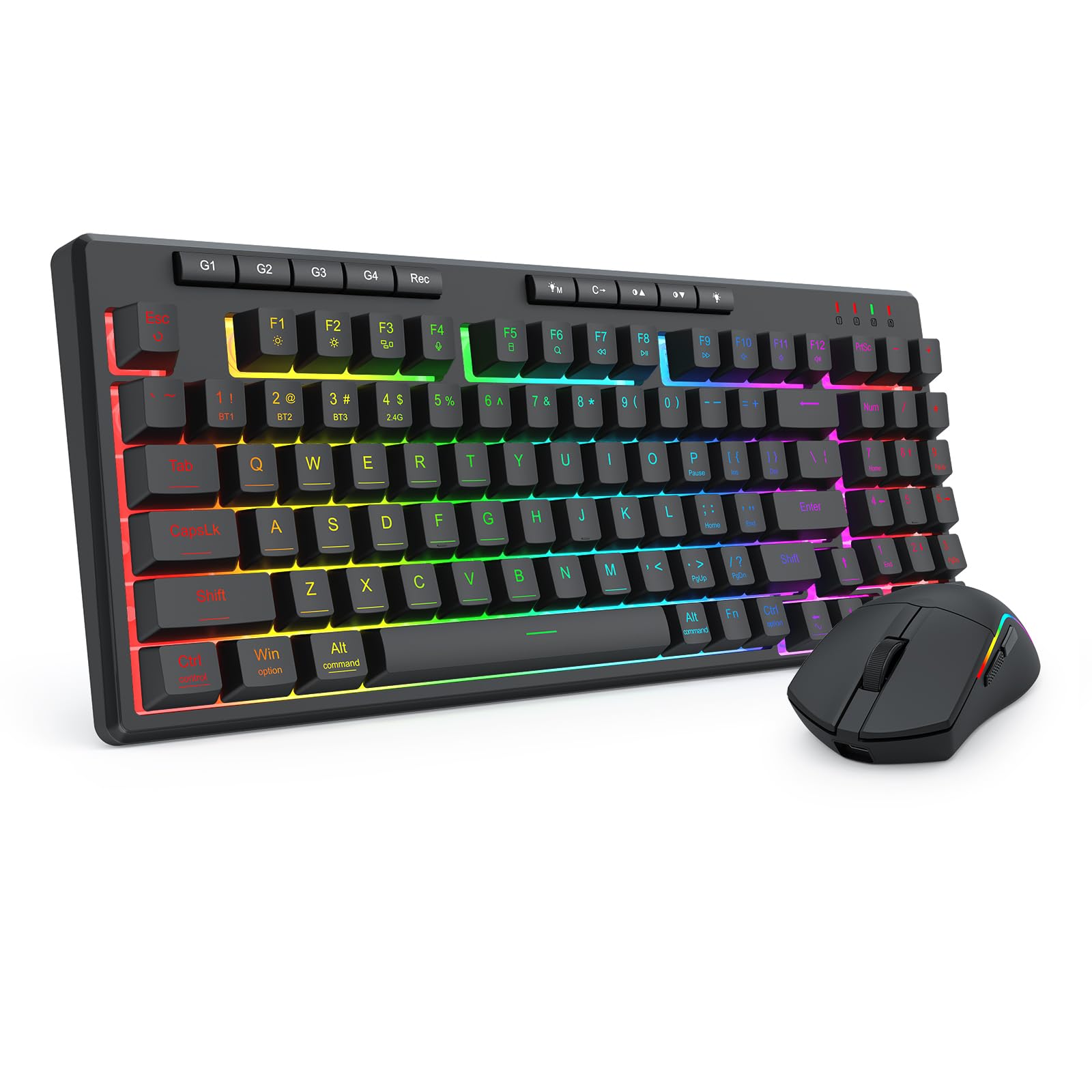
Figure 1: Redragon S156 Keyboard and Mouse in a typical gaming setup.
پيڪيج مواد
Before proceeding with setup, please verify that all items are present in your package:
- Redragon S156 Wireless Gaming Keyboard
- Redragon S156 Wireless Gaming Mouse
- 2.4GHz USB وصول ڪندڙ
- USB-C چارجنگ ڪيبل
- استعمال ڪندڙ جو دستياب (ھي دستاويز)

Figure 2: Contents included with the Redragon S156 product.
سيٽ اپ ڪريو
ڊوائيسز کي چارج ڪرڻ
Ensure both the keyboard and mouse are fully charged before initial use. Connect the provided USB-C cable to the charging port on each device and to a powered USB port on your computer or a USB wall adapter. The charging indicator will show status (refer to device for specific light behavior).
Connectivity Options (Tri-Mode)
The Redragon S156 supports three connection modes: 2.4GHz Wireless, Bluetooth (BT1/BT2/BT3), and Wired (USB-C).

Figure 3: Tri-mode connectivity options for multiple devices.
2.4GHz وائرليس ڪنيڪشن
- Locate the 2.4GHz USB receiver.
- وصول ڪندڙ کي توهان جي ڪمپيوٽر تي موجود USB پورٽ ۾ پلگ ان ڪريو.
- ڪي بورڊ ۽ مائوس آن ڪريو. انهن کي خودڪار طريقي سان رسيور سان ڳنڍجي وڃڻ گهرجي.
بلوٽوٿ ڪنيڪشن
The keyboard and mouse can connect to up to three different Bluetooth devices (BT1, BT2, BT3).
- Turn on the keyboard/mouse and switch to a desired Bluetooth channel (e.g., BT1).
- Activate Bluetooth on your device (PC, Mac, smartphone, tablet).
- ڳولھيو new Bluetooth devices and select "Redragon S156 Keyboard" or "Redragon S156 Mouse" from the list.
- جوڙڻ کي مڪمل ڪرڻ لاءِ ڪنهن به آن-اسڪرين اشارن تي عمل ڪريو.
وائرڊ USB-C ڪنيڪشن
Connect the USB-C cable directly from the keyboard/mouse to your computer's USB port. The devices will function in wired mode and charge simultaneously.

Figure 4: Mouse connectivity options.

Figure 5: Mouse connected via USB-C for wired operation and charging.
آپريٽنگ هدايتون
ڪي بورڊ افعال
آر بي جي بائيٽ لائٽنگ
The keyboard features multiple built-in RGB lighting modes and effects. Use the dedicated keys (often Fn + specific keys) to cycle through modes, adjust brightness, and change colors. Refer to the keyboard's function key legends for specific controls.

Figure 6: Keyboard lighting customization options.

Figure 7: Keyboard software interface for backlight customization (Windows only).
Macro Keys (G1-G4)
The keyboard includes dedicated macro keys (G1-G4) for instant command execution. These can be programmed directly on the keyboard without software.
- کي دٻايو [ريڪ] button to start macro recording.
- ھڪڙي کي دٻايو [G1-G4] keys to select a profile رڪارڊنگ لاءِ.
- Type the sequence of keys you wish to record.
- After finishing the macro key recording, press [ريڪ] ٻيهر ميڪرو بچائڻ لاءِ.

Figure 8: On-the-fly macro recording instructions.
ماؤس جا ڪم ڪار
ڊي پي آءِ ايڊجسٽمينٽ
The mouse features adjustable DPI settings up to 10000 DPI for precision control. Use the dedicated DPI button on the mouse to cycle through preset DPI levels.
Programmable Buttons and RGB Customization
The mouse buttons and RGB lighting can be customized using the Redragon software. This software allows for adjusting DPI, polling rate, assigning macros, and customizing RGB effects.

Figure 9: Customizable gaming mouse buttons.

Figure 10: Mouse software for customization (Windows only; not supported in Bluetooth mode).
سار سنڀال
صفائي
To maintain optimal performance, regularly clean your keyboard and mouse. Use a soft, dry cloth to wipe surfaces. For stubborn dirt, a slightly damp نرم صابڻ وارو ڪپڙو استعمال ڪري سگهجي ٿو، انهي ڳالهه کي يقيني بڻائڻ لاءِ ته ڪو به مائع ڊوائيس ۾ داخل نه ٿئي. سخت ڪيميڪلز يا رگڙيندڙ مواد کان پاسو ڪريو.
بيٽري جي زندگي ۽ چارج
The keyboard features a 4000mAh battery, offering extended use. The mouse provides up to 200 hours of battery life on a full charge. For best battery longevity, avoid fully discharging the devices frequently. Recharge when the low battery indicator appears.

Figure 11: Keyboard battery capacity and estimated usage time.

Figure 12: Mouse ultra-long battery life indication.
مشڪلاتون
رابطي جا مسئلا
- ڊوائيس ڳنڍجي نه رهيو آهي: Ensure the device is powered on and in the correct connection mode (2.4GHz, BT1/2/3). For 2.4GHz, ensure the USB receiver is securely plugged in. For Bluetooth, ensure your host device's Bluetooth is enabled and the pairing process is completed.
- وقفي وقفي سان ڳنڍڻ: Move the devices closer to the receiver/host device. Avoid sources of interference such as other wireless devices or large metal objects. Ensure devices are charged.
ڪي بورڊ/ماؤس جواب نه ڏئي رهيو آهي
- بيٽري جي سطح چيڪ ڪريو ۽ ريچارج ڪريو جيڪڏھن ضروري ھجي.
- Try switching to wired mode using the USB-C cable to rule out wireless issues.
- پنهنجي ڪمپيوٽر کي ٻيهر شروع ڪريو.
- For the keyboard, ensure it is not in a locked mode (e.g., Num Lock, Caps Lock, Scroll Lock indicators).
آر بي جي روشني ڪم نه ڪندي
- Ensure the backlight is turned on and brightness is adjusted.
- Cycle through different lighting modes to see if any work.
- If using software, ensure it is running and settings are applied correctly.
وضاحتون
| خاصيت | تفصيل |
|---|---|
| برانڊ | ريڊريگون |
| ماڊل | S156 |
| رابطي ٽيڪنالاجي | 2.4G Wireless, Bluetooth (BT1/BT2/BT3), USB-C Wired |
| ڪي بورڊ جو قسم | Mechanical Feel Membrane Keyboard |
| ڪي بورڊ جي چاٻي | 94-key layout, 4 Macro Keys (G1-G4) |
| ڪي بورڊ Backlight | RGB Backlit (multiple modes) |
| ڪي بورڊ جي بيٽري | 4000mAh |
| ماؤس DPI | 10000 DPI تائين (ايڊجسٽبل) |
| مائوس جو وزن | 61g (Ultra-lightweight) |
| مائوس جي بيٽري جي زندگي | 200 ڪلاڪ تائين |
| مطابقت رکندڙ ڊوائيسز | ليپ ٽاپ، پي سي، اسمارٽ فون، ٽيبليٽ |
| آپريٽنگ سسٽم مطابقت | ونڊوز، ميڪ |
| مواد | پلاسٽڪ |
| شيءِ جو وزن | 2.16 پائونڊ (گڏيل) |
| پيڪيج جي ماپ | 15.12 x 8.86 x 2.01 انچ |

شڪل 13: ڪي بورڊ جا طول و عرض.

Figure 14: Keyboard height.
وارنٽي ۽ سپورٽ
وارنٽي ڄاڻ
Redragon products are covered by a limited warranty against defects in materials and workmanship. The specific warranty period may vary by region and product. Please retain your proof of purchase for warranty claims.
ڪسٽمر سپورٽ
For technical assistance, troubleshooting, or warranty inquiries, please visit the official Redragon website or contact their customer support team. Contact information can typically be found on the Redragon webسائيٽ تي يا پراڊڪٽ پيڪنگنگ تي.


