تعارف
Welcome to the user manual for your new DOOGEE Tab A9 Wi-Fi Tablet. This guide provides essential information to help you set up, operate, maintain, and troubleshoot your device. Please read this manual thoroughly to ensure optimal performance and longevity of your tablet.
پيڪيج مواد
پڪ ڪريو ته سڀئي شيون توهان جي پيڪيج ۾ موجود آهن:
- DOOGEE Tab A9 Tablet
- USB قسم-سي ڪيبل
- چارجر
- استعمال ڪندڙ دستي
- (Optional accessories, depending on package edition: Stylus Pen, Reinforced Case, Bluetooth Mouse, Leather Protective Cover, Bluetooth Keyboard)
سيٽ اپ ڪريو
1. شروعاتي چارجنگ
Before first use, fully charge your tablet. Connect the USB Type-C cable to the tablet's charging port and the other end to the provided charger. Plug the charger into a power outlet. The charging indicator will show the charging status.
2. پاور آن/آف
- پاور آن ڪرڻ: پاور بٽڻ کي دٻايو ۽ رکو جيستائين DOOGEE لوگو اسڪرين تي ظاهر نه ٿئي.
- پاور آف ڪرڻ: پاور بٽڻ کي دٻايو ۽ رکو جيستائين پاور آف مينيو ظاهر نه ٿئي. ڊوائيس کي بند ڪرڻ لاءِ "پاور آف" چونڊيو.
- ٻيهر شروع ڪرڻ لاء: پاور آف مينيو مان، ڊوائيس کي ريبوٽ ڪرڻ لاءِ "ٻيهر شروع ڪريو" چونڊيو.
3. شروعاتي سيٽ اپ مددگار
پهرين پاور آن ٿيڻ تي، ٽيبليٽ توهان کي شروعاتي سيٽ اپ جي عمل ذريعي رهنمائي ڪندو. اسڪرين تي ڏنل اشارن تي عمل ڪريو:
- پنھنجي ٻولي چونڊيو.
- وائي فائي نيٽ ورڪ سان ڳنڍيو.
- شرطن ۽ ضابطن کي قبول ڪريو.
- پنهنجي گوگل اڪائونٽ سان سائن ان ڪريو يا هڪ نئون ٺاهيو.
- اسڪرين لاڪ سيٽ اپ ڪريو (پن، پيٽرن، پاسورڊ).

تصوير: اڳيان ۽ پوئتي view of the DOOGEE Tab A9 tablet, illustrating its design and camera placement.
آپريٽنگ هدايتون
1. بنيادي نيويگيشن
- ڇڪڻ: ڪنهن به آئڪن يا آپشن کي چونڊڻ لاءِ ان تي ٽيپ ڪريو.
- سوائپ Drag your finger across the screen to scroll through pages or content.
- زوم ڪرڻ لاءِ پنچ: اسڪرين تي ٻه آڱريون رکو ۽ انهن کي زوم ان ڪرڻ لاءِ الڳ الڳ ڪريو، يا زوم آئوٽ ڪرڻ لاءِ انهن کي گڏ ڪريو.
- گھر جي اسڪرين: Tap the Home button (usually a circle or house icon) to return to the main screen.
- پوئتي: Tap the Back button (usually a left arrow) to return to the previous screen.
- تازو ائپس: Tap the Recent Apps button (usually a square or three vertical lines) to view ۽ تازو استعمال ٿيل ايپليڪيشنن جي وچ ۾ سوئچ ڪريو.
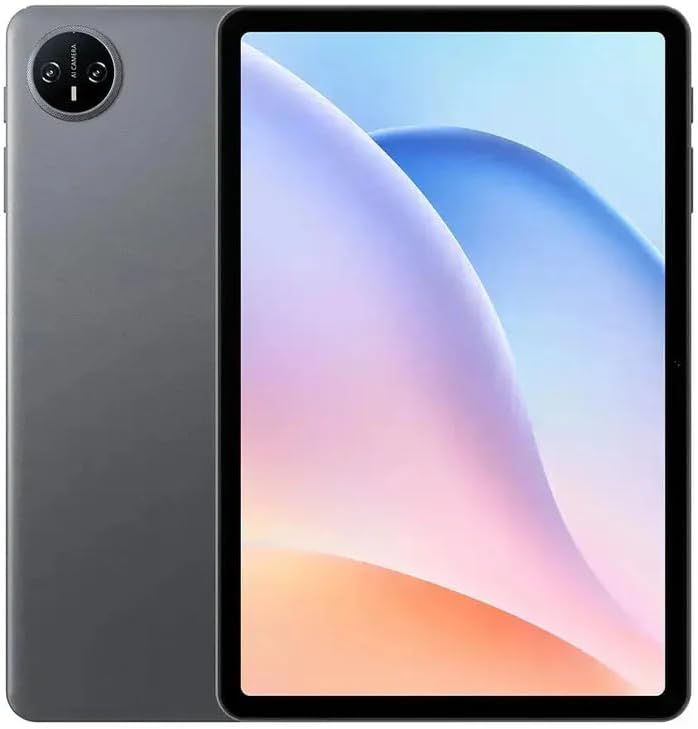
تصوير: سامهون view of the DOOGEE Tab A9 tablet with its display active, showing the user interface.
2. وائي فائي ڪنيڪشن
وائي فائي نيٽ ورڪ سان ڳنڍڻ لاء:
- ڏانهن وڃو سيٽنگون > نيٽ ورڪ ۽ انٽرنيٽ > وائي فائي.
- وائي فائي کي ٽوگل ڪريو On.
- فهرست مان پنھنجو گهربل نيٽ ورڪ چونڊيو.
- جيڪڏهن چيو وڃي ته پاسورڊ داخل ڪريو ۽ ٽيپ ڪريو ڳنڍڻ.
3. بلوٽوٽ جوئر
بلوٽوٽ ڊوائيس سان جوڙي ٺاھڻ:
- ڏانهن وڃو سيٽنگون > ڳنڍيل ڊوائيسز > بلوٽوٿ.
- بلوٽوت کي ٽوگل ڪريو On.
- Ensure the other Bluetooth device is in pairing mode.
- Select the device from the list of available devices and follow any on-screen prompts to complete pairing.
4. ڪئميرا جو استعمال
ٽيبليٽ ۾ 5 ايم پي فرنٽ ڪيمرا ۽ 8 ايم پي ريئر ڪيمرا آهي.
- کوليو ڪئميرا درخواست.
- تصوير ڪڍڻ لاءِ شٽر بٽڻ کي دٻايو.
- ڪئميرا سوئچ آئڪن استعمال ڪندي اڳيان ۽ پوئين ڪئميرا جي وچ ۾ سوئچ ڪريو.
- وڊيوز رڪارڊ ڪرڻ لاءِ وڊيو موڊ چونڊيو.
5. ڊسپلي خاصيتون

Image: Visual representation of the DOOGEE Tab A9's 10.1-inch IPS HD display, highlighting its 1280x800 resolution, 80.2% screen-to-body ratio, and 16.7 million screen colors.
The DOOGEE Tab A9 features a 10.1-inch IPS HD display with a resolution of 1280x800 pixels, offering a wide field of view and vibrant colors. The screen-to-body ratio is approximately 80.2%, providing an immersive viewتجربو.
6. بيٽري جو انتظام

Image: Infographic detailing the DOOGEE Tab A9's 6580mAh battery capacity and its estimated usage times for Wi-Fi standby, music playback, video watching, and web برائوزنگ
ٽيبليٽ 6580mAh جي بيٽري سان ليس آهي. بيٽري جي زندگي کي بهتر بڻائڻ لاءِ:
- اسڪرين جي روشني کي ترتيب ڏيو.
- غير استعمال ٿيل ايپليڪيشنون بند ڪريو.
- جڏهن استعمال ۾ نه هجي ته وائي فائي يا بلوٽوٿ بند ڪريو.
- Android سيٽنگن ۾ موجود پاور سيونگ موڊ استعمال ڪريو.
سار سنڀال
1. صفائي
- ٽيبليٽ جي اسڪرين ۽ باڊي کي صاف ڪرڻ لاءِ نرم، لِنٽ فري ڪپڙو استعمال ڪريو.
- سخت ڪيميڪل، رگڙيندڙ صاف ڪندڙ، يا ايروسول اسپري استعمال ڪرڻ کان پاسو ڪريو.
- ضدي داغن لاءِ، ٿورو ڊيampڪپڙي کي پاڻي يا اسڪرين جي مخصوص صفائي واري حل سان ڌوئڻ.
2. اسٽوريج
- ٽيبليٽ کي سڌي سج جي روشني ۽ انتهائي گرمي پد کان پري ٿڌي، سڪل جاءِ تي رکو.
- If storing for an extended period, ensure the battery is charged to about 50% to prevent deep discharge.
3. سافٽ ويئر اپڊيٽ
باقاعدي طور تي سافٽ ويئر اپڊيٽس جي جانچ ڪريو ۽ انسٽال ڪريو ته جيئن پڪ ڪري سگهجي ته توهان جي ٽيبليٽ ۾ جديد خاصيتون، سيڪيورٽي پيچ، ۽ ڪارڪردگي بهتري آهي. ڏانهن وڃو سيٽنگون > سسٽم > سسٽم اپڊيٽ.
مشڪلاتون
| مسئلو | ممڪن حل |
|---|---|
| ٽيبليٽ آن نٿو ٿئي | پڪ ڪريو ته بيٽري چارج ٿيل آهي. چارجر کي ڳنڍيو ۽ ٻيهر ڪوشش ڪريو. جيڪڏهن جواب نه ملي ته، پاور بٽڻ کي 10-15 سيڪنڊن لاءِ دٻايو ۽ دٻايو ته جيئن زبردستي ٻيهر شروع ٿئي. |
| وائي فائي سان ڳنڍجي نٿو سگھي | Check if Wi-Fi is enabled in settings. Restart your router and tablet. Verify the Wi-Fi password. |
| Applications are crashing or freezing | Close and reopen the application. Clear the app's cache (Settings > Apps > [App Name] > Storage & cache). Restart the tablet. |
| سست ڪارڪردگي | غير استعمال ٿيل ايپس بند ڪريو. ڪيش صاف ڪريو ۽ عارضي files. Check for system updates. Consider a factory reset if issues persist (backup data first). |
| ٽچ اسڪرين غير جوابي | Restart the tablet. Ensure the screen is clean and free of debris. If a screen protector is installed, ensure it is properly applied. |
وضاحتون
| خاصيت | تفصيل |
|---|---|
| ماڊل نالو | DOOGEE Tab A9 |
| آپريٽنگ سسٽم | Android 15 |
| پروسيسر | Unisoc T310 Octa-Core (1x Cortex-A75 @2.0GHz, 3x Cortex-A55 @1.8GHz) |
| جي پي يو | آرم مالي G52 |
| رام | 3GB LPDDR3 |
| اندروني اسٽوريج (ROM) | 64GB ايم ايم سي |
| وسعت وارو اسٽوريج | 2 ٽي بي تائين TF ڪارڊ جي حمايت ڪري ٿو |
| ڊسپلي سائيز | 10.1 انچ |
| ڊسپلي جو قسم | IPS HD LCD |
| ڊسپلي قرارداد | 1280 x 800 پکسلز |
| اسڪرين کان جسم جو تناسب | 80.2% |
| سامهون ڪئميرا | 5MP |
| پوئين ڪئميرا | 8 ايم پي فليش سان |
| وڊيو رڪارڊنگ | FHD 1080p @ 30fps |
| وائي فائي | 802.11 a / b / g / n / ac (2.4GHz / 5GHz) |
| بلوٽوٿ | بلوٽوٿ 5.0 |
| سيلولر نيٽ ورڪ | Not supported (Wi-Fi only model) |
| بيٽري جي گنجائش | 6580 mAh (38.38 Wh) |
| چارج ڪرڻ | 10W Max Charging Current, USB Type-C |
| آڊيو جيڪ | 3.5mm هيڊ فون جيڪ |
| سينسر | Accelerometer |
| طول و عرض | 242.5 × 160.9 × 9.7 mm (approx. 25L x 18W x 1.5T cm) |
| وزن | 512 grams (approx. 500 grams) |
| رنگ | ڀورو |
وارنٽي ۽ سپورٽ
وارنٽي ڄاڻ
Your DOOGEE Tab A9 tablet comes with a limited one-year manufacturer's warranty from the date of purchase. This warranty covers defects in materials and workmanship under normal use. It does not cover damage caused by accidents, misuse, unauthorized repairs, or normal wear and tear. Please retain your proof of purchase for warranty claims.
ڪسٽمر سپورٽ
For technical assistance, warranty claims, or further inquiries, please contact DOOGEE customer support through their official website or the retailer where you purchased the device. Have your model number (Tab A9) and proof of purchase ready when contacting support.


