تعارف
This manual provides comprehensive instructions for the TOZO OpenWear T13051 Open Ear Headphones. Designed for comfort and situational awareness, these headphones feature an open-ear design, adjustable ear hooks, and advanced audio technology. Please read this manual thoroughly to ensure proper use and optimal performance of your device.
دٻي ۾ ڇا آهي
پڪ ڪريو ته هيٺ ڏنل سڀئي شيون توهان جي پيڪيج ۾ شامل آهن:
- OpenWear Earbuds (Left and Right)
- چارج ڪيس
- استعمال ڪندڙ دستي
- USB-C® (A to C) cable (20")
- تڪڙو رستو
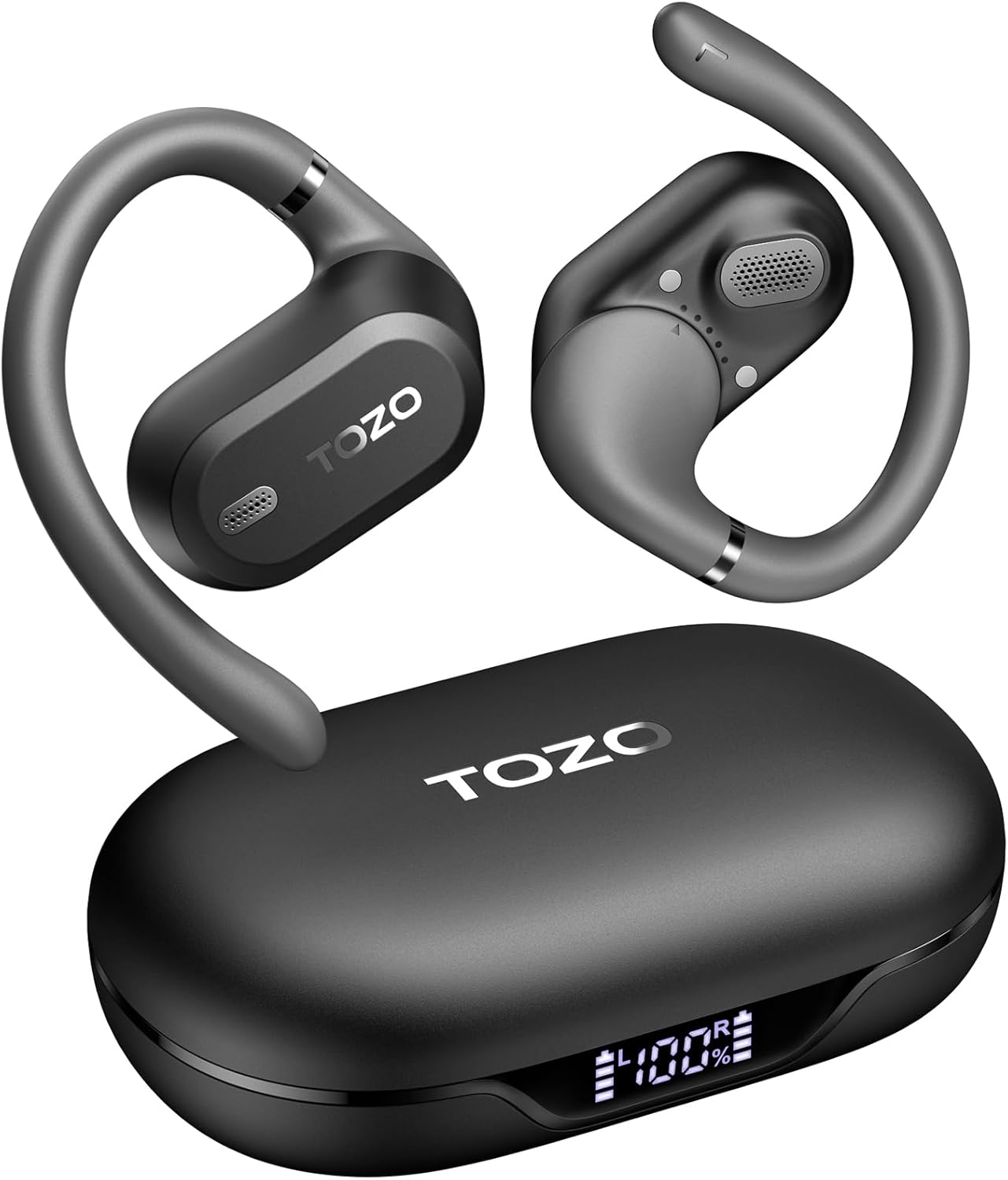
Image: TOZO OpenWear T13051 Open Ear Headphones and Charging Case. The image displays the two black open-ear earbuds with their flexible ear hooks, alongside their matching black charging case. The charging case features a digital display on the front.
پيداوار ختمview
اجزاء
The TOZO OpenWear headphones are designed with user comfort and sound quality in mind. Each earbud features a main body housing the audio components and a flexible ear hook for secure placement.

تصوير: ويجهو تصوير view of a TOZO OpenWear earbud, highlighting the internal 14.2mm dynamic driver and speaker grille. The image emphasizes the audio technology for clear sound and bass.
ڪنٽرول
Each earbud is equipped with touch-sensitive controls for managing audio playback, calls, and other functions. Specific control gestures can be customized via the TOZO App.
وڊيو: هڪ اوورview of the TOZO OpenWear Open Ear Headphones. The video demonstrates the physical design, including the flexible ear hooks and the charging case, providing a general introduction to the product's appearance and features.
سيٽ اپ ڪريو
هيڊفون چارج ڪرڻ
پهرين استعمال کان اڳ، هيڊفون ۽ چارجنگ ڪيس کي مڪمل طور تي چارج ڪريو.
- Place the earbuds into the charging case. Ensure they are correctly seated; magnets will guide them into position.
- USB-C ڪيبل کي ڪيس تي چارجنگ پورٽ ۽ پاور سورس سان ڳنڍيو.
- چارجنگ ڪيس تي ڊجيٽل ڊسپلي بيٽري جي فيصد ڏيکاريندوtagڪيس ۽ انفرادي ائربڊس لاءِ e (L/R).
- A 10-minute charge provides approximately 2 hours of playtime. A full charge offers up to 38 hours of total playtime with the charging case.

Image: The TOZO OpenWear charging case open, showing the earbuds inside and a digital display indicating "38 hrs" of extended battery life, "630 songs", and "38 meetings". This highlights the long battery performance.
Image: A close-up of the TOZO OpenWear charging case's digital display, showing the battery levels for the left earbud (L), the charging case (center percentage), and the right earbud (R).
توهان جي ڊوائيس سان ڳنڻ
- چارجنگ ڪيس کوليو. ائربڊس پاڻمرادو پيئرنگ موڊ ۾ داخل ٿي ويندا.
- پنهنجي ڊوائيس (اسمارٽ فون، ٽيبليٽ، ليپ ٽاپ) تي، بلوٽوٿ کي فعال ڪريو.
- ڳولھيو "TOZO OpenWear" in the list of available Bluetooth devices and select it to connect.
- هڪ دفعو ڳنڍيل، هڪ وائس پرامپٽ ڪامياب جوڙڻ جي تصديق ڪندو.
Image: A TOZO OpenWear earbud shown next to a smartphone displaying its Bluetooth settings, with "TOZO OpenWear" listed as a connected device. The charging case is also visible in the background.
پائڻ جون هدايتون
The TOZO OpenWear headphones feature a dual-axis adjustable design for a personalized and secure fit. Proper placement is crucial for both comfort and sound quality.
- Gently place the earbud over your ear, positioning the main body in front of your ear canal.
- Adjust the flexible ear hook to rest comfortably and securely behind your ear.
- Utilize the dual-axis rotation to adapt the earbud's angle both horizontally and vertically until it sits comfortably and the sound is clear.
- Ensure the speaker grille is positioned to direct sound towards your ear canal without blocking it.

Image: A diagram illustrating the dual-axis adjustment feature of the TOZO OpenWear ear hooks. It shows how the ear hook can rotate 40 degrees horizontally and 75 degrees vertically to adapt to different ear shapes for enhanced comfort and stability.

Image: A woman wearing a TOZO OpenWear earbud, demonstrating the comfortable and breathable fit of the open-ear design for all-day wear. The earbud sits gently on the ear without entering the ear canal.
آپريٽنگ هدايتون
بنيادي ڪنٽرول
The earbuds feature touch controls for various functions. Refer to the Quick Guide for detailed touch gestures. Common functions include:
- راند/روڪ: ٻنهي ائربڊ تي هڪ ڀيرو ٽيپ ڪريو.
- اڳيون ٽريڪ: ساڄي ائربڊ تي ٻٽي ٽيپ ڪريو.
- پويون ٽريڪ: کاٻي ائربڊ تي ٻٽي ٽيپ ڪريو.
- حجم مٿي ساڄي ائربڊ تي ٽي ڀيرا ٽيپ ڪريو.
- حجم ھيٺ کاٻي ائربڊ تي ٽي ڀيرا ٽيپ ڪريو.
- جواب/آخر ڪال: ٻنهي ائربڊ تي هڪ ڀيرو ٽيپ ڪريو.
- ڪال رد ڪريو: 2 سيڪنڊن لاءِ ٻئي ائربڊ کي دٻايو ۽ رکو.
گھٽ ويڪرائي موڊ
Activate low-latency mode for an enhanced audio-visual synchronization, ideal for gaming and video playback. This mode reduces audio delay to 60ms.
- Refer to the TOZO App or Quick Guide for specific instructions on activating/deactivating low-latency mode.
TOZO App Features
Download the official TOZO App for a personalized audio experience. The app allows you to:
- Access 16 custom EQ settings to fine-tune your sound.
- بهتر ڪارڪردگي لاءِ فرم ويئر اپڊيٽ حاصل ڪريو ۽ انسٽال ڪريو.
- Control various features and settings of your OpenWear headphones.

Image: Screenshots of the TOZO App interface, demonstrating features such as 5 types of EQ sound modes, firmware updates, and detailed EQ adjustment options for a personalized listening experience.
سار سنڀال
صفائي
باقاعده صفائي بهتر ڪارڪردگي ۽ صفائي کي برقرار رکڻ ۾ مدد ڪري ٿي.
- ائربڊس ۽ چارجنگ ڪيس کي نرم، سڪل، لِنٽ فري ڪپڙي سان صاف ڪريو.
- گھڙڻ واري مواد، محلول، يا ايروسول اسپري استعمال ڪرڻ کان پاسو ڪريو.
- چارجنگ ڪيس کي پاڻي ۾ نه ٻوڙيو.
ذخيرو
Always store the headphones in their charging case when not in use to protect them and ensure they remain charged.
پاڻي جي مزاحمت (IPX6)
The TOZO OpenWear headphones are rated IPX6 water-resistant, meaning they can withstand high-pressure water jets from any direction. This makes them suitable for workouts and outdoor activities where sweat and splashes may occur.
- The IPX6 rating applies to the earbuds only, not the charging case.
- Do not intentionally submerge the earbuds in water for extended periods.
- نقصان کان بچڻ لاءِ چارجنگ ڪيس ۾ واپس رکڻ کان اڳ پڪ ڪريو ته ائربڊس سڪي ويا آهن.
مشڪلاتون
If you encounter any issues, try the following solutions:
- آواز ناهي: Ensure earbuds are charged, properly paired, and volume is adjusted.
- جوڙڻ جا مسئلا: Turn off Bluetooth on your device, place earbuds in case, close and reopen, then try pairing again. Forget "TOZO OpenWear" from your device's Bluetooth list and re-pair.
- غير آرامده فٽ: Adjust the dual-axis ear hooks as described in the "Wearing Instructions" section.
- چارج ڪرڻ جا مسئلا: Check the USB-C cable and power source. Ensure earbuds are correctly seated in the case.
If issues persist, please refer to the official TOZO website for detailed FAQs or contact customer support.
وضاحتون
| خاصيت | تفصيل |
|---|---|
| ماڊل نالو | OpenWear T13051 |
| برانڊ | ٽوزو |
| رابطي ٽيڪنالاجي | وائرليس (بلوٽوٿ 5.4) |
| ڪن جي جڳهه | کليل ڪن |
| آڊيو ڊرائيور جي ماپ | 14.2 ملي ايم ڊائنامڪ ڊرائيور |
| بيٽري جي زندگي (ايربڊس) | 8.5 ڪلاڪن تائين (هڪ چارج تي) |
| ڪل بيٽري جي زندگي (ڪيس سان) | 38 ڪلاڪ تائين |
| چارج ڪرڻ جو وقت (جلدي چارج) | 10 منٽ 2 ڪلاڪ راند جي وقت لاء |
| پاڻي جي مزاحمت | IPX6 (صرف ائربڊ) |
| گھٽ ويڪرائي موڊ | 60ms |
| ڪنٽرول قسم | ٽچ، ايپ ڪنٽرول |
| مطابقت رکندڙ ڊوائيسز | IOS/Android mobile phones, tablets, laptops |
| شيءِ جو وزن | 1.38 آونس (ڪل) |
وارنٽي ۽ سپورٽ
TOZO products come with a standard manufacturer's warranty. For specific warranty details, registration, or to access customer support, please visit the official TOZO webسائيٽ:
Visit the TOZO Store on Amazon
You can also find additional support resources, FAQs, and contact information on their official webسائيٽ.


