1. تعارف
The BLUETTI Elite 10 Mini Portable Power Station is a compact and versatile power solution designed for various applications, including camping, travel, and emergency backup. Featuring a 128Wh LiFePO4 battery and a 200W AC outlet, it provides reliable power for small electronic devices. Its lightweight and airline-friendly design makes it an ideal companion for on-the-go power needs.

Figure 1: BLUETTI Elite 10 Mini Portable Power Station, showcasing its compact design and front panel.
2. حفاظتي هدايتون
Please read and understand all safety instructions before operating the BLUETTI Elite 10. Failure to follow these instructions may result in electric shock, fire, or serious injury.
- حصو نه جدا ، مرمت ، يا تبديل ڪريو.
- يونٽ کي باهه، پاڻي ۽ انتهائي گرمي پد کان پري رکو.
- يونٽ کي ڇڏڻ يا مضبوط اثرن جي تابع ڪرڻ کان پاسو ڪريو.
- صرف منظور ٿيل لوازمات ۽ چارجنگ ڪيبل استعمال ڪريو.
- استعمال ۽ چارج ڪرڻ دوران مناسب وينٽيليشن کي يقيني بڻايو وڃي.
- ٻارن جي پهچ کان پري رکو.
3. مصنوعات جون خاصيتون
- ورسٽائل پاور آئوٽ پُٽ: Equipped with a 200W AC outlet, 100W USB-C fast charging, and multiple DC ports to power various devices.
- ڪمپيڪٽ ۽ پورٽيبل: Weighs approximately 4.0 lbs (1.8 kg) with an ergonomic handle, making it easy to carry.
- Airline-Friendly Capacity: 128Wh battery capacity falls within the 100–160Wh range, allowing it to be carried on most major airlines with prior approval (limit 2 per passenger).
- اڻ رڪاوٽ بجلي جي فراهمي (UPS): Features a built-in 10ms UPS and 350W bypass output for seamless power during outages.
- گھڻن چارجنگ جا اختيار: Supports 150W AC charging (full in 70 mins), 100W solar charging, and 100W car charging.
- سمارٽ ايپ ڪنٽرول: Connect via Bluetooth to customize charging modes, adjust lighting, and monitor power status in real time.
- انٽيگريٽيڊ LED لائٽنگ: Offers 3 lighting modes (warm/cool light, SOS) for up to 50 hours of illumination.
4. شروعات ۽ سيٽ اپ ڪرڻ
4.1. انباڪسنگ ۽ پيڪيج مواد
پيڪيج کولڻ تي، پڪ ڪريو ته سڀئي جزا موجود آهن:
- BLUETTI Elite 10 Mini Power Station
- اي سي چارجنگ ڪيبل
- ڪار چارج ڪيبل
- استعمال ڪندڙ دستي

Figure 2: Contents of the BLUETTI Elite 10 package.
4.2. شروعاتي چارجنگ
Before first use, fully charge the BLUETTI Elite 10. Connect the AC charging cable to the AC input port on the unit and then to a wall outlet. The display will indicate charging status. A full charge via AC takes approximately 70 minutes.
5. پراڊڪٽ ختمview
5.1. فرنٽ پينل
The front panel features the main display, control buttons, and various output ports:
- ڊي سي آئوٽ پُٽ (12V/5A): For compatible DC devices.
- ڊسپلي اسڪرين: ان پٽ/آئوٽ پٽ واٽ ڏيکاري ٿوtagاي، بيٽري جو سيڪڙوtage، ۽ باقي رن ٽائم.
- ڊي سي بٽڻ: Activates DC output ports.
- پاور بٽڻ: يونٽ کي آن/آف ڪري ٿو.
- AC بٽڻ: Activates the AC output outlet.
- USB-C 100W Output: For fast charging compatible USB-C devices.
- USB-A 15W Outputs (x2): Standard USB-A ports for charging.
- USB-C 15W Output: Additional USB-C port.
Figure 3: Front panel layout of the BLUETTI Elite 10.
5.2. Side and Rear Panels
The side and rear panels house additional input/output ports and the LED light:
- DC/PV Input (12-28V/8A, 100W Max): For solar or car charging.
- AC Output (120V/200W): Standard wall outlet for AC-powered devices.
- AC ان پٽ: For charging the unit via wall outlet.
- LED لائيٽ: Multi-mode light for illumination.

Figure 4: Rear panel showing AC output and LED light.
5.3. طول و عرض ۽ وزن
The Elite 10 is designed for portability:
- طول و عرض: Approximately 7.8"L x 5.7"W x 4.3"H (19.8cm x 14.5cm x 11cm)
- وزن: تقريبن 4.0 پائونڊ (1.8 ڪلوگرام)

Figure 5: Visual representation of the Elite 10's compact size.
6. آپريٽنگ هدايتون
6.1. پاور آن/آف
Press and hold the main power button on the front panel to turn the unit on or off. The display will illuminate upon activation.
6.2. اي سي آئوٽليٽ استعمال ڪرڻ
To use the AC outlet, press the 'AC' button on the front panel. The AC icon on the display will light up. Plug your AC-powered device into the AC output port on the rear panel. Ensure your device's power consumption does not exceed 200W.
6.3. Using DC Outputs
To use the DC output ports (USB-C, USB-A, 12V/5A), press the 'DC' button on the front panel. The DC icon on the display will light up. Connect your devices to the appropriate USB or 12V DC output ports.
6.4. Charging the Elite 10
The Elite 10 supports three charging methods:
- AC چارجنگ: Connect the AC charging cable to the AC input port and a wall outlet. Max 150W, full charge in approximately 70 minutes.
- شمسي چارج: Connect a compatible solar panel (e.g., BLUETTI PV60L/PV60F/PV100) to the DC/PV input port. Max 100W.
- ڪار چارج ڪرڻ: Connect the car charging cable to the DC/PV input port and your vehicle's cigarette lighter socket. Max 100W.

Figure 6: Various charging methods for the Elite 10.
6.5. Uninterruptible Power Supply (UPS) Function
When the Elite 10 is connected to an AC wall outlet and has devices plugged into its AC output, it can function as a UPS. In case of a power outage, the unit will automatically switch to battery power within 10 milliseconds, providing continuous power to connected devices up to 350W bypass output.
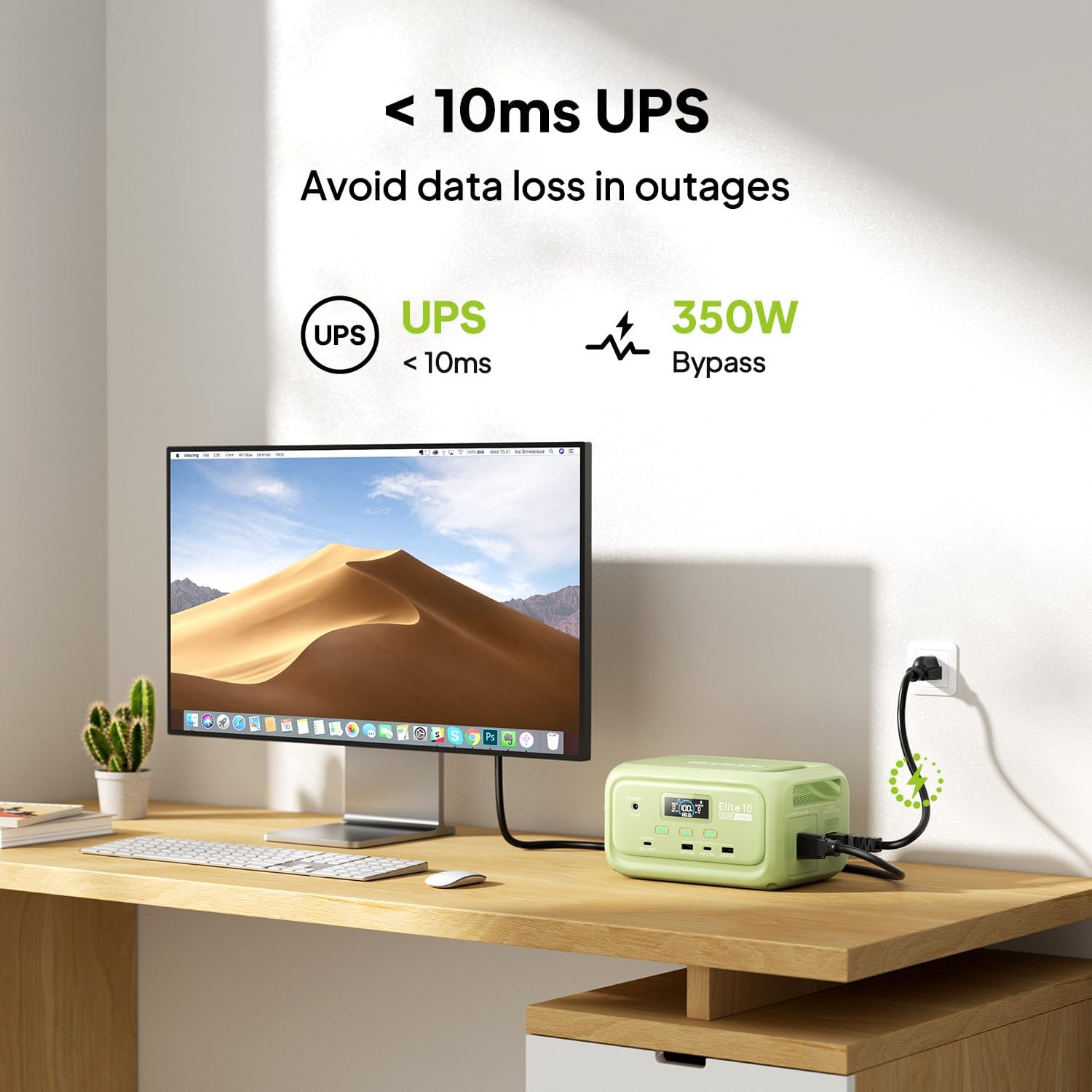
Figure 7: Illustration of the Elite 10's UPS capability.
6.6. LED روشني
The LED light on the rear panel offers three modes: warm light, cool light, and SOS. Press the dedicated light button to cycle through modes or turn it off. The light can provide up to 50 hours of illumination.
6.7. سمارٽ ايپ ڪنٽرول
Download the BLUETTI app and connect to your Elite 10 via Bluetooth. The app allows you to monitor power status, customize charging modes, and adjust lighting settings remotely.

Figure 8: Managing the Elite 10 via the BLUETTI mobile application.
7. مينٽيننس ۽ اسٽوريج
- صفائي: Use a dry, soft cloth to clean the unit. Do not use abrasive cleaners or solvents.
- گرمي پد: Store and operate the unit within the recommended temperature range (typically 0°C to 40°C or 32°F to 104°F).
- ڊگھي مدت اسٽوريج: If storing for extended periods, charge the unit to 50-80% every 3-6 months to prolong battery life. Store in a cool, dry place.
8. مسئلا حل ڪرڻ
If you encounter issues with your BLUETTI Elite 10, refer to the following common solutions:
- يونٽ چالو نه آهي: پڪ ڪريو ته بيٽري چارج ٿيل آهي. جيڪڏهن نه، چارج ڪرڻ لاءِ AC آئوٽليٽ سان ڳنڍيو.
- بندرگاهن مان ڪو به آئوٽ پُٽ ناهي: Verify that the respective DC or AC output buttons are pressed and their indicators are lit. Check if the device connected requires more power than the unit can provide.
- سست چارجنگ: Ensure you are using the original BLUETTI charging cables. Check the power source for adequate output.
- اوور لوڊ تحفظ: If the unit shuts down, it may be due to an overload. Disconnect some devices and restart the unit.
For persistent issues, contact BLUETTI customer support.
9. وضاحتون
| خاصيت | تفصيل |
|---|---|
| ماڊل | ايلٽ 10 |
| بيٽري جي گنجائش | 128Wh LiFePO4 |
| AC ٻاھر | 120V/200W (Pure Sine Wave) |
| يو ايس بي-سي آئوٽ | 1 x 100W، 1 x 15W |
| USB-اي آئوٽ | 2 x 15W |
| ڊي سي اوٽ | 12V/5A |
| DC/PV ان پٽ | 12-28V/8A، 100W وڌ ۾ وڌ |
| AC چارج وقت | Approx. 70 minutes (150W Max) |
| UPS فنڪشن | 10ms switchover, 350W bypass |
| طول و عرض (L x W x H) | 7.8" x 5.7" x 4.3" (19.8 سينٽي ميٽر x 14.5 سينٽي ميٽر x 11 سينٽي ميٽر) |
| وزن | 4.0 پائونڊ (1.8 ڪلوگرام) |
10. وارنٽي ۽ سپورٽ
The BLUETTI Elite 10 Mini Portable Power Station comes with a standard manufacturer's warranty. Please refer to the warranty card included in your package or visit the official BLUETTI webتفصيلي وارنٽي شرطن ۽ ضابطن لاءِ سائيٽ.
For technical support, troubleshooting assistance, or any product-related inquiries, please contact BLUETTI customer service through their official channels.


