1. پراڊڪٽ ختمview
The OnePlus 15 is an advanced Android smartphone designed for high performance and extended usage. It features a powerful Snapdragon 8 Elite Gen 5 processor, a large 7,300mAh battery, and a vibrant 6.78-inch 165 Hz AMOLED display. The device is equipped with a triple 50 MP camera system for detailed photography and offers robust durability with IP66/IP68/IP69 and IP19K ratings for dust and water resistance.
اهم خاصيتون:
- Massive 7,300 mAh Battery: Provides extended power for all-day use and beyond.
- Tri-Chip System: Integrates the Snapdragon 8 Elite Gen 5, a dedicated Wi-Fi chip, and a CPU scheduler for optimized performance, connectivity, and efficiency.
- Triple 50 MP Camera System: Captures high-quality images with wide, ultra-wide, and telephoto capabilities.
- پائيدار ڊيزائن: Built to resist dust and water, with IP66/IP68/IP69 and IP19K ratings for enhanced protection.
- 6.78-inch 165 Hz AMOLED Display: Delivers vivid colors, smooth motion, and exceptional clarity.
2. دٻي ۾ ڇا آهي
پڪ ڪريو ته سڀئي شيون توهان جي پراڊڪٽ پيڪنگنگ ۾ موجود آهن:
- OnePlus 15 Smartphone x1
- چارجر x1
- USB ڊيٽا ڪيبل x1
- SIM Ejector Tool x1
- تڪڙو ھدايت x1
- Safety Guide x1

Image: Contents of the OnePlus 15 retail box, showing the smartphone, charger, USB data cable, SIM ejector tool, quick guide, and safety guide.
3. سيٽ اپ
3.1 سم ڪارڊ لalائڻ
- Locate the SIM card tray on the side of your OnePlus 15.
- مهيا ڪيل سم ايجيڪٽر ٽول کي سم ٽري تي ننڍڙي سوراخ ۾ داخل ڪريو. مضبوطيءَ سان دٻايو جيستائين ٽري ٻاهر نه اچي.
- Place your Nano-SIM card(s) into the tray with the gold contacts facing down. Ensure they are correctly oriented according to the tray's outline.
- Carefully push the SIM tray back into the phone until it is flush with the device.
3.2 شروعاتي پاور آن ۽ ترتيب
- Press and hold the Power button (located on the right side of the device) until the OnePlus logo appears.
- پنهنجي ٻولي چونڊڻ، وائي فائي نيٽ ورڪ سان ڳنڍڻ، ۽ پنهنجو گوگل اڪائونٽ سيٽ اپ ڪرڻ لاءِ اسڪرين تي ڏنل هدايتن تي عمل ڪريو.
- You may be prompted to transfer data from an old device. Follow the instructions or skip this step to set up as a new device.
- Configure security settings such as fingerprint unlock, face unlock, or a PIN/pattern.

تصوير: سامهون view of the OnePlus 15 smartphone, showcasing ان جي ڊسپلي ۽ فرنٽ ڪيمرا.
4. توهان جي ڊوائيس کي هلائڻ
4.1 اسڪرين ۽ نيويگيشن
The OnePlus 15 features a 6.78-inch 165 Hz AMOLED display. Navigate the interface using touch gestures:
- ٽيپ ڪريو: ڪا شيءِ چونڊيو يا ڪا فنڪشن چالو ڪريو.
- سوائپ اسڪرينن يا فهرستن ذريعي اسڪرول ڪريو.
- چٽيو: تصويرن کي زوم ان يا آئوٽ ڪريو ۽ web صفحا.
- ڊگهي پريس: لاڳاپيل مينيو تائين رسائي ڪريو يا آئڪن کي منتقل ڪريو.
4.2 بٽڻ ۽ بندرگاهن
Familiarize yourself with the physical controls and connections:
- پاور بٽڻ: Located on the right side. Press to wake/sleep the screen, long press to power off or restart.
- حجم بٽڻ: Located on the left side. Adjust media volume, ringtone volume, and alarm volume.
- USB قسم-سي پورٽ: Located at the bottom. Used for charging, data transfer, and connecting Type-C headphones.
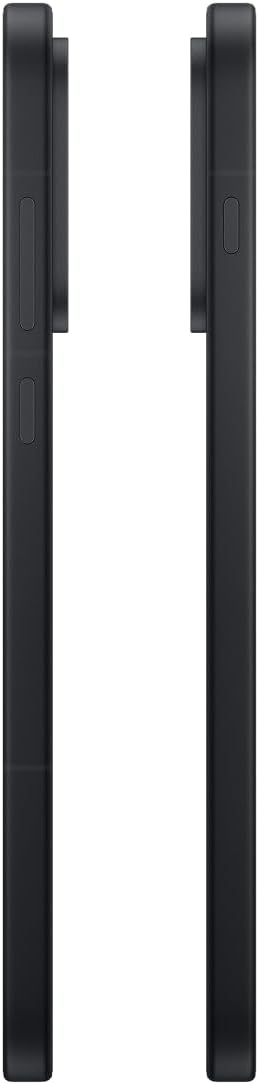
تصوير: پاسي view of the OnePlus 15, showing the placement of the power and volume buttons.
4.3 ڪئميرا جو استعمال
The OnePlus 15 features a versatile triple 50 MP camera system. To open the camera app, tap the camera icon on your home screen or lock screen.
- مٽائڻ جا طريقا: Swipe left or right on the screen to switch between Photo, Video, Portrait, and other modes.
- وڏو ڪريو: Pinch in or out on the viewfinder, or tap the zoom icons (e.g., 0.6x, 1x, 2x) to adjust magnification.
- قبضو: فوٽو ڪڍڻ يا وڊيو رڪارڊنگ شروع/بند ڪرڻ لاءِ شٽر بٽڻ کي دٻايو.
- سيٽنگون: Access camera settings for features like flash, timer, aspect ratio, and more.

تصوير: پوئتي view of the OnePlus 15, highlighting the triple 50 MP camera system.
4.4 بيٽري جو انتظام
Your OnePlus 15 is equipped with a 7,300 mAh battery. To optimize battery life:
- اسڪرين جي چمڪ کي ترتيب ڏيو ۽ ننڍو اسڪرين ٽائيم آئوٽ مقرر ڪريو.
- جڏهن استعمال ۾ نه هجي ته وائي فائي، بلوٽوٿ ۽ جي پي ايس کي بند ڪريو.
- Close background apps that are consuming power.
- Utilize Battery Saver mode when your battery is low.
- Use the provided charger and USB cable for optimal fast charging.
5. سار سنڀال
5.1 توهان جي ڊوائيس کي صاف ڪرڻ
To clean your OnePlus 15:
- اسڪرين ۽ پوئين پينل کي صاف ڪرڻ لاءِ نرم، لِنٽ فري ڪپڙو استعمال ڪريو.
- ضدي داغن لاءِ، ٿورو ڊيampپاڻي يا اسڪرين ڪلينر سان ڪپڙو.
- سخت ڪيميڪلز، رگڙيندڙ مواد، يا دٻيل هوا استعمال ڪرڻ کان پاسو ڪريو.
5.2 سافٽ ويئر اپڊيٽ
باقاعدي سافٽ ويئر اپڊيٽ نوان فيچر، سيڪيورٽي واڌارا، ۽ بگ فڪس فراهم ڪن ٿا. اپڊيٽس جي جانچ ڪرڻ لاءِ:
- ڏانهن وڃو سيٽنگون > ڊوائيس بابت > OxygenOS version.
- ٽيپ ڪريو تازه ڪاري لاء چيڪ ڪريو.
- If an update is available, follow the on-screen instructions to download and install it. Ensure your device has sufficient battery and is connected to Wi-Fi before updating.
6. مسئلا حل ڪرڻ
If you encounter issues with your OnePlus 15, try the following common troubleshooting steps:
- ڊوائيس غير جوابده: زبردستي ٻيهر شروع ڪرڻ لاءِ پاور بٽڻ کي تقريباً 10 سيڪنڊن لاءِ دٻايو ۽ رکو.
- ايپس جو ڪريش ٿيڻ: مسئلو واري ايپ لاءِ ڪيش ۽ ڊيٽا صاف ڪريو سيٽنگون > ايپس > [ايپ جو نالو] > اسٽوريج ۽ ڪيش.
- بيٽري جلدي ختم ٿيڻ: Review ۾ بيٽري جو استعمال سيٽنگون > بيٽري to identify power-hungry apps. Adjust settings as described in Section 4.4.
- نيٽ ورڪ ڪنيڪشن جا مسئلا: Toggle Airplane Mode on and off, restart your device, or reset network settings in سيٽنگون > سسٽم سيٽنگون > بيڪ اپ ۽ ري سيٽ ڪريو > فون ري سيٽ ڪريو > وائي فائي، موبائيل ۽ بلوٽوت ري سيٽ ڪريو.
- Screen protector installation: For assistance with screen protector installation, refer to the following video guide:
Video: Installation guide for a screen protector on the OnePlus 15 5G. This video demonstrates the steps to correctly apply a screen protector to your device.
7. وضاحتون
| ماڊل نالو | OnePlus 15 |
| شيون ماڊل نمبر | سي پي ايڇ 2749 |
| پيداوار جي ماپ | 6.36 x 3.02 x 0.33 انچ |
| شيءِ جو وزن | 1.29 پائونڊ |
| آپريٽنگ سسٽم | Android 16 |
| سي پي يو ماڊل | Snapdragon 8 Elite Gen 5 |
| سي پي يو اسپيڊ | 4.61 GHz |
| رام ميموري انسٽال ٿيل سائيز | 12 جي بي |
| ميموري رکڻ جي صلاحيت | 256 جي بي |
| اسڪرين جي ماپ | 6.78 انچ |
| قرارداد | 2772*1272 |
| ريفريش جي شرح | 165 هز |
| بيٽري جي گنجائش | 7300 مليamp ڪلاڪ |
| فون تي ڳالهائڻ جو وقت | 68.7 ڪلاڪ |
| ڪنيڪشن ٽيڪنالاجيز | بلوٽوٿ، انفراريڊ، اين ايف سي، يو ايس بي، وائي فائي |
| خاص خاصيتون | Dual SIM, Wireless Charging |
| ٺاهيندڙ | OnePlus |
8. اهم حفاظتي ڄاڻ
محفوظ ۽ صحيح استعمال کي يقيني بڻائڻ لاءِ مهرباني ڪري پنهنجي ڊوائيس کي استعمال ڪرڻ کان اڳ سڀ حفاظتي معلومات پڙهو. غلط استعمال ڊوائيس کي نقصان يا ذاتي زخم جو سبب بڻجي سگهي ٿو.
- ڊوائيس کي گهڻي عرصي تائين انتهائي گرمي پد يا سڌي سج جي روشنيءَ ۾ نه رکو.
- صرف منظور ٿيل چارجر، بيٽريون، ۽ لوازمات استعمال ڪريو.
- ڊوائيس کي ڇڏڻ يا سخت اثر کان پاسو ڪريو.
- Keep the device away from water and liquids, despite its water resistance ratings, to prevent potential damage.
- ڊوائيس کي ڌار ڪرڻ يا تبديل ڪرڻ جي ڪوشش نه ڪريو.
9. وارنٽي ۽ سپورٽ
Your OnePlus 15 is covered by a manufacturer's warranty. For detailed warranty information, technical support, or service inquiries, please visit the official OnePlus webسائيٽ يا ڪسٽمر سروس سان رابطو ڪريو.
توهان اضافي سپورٽ ۽ پراڊڪٽ جي معلومات تي ڳولي سگهو ٿا OnePlus Store.


