1. تعارف
This manual provides detailed instructions for the safe and efficient operation of your Bigme B6 Color Ebook Reader. Please read this manual thoroughly before using the device and retain it for future reference.
پيڪيج مواد
- بگمي بي 6 اي بڪ ريڊر
- حفاظتي ڪيس
- استعمال ڪندڙ جو دستياب (ھي دستاويز)
- چارج ڪيبل

Image 1.1: Bigme B6 Color Ebook Reader and included protective case.
2. پراڊڪٽ ختمview
Familiarize yourself with the components and features of your Bigme B6 device.
اهم خاصيتون
- ڏيکاريو: 6-inch Color E-paper display, 300 PPI resolution.
- پروسيسر: Octa-core CPU for responsive performance.
- ياداشت ۽ ذخيرو: 4GB RAM and 64GB internal storage, expandable via Micro-SD card (up to 1TB).
- آپريٽنگ سسٽم: Android 14, providing access to various applications.
- رابطي: Bluetooth and Wi-Fi for wireless communication.
- آڊيو: Integrated Hi-Fi Speakers.
- ڊيزائن: الٽرا پتلي پروfile at 6.98mm.
- اکين جو آرام: Features Zero Blue Light and Flicker-Free technology, TUV Rheinland certified for reduced eye strain.

تصوير 2.1: مٿيview of the Bigme B6 Ebook Reader's main features.
3. سيٽ اپ
3.1 شروعاتي چارجنگ
Before first use, fully charge your Bigme B6. Connect the device to a power source using the provided charging cable. The charging indicator will show the charging status.
3.2 پاور آن/آف
- To power on: Press and hold the power button until the screen illuminates.
- To power off: Press and hold the power button, then select "Power Off" from the options.
- To sleep/wake: Briefly press the power button.
3.3 نيٽ ورڪ ڪنيڪشن (وائي فائي)
- هوم اسڪرين تان، ڏانهن وڃو سيٽنگون.
- چونڊيو نيٽ ورڪ ۽ انٽرنيٽ.
- ٽوگل وائي فائي تي ڏانهن.
- فهرست مان پنھنجو مطلوب وائي فائي نيٽ ورڪ چونڊيو.
- جيڪڏهن چيو وڃي ته پاسورڊ داخل ڪريو ۽ ٽيپ ڪريو ڳنڍڻ.
3.4 شروعاتي سسٽم ڪنفيگريشن
Upon first power-on or after a factory reset, follow the on-screen prompts to select your language, connect to Wi-Fi, and set up your Google account (optional, for app store access).
4. آپريٽنگ هدايتون
4.1 بنيادي نيويگيشن
- ٽچ اسڪرين: Tap to select items, swipe to scroll, pinch to zoom.
- گھر جي اسڪرين: Displays installed applications and widgets.
- نوٽيفڪيشن پينل: تڪڙي سيٽنگون ۽ اطلاعن تائين رسائي حاصل ڪرڻ لاءِ اسڪرين جي چوٽي کان هيٺ سوائپ ڪريو.
- ڪنٽرول سينٽر: Access system settings like Wi-Fi, Bluetooth, brightness, and refresh modes.
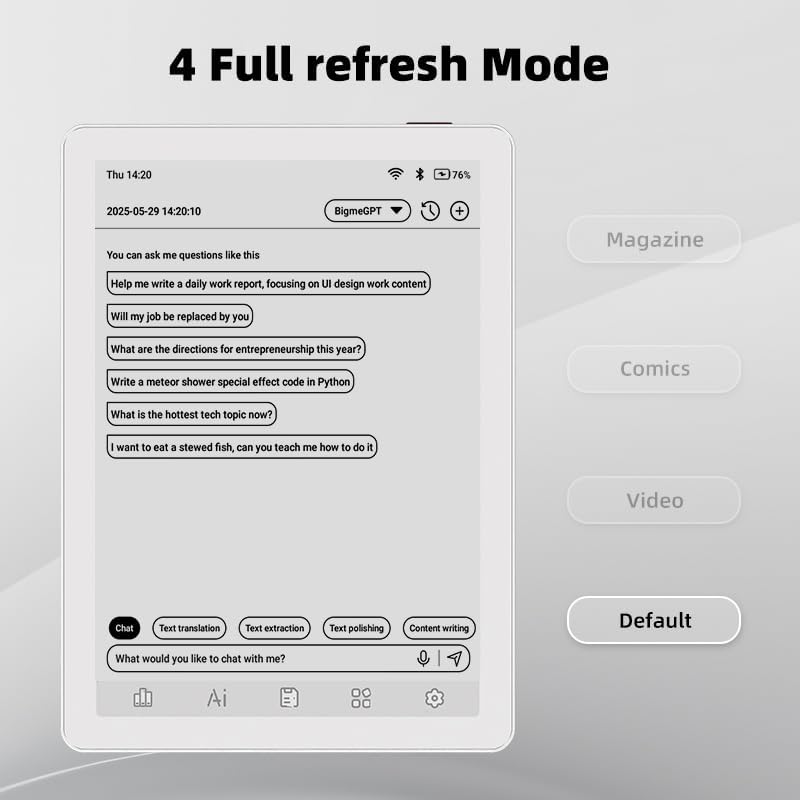
Image 4.1: The Bigme B6 home screen displaying various application icons.

Image 4.2: Accessing the Control Center for quick adjustments to device settings.
4.2 Reading eBooks
The Bigme B6 supports over 19 eBook formats, including PDF, TXT, EPUB, MOBI, and more. You can load books via USB or download them directly through reading applications.
- Open a reading application (e.g., the default reader or a downloaded app like Kindle or Libby).
- Select the book you wish to read from your library.
- Tap the left or right side of the screen to turn pages.
- Tap the center of the screen to access reading options (font size, line spacing, contrast, etc.).
- To highlight text: Press and hold on a word, then drag the selection handles to cover the desired text. Options for highlighting or notes will appear.

Image 4.3: Reading an eBook and highlighting text with color on the Bigme B6.
4.3 ايپ مئنيجمينٽ
As an Android 14 device, you can install applications from the Google Play Store or other compatible sources.
- ائپس انسٽال ڪرڻ: کوليو ايپ اسٽور icon (Google Play Store) on your home screen, search for the desired app, and follow the installation prompts.
- ايپس کي انسٽال ڪرڻ: ڏانهن وڃو سيٽنگون > ائپس، ايپ چونڊيو، ۽ ٽيپ ڪريو انسٽال ڪريو.
4.4 Audiobooks and Media Playback
The device supports audiobook playback through its built-in Hi-Fi speakers or connected Bluetooth headphones.
- Playing Audiobooks: Use a compatible audiobook application.
- Connecting Bluetooth Headphones: ڏانهن وڃو سيٽنگون > ڳنڍيل ڊوائيسز > بلوٽوٿ, enable Bluetooth, and pair with your headphones.

Image 4.4: The Bigme B6 supports audiobooks, allowing for hands-free listening.
4.5 Display Refresh Modes
The Bigme B6 offers multiple refresh modes to optimize display performance for different content types.
- Access refresh modes from the Control Center or Display Settings.
- عام طريقن ۾ شامل آهن:
- ڊفالٽ: Standard reading mode.
- رسالو: Optimized for images and text in magazines.
- Comics: Enhanced for comic book viewing.
- وڊيو: Provides a smoother refresh rate for video content (note: e-paper displays have limitations for video).

Image 4.5: Selecting from various refresh modes to suit different content types.
5. سار سنڀال
5.1 ڊوائيس کي صاف ڪرڻ
- Use a soft, lint-free cloth to gently wipe the screen and body of the device.
- ضدي داغن لاءِ، ٿورو ڊيampen پاڻي سان ڪپڙو يا اسڪرين ڪلينر خاص طور تي اليڪٽرانڪس لاءِ ٺهيل آهي.
- سخت ڪيميڪلز، ٻرندڙ مواد، يا گهڻي نمي استعمال ڪرڻ کان پاسو ڪريو.
5.2 بيٽري جي سنڀال
- ڊوائيس کي باقاعدي چارج ڪريو، پر ان کي ڊگهي عرصي تائين مڪمل طور تي چارج نه ڇڏيو.
- Do not expose the device to extreme temperatures, as this can affect battery life.
- Use only the provided or a certified charging cable and adapter.
5.3 اسٽوريج
When not in use for extended periods, store the device in a cool, dry place, away from direct sunlight and extreme temperatures. It is recommended to charge the device to about 50% before long-term storage.
6. مسئلا حل ڪرڻ
| مسئلو | ممڪن سبب | حل |
|---|---|---|
| ڊوائيس تي طاقت نه آهي. | بيٽري گهٽ آهي؛ ڊوائيس منجمد آهي. | گهٽ ۾ گهٽ 30 منٽن لاءِ ڊوائيس کي چارج ڪريو. 10-15 سيڪنڊن لاءِ پاور بٽڻ کي دٻائي زبردستي ري اسٽارٽ ڪريو. |
| Screen is unresponsive or slow. | Temporary software glitch; too many apps running. | Restart the device. Close unnecessary background applications. Check for system updates. |
| وائي فائي سان ڳنڍجي نٿو سگھي. | Incorrect password; router issue; Wi-Fi disabled. | Ensure Wi-Fi is enabled and the password is correct. Restart your Wi-Fi router. Try connecting to a different network. |
| بيٽري جلدي ختم ٿئي ٿي. | High screen brightness; many background apps; frequent Wi-Fi/Bluetooth use. | Reduce screen brightness. Close unused applications. Disable Wi-Fi and Bluetooth when not needed. Adjust refresh mode settings. |
| Applications crash or freeze. | App incompatibility; insufficient memory. | Update the application. Clear the app's cache (Settings > Apps > [App Name] > Storage & cache). If issues persist, uninstall and reinstall the app. |
7. وضاحتون
| ماڊل نالو | US-B6 |
| ڏيکاريو | 6-inch Color E-paper, Electronic Ink, 300 PPI |
| آپريٽنگ سسٽم | Android 14 |
| رام | 4 جي بي |
| اندروني اسٽوريج | 64 جي بي |
| وسعت وارو اسٽوريج | Micro-SD card (up to 1TB support) |
| رابطي | بلوٽوٽ ، وائي فائي |
| بيٽري | 1 غير معياري بيٽري (شامل) |
| Dimensions (L x W x Th) | 5.88" x 4.25" x 0.28" (14.94 سينٽي ميٽر x 10.8 سينٽي ميٽر x 0.71 سينٽي ميٽر) |
| شيءِ جو وزن | 6.2 آونس (175.77 گرام) |
| سپورٽ ٿيل اي بڪ فارميٽ | PDF, TXT, EPUB, EPUB3, HTML, HTM, AZW3, FB2, DOC, DOCX, MOBI, OEB, CBR, RPC, RTF, DJVU, ZIP |
8. وارنٽي ۽ سپورٽ
8.1 وارنٽي ڄاڻ
Please refer to the warranty card included with your product for specific warranty terms and conditions. The warranty typically covers manufacturing defects for a specified period from the date of purchase.
8.2 ڪسٽمر سپورٽ
For technical assistance, troubleshooting not covered in this manual, or warranty claims, please contact Bigme customer support. Contact details can usually be found on the Bigme official webسائيٽ تي يا پراڊڪٽ پيڪنگنگ تي.
توهان پڻ دورو ڪري سگهو ٿا Bigme Store on Amazon اضافي پراڊڪٽ جي معلومات ۽ سپورٽ وسيلن لاءِ.


