1. پراڊڪٽ ختمview
The KLIM Cassette Player Boombox is a versatile audio device combining classic cassette playback with modern features like AM/FM radio, Bluetooth connectivity, and USB playback/recording. Its portable design allows for use at home or on the go.
اهم خاصيتون:
- ڪيسٽ پليئر ۽ رڪارڊر
- اي ايم/ايف ايم ريڊيو ٽيونر
- Bluetooth Connectivity for wireless streaming
- USB Port for MP3 playback and recording
- Integrated Microphone for direct recording
- Headphone Jack for private listening
- Dual Power: AC power cord or 4 x C-type batteries (not included)
- Portable design with a carrying handle
دٻي ۾ ڇا آهي:
- KLIM Cassette Player Boombox
- اي سي پاور ڪارڊ
- استعمال ڪندڙ دستي

شڪل 1: سامهون view of the KLIM Cassette Player Boombox, showcasing its controls and cassette compartment.
2. سيٽ اپ
ڊوائيس کي طاقت ڏيڻ:
The KLIM Cassette Player Boombox can be powered in two ways:
- اي سي پاور: Connect the included AC power cord to the device's power input and then to a standard wall outlet.
- بيٽري پاور: For portable use, insert 4 x C-type batteries (not included) into the battery compartment located on the underside of the device. Ensure correct polarity.

شڪل 2: هيٺان view showing the battery compartment for portable power.
3. آپريٽنگ هدايتون
3.1. Cassette Player/Recorder
- Slide the function selector to 'TAPE'.
- Press the 'OPEN' button to open the cassette compartment.
- Insert a cassette tape with the open side facing up.
- ڪئسٽ جي ڪمري کي بند ڪريو.
- Use the 'PLAY', 'STOP/EJECT', 'FFWD' (Fast Forward), and 'REW' (Rewind) buttons to control playback.
- To record, ensure a blank tape is inserted. Press the 'REC' button to start recording from the built-in microphone, radio, or USB.

شڪل 3: مٿي view of the boombox with a cassette tape inserted into the compartment.
3.2. ايم/ايف ايم ريڊيو
- Slide the function selector to 'RADIO'.
- بهترين استقبال لاءِ ٽيليسڪوپڪ اينٽينا کي وڌايو.
- Use the 'BAND' switch to select between AM and FM frequencies.
- Rotate the 'TUNING' knob to find your desired radio station.
3.3. بلوٽوت ڪنيڪشن
- Slide the function selector to 'BT' (Bluetooth).
- The device will enter pairing mode, indicated by a flashing light or audible prompt.
- توهان جي اسمارٽ فون يا ٽيبليٽ تي، بلوٽوت کي فعال ڪريو ۽ دستياب ڊوائيسز جي ڳولا ڪريو.
- Select 'KLIM Cassette Player' (or similar name) from the list to pair.
- هڪ دفعو جوڙيو ويو، توهان پنهنجي ڊوائيس تان وائرليس طور آڊيو اسٽريم ڪري سگهو ٿا.
3.4. USB پلے بیک ۽ رڪارڊنگ
- Slide the function selector to 'USB'.
- هڪ USB فليش ڊرائيو داخل ڪريو جنهن ۾ MP3 آڊيو هجي. files USB پورٽ ۾.
- The device will automatically begin playing the audio files. Use the playback controls (play/pause, skip) to navigate.
- To record to USB, ensure a USB drive is inserted. Press the 'REC' button while in radio or cassette mode to record the audio source directly to the USB drive.
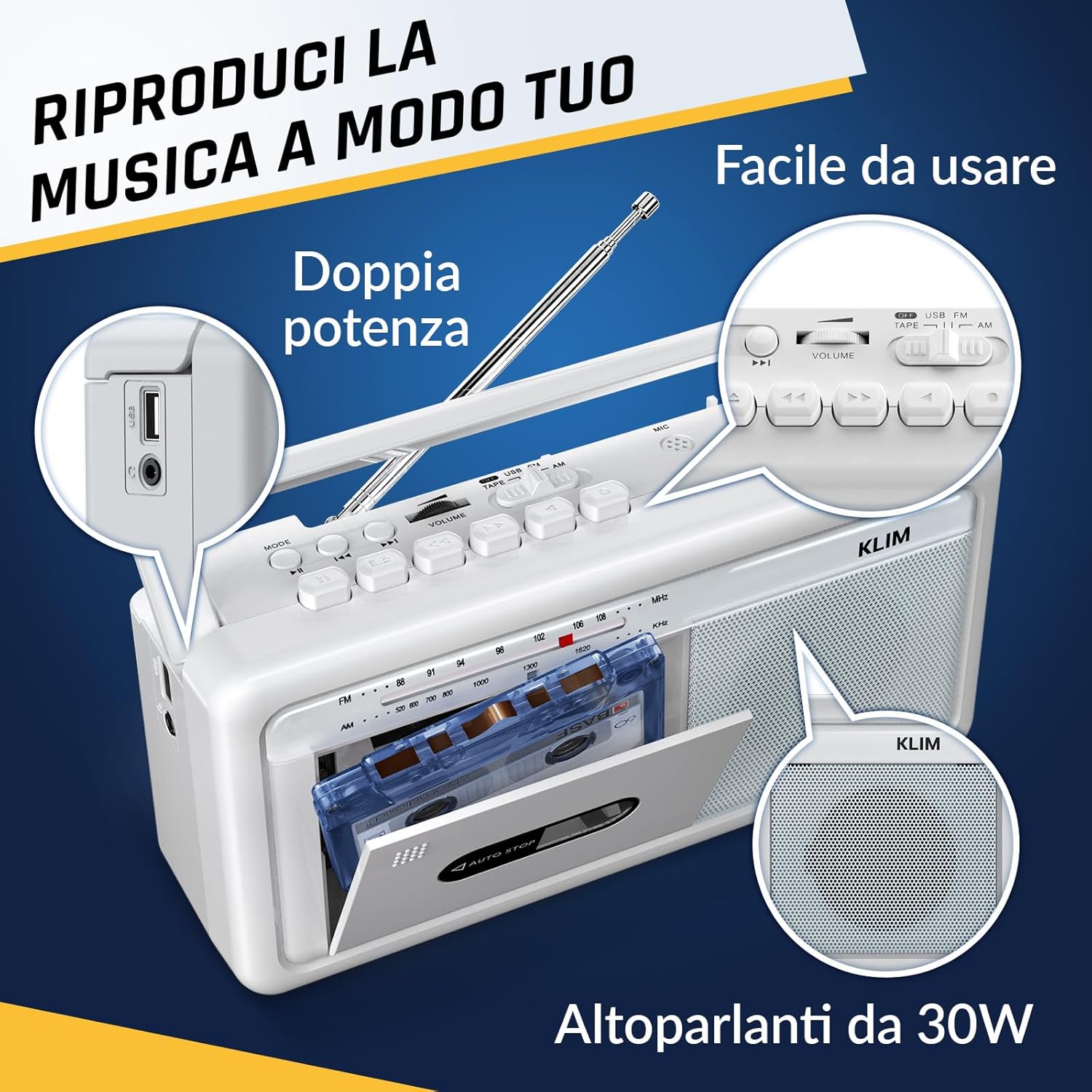
شڪل 4: پاسي view highlighting the USB port for media playback and recording.
3.5. هيڊ فون جو استعمال
Connect standard 3.5mm headphones to the headphone jack for private listening. The internal speakers will automatically mute when headphones are connected.
Video 1: Instructions on how to record a tape to USB using the WTB-795 model. This video demonstrates the USB recording functionality.
وڊيو 2: ختمview of a retro cassette player with USB, Bluetooth, and AM/FM radio features, similar to the KLIM Cassette Player Boombox.
4. سار سنڀال
- ڊوائيس کي نرم، سڪل ڪپڙي سان صاف ڪري صاف رکو. مائع صاف ڪندڙ يا سالوينٽس استعمال ڪرڻ کان پاسو ڪريو.
- Regularly clean the cassette head and pinch rollers with a cotton swab lightly dampبهترين آواز جي معيار کي يقيني بڻائڻ ۽ ٽيپ جي نقصان کي روڪڻ لاءِ آئسوپروپيل الڪوحل سان ڀريل.
- Keep the device away from direct sunlight, heat sources, and excessive dust or moisture.
- When not in use for extended periods, remove batteries to prevent leakage.
5. مسئلا حل ڪرڻ
| مسئلو | ممڪن حل |
|---|---|
| طاقت نه آهي | Check if the AC power cord is securely connected. If using batteries, ensure they are inserted correctly and are not depleted. |
| .الهائيندڙن مان آواز ڪونهي | Increase the volume. Ensure headphones are not connected. Check the function selector is in the correct mode (TAPE, RADIO, BT, USB). |
| ناقص ريڊيو استقبال | Extend the telescopic antenna fully. Adjust the antenna direction. Try moving the unit to a different location. |
| ڪيسٽ ٽيپ نه پئي هلي/ريڪارڊنگ ٿي رهي آهي | Ensure the tape is inserted correctly. Check if the tape is damaged. Clean the cassette head and pinch rollers. |
| بلوٽوٿ ڳنڍي نه ٿو | Ensure the unit is in Bluetooth mode. Make sure your device's Bluetooth is enabled and within range. Try unpairing and re-pairing the device. |
| USB پلے بیک مسئلا | Ensure the USB drive is formatted correctly (FAT32) and contains compatible audio files (MP3, WAV, WMA, AAC, FLAC). Try a different USB drive. |
6. وضاحتون
- برانڊ: ڪليم
- ماڊل: ڪيسٽ پليئر
- پيداوار جي ماپ: 25 x 13.1 x 7.6 سينٽي
- شيء جو وزن: 1 ڪلو
- مطابقت رکندڙ ڊوائيسز: ايم پي 3 پليئر، اسمارٽ فون، ٽيبليٽ
- آڊيو آئوٽ موڊ: اسٽيريو
- سپورٽ ٿيل آڊيو فارميٽ: Cassette, Analog Radio, MP3, WAV, WMA, AAC, FLAC, Bluetooth
- طاقت جو ذريعو: Corded Electric (AC) / 4 x C-type Batteries (not included)
- رابطي ٽيڪنالاجي: USB، بلوٽوت
- رنگ: ٿڌڙو اڇو
- شئي نمبر: KLSIN4825
7. وارنٽي ۽ سپورٽ
The KLIM Cassette Player Boombox comes with a 5 سال وارنٽي. For any questions, technical assistance, or warranty claims, please contact KLIM customer support. Our team is available 24/7 to assist you.
Please refer to the contact information provided in your product packaging or visit the official KLIM webو furtherيڪ تفصيل لاءِ سائيٽ.


