1. تعارف
The COUGAR CFV235 is an innovative PC case featuring a Central Floating Ventilation (CFV) structure. This design separates the power supply unit compartment from the main chamber, utilizing the space between them as a highly effective ventilation channel to enhance cooling performance. The CFV235 combines a full panoramic view, a compact footprint, and structurally reinforced cooling capabilities to achieve superior airflow beyond traditional case designs.
This manual provides essential information for the proper installation, operation, and maintenance of your COUGAR CFV235 PC case. Please read it thoroughly before beginning assembly.
2. اهم خاصيتون
- Central Floating Ventilation (CFV) Structure: Innovative design for enhanced cooling efficiency.
- Full Panoramic View: Clear tempered glass panels for showcasinجي اندروني جزا.
- High Airflow Design: Optimized for superior air circulation.
- وسيع مطابقت: Supports Mini ITX, Micro ATX, ATX, and CEB motherboards.
- Ampاسٽوريج جا اختيار: Multiple drive bays for 3.5" HDDs and 2.5" SSDs.
- سخاوت واري جزو جي منظوري: Accommodates long GPUs, tall CPU coolers, and standard PSUs.
- پائيدار تعمير: Built with robust materials for longevity.

شڪل 2.1: سامهون واري پاسي view of the COUGAR CFV235 PC case, highlighting its panoramic glass panels and illuminated interior.

Figure 2.2: The COUGAR CFV235 PC case showcasing its design in both black and white variants, with internal components and customizable RGB lighting.
3. سيٽ اپ گائيڊ
3.1 Unpacking the Case
- Carefully remove the PC case from its packaging.
- Inspect the case for any signs of damage during transit. Contact your retailer immediately if any damage is found.
- Remove all protective films and internal packaging materials.
3.2 اجزاء جي انسٽاليشن
Before installing components, ensure you have all necessary tools, including a Phillips head screwdriver.
- Motherboard لڳائڻ:

Figure 3.1: Interior of the CFV235 case, showing pre-installed motherboard standoffs.
- ڪيس جي پوئين اوپننگ ۾ I/O شيلڊ نصب ڪريو.
- Align your Mini ITX, Micro ATX, ATX, or CEB motherboard with the pre-installed standoffs.
- مهيا ڪيل اسڪرو استعمال ڪندي مدر بورڊ کي محفوظ ڪريو.
- پاور سپلائي يونٽ (PSU) تنصيب:
- The CFV235 features a dedicated PSU compartment. Install your ATX PSU (up to 200mm length) into this compartment.
- ڪيس جي پوئين پاسي کان اسڪرو سان PSU کي محفوظ ڪريو.
- اسٽوريج ڊرائيو جي انسٽاليشن:

Figure 3.2: Rear interior of the CFV235, illustrating cable management options and locations for 2.5" and 3.5" drive bays.
- Install 3.5" HDDs into the designated drive bays (up to 2 drives).
- Install 2.5" SSDs into the dedicated SSD mounts (up to 4 drives, 2 of which are shared with 3.5" bays).
- Ensure all drives are securely fastened.
- گرافڪس ڪارڊ (GPU) جي انسٽاليشن:

Figure 3.3: Diagram indicating the maximum GPU length of 430mm supported by the CFV235 case.
- ڪيس 430 ملي ميٽر تائين جي پي يو کي سپورٽ ڪري ٿو.
- Insert your GPU into the appropriate PCIe slot on the motherboard and secure it with the retention clip and screw.
- سي پي يو ڪولر جي انسٽاليشن:
- The case supports CPU coolers up to 175mm in height.
- پنهنجو سي پي يو ڪولر ان جي ٺاهيندڙ جي هدايتن مطابق انسٽال ڪريو.
- ڪيبل جو انتظام:
- Utilize the cable routing cutouts and tie-down points behind the motherboard tray to manage cables neatly.
- ڪيبل جو صحيح انتظام هوا جي وهڪري ۽ جمالياتيات کي بهتر بڻائي ٿو.
4. آپريٽنگ هدايتون
4.1 فرنٽ I/O پينل

Figure 4.1: The front I/O panel of the CFV235, featuring USB ports, audio jacks, and the power button.
سامهون وارو I/O پينل ضروري بندرگاهن ۽ ڪنٽرولن تائين آسان رسائي فراهم ڪري ٿو:
- پاور بٽڻ: Press to power on/off your system.
- ري سيٽ بٽڻ: Press to restart your system.
- USB بندرگاهن: USB ڊوائيسز ڳنڍيو.
- آڊيو جڪس: هيڊفون ۽ مائڪروفون ڳنڍيو.
4.2 هوا جو وهڪرو ۽ ٿڌي ڪرڻ
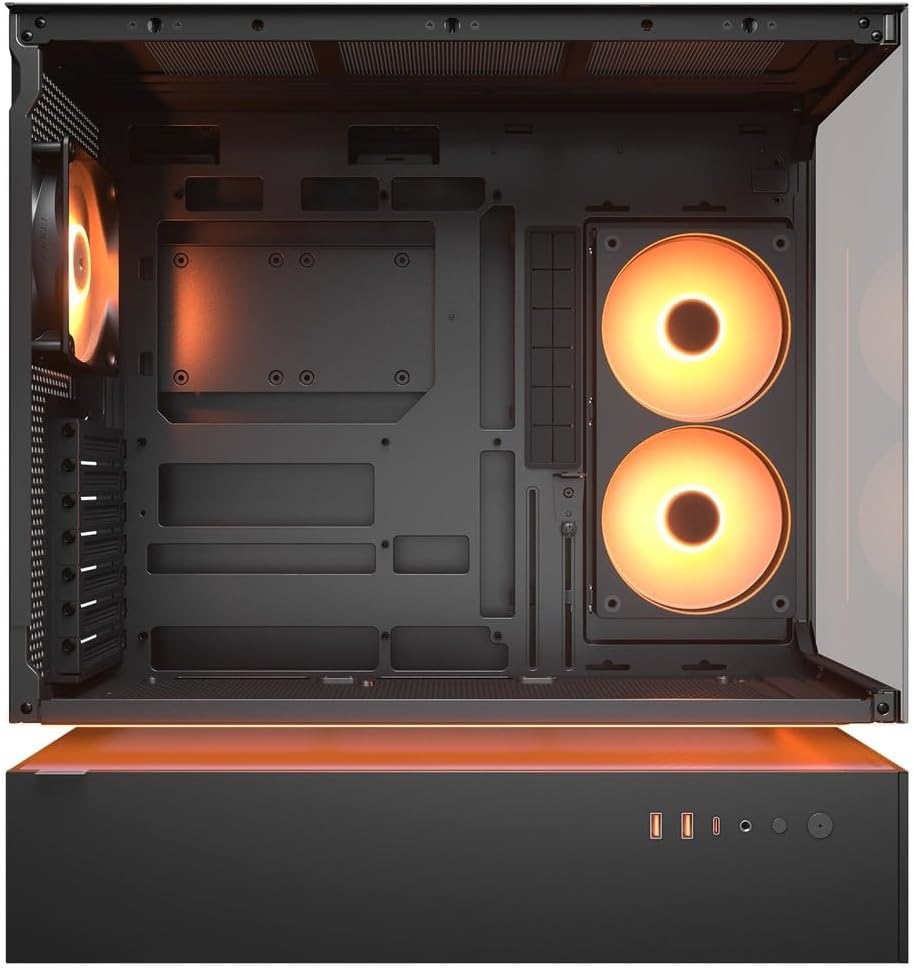
شڪل 4.2: اندروني view of the CFV235 with fans installed, demonstrating the potential for high airflow.
The CFV235 is designed for optimal airflow. Ensure all fans are correctly installed and oriented to facilitate efficient cooling. The Central Floating Ventilation structure promotes direct airflow to critical components.
5. سار سنڀال
5.1 مٽي فلٽر جي صفائي

Figure 5.1: Removable magnetic dust filter for easy cleaning.
Regular cleaning of dust filters is crucial for maintaining optimal airflow and preventing dust buildup inside your PC. The CFV235 features easily removable dust filters:
- Gently remove the magnetic dust filters located on the top and bottom of the case.
- Clean the filters using compressed air or by rinsing them with water. Ensure they are completely dry before reattaching.
- Reattach the filters to their respective positions.
5.2 عام صفائي
- نرم استعمال ڪريو، ڊيamp cloth to wipe down the exterior surfaces of the case.
- Avoid using harsh chemicals or abrasive materials that could damage the finish or tempered glass.
- For internal cleaning, use compressed air to remove dust from components and fan blades.
6. مسئلا حل ڪرڻ
هي سيڪشن عام مسئلن کي حل ڪري ٿو جيڪي توهان کي درپيش اچي سگهن ٿا. وڌيڪ پيچيده مسئلن لاءِ، مهرباني ڪري سپورٽ سيڪشن جو حوالو ڏيو.
6.1 سسٽم آن نه ٿي رهيو آهي
- Check if the power cable is securely connected to both the PSU and the wall outlet.
- Ensure the PSU switch is in the "ON" position.
- Verify that the front panel power button cable is correctly connected to the motherboard.
- Confirm that all internal power connections (24-pin ATX, CPU, GPU) are firmly seated.
6.2 وڌيڪ گرم ٿيڻ جا مسئلا
- Ensure all case fans and CPU/GPU coolers are functioning correctly.
- Clean any dust buildup from fans and dust filters (refer to Section 5.1).
- Verify that fans are oriented for optimal airflow (intake and exhaust).
- Check for proper cable management to avoid obstructing airflow.
6.3 USB/Audio Ports Not Working
- Ensure the front panel USB and audio cables are correctly connected to the motherboard headers.
- ڪنهن به ڊرائيور جي مسئلن لاءِ پنهنجي آپريٽنگ سسٽم جي ڊوائيس مئنيجر کي چيڪ ڪريو.
7. وضاحتون
| خاصيت | تفصيل |
|---|---|
| برانڊ | کوگر |
| ماڊل نالو | سي ايف وي 235 |
| شين جي طول و عرض (ڊبليو ايڇ ڊي ڊي) | 235 x 493 x 460 ملي ميٽر |
| پيداوار جو وزن | 9.5 ڪلو |
| سپورٽ Motherboards | ميني ITX / مائڪرو ATX / ATX / CEB |
| ڊرائيو بيز | 5.25" x0 / 3.5" x2 / 2.5" SSD x2+2 (2 shared with 3.5" bays) |
| وڌ ۾ وڌ GPU ڊگھائي | 430 ملي ميٽر |
| وڌ ۾ وڌ CPU کولر جي اوچائي | 175 ملي ميٽر |
| وڌ ۾ وڌ PSU ڊگھائي | 200 ملي ميٽر |
| رنگ | ڪارو |
| خاصيتون | Central Floating Ventilation, Panoramic Glass, High Airflow, Built-in Fans |
8. وارنٽي ۽ سپورٽ
Your COUGAR CFV235 PC case comes with a 1 سال وارنٽي خريداري جي تاريخ کان. هي وارنٽي عام استعمال هيٺ پيداوار جي خرابين ۽ مادي خامين کي ڍڪيندي آهي.
For technical support, warranty claims, or further assistance, please visit the official COUGAR website or contact your local retailer. Please have your product model number (CFV235) and proof of purchase ready when contacting support.
Official COUGAR Webسائيٽ: cougargaming.com


