1. تعارف
The Zebra ZQ220 Plus is a versatile mobile thermal printer designed for on-the-go professionals. This portable device offers reliable, high-quality receipt and label printing capabilities, making it suitable for various applications including retail, hospitality, and field services. Featuring Bluetooth 5.0 connectivity and a durable design, the ZQ220 Plus ensures efficient operation in diverse working environments. Its thermal printing technology eliminates the need for ink or toner, simplifying maintenance.
2. حفاظت جي ڄاڻ
- Read all instructions before operating the printer.
- پرنٽر کي انتهائي گرمي پد، سڌي سج جي روشني، يا وڌيڪ نمي جي سامهون نه رکو.
- Use only Zebra-approved accessories and power sources.
- Avoid dropping the printer or subjecting it to severe impacts.
- پرنٽر کي پاڻي ۽ ٻين مائع کان پري رکو.
- پرنٽر کي پاڻ ڌار ڪرڻ يا مرمت ڪرڻ جي ڪوشش نه ڪريو. قابل سروس اهلڪارن سان رجوع ڪريو.
3. پيڪيج مواد
پڪ ڪريو ته سڀئي شيون پيڪيج ۾ موجود آهن:
- Zebra ZQ220 Plus Mobile Thermal Printer
- Rechargeable بيٽري
- USB چارجنگ ڪيبل
- تڪڙو شروع ھدايت
- Sampٿرمل پيپر رول
4. پراڊڪٽ ختمview
Familiarize yourself with the components of your ZQ220 Plus printer.

شڪل 4.1: سامهون View of the ZQ220 Plus Printer
This image displays the front of the ZQ220 Plus printer, highlighting its compact design. The top panel features an LCD display and three control buttons: Power, Settings, and Connectivity. The paper output slot is visible below the control panel.
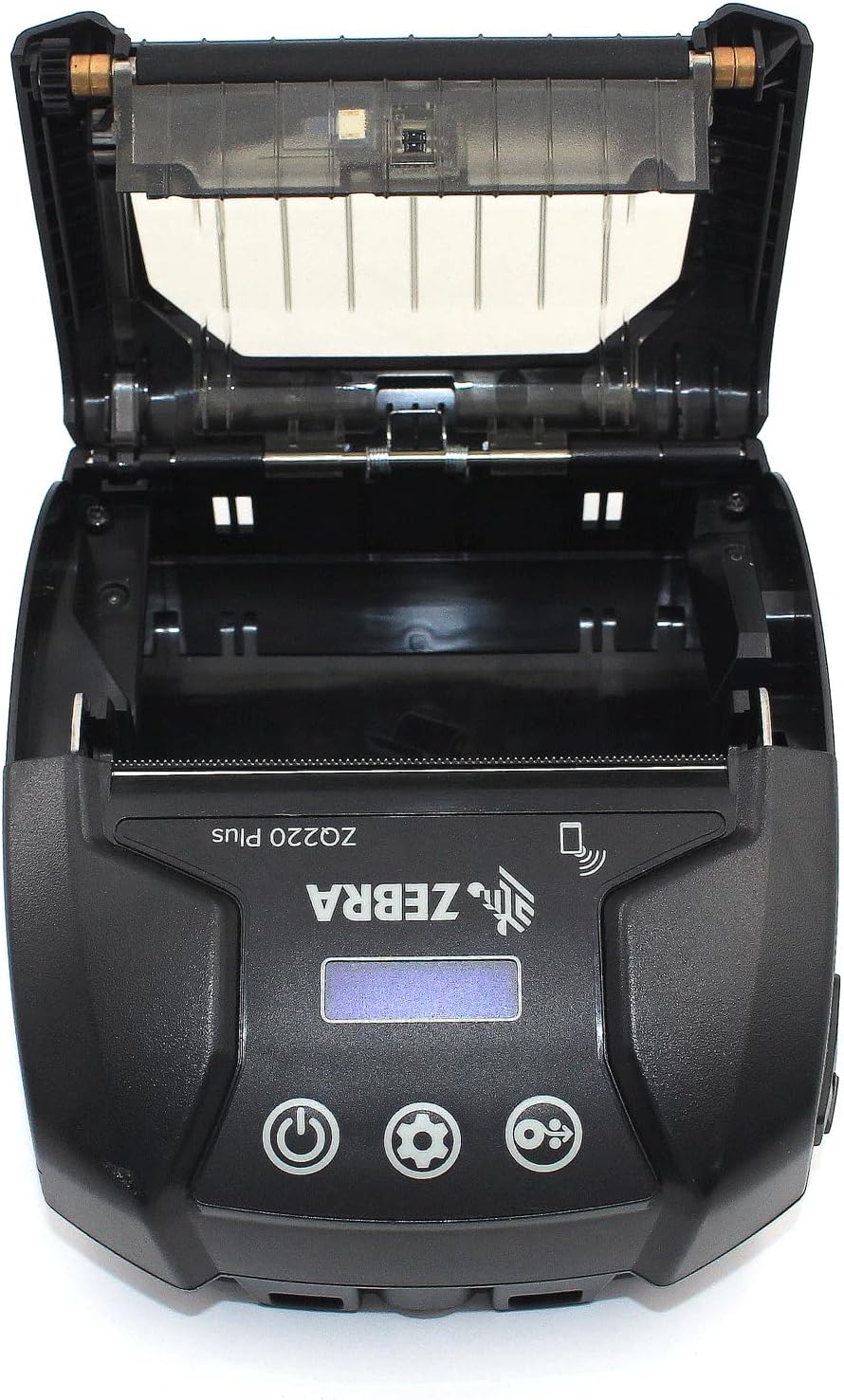
Figure 4.2: Media Compartment Open
This image shows the printer with its top cover open, providing access to the media compartment. The thermal printhead is visible, along with the spindle for loading paper rolls. This view is essential for understanding how to load printing media.

Figure 4.3: Media Roll Insertion
This image demonstrates the media loading process. The side view with the cover open clearly shows how a roll of thermal paper is placed into the printer's media bay, ensuring correct alignment for printing.
5. سيٽ اپ
5.1. بيٽري لڳائڻ
- پڪ ڪريو ته پرنٽر بند ٿيل آهي.
- Locate the battery compartment cover on the back or bottom of the printer.
- Open the cover and insert the rechargeable battery, ensuring the contacts align correctly.
- بيٽري جي ڪمري واري ڍڪ کي محفوظ طور تي بند ڪريو.
5.2. Loading Print Media
- Open the media compartment cover (refer to Figure 4.2).
- Place the thermal paper roll into the compartment with the leading edge feeding from the bottom of the roll.
- Pull a small amount of paper past the printhead.
- Close the media compartment cover firmly until it latches.
5.3. شروعاتي پاور آن ۽ چارجنگ
- Connect the USB charging cable to the printer and a power source (e.g., USB wall adapter, vehicle USB port).
- Allow the battery to fully charge before first use. The charging indicator light will show the status.
- Press and hold the Power button until the printer powers on. The LCD display will illuminate.
6. پرنٽر هلائڻ
6.1. بلوٽوٽ جوئر
- Ensure the printer is powered on and within range of your host device (smartphone, tablet, etc.).
- On your host device, navigate to the Bluetooth settings and enable Bluetooth.
- ڳولھيو available devices. The printer will appear as 'ZQ220 Plus' or a similar identifier.
- Select the printer from the list to initiate pairing. If prompted, enter the default PIN (usually '0000' or '1234').
- Once paired, the Bluetooth icon on the printer's display will indicate a successful connection.
6.2. ڇپائي
- Ensure the printer is paired with your host device and has sufficient media loaded.
- Open your printing application (e.g., ZLabel Designer Mobile App for Android or iOS, or other compatible software).
- Select the ZQ220 Plus as your target printer within the application.
- Initiate the print command from your application. The printer will begin printing the document or label.
6.3. USB چارجنگ
The ZQ220 Plus supports simple USB charging. Connect the printer to any standard USB power source using the provided USB cable. This allows for convenient charging in vehicles or from portable power banks.
7. سار سنڀال
7.1. پرنٽر جي صفائي
- ٻاهران: پرنٽر جي ٻاهرين حصي کي نرم، ڊي سان صاف ڪريو.amp ڪپڙو. استعمال نه ڪريو سخت ڪيميائي يا گھڻائي صاف ڪندڙ.
- مٿيون Periodically clean the thermal printhead using a printhead cleaning pen or a cotton swab lightly dampened with isopropyl alcohol. Ensure the printer is off and cool before cleaning. Allow to dry completely before use.
- پليٽن رولر: Clean the platen roller with a lint-free cloth dampened with isopropyl alcohol to remove paper dust or adhesive residue.
7.2. اسٽوريج
When not in use for extended periods, store the printer in a cool, dry place, away from direct sunlight and extreme temperatures. Remove the battery if storing for several months to prevent discharge or damage.
8. مسئلا حل ڪرڻ
| مسئلو | ممڪن سبب | حل |
|---|---|---|
| پرنٽر آن نٿو ٿئي | گھٽ يا ختم ٿيل بيٽري Improperly installed battery | بيٽري کي چارج ڪريو بيٽري کي صحيح طريقي سان انسٽال ڪريو |
| ڪابه پرنٽ آئوٽ پُٽ ناهي | No paper loaded پيپر غلط لوڊ ٿيل Printhead dirty or damaged | Load thermal paper Reload paper correctly Clean the printhead |
| خراب پرنٽ معيار | Dirty printhead گھٽ بيٽري غلط ميڊيا جو قسم | Clean the printhead بيٽري کي چارج ڪريو Ensure correct thermal media is used |
| بلوٽوٿ ذريعي ڳنڍي نٿو سگھجي | ڊوائيس تي بلوٽوت فعال نه آهي Printer not in pairing mode حد کان ٻاهر | Enable Bluetooth on host device Ensure printer is discoverable Move device closer to printer |
| Printer stops during operation | گھٽ بيٽري ڪاغذ جو جام گهڻو گرم ٿيڻ | بيٽري کي چارج ڪريو Clear any paper jam Allow printer to cool down |
9. وضاحتون
| خاصيت | تفصيل |
|---|---|
| ماڊل نالو | ZQ220 PLUS |
| ڇپائي ٽيڪنالاجي | سڌو حرارتي |
| پرنٽ ريزوليوشن | 203 DPI (ڊٽس في انچ) |
| وڌ ۾ وڌ پرنٽ اسپيڊ (مونوڪروم) | 20 پي پي ايم |
| Supported Media Widths | 80 mm (3.14 in), 76.2 mm (3 in), 58 mm (2.28 in) |
| رابطي | بلوٽوٿ 5.0، يو ايس بي |
| بيٽري جي گنجائش | 2500 mAh |
| ياداشت | 8 ايم بي |
| پائيداري جي درجه بندي | IP54 (resistance to dust and liquids) |
| پيداوار جا طول و عرض (ڊي x ڊبليو x ايڇ) | 3.15" x 2.25" x 3" |
| شيءِ جو وزن | 4 آونس (0.25 پونڊ) |
| شامل اجزاء | Printer, Battery, USB Cable |
10. وارنٽي ۽ سپورٽ
10.1. وارنٽي ڄاڻ
The Zebra ZQ220 Plus Mobile Thermal Printer comes with a محدود ڪاريگر وارنٽي. Please refer to the warranty card included with your product or visit the official Zebra webڪوريج، مدت، ۽ دعوائن جي طريقيڪار بابت تفصيلي شرطن ۽ ضابطن لاءِ سائيٽ.
10.2. ٽيڪنيڪل سپورٽ
For technical assistance, troubleshooting beyond this manual, or service inquiries, please contact Zebra customer support. Contact information can typically be found on the official Zebra webسائيٽ يا توهان جي پراڊڪٽ دستاويزن ۾.


