1. تعارف
This manual provides detailed instructions for the setup, operation, and maintenance of your SANSUI 15.6 Inch Portable Monitor. Please read this manual thoroughly before using the product to ensure proper functionality and to prevent damage.
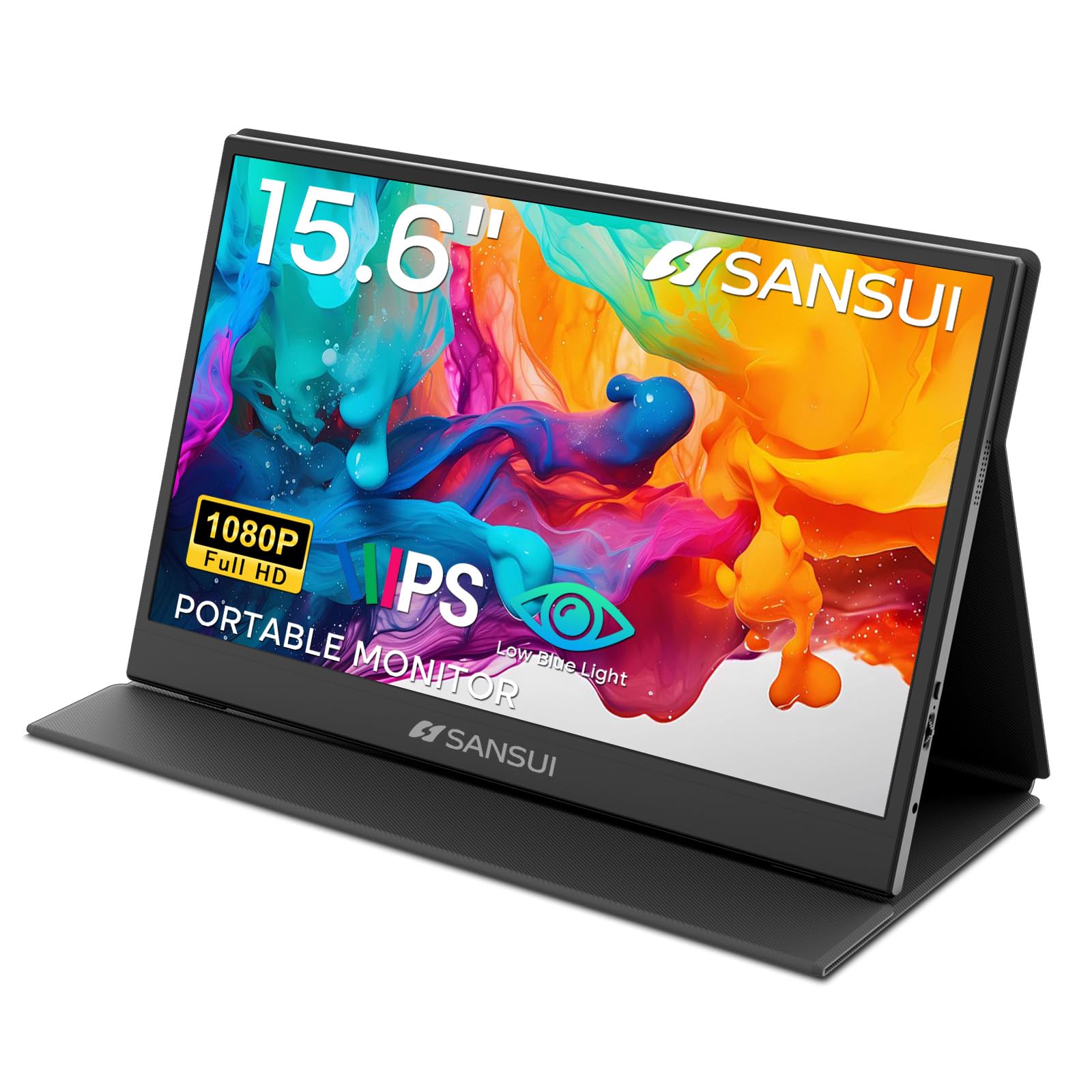
Image: The SANSUI 15.6 Inch Portable Monitor, showcasing ان جي سهڻي ڊيزائن ۽ متحرڪ ڊسپلي.
2. پيڪيج مواد
Verify that all items listed below are included in your product package. If any items are missing or damaged, please contact SANSUI customer support.
- SANSUI 15.6 Inch Portable Monitor with PU Leather Cover
- HDMI to Mini HDMI Cable (1.2m)
- Type-C to Type-C Cable (30V5A, 1m)
- Quick Start Guide (QSG Card)
- استعمال ڪندڙ جو دستياب (ھي دستاويز)
- وارنٽي ڪارڊ

Image: All included accessories laid out next to the portable monitor.
انباڪسنگ وڊيو
Video: An unboxing demonstration of the SANSUI 15.6 Inch Portable Monitor, showing how to unpack the device and its accessories.
3. مصنوعات جون خاصيتون
- ڏيکاريو: 15.6-inch IPS panel with FHD 1920x1080 resolution.
- Visual Quality: 1200:1 high contrast ratio and 250 nits brightness for clear images.
- Viewزاويه: 178 ° ويڪر viewزاويه.
- اکين جو آرام: Features low blue light and flicker-free technology to reduce eye strain.
- ڊيزائن: Ultra-thin (0.43 inches) and lightweight (2.1 lbs without cover) for portability.
- حفاظتي ڪپڙا: Includes a PU leather stand cover that offers 24°/37° tilt angles.
- آڊيو: Built-in dual speakers and a 3.5mm audio jack.
- رابطي: Two USB Type-C ports and one Mini HDMI port.

Image: Visual representation of the monitor's display specifications and features.

Image: Illustration of the monitor's eye-care features, including low blue light and flicker-free technology.
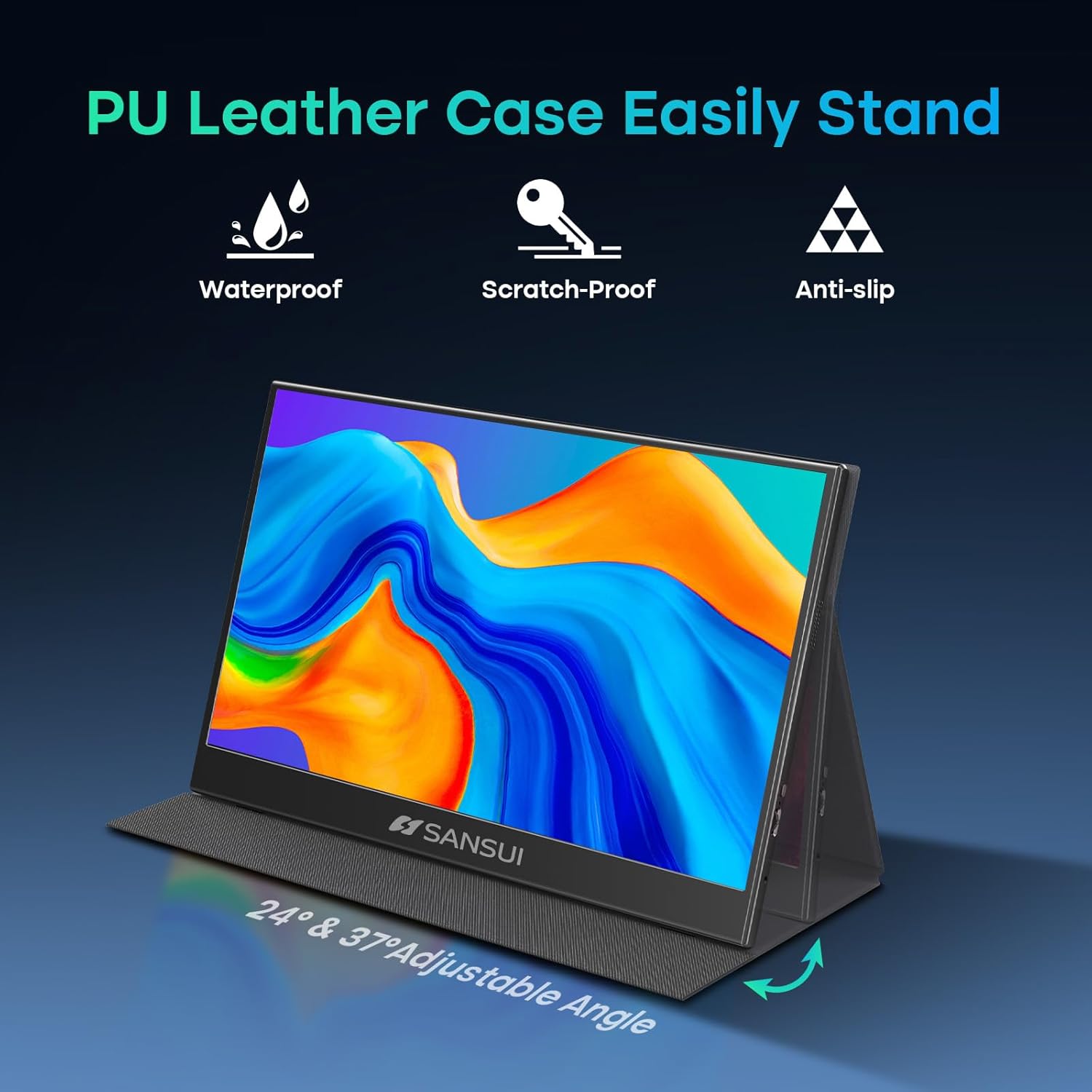
Image: The monitor's PU leather cover functioning as a stand, illustrating its adjustable angles and protective qualities.
4. جسماني اوورview
Familiarize yourself with the ports and controls on your SANSUI portable monitor.
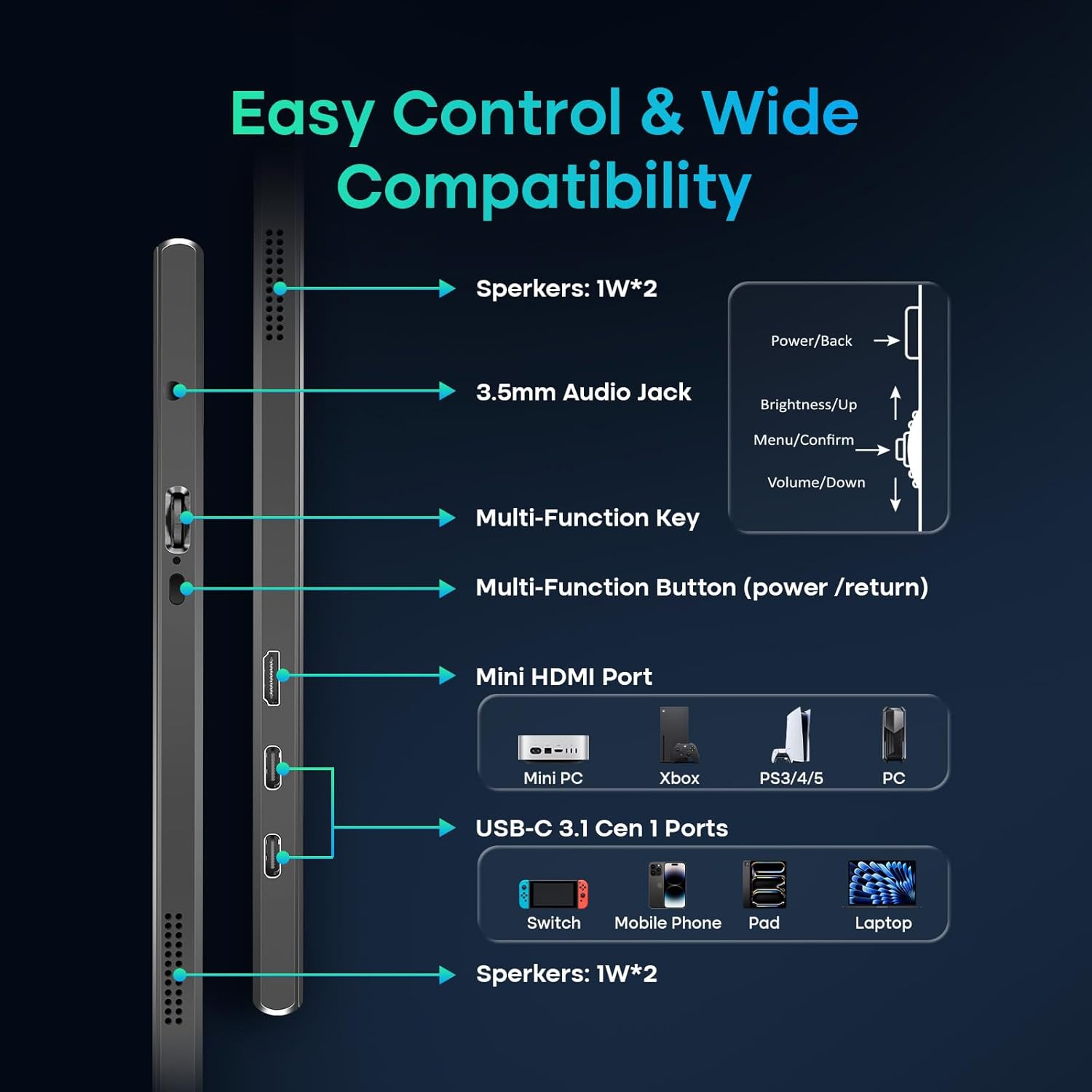
Image: A detailed diagram showing the location and function of all ports and control buttons on the monitor.
بندرگاهن ۽ بٽڻ:
- USB ٽائپ-سي پورٽس (x2): For power, video, and data transmission (requires full-function USB-C port on host device).
- Mini HDMI Port (x1): For video input from devices like laptops, PCs, gaming consoles.
- 3.5mm آڊيو جيڪ: ٻاهرين هيڊفون يا اسپيڪر کي ڳنڍڻ لاءِ.
- Multi-Function Key: Controls power, menu navigation, brightness, and volume.
- بلٽ ان اسپيڪرز: Dual 1W speakers for audio output.
5. سيٽ اپ ۽ ڪنيڪشن
The SANSUI portable monitor offers flexible connection options for various devices.
پاور گهرجون:
- The monitor can be powered directly by a compatible full-function USB-C port on your device (e.g., laptop, phone).
- For independent power supply or when using the Mini HDMI connection, a dedicated PD adapter (45W or higher, not included) and a USB-C cable supporting 45W+ power transmission are required.
ڪنيڪشن جا طريقا:
- USB ٽائپ-سي ڪنيڪشن (سنگل ڪيبل حل):
- Connect one end of the provided Type-C to Type-C cable to a full-function USB-C port on your device (which supports DisplayPort Alt Mode).
- Connect the other end to one of the USB Type-C ports on the monitor.
- This connection provides power, video, and data through a single cable. Ensure your device's USB-C port supports video output.
- HDMI Connection (Video Only):
- Connect one end of the provided HDMI to Mini HDMI cable to your device's HDMI port.
- ميني HDMI جي پڇاڙي کي مانيٽر تي ميني HDMI پورٽ سان ڳنڍيو.
- When using HDMI, external power is required for the monitor via a USB Type-C port and a PD adapter (not included).
6. مانيٽر کي هلائڻ
آن-اسڪرين ڊسپلي (OSD) مينيو:
Use the Multi-Function Key to access and navigate the OSD menu for display settings, audio adjustments, and other configurations.
- Press the Multi-Function Key to open the OSD menu.
- Move the key up/down to navigate through menu options.
- Press the key to confirm a selection.
- Press the Multi-Function Button (power/return) to go back or exit the menu.
ڊسپلي موڊس:
The monitor supports various display modes depending on your connected device and operating system settings.
- MirrorMode: Duplicates your primary screen's content.
- وڌايل موڊ: Extends your desktop, allowing for multitasking across multiple screens.
- ٻيو اسڪرين موڊ: پورٽيبل مانيٽر کي واحد ڊسپلي طور استعمال ڪري ٿو.

تصوير: Examples of the monitor used in Mirror, Extended, and Second Screen modes with various devices.
7. سار سنڀال
- اسڪرين جي صفائي: نرم، لِنٽ کان خالي ڪپڙو استعمال ڪريو ٿورڙو ڊيampپاڻي يا اسڪرين ڪلينر سان صاف ڪريو. سخت ڪيميڪلز کان پاسو ڪريو.
- جسم جي صفائي: نرم، سڪل ڪپڙي سان مسح ڪريو.
- اسٽوريج: When not in use, store the monitor in its protective PU leather cover to prevent scratches and damage.
- انتهائي حالتن کان بچڻ: مانيٽر کي انتهائي گرمي پد، نمي، يا سڌي سج جي روشني ۾ نه لڳايو.
8. مسئلا حل ڪرڻ
جيڪڏهن توهان کي پنهنجي مانيٽر سان مسئلا درپيش اچن ٿا، ته هيٺ ڏنل عام مسئلن ۽ حلن جو حوالو ڏيو:
- ڪوبه سگنل / ڪاري اسڪرين ناهي:
- Ensure all cables (USB-C, HDMI, power) are securely connected.
- Verify that your device's USB-C port supports video output (DisplayPort Alt Mode).
- If using HDMI, ensure the monitor is receiving adequate power from a separate USB-C power source.
- Try connecting to a different port on your device or a different device to isolate the issue.
- Check your device's display settings to ensure the external monitor is detected and enabled.
- طاقت ناهي:
- Ensure the USB-C power cable is connected to a power source (either your device's full-function USB-C port or a 45W+ PD adapter).
- هڪ مختلف USB-C ڪيبل يا پاور اڊاپٽر آزمايو.
- Image Flickering / Unstable Display:
- Ensure the cables are not damaged and are properly connected.
- Reduce the display resolution or refresh rate on your connected device.
- Ensure the monitor is receiving stable power.
- اسپيڪرن کان ڪو به آڊيو ناهي:
- مانيٽر (او ايس ڊي مينيو ذريعي) ۽ پنهنجي ڳنڍيل ڊوائيس تي حجم سيٽنگون چيڪ ڪريو.
- Ensure the correct audio output device is selected on your computer/device.
- جيڪڏهن HDMI استعمال ڪري رهيا آهيو، پڪ ڪريو ته توهان جو ڊوائيس HDMI تي آڊيو موڪلي رهيو آهي.
9. وضاحتون
| ماڊل نمبر | ES-P156T1F |
| اسڪرين جي ماپ | 15.6 انچ |
| پينل جو قسم | آئي پي ايس |
| قرارداد | FHD 1920x1080 |
| اسپيڪٽ ريشو | 16:9 |
| روشني | 250 nits (candela per square meter) |
| مقابلي جي نسبت | 1200:1 |
| Viewزاويه | 178° |
| اسڪرين جي مٿاڇري | مٽي |
| رابطي | 2x USB Type-C, 1x Mini HDMI, 1x 3.5mm Audio Jack |
| ڳالهائيندڙ | Dual 1W Built-in Speakers |
| Product Dimensions (with cover) | 14.33 x 9.21 x 0.59 انچ |
| Product Dimensions (without cover) | 14.2 x 9.1 x 0.43 انچ |
| Item Weight (with cover) | 2.99 پائونڊ |
| Item Weight (without cover) | 2.1 پائونڊ (تقريبن) |
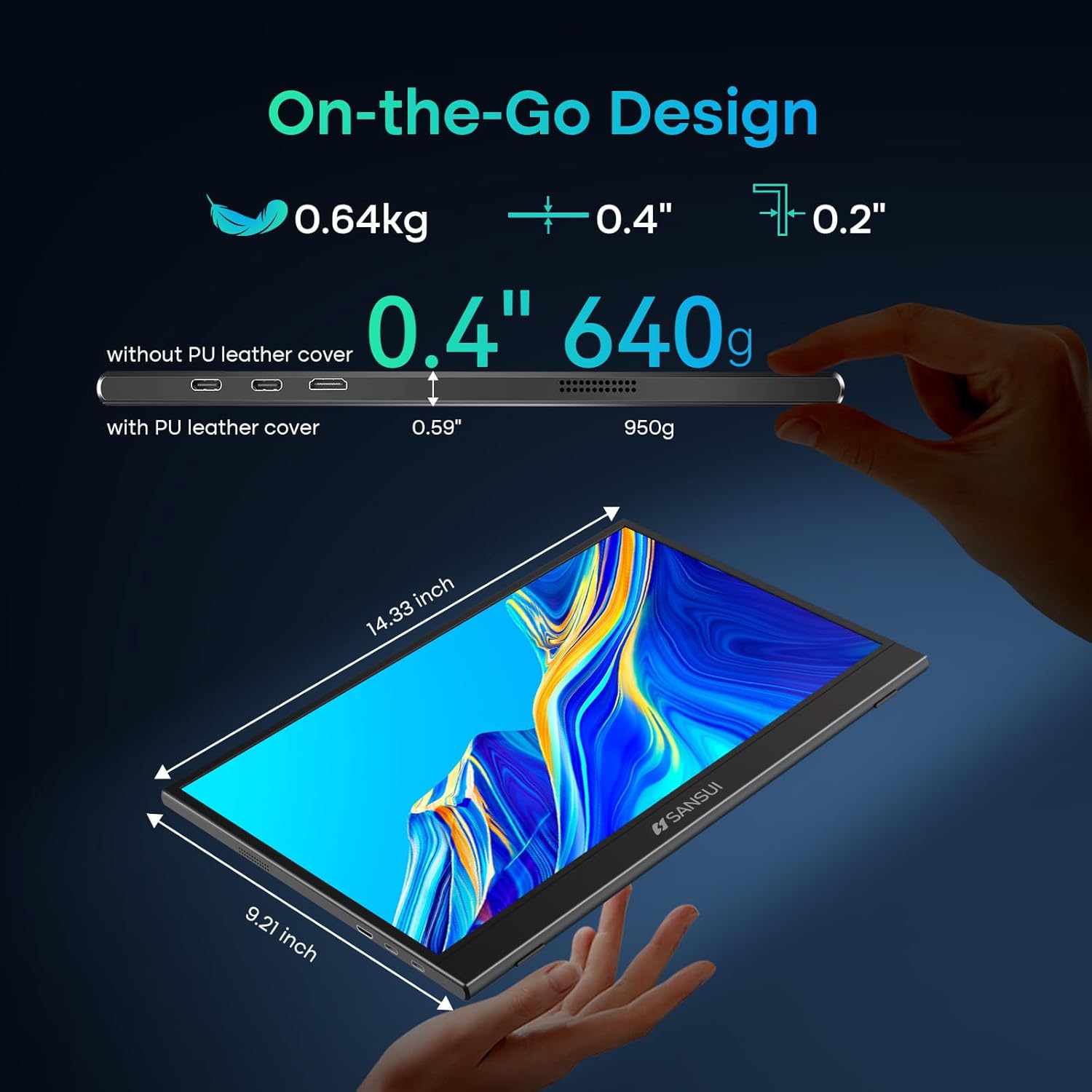
Image: Detailed dimensions and weight specifications of the portable monitor.
10. وارنٽي ۽ سپورٽ
Your SANSUI portable monitor comes with a manufacturer's warranty. Please refer to the included Warranty Card for specific terms and conditions, including warranty period and coverage details.
For technical support, troubleshooting assistance, or warranty claims, please contact SANSUI customer service. Contact information can typically be found on the Warranty Card, Quick Start Guide, or the official SANSUI webسائيٽ.