


مائڪروچپ ايم پي ايل اي بي ڪوڊ ڪنفيگريٽر
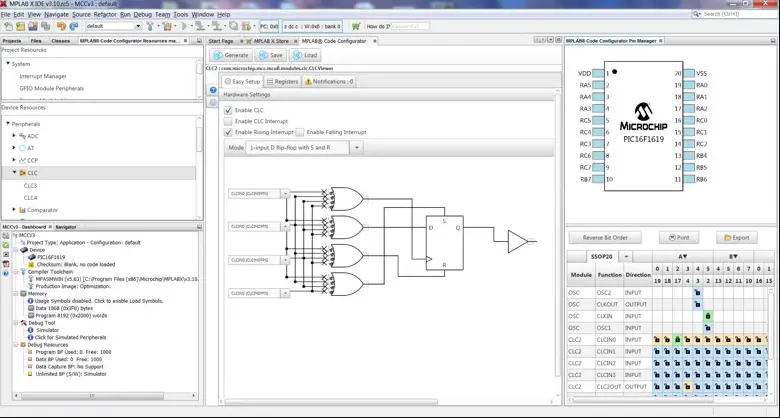
MPLAB® ڪوڊ ڪنفيگريٽر v5.5.3 لاءِ رليز نوٽس
Core versions bundled with this MCC release
ڪور v5.7.1
What is MPLAB Code Configurator (MCC)
The MPLAB® Code Configurator generates seamless, easy to understand code that is inserted into your project. It enables, configures, and utilizes a rich set of peripherals and libraries across select devices. It is integrated into MPLAB® X IDE to provide a very powerful and extremely easy to use development platform.
سسٽم گهرجون
- MPLAB® X IDE v6.25 or later
Documentation Support
MPLAB® ڪوڊ ڪنفيگريٽر v5 استعمال ڪندڙ جي گائيڊ مائڪروچپ تي MPLAB® ڪوڊ ڪنفيگريٽر صفحي تي ملي سگهي ٿي. web سائيٽ. www.microchip.com/mcc
Installing MPLAB® Code Configurator
MPLAB® ڪوڊ ڪنفيگريٽر v5 پلگ ان انسٽال ڪرڻ جا بنيادي قدم هتي ڏنل آهن.
To install the MPLAB® Code Configurator v5 Plugin through the MPLAB® X IDE:
- In the MPLAB® X IDE, select Plugins from the Tools menu
- Select the Available Plugins ٽيب
- Check the box for the MPLAB® Code Configurator v5, and click on Install
To install the MPLAB® Code Configurator v5 Plugin manually:
(If installing on a computer that has internet access, you can skip steps 3 through 5)
- زپ ڊائون لوڊ ڪريو file مائڪروچپ کان webسائيٽ www.microchip.com/mcc, and extract the folder.
- Open MPLAB® X IDE.
- اوزار ڏانهن وڃو -> Plugins -> Settings.
- Add in update center for MCC and its dependencies:
- Click on add, a dialog will appear as shown below.
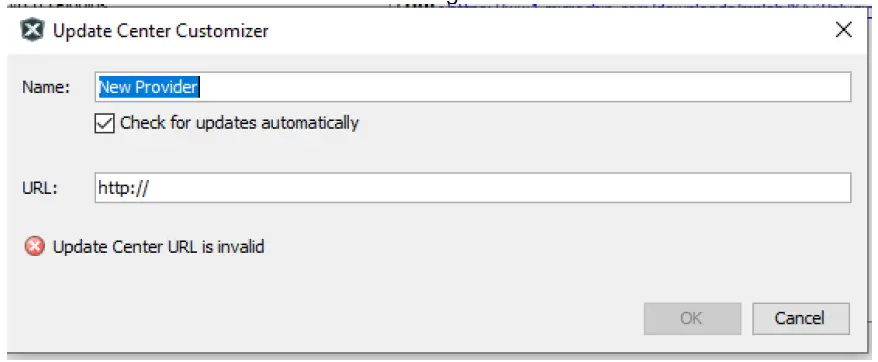 ايم سي سي ڪڍيل فولڊر (قدم 1 مان حاصل ڪيل):
- Change the name “New Provider” to something more meaningful, such as MCC5.3.0Local.
- تبديل ڪريو URL updates.xml ڏانهن file ايم سي سي ڪڍيل فولڊر هيٺان رستو. مثال طورampاليزي: file:/D:/MCC/updates.xml.
- When finished click OK.
- Click on add, a dialog will appear as shown below.
 Uncheck any option labeled Microchip Plugins اپڊيٽ سينٽر ۾.
 اوزار ڏانهن وڃو -> Plugins -> ڊائون لوڊ ٿيل ۽ شامل ڪريو تي ڪلڪ ڪريو Plugins… بٽڻ
- Navigate to the folder where you extracted the zip file ۽ ايم سي سي پلگ ان چونڊيو file, com-microchip-mcc.nbm.
- Click on the Install button. MPLAB X IDE will ask to be restarted. Upon restart, the plugin is installed.
- If you unchecked the Microchip Plugins اپڊيٽ سينٽر ۾، واپس وڃو ۽ چونڊ کي ٻيهر چيڪ ڪريو.
نئون ڇا آهي
| # | ID | وصف |
| N/A | ||
Repairs and Enhancements
هي حصو پلگ ان ۽ ڪور جي مرمت ۽ واڌارن جي فهرست ڏئي ٿو. لائبريري جي مخصوص مسئلن لاءِ، مهرباني ڪري انفرادي لائبريري رليز نوٽس ڏسو.
| # | ID | وصف |
| 1. | CFW-4055 | مطابقت رکندڙ JRE کي بنڊل ڪندي macOS سونوما (v14) ۽ Sequoia (v15) تي اسٽينڊ اڪيلو استعمال کي درست ڪري ٿو. |
ڄاڻايل مسئلا
هي حصو پلگ ان لاءِ ڄاتل سڃاتل مسئلن جي فهرست ڏئي ٿو، لائبريري جي مخصوص مسئلن لاءِ مهرباني ڪري انفرادي لائبريري رليز نوٽس ڏسو.
ڪارڪن
| # | ID | وصف |
| 1. | CFW-1251 | جڏهن موجوده MCC ڪلاسڪ ترتيب تي MPLAB X v6.05/MCC v5.3 تي اپ گريڊ ڪيو وڃي ته ڪجهه GUIs کي صحيح طريقي سان ڏيکارڻ لاءِ توهان جي MCC لائبريرين کي اپڊيٽ ڪرڻ ضروري ٿي سگهي ٿو. ميلوڊي ۽ هارموني ترتيبون هن اپ گريڊ کان متاثر نه ٿيون ٿين ۽ نتيجي طور ڪنهن به ڪارروائي جي ضرورت ناهي. لائبريرين کي اپڊيٽ ڪرڻ لاءِ، پنهنجي ايم سي سي ڪنفگريشن کوليو ۽ پوءِ ڊيوائس ريسورسز پين مان ڪنٽينٽ مئنيجر کوليو. ڪنٽينٽ مئنيجر ۾ "سيليڪٽ ليٽس ورزن" بٽڻ کي دٻايو ۽ ان کان پوءِ "لاڳو ڪريو" بٽڻ دٻايو ۽ اهو خودڪار طريقي سان سڀني لائبريرين کي اپڊيٽ ڪندو ۽ ايم سي سي کي ٻيهر شروع ڪندو. اپڊيٽس ڪرڻ لاءِ توهان کي انٽرنيٽ تائين رسائي جي ضرورت آهي. |
| 2. | MCCV3XX-8013 | XC8 v2.00 سان ايم سي سي انٽرپٽ سنٽيڪس مطابقت.ڪم ڪار: If you are using MPLAB XC8 v2.00 to compile an MCC project and there are errors generated regarding interrupt syntax, please add the command line argument -std=c90. If you’re using the MPLABX IDE: right- click on your project and open your project properties, go to your active project configuration and from the XC8 Global options select the C Standard C90 option. |
| 3. | MCCV3XX-8423 | MCC hanging on Mac OS X. There is a compatibility issue between MCC and some of the applications which make use of the Mac OS X Accessibility interface (i.e. Hyper Dock, Magnet). Depending on the hardware configuration and the suite of Accessibility-using applications running at a given time, users might experience a hanging behavior either when starting or using MCC. حل: The easiest way would be to stop all apps which make use of the Apple Accessibility interface before starting MCC. If this is not an option, you may want to start closing Accessibility-based applications one by one. Not all of these apps cause MCC to hang, so identifying which applications in particular cause the behavior would help keeping the rest of them running along with MCC. How to disable an Accessibility-based application: Using the Apple menu, go to System Preferences -> Security & Privacy -> Accessibility and un-check the application you want to disable. See attached screenshot. |
کليل


سپورٽ ٿيل خاندان
- سپورٽ ٿيل خاندانن جي فهرست لاءِ، لاڳاپيل لائبريرين جي رليز نوٽس جو حوالو ڏيو.
- ايم سي سي جو هي نسخو هن دستاويز جي باب 1 ۾ ڏيکاريل جدول ۾ بيان ڪيل بنيادي نسخن سان ورهايو ويو آهي.
- Classic libraries can be found at: http://www.microchip.com/mcc.
ڪسٽمر سپورٽ
MCC Support
ٽيڪنيڪل سپورٽ جي ذريعي دستياب آهي webسائيٽ تي: http://www.microchip.com/support
مائيڪروچپ Web سائيٽ
مائڪروچپ اسان جي ذريعي آن لائن مدد فراهم ڪري ٿي web سائيٽ تي http://www.microchip.com. هي web سائيٽ ٺاهڻ لاء استعمال ڪيو ويندو آهي files ۽ معلومات آساني سان گراهڪن لاء دستياب آهي. توهان جي پسنديده انٽرنيٽ برائوزر استعمال ڪندي رسائي، web سائيٽ ھيٺ ڏنل معلومات تي مشتمل آھي:
- پراڊڪٽ سپورٽ - ڊيٽا شيٽ ۽ خطا، ايپليڪيشن نوٽس ۽ ايسampلي پروگرام، ڊيزائن جا وسيلا، صارف جي رهنمائي ۽ هارڊويئر سپورٽ دستاويز، جديد سافٽ ويئر رليز ۽ آرڪائيو ٿيل سافٽ ويئر
- General Technical Support – Frequently Asked Questions (FAQs), technical support requests, online discussion groups/forums (http://forum.microchip.com), Microchip consultant program member listing
- Business of Microchip – Product selector and ordering guides, latest Microchip press releases, listing of seminars and events, listings of Microchip sales offices, distributors and factory representatives.
اضافي حمايت
مائڪروچپ پروڊڪٽس جا استعمال ڪندڙ ڪيترن ئي چينلن ذريعي مدد حاصل ڪري سگھن ٿا:
- تقسيم ڪندڙ يا نمائندو
- مقامي سيلز آفيس
- Field Application Engineering (FAE)
- ٽيڪنيڪل سپورٽ
Customers should contact their distributor, representative or field application engineer (FAE) for support. Local sales offices are also available to help customers. A listing of sales offices and locations is available on our web site. Generic technical support is available through the web سائيٽ تي: http://support.microchip.com.
Appendix: Supported Devices
سپورٽ ٿيل ڊوائيسز جي فهرست لاءِ، مھرباني ڪري لاڳاپيل لائبريرين جي رليز نوٽس جو حوالو ڏيو.
اڪثر پڇيا ويا سوال
- MPLAB ڪوڊ ڪنفيگريٽر (MCC) ڇا آهي؟
MPLAB Code Configurator is a tool that simplifies and accelerates the setup of software components for PIC microcontrollers. - MCC v5.5.3 سان گڏ ڪهڙا بنيادي ورجن شامل آهن؟
MCC v5.5.3 سان گڏ بنيادي ورجن v5.7.1 آهي.
For frequently asked questions, please refer to the FAQ post on the MCC Forum.
دستاويز / وسيلا
 |
مائڪروچپ ايم پي ايل اي بي ڪوڊ ڪنفيگريٽر [pdf] هدايتون MPLAB ڪوڊ ڪنفيگريٽر، ڪوڊ ڪنفيگريٽر، ڪنفيگريٽر |