1. تعارف
The ICY BOX M.2 NVMe & SATA SSD/HDD Docking Station (Model IB-2913MCL-C31) is a versatile device designed for efficient data management, including bidirectional cloning and high-speed data transfer. It supports a wide range of storage drives, offering tool-free installation and standalone cloning capabilities. This manual provides instructions for setup, operation, and troubleshooting.
2. پيڪيج مواد
پڪ ڪريو ته سڀئي شيون پيڪيج ۾ موجود آهن:
- M.2 NVMe & SATA SSD/HDD Docking Station & Cloner
- 2-in-1 Cable (USB-C to USB-C & USB-C to USB-A)
- پاور اڊاپٽر
- 3x M.2 rubber fixations

Figure 2.1: The ICY BOX M.2 NVMe & SATA SSD/HDD Docking Station, showing its two drive slots and included USB-C and USB-A cables.
3. سيٽ اپ
3.1 پاور ڪنيڪشن
- Connect the power adapter to the DC 12V input port on the docking station.
- پاور اڊاپٽر کي معياري برقي آئوٽليٽ ۾ لڳايو.
3.2 USB Connection (for Online Data Transfer)
- Use the provided 2-in-1 cable to connect the docking station's USB-C port to an available USB-C or USB-A port on your computer.
- The device will be recognized by your operating system, allowing access to inserted drives.
3.3 Drive Installation (Tool-Free)
- For M.2 SSDs: Gently insert the M.2 SSD into the designated M.2 slot. Secure it in place using one of the provided rubber fixations.
- For 2.5"/3.5" SATA HDDs/SSDs: Insert the SATA drive into the 2.5"/3.5" SATA bay. The design allows for tool-free installation.

Figure 3.1: Tool-free installation of M.2 SSD and 2.5-inch SATA HDD.
4. آپريٽنگ هدايتون
4.1 Online Data Transfer
When the docking station is connected to a computer via USB, it functions as an external drive enclosure. You can access and manage data on up to two inserted drives simultaneously. This allows for seamless file transfers between drives or to/from your computer at speeds up to 10 Gbit/s (USB 3.2 Gen 2).

Figure 4.1: The docking station supports rapid data transfer rates up to 10 Gbit/s via USB 3.2 Gen 2.
4.2 Offline Cloning
The offline cloning function allows you to duplicate a source drive to a target drive without requiring a computer connection. This creates an exact, bit-by-bit copy.
- USB ڊسڪنيڪٽ ڪريو: پڪ ڪريو ته ڊاکنگ اسٽيشن آهي disconnected from any computer before initiating the cloning process.
- ڊرائيو داخل ڪريو: داخل ڪريو سورس ڊرائيو هڪ سلاٽ ۾ ۽ ٽارگيٽ ڊرائيو ٻئي ۾.
- Capacity Requirement: جي target drive must have an equal or larger capacity than the source drive. If the target drive is smaller, the cloning process will not start.
- هدايت چونڊيو: Use the switch on the device to select the correct cloning direction (e.g., NVMe to SATA, SATA to NVMe, 2.5"/3.5" SATA to M.2 NVMe, or M.2 SATA to M.2 NVMe).
- Initiate Cloning (Step 1): Press and hold the "Clone" button for approximately 5 seconds until the LED indicators begin flashing.
- Initiate Cloning (Step 2): Release the button, then press the "Clone" button again briefly to confirm and start the cloning process.
- مانيٽر ترقي: The LED indicators (25%, 50%, 75%, 100%) will illuminate sequentially to show the cloning progress.
- مڪمل ٿيڻ: هڪ دفعو سڀئي ايل اي ڊي مضبوط ٿي وڃن ٿا، ڪلوننگ جو عمل مڪمل ٿي ويندو آهي.
- Remove Drives: Disconnect the power adapter before removing the drives.

Figure 4.2: Illustration of offline cloning and online data transfer modes.

Figure 4.3: LED indicators display the cloning progress and drive activity.
5. مطابقت
5.1 Supported Drive Types
- M.2 PCIe NVMe SSDs (form factors: 2230, 2242, 2260, 2280)
- M.2 SATA SSDs
- 2.5-inch SATA HDDs/SSDs
- 3.5-inch SATA HDDs
5.2 سپورٽ ٿيل آپريٽنگ سسٽم
- ونڊوز
- macOS
- لينڪس
5.3 Simultaneous Drive Access
The device supports simultaneous access to two drives. It cannot read three drives concurrently.

Figure 5.1: Comprehensive compatibility diagram for drive types and operating systems.
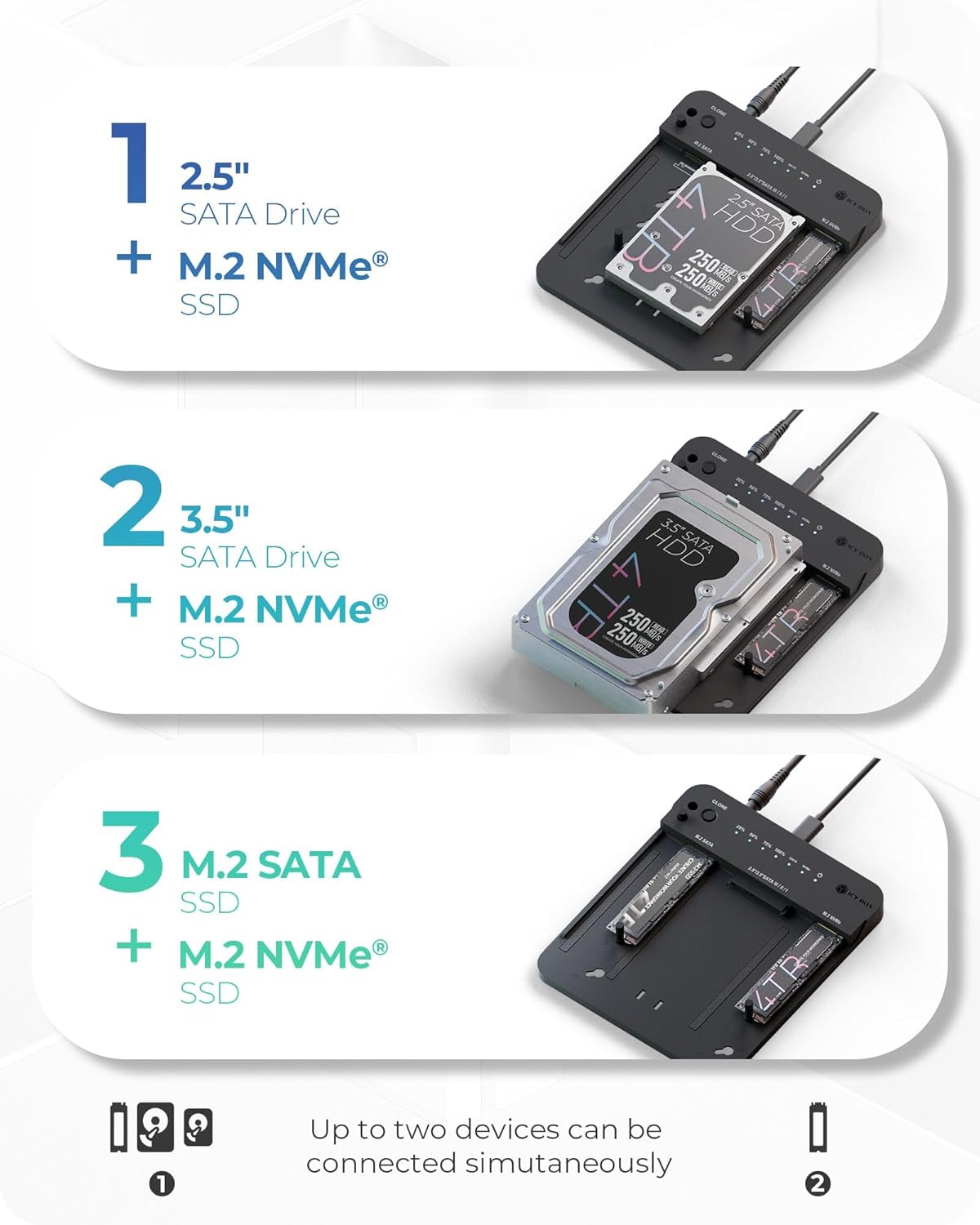
شڪل 5.2: مثالamples of simultaneous dual drive configurations, such as 2.5" SATA with M.2 NVMe, 3.5" SATA with M.2 NVMe, and M.2 SATA with M.2 NVMe.
6. سار سنڀال
To ensure optimal performance and longevity of your docking station, keep it clean and free from dust. Use a soft, dry cloth for cleaning. Avoid exposing the device to extreme temperatures or moisture. The open-frame design aids in passive cooling during operation.

Figure 6.1: The open-frame design promotes efficient cooling for continuous operation.
7. مسئلا حل ڪرڻ
- Cloning Fails (Target Drive Capacity): If the cloning process does not start, verify that the target drive's capacity is equal to or greater than the source drive's capacity.
- Cloning Fails (USB Connection): Ensure the USB-C cable is disconnected from your computer when performing an offline clone. The cloning process will not initiate if the docking station is connected to a host device.
- Simultaneous Drive Access: The docking station supports simultaneous access for two drives only. Attempting to connect three drives will not work.
- طاقت ناهي: Check that the power adapter is securely connected to both the docking station and a working power outlet.
8. وضاحتون
| ماڊل نمبر | IB-2913MCL-C31 |
| پيداوار جي ماپ | 6.45 x 1.57 x 0.71 انچ (16.38 x 3.99 x 1.80 سينٽي) |
| شيءِ جو وزن | 5.5 اونس (0.16 ڪلوگرام) |
| ھارڊويئر انٽرفيس | USB 3.2 Gen 2 |
| ڊيٽا جي منتقلي جي شرح | 10 Gbit/s تائين |
| مطابقت رکندڙ ڊوائيسز | PC, Phone, Game console |
| Number of Drive Ports | 2 |
9. وارنٽي ۽ سپورٽ
The ICY BOX M.2 NVMe & SATA SSD/HDD Docking Station (IB-2913MCL-C31) comes with a 24-مهيني وارنٽي. For technical support, warranty claims, or further assistance, please refer to the official ICY BOX webسائيٽ تي وڃو يا سڌو سنئون انهن جي ڪسٽمر سروس ڊپارٽمينٽ سان رابطو ڪريو.


